Last updated: 2025-12-03
Release Notes - SmartOffice 2016 Release 3
About This Document
For general information about SmartOffice release notes, visit the Release Notes home page.
Revision History
These release notes may be revised after their initial publication. This section lists the dates of any revisions as well as a list of changes.
June 6, 2016
- Initial publication.
June 7, 2016
- Core System: Added "File posting changes" enhancement.
- Core System: Added solution to issue with logging set member deletions (PMG-648498).
- SmartCommissions: Added solution to issue with advisor contracts and Mass Projection (PMG-582577).
- SmartCommissions: Added solution to issue with editing commission rates (PMG-649112).
- Integrations and Data Services: Added "Missing positions report" enhancement (PMG-573457, PMG-628070).
June 17, 2016
- Added "SmartOffice Pro Known Issues" section.
- System Requirements: Added more information about Microsoft Plug-in for SmartOffice requirement.
- Integrations and Data Services: Added "Additional presale fields exposed to developers" enhancement (PMG-644792).
- SmartOffice Anywhere: Added "SmartView for Advisors Improvements" enhancement (PMG-626083).
- Minor wording and formatting fixes.
June 21, 2016
- Core System: Added "Compliance View" enhancement (PMG-559754).
- Core System: Added "Overall performance enhancements" (PMG-654297).
- Integrations and Data Services: Added solution for Reconciliation button and Albridge downloads (PMG-588190).
- Advisors/Agencies: Added solution for inability to create opportunities from presale records (PMG-644641).
- SmartCommissions: Added solution for inability to select advisors when assigning advanced commission splits to policies (PMG-653978).
- SmartCommissions: Added solution for issue with modifying a rate from a group policy (PMG-654528).
June 29, 2016
- Core System: Added "Activity attendee/contact sync" enhancement for enterprise Exchange sync (PMG-636172).
- Core System: Added "More configuration options for new-office welcome e-mail" enhancement for enterprise customers (PMG-609969).
- Core System: Updated description for "Plug-in prompt for letter, document and other workflows enhancement" (PMG-642549) to add information about config.xml enhancements for enterprise SmartOffice administrators (PMG-644756).
Release Overview
This release of SmartOffice features numerous enhancements and packages updates that have been applied to SmartOffice servers since SmartOffice 2016 Release 2. Additional updates that have not previously been applied to SmartOffice servers are also included.
Enhancement Highlights
This section provides quick links to the featured enhancements in this release.
Core System
Agency Management System
SmartOffice Anywhere
System Requirements
Important: This release of SmartOffice requires version 5.0.51 or later of the Microsoft Plug-in for SmartOffice for correspondence, document management, list export and other workflows involving Microsoft Windows and Office. To check your plug-in version, look in the lower-right corner of the plug-in sign-in window.
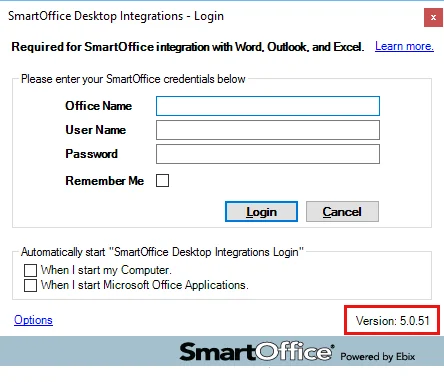
If your sign-in window shows an earlier version or no version information, please download and install the latest version of the plug-in.
Learn more about changes related to Windows and Office workflows.
For detailed system requirements, see System Requirements.
Note Regarding Text Changes in SmartOffice
This release may contain minor changes to text in dialog boxes and other areas of the SmartOffice user interface. Changes of this type are typically made to correct spelling, grammar, punctuation and other language-related issues. Such changes normally are not listed in this document unless they affect the way the application works.
SmartOffice Pro Changes
Core System
Featured Enhancements
Single Sign-on to SmartOffice Anywhere
Users who are signed in to SmartOffice Pro can now access SmartOffice Anywhere without having to sign in again. To do so, open the profile menu and select SmartOffice Anywhere.
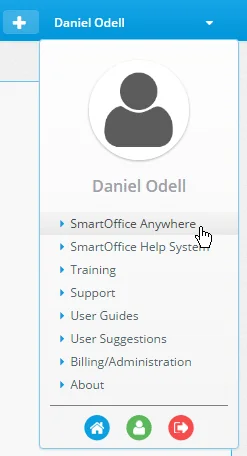
A similar menu option is available in SmartOffice Anywhere for navigating back to SmartOffice Pro (see SmartOffice Anywhere Changes). (PMG-633445)
Other Enhancements
General
- File posting changes: The File Uploader dialog box introduced in a previous SmartOffice Pro release was removed because of technical issues. Now, when users try to post files to SmartOffice, they are prompted to first download and open an .sopro file (they must be signed in to the Microsoft Plug-in for SmartOffice to proceed). SmartOffice then prompts the user to select the files before displaying the Posting Details dialog box from previous SmartOffice versions.
- Compliance View: To aid in forensic analysis of data for legal and compliance requirements, enterprise customers can now give SmartOffice administrators the right to view all data in SmartOffice without restriction. A new user right named Compliance View allows an administrator to access data regardless of record privatization, office hierarchy, user assignments, user rights and user proxies. This user right can be assigned only from the System office. In addition, the user assigning the right and the user being assigned the right must have the Administrator: User Rights & Creation/Licenses/Groups user right. (PMG-559754)
- More configuration options for new-office welcome e-mail: Enterprise customers now have additional options for configuring the support information that appears in the welcome e-mail message sent to administrators of new offices. In the server config.xml file, users can configure the support company's name, phone number, e-mail address and team name, as well as whether support information is displayed at all. The following elements were added to config.xml as child elements of the
element:
-
-
-
-
-
(PMG-609969)
- Parent office deletion restrictions: To prevent negative effects on child offices, SmartOffice no longer allows parent offices to be disabled if they are linked to child offices in the office hierarchy. (PMG-636991)
- Plug-in prompt for letter, document and other workflows: When a user tries to send a letter, download a document or perform some other action in SmartOffice Pro that requires the Microsoft Plug-in for SmartOffice, the plug-in now prompts the user to sign in. A timer displays on the user's screen to indicate that the user has 60 seconds to sign in before the workflow must be restarted. Enterprise SmartOffice Pro administrators can define the number of seconds in the server config.xml file; a
element for this purpose. (PMG-642549, PMG-644756)
- Support for Excel list export in multiple browsers: Users can now export lists in Excel format using all supported browsers (note that the latest version of the Microsoft Plug-in for SmartOffice is required). When exporting a list, users are now prompted to download an .sopro file. Opening this file completes the export. (PMG-646917)
- Consistent download file name for all Windows and Office workflows: For all SmartOffice Pro workflows that now require the user to download a special file (e.g., correspondence, list export, document downloads, etc.), the file name now has the extension .sopro in all cases. Previously, the file name had a different extensions depending on the action being performed. (PMG-648642)
- Overall performance enhancements: Changes were made to improve the overall speed and responsiveness of the application. (PMG-654297)
Alert Center
- Alert Center display enhancement: In the Alert Center section of User Preferences, the Number of days' worth of alerts to display drop-down list now contains several additional options to provide users with more flexibility. The default is now 90 days. (PMG-642548)
PDF Reports
- Report option changes: Several enhancements related to report options were made:
- When presented with report options while running a PDF report, users who select the Save Settings option now see a confirmation message. The message states that saving the settings will overwrite any previously saved custom settings for that report.
- In Report Setup, users who tried to create a report options record with an invalid entry in the Percentage field for Merge Slices Less Than were encountering an error. However, the field was not appearing highlighted to indicate where the problem was. The field now appears highlighted.
- When users created a report options record in Report Setup, the Maximum of 10 slices option for pie charts was not selected by default. It is now the default option.
- After creating a report options record in Report Setup, users were finding that the Run-Time Options check box for the report was not enabled unless they selected Menu > Save. Running the report at that point was producing an error. Now, users do not have to save the record for the Run-Time Options check box to be enabled.
- When a report was run without having at least one report options record in Report Setup, SmartOffice was displaying an error that did not adequately describe the problem. The error now explains the report options requirement.
(PMG-616295)
- Renamed command for making reports available for packages: In Report Setup, the Menu command Add Report to PDF List was renamed Make Available in Packaged Reports to reflect its purpose more accurately. In addition, selecting this command now displays a confirmation message informing the user that the selected reports will be made available for use in report packages and bunch reports. (PMG-618535)
SmartOffice Sync for Microsoft Exchange
Note: These changes apply to enterprise customers only.
- Activity attendee/contact sync: When a calendar activity created in Exchange using Outlook or another compatible application is synchronized, the activity's attendees can now be assigned automatically as activity contacts in SmartOffice. Previously, such activities were not automatically linked to SmartOffice contacts when synchronized, preventing users from using SmartOffice features such as activity outcome tracking.
This feature can be turned on or off at the server level by setting the
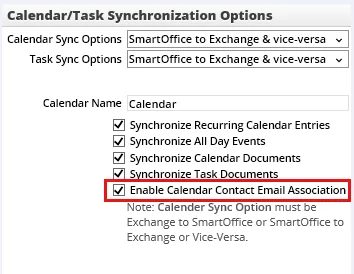
(PMG-636172)
SmartPad
- Support for SmartPad e-mail commands in multiple browsers: The Forward E-mail, Reply to E-mail and Reply All to E-mail commands for e-mail messages posted to the SmartPad now work in all supported browsers (note that the latest version of the Microsoft Plug-in for SmartOffice is required). When using these commands, users are now prompted to download an .sopro file. Opening this file completes the workflow. (PMG-648966)
Resolved Issues
General
- After being customized, portlet heights in page layouts were unexpectedly reverting to their default values. This issue was resolved. (PMG-627192)
- An issue that was causing the Menu button and/or its options to be partially or entirely invisible depending on browser window width was resolved. (PMG-630166)
- The List View Mode command was not working in the SmartPad and other SmartOffice lists. This issue was resolved. (PMG-635689)
- Pressing the Enter key to activate hyperlinked field names throughout SmartOffice Pro (e.g., Referred By, Primary Advisor) was not working. This issue was resolved. (PMG-636246)
- Users with many home page tabs were seeing distortions in the home page layout. (PMG-636957)
- Users were unable to install the Microsoft Plug-in for SmartOffice from Setup > Installations. This issue was resolved. (PMG-637381)
- Issues affecting the layout of the user Detail content link, list export dialog box and activity information card were resolved. (PMG-640689)
- On the Proxy: Whose data this User can see content link of a user account, System office administrators were unable to add users from other offices to the list. This issue was resolved. (PMG-642364)
- Bar charts in lists were incorrectly displaying values with percentage symbols. The percentage symbols were removed. (PMG-642381)
- When a custom logo was selected in Office Settings, it was not appearing in the upper-left corner of SmartOffice. The logo now appears as expected. (PMG-642743)
- An issue that was preventing parent-office users from accessing documents in child offices was resolved. (PMG-642970)
- An issue with list printing that was causing incorrect formatting and random numbers to appear in the far-right column was resolved. (PMG-643084)
- An issue that was preventing the Compact row layout from displaying properly in the Activity Log and SmartPad was resolved. (PMG-643107)
- Users who signed in to SmartOffice Pro using Internet Explorer were seeing a message about enabling Compatibility View, even though SmartOffice Pro does not require Compatibility View. This issue was resolved. (PMG-643735)
- Several user interface issues were resolved, including dialog boxes that were not opening completely, Menu buttons that were cut off and scroll bars that were missing. (PMG-643821)
- While viewing other users' data using the See Data For button, any attempt to print tagged rows from a list of contacts was resulting in an error. This issue was resolved. (PMG-644269)
- In dialog boxes that opened on top of other dialog boxes, the Menu button was often not available. This issue was resolved. (PMG-645927)
- An issue with the way in which the Print List dialog box was displaying for Google Chrome users was resolved. (PMG-646248)
- Issues that were causing slow page refreshes across the application were resolved. (PMG-646900)
- A search issue affecting Enterprise View users was resolved. When typing search queries in the Search box and viewing the list of dynamically generated results, these users were unable to tell which records resided in child offices because those records lacked blue highlighting. (PMG-648760)
- Customers with office hierarchies and System office access were unable to create user accounts in other offices from the System office. This issue was resolved. (PMG-648904)
Alert Center
- Issues that users were encountering when trying to view old alerts and reply to alerts were resolved. (PMG-642287, PMG-643326)
- The Delete command for alerts was missing. This command was restored. (PMG-642614)
- The following Alert Center issues were resolved:
- The Total Records count was incorrect.
- Marking an activity Done and going through the activity outcome workflow was not creating an alert.
- Users were unable to reply to SmartPad note alerts.
- Selecting the Messages view was displaying deleted alerts.
- Activity reminder alerts were not opening completely.
(PMG-645155)
Contact Management
- An issue that prevented users from printing multiple contact records using the Print Record Details option was resolved. (PMG-617477)
- On the Letters/Documents content link of a contact or other record, users could not view the tabs for categories they added to the Document List. This issue was resolved. (PMG-619110)
- When the All Addresses column was added to any contact list, users were unable to print the list using the Print All option. This issue was resolved. (PMG-626703)
- When users selected the New (Comprehensive) 'Contact' Record command to create a contact, excessive space between the buttons at the bottom of the dialog box were causing scroll bars to appear. This issue was resolved. (PMG-636155)
- In Google Chrome, clicking an e-mail address on the contact Personal content link was not opening the user's e-mail application. This issue was resolved. (PMG-636242)
- While adding a contact to a household as a member, users who navigated the fields using the mouse and the Tab key were unable to save the information they entered. The system was prompting the user to enter required fields. This issue was resolved. (PMG-636243)
- When selecting the New (Comprehensive) 'Contact' Record command to create a contact, users who tried to scroll within drop-down lists were finding that the entire contact dialog box was scrolling instead. This issue was resolved. (PMG-636253)
- On the contact Personal content link, users who tried to enter free-form text in the Type and Sub-Type fields were finding that their keystrokes were selecting existing choices instead. This issue was resolved. (PMG-636957)
- The information card for contacts and other records was displaying rows and columns, and the Clear this checkbox if you do not want to see this card option was not working. These issues were resolved. (PMG-644188)
- When the contact Personal content link was printed, the printout was displaying the contact's birth date in the wrong date format. This issue was resolved. (PMG-644222)
- When starting the call timer from the contact Personal content link, users were noticing that the text field in the timer dialog box was too small. This issue was resolved. (PMG-646875)
- An issue affecting sets with long names was resolved. Users who selected the Go to List command were finding that the list's Menu button was appearing outside the browser's viewable area. (PMG-648064)
- When adding a key relation, users were having trouble reading the text describing the relationship between the selected contacts. This issue was resolved. (PMG-648299)
- While adding key relations to contacts, users could not use the down-arrow key to select options from the Define the Relationship drop-down list. The field would either freeze or fail to display the drop-down menu. This issue was resolved. (PMG-648316)
- No entry was being added to the DELETELOG table in the SmartOffice database when set members were deleted through set validation, vendor deletion or record merge. This issue was resolved. (PMG-648498)
- Users were unable to privatize a document so that it was visible only to a user group. This issue was resolved. (PMG-648887)
- Issues with the size of the Key Relation to Reassign dialog box were resolved. (PMG-650233)
Correspondence
- An issue that prevented users from previewing and printing envelopes and labels was resolved. (PMG-636957)
- Users who tried to resend a printed letter as an e-mail message from the contact Letter Log were finding that the letter was being generated as a print letter rather than an e-mail message. (PMG-636957)
- When a user tried to send correspondence as an .rtf e-mail attachment, the E-mail Subject field on the Validate & Send step in the Correspondence Wizard was overlapping other fields. In addition, the attachment was being generated in .pdf format. These issues were resolved. (PMG-636957)
- From the results list of a Calendar-family Dynamic Report, users who generated letters for multiple activities were finding that the letters contained incorrect activity dates and times. This issue was resolved. (PMG-642461)
- When the Letters/Documents content link was configured to display letters and documents in a single list, users were unable to open letters. This issue was resolved. (PMG-642581)
- An issue with Outlook e-mail posting that was preventing users from posting messages to pending cases in SmartOffice was resolved. (PMG-643031)
- Phone numbers with the Do Not Call option selected were not appearing in red. This issue was resolved. (PMG-634067)
- After selecting the Launch E-mail command for a pending case, users were finding that the e-mail message's Subject line was blank. The subject line now displays information about the case. (PMG-643260)
- In the standard outcome activity workflow, SmartOffice was not remembering the outcome options selected for activities marked Done. This issue was resolved so that the previously selected options are selected by default the next time the user marks an activity Done. (PMG-643422)
- The first time that users performed a contact search after signing in, the Menu button on the results list was unresponsive. This issue was resolved. (PMG-646281)
- Google Chrome users who dragged the Save button from the Menu to the Custom Button Bar were finding that the button would disappear after a record was saved. This issue was resolved. (PMG-646668)
- Portlet toolbar buttons on the contact Personal content link were appearing in grey in Google Chrome. This issue was resolved. (PMG-646892)
Data Import
- During creation of data import setups, SmartOffice was not automatically mapping fields in SmartOffice to fields in the import file. This issue was resolved. (PMG-636957)
Dynamic Reports
- After running a Dynamic Report located in the System office, users who clicked the Open Report Filter hyperlink were encountering two issues:
- The confirmation message informing the user that the report will open in read-only mode was not appearing.
- Two Dynamic Report Setup dialog boxes were opening.
These issues were resolved. (PMG-636248)
- An issue affecting Dynamic Reports with run-time date filters was resolved. Users who tried to export the list of results were encountering an error. (PMG-637800)
- In Dynamic Report searches, the Created by me option was being ignored when it was selected. This issue was resolved. (PMG-643190, PMG-637806)
- An issue with filters in contact Dynamic Reports was resolved. During filter creation in Google Chrome, users who searched for the Type field and then selected it were finding that it was not being added to the Selected Columns list. (PMG-646644)
Filters
- During filter creation, when users selected the Advanced filter option for any date column, the dialog box listing the filter conditions was not displaying the condition descriptions. This issue was resolved. (PMG-643130)
- When activating a column filter, users had to click inside the criteria field before they could enter their criteria. The field was not receiving cursor focus automatically. This issue was resolved. (PMG-644617)
Home Page
- After editing the height of a home page portlet, users who later edited the portlet again were finding that the height had changed. This issue was resolved. (PMG-636957)
PDF Reports
- A rounding issue was causing pie charts in PDF reports and SmartOffice lists to display incorrectly sized pie slices. This issue was resolved. (PMG-556235)
- Inconsistent display of footer disclaimers across PDF reports was resolved. (PMG-618539)
SmartPad
- Users who opened a document from the SmartPad, made changes, and then tried to save the changes back to SmartOffice were finding that the document was not updating in SmartOffice. (PMG-636878)
- When a user changed the font size while composing SmartPad notes, SmartOffice was not remembering that setting the next time the user composed a note. This issue was resolved. (PMG-643277)
- After opening a SmartPad entry and clicking the Print button, users were noticing that the print output was smaller than expected. This issue was resolved. (PMG-643756)
SmartCalendar
Resolved Issues
- Clicking the Menu button in the Calendar Week view was displaying an oversized menu with unintelligible text. This issue was resolved. (PMG-629781)
- In the activity outcome workflow, users who clicked the Assign To hyperlink in the New Activity Details section were not seeing a list of users to choose from. This issue was resolved. (PMG-636141)
- An issue with the activity confirmation letter workflow was resolved. The issue occurred when the user selected the Show E-mail/Print Options check box, selected a letter template, and then changed the correspondence method in the Correspondence Wizard. At that point, the user was no longer able to select a template, yet the wizard was still prompting the user to select one. (PMG-636957)
- In the calendar Tasks list, high-priority activities were not appearing in red for Internet Explorer users. This issue was resolved. (PMG-642407)
- A calendar printing issue affecting Enterprise View users was resolved. During the Print Calendar workflow, the calendar was printing before any users could be selected. (PMG-642755)
- While viewing the Activity Log, users were unable to cancel activities by right-clicking them and selecting Cancel. This issue was resolved. (PMG-642997)
- In the pop-up calendar, the Menu button was displaying gibberish text. This issue was resolved. (PMG-643076)
- During the activity outcome workflow, users who entered outcome notes and selected the Send this note as an alert and e-mail to other user(s) option were not being prompted to select recipient users. This issue was resolved. (PMG-643309)
- When users clicked the Pick Date button in a date field, there was no Today button that users could click to quickly select the current date. This issue was resolved. (PMG-643298)
- When the user marked an activity as Done and selected the Contact Made and Add more activity details after this window options, those options were not becoming the defaults for activities marked as Done from that point on. (PMG-644567)
- While viewing the details of an activity, users who opened the contact information card by pointing to the Contact field were finding that the card would not disappear. (PMG-645391)
- In the Activity Detail dialog, Google Chrome users were not seeing an underline on the Contact hyperlink. This issue was resolved. (PMG-645823)
- Users who changed the date or time of an activity linked to a contact were not being prompted to send a new appointment confirmation letter to the contact. This issue was resolved. (PMG-646589)
- In activity list views, the Mark Done column was not displaying a red "X" for canceled activities. This issue was resolved. (PMG-646457, PMG-649627)
- Entering a value in the Minutes Spent field in the activity outcome workflow was resulting in the activity not being marked Done. This issue was resolved. (PMG-648286)
SmartOpportunities
Resolved Issues
- On the Resources/Competition content link of an opportunity, changing the percentage of the primary owner to a value lower than 100% was causing an issue. When the user tried to save the change, SmartOffice was opening a blank dialog box, and the change was not being saved. These issues were resolved. (PMG-257672)
- Attempts to change an opportunity's owner or add owners were causing an "insert/update failed" error. This issue was resolved. (PMG-636957)
SmartLeads
Resolved Issues
- When users in parent offices tried to assign leads to other offices in the hierarchy, the dialog box displaying the enterprise hierarchy was not opening. This issue was resolved. (PMG-621903)
SmartRecruiting
Resolved Issues
- On the candidate Add'l Personal content link, the Pick Date button on the Training Class field was not working, and the Pick Date button on the Graduation Date field was missing. These issues were resolved. (PMG-634701)
- Layout issues with the candidate Add'l Personal and Interview/Actions content links were resolved. (PMG-636145)
- Users were being signed out of SmartOffice unexpectedly while working with stages on the candidate Interview/Actions content link. This issue was resolved. (PMG-636251)
SmartEvents
Resolved Issues
- An error that occurred when users added custom statuses for event invitees was resolved. (PMG-624868)
- An issue that was preventing users from adding entries on the Expenses content link of an event was resolved. (PMG-642745)
- Inviting a contact to an event using the Marketing Options command was producing an error. This issue was resolved. (PMG-642751)
- The invitee import process was not working. This issue was resolved. (PMG-647783)
- After selecting the Reassign Event command, users who selected a new event initiator were encountering a frozen dialog box. This issue was resolved. (PMG-648786)
Advisors/Agencies
Enhancements
- Presale filtering and field enhancements: Two changes were made to improve presale activity management:
- Users can now filter the Presale Activity/Proposal List by role. A Role drop-down list was added to the Presale Activity/Proposals tabs of contact, advisor and wholesaler records.
- A Presale Owner field was added under the Presale Insured field on the presale activity Detail content link.
(PMG-640698)
Resolved Issues
- On the advisor Production content link, selecting Previous Year as the production period was automatically entering a date range reflecting the previous 12 months. This issue was resolved so that the date range correctly reflects the previous year. (PMG-549673)
- An issue with adding policy contacts to the advisor Key Relations contact link was resolved. The issue occurred when users typed characters into the Contact Name field of the search dialog box. In the drop-down list that dynamically displays matching contacts, contact names were not being listed in last name, first name format. (PMG-627690)
- While viewing the details of an advisor request, users who clicked the Complete Requirement button on the Requirement List were seeing a blank dialog box. This issue was resolved. (PMG-639150)
- The Launch E-mail command in the Correspondence button menu was not working when selected from a presale activity record. This issue was resolved. (PMG-642931)
- Users who updated the SS # field of an advisor record were finding that the changes were not being saved. In addition, the update was deleting the advisor's first and last names. These issues were resolved. (PMG-643840)
- On a presale activity record, users who clicked the Opportunity hyperlink to open the Opportunity List were finding that the New 'Opportunity' Record command was missing. The command was restored. (PMG-644641)
- When users viewed an advisor hierarchy that displayed both the advisor and agency hierarchies, the sections for those hierarchies were large enough to display only two lines of data. The height of the sections was increased. (PMG-646750)
SmartPolicies
Featured Enhancements
Page Layout Customization for Policy Records
Users who have the appropriate rights can now customize the information that appears on the policy Basic Information content link. This allows users to select the fields that are most important to them and hide any fields that they do not normally work with. To begin customizing the layout, open a policy record and select Menu > Page Layouts. For more information, see Page Layout Customization. (PMG-297672)
Other Enhancements
- Ability to list active policies in correspondence: A new merge code, ActivePolicyList, allows users to automatically pull a list of any contact's Active-status policies into a letter. The policy list is formatted as a table that displays the policy type, product name, carrier name, policy number, policy date, benefits and annual premium of each policy. (PMG-573439)
- Policy list column enhancements: In policy lists, the following enhancements were made to allow for easier sorting:
- A column named Insured Last Name, First Name was added to the Policy table.
- The Trustee column in the Policy table was changed to display the trustee's last name first.
(PMG-582018)
- Proposed/issued class information for second insureds: Users can now add proposed/issued class information for second insureds on pending cases and policies that support second insureds. To view this information, open the second-insured record in the Policy Insured List of a case or policy. The new Proposed Class or Issued Class field is below the Current Risk Class field.
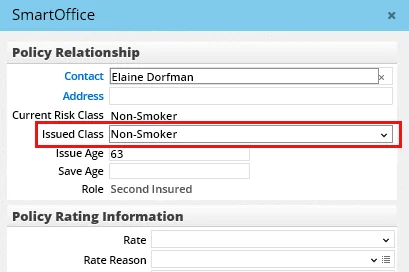
(PMG-582028)
- Commissionable modal premium recalculation after policy import: During policy import, selecting the Update existing policies based on policy # only option for an import file containing updates to flat extra amounts now automatically recalculates the relevant commissionable modal premium amounts in SmartOffice. (PMG-618163)
- New merge codes for policy relations: Several new merge codes can now be used in correspondence and documents to display information about policy relations in a comma-separated format. The merge codes are AllOwners, BeneficiaryNames, AllTrustees and RelationshipManager. (PMG-6 21772)
- Modified Date column import and mass modification: The Modified Date column is now available for mapping in policy import setups and for modification through the Mass Modify feature. (PMG-640667)
Resolved Issues
- An issue that was causing the Smart Validation procedure to ignore policy tables under certain circumstances was resolved. (PMG-635746)
- When attempting to send correspondence from a policy record, users were finding that none of the options under Correspondence Options were working except for Send Form Letter using Preferred Communication. This issue was resolved. (PMG-636263)
- An issue that occurred when users created critical illness policy records was resolved. Clicking the Benefits button was causing the Policy Riders button to cover up certain fields. (PMG-637449)
- On the Letters/Documents content link of policy records, Internet Explorer users were not seeing all of the uploaded documents they were expecting to see. This issue was resolved. (PMG-646188)
- An issue that was preventing addresses from appearing for contacts listed in the Policy Relationship List was resolved. (PMG-648325)
- When a policy or pending case was created and the linked supervisor had multiple contracts of same the type and paid-by entity, the system was not prompting the user to select a contract. This issue was resolved. (PMG-650970)
Insurance Products and Carriers
Resolved Issues
- On the carrier Products and Riders tabs, an issue that was causing the Menu button to become inaccessible was resolved. (PMG-638819)
- After a user modified the price of a product subaccount, the process for updating linked policies was not completing. This issue was resolved. (PMG-640413)
SmartCaseManager
Enhancements
- New requirement status choices: Four pending case requirement statuses were added to the system for use with pending case downloads (for both Side-by-Side Processing and Direct Download and Replace methods). The statuses are uncommon but are used by carriers such as Lincoln and Prudential: Reviewed - Received , Acknowledged - Outstanding, Published - Received and Evaluated - Received. (PMG-635159)
Resolved Issues
- Pending case correspondence sent by e-mail was not displaying the default subject line specified in the selected correspondence template. This issue was resolved. (PMG-148497)
- Resource office requirements were visible to users in offices that were not subscribed to the resource office. This issue was resolved. (PMG-600748)
- In Policy/Case Setup, using the Print List command in the Follow-up > Requirements section was producing an unexpectedly long list of requirements. (PMG-622193)
- On the Pending Case List, the value in the Days in Underwriting column was continuing to increase until the case moved to the Inforce stage. This issue was resolved so that the value stops increasing as soon as the case moves to the Approved stage. (PMG-624546)
- An issue affecting opportunities that were created on the Opportunities tab of a business record was resolved. The issue occurred when a user linked such an opportunity to a pending case associated with the business. When the user opened the pending case record and selected Menu > Show Linked Opportunity, the opportunity was not appearing. (PMG-634804)
- In the pending case requirement dialog box, when users clicked the Medical Facility hyperlink under Medical Requirement Details, the search dialog box that opened was missing the New button for creating a facility record. The button was restored. (PMG-635745)
- In multi-life policy records, users could not save changes made to child policies on the Related Policies content link. This issue was resolved. (PMG-640042)
- An issue with sending e-mail to carriers with no preferred e-mail address was resolved. After selecting the Launch E-mail command in SmartOffice Pro, users were seeing a new Outlook e-mail message with a blank To field. Now, when no preferred address exists for a carrier, the To field is populated with the first e-mail address added to the carrier record. (PMG-642490)
- When sending printed pending case correspondence, users were unable to change the default letter header in the Correspondence Wizard. This issue was resolved. (PMG-642960)
- In the pending case requirement dialog box, changing the requirement’s status to Received was not automatically changing the Required Of field to GA. This issue was resolved. (PMG-643183)
- Several issues with the pending case Issued/Delivery workflow were resolved:
- Users who changed a date (e.g., the Office Expiration date) and then tried to add a requirement were being prompted repeatedly to save their changes first. Some users were also encountering a message about the page needing to refresh, but the new requirement was not appearing after the refresh.
- The Requirements section was too small and was not displaying enough requirements at once.
- Users were seeing multiple identical prompts when sending manual correspondence.
- Users were being taken to the pending case Detail content link instead of the Delivery content link after completing the workflow.
(PMG-647857)
- After creating a pending case from the Pending Cases tab of a contact, users were not being prompted to send a letter for automatically added requirements. This issue was resolved. (PMG-648290)
SmartBenefits
Resolved Issues
- When users deleted a record from the business Employee Census content link, the system was displaying a confirmation message but was still deleting the record before the user clicked the Yes or No button. This issue was resolved. (PMG-636245)
- Several issues with group policy records were resolved:
- While viewing the list of group plans in a group policy, users who selected the Show Benefit command were encountering a "Missing primary keys in URL" error.
- The layout of the Group Members Detail dialog box was incorrect.
- While viewing the list of group plans in a group policy, users who tagged multiple plans and selected the Show Benefit command were seeing the message: "Only the highlighted record will be processed. Continue?" However, when the user clicked the Yes button, nothing was happening.
- While viewing the list of group plans in a group policy, users who selected the Show Benefit command were finding that the Group Plan Detail dialog box was not opening completely for Travel, Retirement, Group Medical and Group Dental policy types.
(PMG-640045)
SmartCommissions
Enhancements
Batch Processing
- Product custom fields in advisor commission list and statements: In batch processing records, users can now include columns from the Product Custom table in the layout of the Advisor Commission List. Because changes to this list affect the layout of e-mailed commission statements, this enhancement makes Product Custom columns available for use in those statements as well. (PMG-575488)
Resolved Issues
General
- An issue was occurring with Mass Projection when an advisor contract specified that the commission be assigned to an advisor other than the policy advisor. When contract selection and commission calculation occurred through Mass Projection, the advisor payment was not showing the advisor to whom the commission was assigned. This issue was resolved. (PMG-582577)
- When changing a rider or group policy commission rate at the hierarchy level, users were not being given the option to apply the change to the current policy only. This option was restored. (PMG-603775)
- In the Search Commission Rates dialog box, users who clicked the New button after entering contract, carrier and product information were encountering an issue. When these users tried to add a commission band to the rate, the Carrier Name field was blank. The field now displays the name of the carrier entered in the search dialog box. (PMG-636250)
- For SmartCommissions for Advisors users, several layout and usability issues with the Commission Calculator dialog box were resolved:
- Some of the fields were too small.
- The Replace Existing Calculations and Commission Rate fields were not aligned properly.
- Changing the value in the How many years to project? field was not changing the value in the End Date field accordingly.
(PMG-639395)
- The Pick Date button was not working in the following commission-related fields:
- Commission Due (Commission Detail dialog box)
- Paid-to/Next Due Date field (Commission Detail dialog box; the button was missing completely in Google Chrome)
- Deposit Date (speed receipt Detail content link)
This issue was resolved. (PMG-640047)
- Two issues with House-type contracts were resolved:
- In existing House contract records, users were able to edit the Commission Paid By field, which should be read-only.
- When creating contracts, users who set the Commission Paid By field to House and then set the Contract Type field to House were finding that the Commission Paid By field was becoming read-only as expected, but it was not changing to Carrier.
(PMG-640690)
- On the Policy Transactions content link, an issue with certain items in the Commissionable Premium Payment Transaction List was resolved. When users opened an item with a Commission Generated status, made changes and then clicked the Gen Comm. button, they were unable to delete existing commission transactions and recreate them. (PMG-643872)
- When a user edited a commission rate record from the Commission Rates List and SmartOffice displayed the Save Commission Rate dialog box, choosing the Selected from the linked policy list option was not doing anything. In addition, when the user clicked the Cancel button, the Save and Cancel buttons were being disabled. These issues were resolved. (PMG-649112)
- When assigning an advanced split commission to a policy, users were unable to select an advisor in the Commission Split Hierarchy Details dialog box. This issue was resolved. (PMG-653978)
- An issue with modifying a commission rate after opening the commission hierarchy from a group policy was resolved. Selecting the This policy only option while saving the rate was enabling the Locked Commission Rate option, but recalculating commissions was using the old rate. In addition, the Locked Commission Rate option was being cleared. (PMG-654528)
Batch Processing
- An issue with the Refresh Minimum Check Amounts command on the Advisor Payment List was resolved. Advance commissions that were not processed because their due dates were after the batch date were being added to the Advisor Checks Under the Minimum Check Amount list. (PMG-592068)
- When generating commission statements to advisors from a commission batch, users were not being given the option to display an office logo in the statements. This issue was resolved. (PMG-642881)
- An issue that occurred when users processed commission batches was resolved. The prompt to check the job status was appearing in a full-screen window instead of a dialog box. (PMG-642933)
Carrier Posting
- When users tried to add a commission transaction to a carrier posting using the Advance Commission command, the transaction was not being added. This issue was resolved. (PMG-632489)
- On the Carrier Posting content link of a resource-office carrier, users were able to view commission records from other SmartOffice offices. This issue was resolved. (PMG-641212)
SmartInvestments
Enhancements
General
- Automatic SmartPad posting for more investment-related actions: SmartOffice now posts an entry to the SmartPad when the following commands are used:
- Reassign Primary Contact (for investment accounts)
- Relink Position to Another Account
The entry displays information about the change, the time and date the change occurred and the user who made the change.

For this to work, the Changes to Investment Position option must be selected on the SmartPad/New Contact/E-mail Posting in Office Settings. (PMG-538589)
- Office-level control over Tax ID export: The SS# column export options on the Office Detail content link now also apply to the Tax ID column from the Investment Accounts table. (PMG-640528)
Investment Accounts
- New method for mass-updating Exclude from Performance option: To update the Exclude from Performance option for multiple investment accounts, positions or securities at once, users must now use the command Menu > Advanced Options > Update Exclude from Performance. Previously, users were able to update this option with the Mass Modify command, but that capability was removed. (PMG-626748)
Investment Positions
- Ability to relink multiple positions: Users can now relink multiple investment positions to an account in one step. From any list of positions that are linked to accounts, tag multiple positions, and then select Menu > Advanced Options > Relink Position to Another Account. (PMG-617065)
- Maturity Date field for bond positions and VA subaccount positions: A read-only Maturity Date field was added to the Position Detail content link of bond positions and variable annuity subaccounts. For bond positions, the field reflects the maturity date on the linked security. For variable annuity subaccounts, the field reflects the maturity date of the variable annuity position. In the case of variable annuities, this enhancement also resolves an issue that was preventing variable annuity maturity dates from displaying in PDF reports when the Variable Annuity - Subaccounts report option was selected. (PMG-630449)
- New position detail fields: On the Position Detail content link, the Purchase Information section now contains a Status field and a Liquidated Date field. (PMG-630474)
Investment Reports
- Sorting for Summary of Accounts report: Users can now sort the Summary of Accounts PDF report by account type. In the report options, select the Account Type option from the Sort By drop-down list. (PMG-616524)
- New column layout for position summary report: To make the layout of the Position Summary w/out Loan Info report more logical, the Maturity Date column was moved to the right of the Purchase Date column. (PMG-640638)
Investment Securities
- New method for mass-updating Fixed Price option: To update the Fixed Price option for multiple investment securities at once, users must now use the command Menu > Advanced Options > Update Fixed Price. Previously, users were able to update this option with the Mass Modify command, but that capability was removed. (PMG-626750)
- Additional sector, asset class and industry options: For security records, several new system choices were added to the Sector, Asset Class and Industry drop-down lists.
- The new sector choices are Basic Materials, Cash, Comm. Svcs., Cons. Cyclical, Cons. Defense, Energy, Fin. Services, Healthcare, Industrials, Multi-Sector, Not Avail, Other Invest, Real Estate, Stock, Technology and Utilities.
- The new asset class choices are All Cap, Alternative, Alternative Fixed Income, Asset Allocated, Balanced, Bank Loan, Bear Market, Commodities, Equity Arbitrage, Fund of Funds, Global Equity, Hedged Equity, Int'l Developed Mkts, Int'l Emerging Mkts, Intermediate Muni, Large Cap Core, Long Muni, Managed Futures, Market Neutral, Mid-Cap Core, Multi-Strategy, Short Muni and Small-Cap Core.
- The new industry choices (these apply to Stock- and Miscellaneous-type securities only) are Basic Materials, Cash, Cons. Cyclical, Cons. Defense, Fixed Inc, Healthcare, Multi-Sector, Not Avail, Real Estate, Stock and Utilities.
(PMG-647177)
Investment Validation
- Automatic validation of account groups: Account groups are now automatically validated when any of their linked investment accounts are validated. (PMG-588520)
- Smart Validation reset message: Users who clear the Smart Validation option in User Preferences now see a message stating when the option will be automatically re-enabled. (PMG-596240)
- Improved transaction validation: Running investment validation at the contact, account or position level now also validates position transactions. Previously, transactions could only be validated manually on the Position Transactions content link. To conserve system resources, SmartOffice validates only those transactions that have been modified since their last validation. (PMG-618199)
Resolved Issues
Asset Allocation
- On the Asset Allocation content link of a household record, selecting Menu > Print was producing an error. This issue was resolved. (PMG-642467)
Investment Accounts
- Users who tried to change the primary contact on an investment account were encountering an error about an interested party already existing for that role. This issue was resolved. (PMG-592664)
Investment Positions
- Users who navigated to a variable annuity subaccount record from the contact Investment Accounts tab were seeing issues with the page layout. These issues were resolved. (PMG-632022)
- With Enterprise View turned on, users who tried to search for an investment position in the search box were finding that entering a partial account number was either producing no result or was causing the browser to become unresponsive. (PMG-638838)
Investment Reports
- When run at the account group level, reports in the Investment and Account Master categories displayed the Include Spouse report option. This option was removed because it was not applicable to account groups. (PMG-577741)
- Running the Dollar-Weighted Returns Since Inception - Gain/Loss report for certain contacts was producing an error. This issue was resolved. (PMG-631702)
- An issue that prevented users from generating the Asset Allocation PDF report was resolved. When the report was run for a date range in which security prices were missing, the Prices Missing from Price History dialog box was opening as expected. However, after users ran the Internet Quote Service from that dialog box to retrieve the missing prices, the report was not being generated. (PMG-632768)
- An issue that was preventing spouse names from appearing in Investment- and Account Master-category PDF reports was resolved. (PMG-652584)
Integrations and Data Services
Enhancements
Investment Data Downloads
- Missing positions report: Users can now run a report that lists the investment positions missing from an investment data download. From this report, users can liquidate these positions if necessary. In the Data Import Log, click the Reconcile Data icon for an entry, and then make sure the Missing Position Report option is selected in the DataXchange Reconciliation – Processing Option dialog box before proceeding. (PMG-573457, PMG-628070)
SmartIntegrator
- Searchable custom data fields: The following fields in the CustomData table are now searchable through SmartIntegrator: AlphaNum4, AlphaNum5, AlphaNum6, AlphaNum7, AlphaNum8. (PMG-631990)
- Ability to link policies to activities through SmartIntegrator: Two properties, LinkID and LinkTable, were added to the Activity object to allow developers to link policy objects to activity objects. The LinkID property specifies the object ID of the policy (e.g., Policy.1.12), while the LinkTable property specifies the ID of the Policy table, which is 27. (PMG-635067)
- Additional presale fields exposed to developers: Several new properties of the ProposalTracking object are now accessible to developers through SmartIntegrator. The properties (and their corresponding field names in SmartOffice) are:
- ADBRiderAmt (Accidental Death Benefit Amount)
- ADBRiderInd (Accidental Death Benefit)
- ADBRiderMaxInd (Accidental Death Benefit Use Max Amount)
- ChildRiderInd (Child Rider)
- ChildRiderUnits (Child Rider # of Units)
- DBeneAmt (Death Benefit)
- MultiFaceAmt (Multiple Values for Face Amount)
- WaiverPremInd (Waiver of Premium)
(PMG-644792)
Resolved Issues
Investment Data Downloads
- The Reconciliation command was available for Albridge data downloads, even though that command can be used only with transaction-based downloads (Albridge is position-based). To prevent confusion for users, the command was removed. (PMG-588190)
- Investment downloads from DST were erroneously causing the Fixed Price option to be selected in certain DST security records in SmartOffice. (PMG-618999)
- DST downloads were erroneously creating zero-share position history records in SmartOffice. This issue was resolved. (PMG-622334)
- In the Data Import Log, customizing the list layout of the transaction page to remove the Transaction Type column was causing an error. This issue was resolved. (PMG-629664)
SmartOffice Pro Known Issues
This section lists significant issues that were identified after this SmartOffice Pro release was deployed to customers. To see the most current information, click here to refresh this page.
This section is updated when issues are resolved and new issues are identified. Ebix resolves known issues by applying updates to SmartOffice servers.
Note: Updates are applied to SmartOffice Online servers on a staggered schedule and may take a few days to reach all servers. When a server receives updates, a notification appears in the Alert Center.
Last Update: June 17, 2016
- General performance: Many users are reporting that SmartOffice Pro's overall performance is slow.
- Date picker: Users are encountering general usability issues with the Pick Date button on date fields.
- SmartPad text: Some SmartPad note text is appearing outside the SmartPad dialog box.
- Column filters: The Activity Date and Calls Made column filters are not working in the Calendar Week, Calendar Agenda and Activity Log.
- SmartPad dialog box: The SmartPad dialog box cannot be resized.
- Home page reports: When a report is set up to fill an entire tab on the home page, the report height is not occupying the entire screen.
- Social Security numbers: Clicking the SS # field is displaying only the last four digits of the Social Security number instead of the entire number.
- Home page Welcome tab: The Welcome tab on the home page is appearing on the extreme right of the tab row, and users who drag it to a different position are finding that it eventually returns to the right.
- Office logo: Office logos in the upper-left corner of SmartOffice are appearing distorted even when they are the correct size.
- Activity shortcut menu: While viewing the details of an activity, users cannot access Copy, Cut and Paste commands from the shortcut menu when right-clicking.
- Quick Action Corner: Buttons in the Quick Action Corner are missing in Google Chrome.
- Spelling checker: The spelling checker is missing in Google Chrome.
SmartOffice Anywhere Changes
Note: SmartOffice Anywhere changes are also summarized on the Release History page in SmartOffice Anywhere Help.
Featured Enhancements
Single Sign-on to SmartOffice Pro
Users who are signed in to SmartOffice Anywhere on a desktop/laptop browser can now access SmartOffice Pro without having to sign in again. To do so, open the profile menu and select SmartOffice Pro.
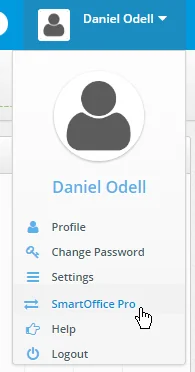
A similar menu option is available in SmartOffice Pro for navigating back to SmartOffice Anywhere (see SmartOffice Pro Changes). (PMG-633445)
SmartView for Advisors Improvements
Several enhancements were made to improve the SmartOffice Anywhere experience on small screens for SmartView for Advisors users:
- After signing in, advisors now see a list of their policies instead of the standard Dashboard.
- The policy list's layout was improved, making it easier for users to view a policy's details (by tapping the policy number) or view contact's details (by tapping the contact's name).
- The policy list can be sorted by date, status or contact, while the presale activities list can be sorted by date or contact.
(PMG-626083)
Other Enhancements
- Ability to allow simultaneous sign-in: Corporate customers can now control whether their users can sign in to SmartOffice Anywhere on multiple devices simultaneously. Customers can allow this while still restricting users to one sign-in on SmartOffice Pro. The following elements were added to the
element in config.xml:
Note that the server reads this setting only if the global
- Ability to create opportunity records: Users can now create opportunity records in SmartOffice Anywhere. Tap or click the Add button
 on the Opportunities List, which can be accessed on the contact detail screen or, on large-screen devices, by selecting the Opportunities in the navigation menu. (PMG-618793)
- Improved font color: The basic font used to display data throughout SmartOffice Anywhere was changed from gray to black to improve readability. (PMG-629332)
- Ability to create opportunity notes: While viewing the details of an opportunity in SmartOffice Anywhere, users can now add opportunity notes by clicking the Add button in the Opportunity Notes section. (PMG-634645)
- Simplified opportunity list for small-screen devices: When viewed on small-screen devices, the Opportunity List now has a simplified layout of only three columns—Current Stage, Contact Name and Potential Revenue—for easier navigation. Users can tap or click the stage to view the opportunity's details. Tapping or clicking the contact's name displays the appropriate contact details. (PMG-649718)
Resolved Issues
- An issue with navigating back from integrations on iOS devices was resolved. (PMG-602889)
- Personal holdings were not appearing in the Investment Positions list in contact records. This issue was resolved. (PMG-610281)
- Text copied from an Outlook e-mail message and pasted into the Description field of an activity in SmartOffice Anywhere was displaying HTML code. This issue was resolved. (PMG-622135)
- An issue that caused SmartView for Advisors users to see the dashboard that regular SmartOffice users see after sign-in was resolved. (PMG-637035)
- Users who tried to sign in to SmartOffice Anywhere without having the proper user rights were not seeing a message explaining the issue. The message now appears. (PMG-640396)
- On the group policy detail screen, the Add button was missing from the Contacts section. The button was restored. (PMG-648333)
- In activity outcome alerts, users were finding links to be slow to load when clicked. This issue was resolved. (PMG-648335)
- In the iOS app, the Help link in the profile menu was not working. This issue was resolved. (PMG-648337)