Last updated: 2025-12-03
Release Notes - SmartOffice 2017 Release 2
About This Document
For general information about SmartOffice release notes, visit the Release Notes home page.
Revision History
These release notes may be revised after their initial publication. This section lists the dates of any revisions as well as a list of changes.
July 6, 2017
- Initial publication.
July 7, 2017
- Core System: Added solution for PDF report Save Settings issue (PMG-682830).
- Core System: Added solution for PDF report package printing issue (PMG-693603).
- Advisors/Agencies: Added "Advisor bank account tracking for automated payments" enhancement (PMG-727808).
- Advisors/Agencies: Added "Hierarchy reporting" enhancement (PMG-727811).
- SmartPolicies: Added "Interested party names in reports" enhancement (PMG-748596)
- SmartCaseManager: Added solution for continuing education credit validation issue (PMG-711134).
- SmartInvestments: Added "Renamed variable annuity subaccount content links" enhancement (PMG-599406).
- SmartInvestments: Added solution for an issue with linking accounts to contacts (PMG-739913).
- Integrations and Data Services: Added "Auto-reconcile option for DST" enhancement (PMG-724123).
- SmartOffice Anywhere: Added solution for text display issue (PMG-742998).
- Minor text and formatting corrections.
July 11, 2017
- Core System: Added "Two-Step Authentication" enhancement (PMG-625378).
- Core System: Added solution for Mass User Assignment issue (PMG-647280).
- Core System: Added "New tax ID merge codes" enhancement (PMG-714546).
- Core System: Added solution for issue with entering phone numbers in new contacts (PMG-721023).
- Core System: Added solution for gibberish characters in exported notes (PMG-723547).
- Core System: Updated "Choice customization in employee census records" enhancement to include additional fields (PMG-729489).
- Core System: Added solution for e-mail posting confirmation issue (PMG-729713).
- Core System: Added solution for Dynamic Report export issue (PMG-738391).
- Core system: Added solution for SmartOffice Online server lockout issue (PMG-743227).
- SmartCalendar: Added solution for issue with default activity display (PMG-727955).
- SmartCalendar: Added solution for issue with long strings in activity fields (PMG-729858).
- Advisors/Agencies: Added "Electronic appointment data updates" enhancement (PMG-727812).
- SmartPolicies: Added solution for issue with policy Benefits content link layout (PMG-720582).
- SmartCaseManager: Added solution for issue with case status report preview (PMG-708828).
- SmartInvestments: Added solution for issue with printing a list of positions (PMG-709658).
- SmartInvestments: Added solution for issue with account list filtering (PMG-726416).
- Integrations and Data Services: Added "Albridge position closing" enhancement (PMG-711706).
- Integrations and Data Services: Added "Better handling of notes in Insurance Sync" enhancement (PMG-722863).
- Integrations and Data Services: Added "More group policy properties exposed" enhancement (PMG-734544).
- Integrations and Data Services: Added solution for deep-linking issue (PMG-730631).
- Integrations and Data Services: Added solution for pending case download issue (PMG-734399).
- SmartOffice Anywhere: Added solution for issue with date fields (PMG-725429).
- SmartOffice Anywhere: Added solution for issue with contact primary advisor data (PMG-726298).
August 2, 2017
- Core System: Corrected "Two-Step Authentication" description (PMG-625378) to mention text message option.
- Integrations and Data Services: Added "SmartIntegrator and SmartXchange" section.
Release Overview
SmartOffice 2017 Release 2 primarily resolves performance, user interface and other issues identified in SmartOffice 2017 Release 1 but also includes several notable enhancements, particularly in the agency management modules.
For a quick overview of this release, see our video.
Enhancement Highlights
This section provides quick links to the featured enhancements in this release.
Core System
Agency Management
Wealth Management
System Requirements
The system requirements remained unchanged in this release. For details, see System Requirements.
Note Regarding Text Changes in SmartOffice
This release may contain minor changes to text in dialog boxes and other areas of the SmartOffice user interface. Changes of this type are typically made to correct spelling, grammar, punctuation and other language-related issues. Such changes normally are not listed in this document unless they affect the way the application works.
SmartOffice Pro Changes
Core System
Featured Enhancements
Two-Step Authentication
Users can now strengthen the security of their SmartOffice user accounts by enabling two-step authentication. When this feature is enabled, a user must enter a one-time code in addition to an office name, user name and password to access SmartOffice Pro or SmartOffice Anywhere from the SmartOffice sign-in page.
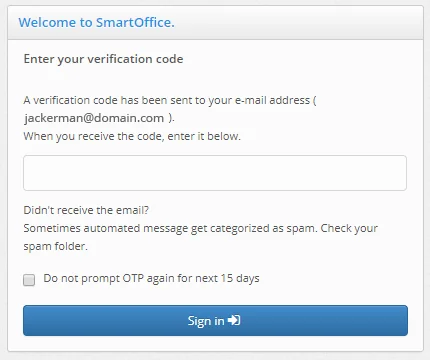
Codes are delivered to users by e-mail or text message immediately after they attempt to sign in to SmartOffice. Two-step authentication can be enabled in SmartOffice Pro under User Preferences > 2-Step Authentication. For more information, see our help topic. (PMG-625378)
Other Enhancements
Contact Management
- Choice customization in employee census records: In employee census records, users who have the appropriate rights can now customize the choices in the drop-down lists under Coverage Information (Medical, Dental, Vision, Life and STD). (PMG-729489)
Correspondence
- New tax ID merge codes: When creating correspondence, users now have access to two new merge codes that display contact and business tax ID numbers with proper hyphenation when expanded. The merge code UnMasked\_F\_CN\_TAXID displays contact Social Security numbers in the format xxx-xx-xxxx and business tax IDs in the format xx-xxxxxxx. The merge code Masked\_F\_CN\_TAXID behaves similarly but obscures the first few digits of the tax ID for privacy. Note: The existing merge code F\_CN\_TAXID, which displays all tax IDs without hyphens, is still available. (PMG-714546)
Resolved Issues
General
- Chrome users who right-clicked certain fields in SmartOffice Pro were finding that the Paste option in the shortcut menu was not working. This issue was resolved. (PMG-714228)
- Users were unable to rename items on the side menu's History tab by right-clicking them. This issue was resolved. (PMG-718395)
- An issue with the custom fields added throughout the system in the previous SmartOffice release was resolved. Users who created custom drop-down lists were finding that the drop-down choices were not available for selection during filter creation. (PMG-719665)
- An issue that was preventing users from reporting or filtering on certain contact custom lookup fields was resolved. (PMG-721614)
- In customized page layouts, users were unable to export lists displayed in portlets. This issue was resolved. (PMG-723262)
- When users typed extra spaces in certain text fields (e.g., SmartPad notes, Remarks fields), those spaces were appearing as gibberish characters when the data was exported to .csv format. This issue was resolved. (PMG-723547)
- The keyboard shortcut ALT+Q was not opening the Search box drop-down list. This issue was resolved. (PMG-724250)
- While creating or editing a custom page layout, users were encountering issues when trying to change half-width portlets to full-width portlets. This issue was resolved. (PMG-727944)
- When a heading format such as Heading 1 was applied to text in the Remarks field of a record, the B (bold) button in the toolbar was not activating to show that the text was bold. This issue was resolved. (PMG-728812)
- On the contact Expenses content link, the Remarks column was displaying gibberish characters. Remarks now appear properly. (PMG-731059)
- When performing advanced searches, users were finding that the only option available in the Sub-Type drop-down list was All. This issue was resolved. (PMG-731088)
- An issue with password resets was resolved. After a reset, users who signed in to SmartOffice using the temporary password were unable to change the password. (PMG-732343)
- A cross-site request forgery (CSRF) vulnerability discovered during internal security testing was resolved. (PMG-739703)
- An issue with viewing exported list data in Microsoft Word was resolved. Lists exported in .csv, .xml or tab-separated format were displaying extra spacing in Word 2010 and gibberish characters in Word 2013. (PMG-740642)
- Enterprise administrators were able to add resource office subscriptions for offices even after the maximum number of resource office licenses had been reached. The system now displays an error in these instances. (PMG-742420)
- Users who had added choices to custom opportunity drop-down fields in SmartOffice 7 were finding that those choices were appearing in contact custom fields after the upgrade to SmartOffice Pro. This issue was resolved. (PMG-742901)
- An server license issue that locked SmartOffice Online users out of the system was resolved. (PMG-743227)
Contact Management
- Users who did not have the Delete permission for Contact/Business were unable to access the Mass User Assignment feature, even when they had the Mass Assignments user right. This issue was resolved. (PMG-647280)
- In custom contact page layouts containing the Contact - Remarks portlet, Internet Explorer users were finding that the Remarks box was missing its scroll bar when it contained a lot of text. The box was resizing itself instead to accommodate the text. The missing scroll bar was restored. (PMG-681909)
- On the contact Personal content link, clicking the name of the business in the Company field was opening a dialog box displaying limited information about the business instead of opening the full record. This issue was resolved. (PMG-709377)
- An issue with the Time Log for business records was resolved. After adding entries to the log, including start times, users who later opened those entries were finding that the start times were missing. (PMG-715398)
- An issue with entering phone numbers while creating contacts from the Contact List was resolved. When users typed too many digits in the Area Code column and then tried to save the record, the dialog box was shrinking after displaying the expected error. (PMG-721023)
- An issue with contact custom page layouts was resolved. When the Contact Identifications portlet was part of the layout, the Pick Date button was missing from the Issue Date field, and the Pick Date button on the Expiration Date field was not working. (PMG-727590)
- An issue with adding address information to contacts with key relations was resolved. When the system asked the user whether the new address should be added to all key relations, users who clicked Yes were encountering an error incorrectly stating that the contact had no key relations. (PMG-732500)
- An issue that was causing an excessive number of columns to appear in the Contact & Business List was resolved. (PMG-733107)
- An issue that was preventing contacts' ages from being updated after data validation was resolved. (PMG-734253)
Correspondence
- A "bad gateway" error that was preventing users from sending mass e-mail correspondence from a list of Dynamic Report results was resolved. (PMG-724416)
- An issue with posting e-mail sent from SmartOffice Pro by clicking a contact's e-mail address was resolved. The Microsoft Plug-in for SmartOffice was treating these e-mail messages as having originated from Outlook instead of SmartOffice Pro and was displaying e-mail posting confirmations accordingly. (PMG-729713)
Data Import
- In the Data Import Wizard, the data mapping screen was displaying a small number of columns at the same time. The dialog box was adjusted to display more columns. (PMG-721451)
Dynamic Reports
- Some users were not receiving .csv-formatted Dynamic Report results by e-mail even when reports were correctly configured to automatically send results. This issue was resolved. (PMG-666199)
- An issue with Advisor Commission-category Dynamic Reports was resolved. From a list of report results, when users generated an advisor commission report using the Print All option, the report contained duplicate records. (PMG-713503)
- In Dynamic Reports containing columns set up with goals, numbers greater than 1,000 were not displaying with commas, making them difficult to read. In addition, dollar amount goals were not displaying decimals, even though the actual amounts were. These issues were resolved. (PMG-718439)
- Running an Opportunity - Wholesaler Dynamic Report was producing an error when the Days Since Last Stage column was included in the report. This issue was resolved. (PMG-722648)
- An issue that was causing bar charts in Dynamic Reports to present data in the wrong order was resolved. (PMG-724164)
- In Dynamic Report run-time filters, users were unable to select drop-down choices. This issue was resolved. (PMG-724238)
- An issue with modifying a Dynamic Report from the report results list was resolved. In the Dynamic Report Setup dialog box, clicking Step 1 in the top navigation was causing the Finish button to become unavailable. (PMG-724482)
- An issue with Dynamic Report filters was resolved. When creating a "contains" filter for a Sub-Type field, users had to click the Enter Value drop-down list and selected the first blank choice before they could type a value. (PMG-724490)
- An issue with Dynamic Reports using the Summary layout was resolved. When a report was sorted by a column containing numeric values, SmartOffice was adding extra decimal places to the values. (PMG-728336)
- Users were encountering an error in Internet Explorer when trying to export certain Dynamic Reports containing run-time filters. This issue was resolved. (PMG-738391)
Filters
- The system's Current Quarter, Previous Quarter and Next Quarter date filters were not covering the expected date ranges. This issue was resolved. (PMG-729876)
Home Page
- An issue with dashboards created from home page tabs was resolved. When a user created a tab using such a dashboard and then deleted the original dashboard, the dashboard on the new tab was disappearing. (PMG-719486)
- An "RSS error loading" message that was appearing in the Yahoo! - Top Stories home page RSS portlet was resolved. (PMG-721305)
PDF Reports
- After selecting the Save Settings option in the PDF report run-time options dialog box, users were finding that some settings were not being saved in their newly created report instances. In addition, the drop-down lists for some report options contained no choices. These issues were resolved. (PMG-682830)
- An error that was preventing users from printing the Detail content link of a report linked to a PDF report package was resolved. (PMG-693603)
- An issue with contacts shared from another office was resolved. Users who tried to run PDF reports from the contact Personal content link were encountering a "your action cannot be completed" error. (PMG-719448)
- Several issues with running bunch PDF reports from pending cases were resolved:
- When the user selected the Two Way Amendment PDF report and then clicked the Run button, the PDF was opening too early and was hiding the run-time text input box. (PMG-723346)
- While selecting report options, users who selected the Two-Way Amendment report along with a letter template were encountering workflow issues that were preventing the report from being generated. (PMG-731671)
- Users who selected the Two-Way Amendment report along with another report were finding that, when the bunch report was run, the prompt to enter text for the two-way amendment was not appearing. (PMG-740818)
- An issue that was omitting footers from certain PDF reports was resolved. (PMG-734520)
- On the Contact List , an error that some users were encountering when they selected the Run Report (PDF) command was resolved. (PMG-739611)
SmartCalendar
Resolved Issues
- In the calendar Week view, display issues with the stacked week view were resolved. (PMG-726903)
- The calendar Day and Week views were not defaulting to the earliest scheduled activity. This issue was resolved. (PMG-727955)
- When an activity was linked to more than one contact, the system was improperly allowing the user to remove the primary contact from the activity. This issue was resolved. (PMG-729817)
- In certain calendar views, lengthy text strings (e.g., long URLs) in an activity's Subject, Location or Description field were extending into adjacent columns. This issue was resolved. (PMG-729858)
- On the Day and Week views, the Task List was not displaying all columns. The missing columns were restored. (PMG-731010)
- Internet Explorer users who configured the calendar to open as a pop-up were experiencing issues opening the calendar. These issues were resolved. (PMG-731015)
SmartOpportunities
Resolved Issues
- On the Opportunity Dashboard, users who selected the Forecast Report or Pipeline Report option were finding that their selection was being cleared when they clicked the Refresh button. This issue was resolved. (PMG-718234)
- On the Opportunity Dashboard, an error that users were encountering when they tried to run a report was resolved. (PMG-730356)
SmartEvents
Resolved Issues
- When creating an event, users who clicked the Venue Name hyperlink were finding that the command to create a venue was missing from the Venue List dialog box. The command was restored. (PMG-731254)
Advisors/Agencies
Featured Enhancements
Advisor Bank Account Tracking for Automated Payments
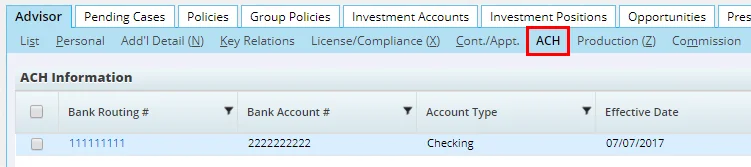
Users can now track bank account information in advisor records to facilitate electronic payments through the Automated Clearing House (ACH) system. A new ACH content link displays this information.
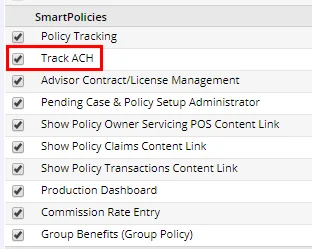
A user must have the new Track ACH license enabled to view and manage bank account information for ACH payments.
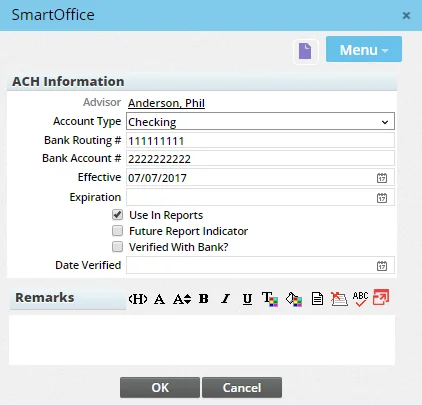
A bank account record includes basic information (routing number, account number, bank verification, etc.) as well as options to include the record in reports.
As part of this enhancement, several new Dynamic Report categories are now available:
- Advisor/Agency - Include ACH (Advisor/Agency report family)
- Advisor/Agency - Include Primary ACH (Advisor/Agency report family)
- Advisor Commission Check - Include ACH (Commission report family)
(PMG-727808)
Hierarchy Reporting
On the advisor Cont./Appt. content link, the View Contract Hierarchy feature was enhanced to allow users to display complete, exportable hierarchies for specific advisors or supervisors for all contracts or specific contracts, with or without rates. To enable these enhancements, the following changes were made to the Contract Hierarchy dialog box:
- All selected contracts are now displayed.
- Additional tables were added so that the column layout can include commission rate and banding data.
- The command Menu > List Options > Export List was added to allow users to export the dialog box's data.
(PMG-727811)
Electronic Appointment Data Updates
Users can now update advisor appointment records in SmartOffice automatically using data from NIPR and Vertafore. As part of this enhancement, the following changes were made:
- In Policy/Case Setup, an Electronic L&A Setup section was added under Licensing/Contracting Setup. Here, the administrator can create entries for NIPR and/or Vertafore and specify the carriers and states for which appointment data will be checked.
- In advisor appointment records, the Status field now contains two new choices: Electronic Request - New and Electronic Request - Renewal. Selecting either choice reveals a new Service field where the user can specify the data provider to which the request will be sent. In addition, new E-Status/Date fields allow user to track the status of the appointment data request.
- Update requests are queued and sent overnight through an automated service. The service also checks the status of all open requests and retrieves any available updates.
For more information, see Advisors/Agencies - Cont./Appt. Content Link and Policy/Case Setup - Licensing/Contracting Setup. (PMG-727812)
Presale Note Reports
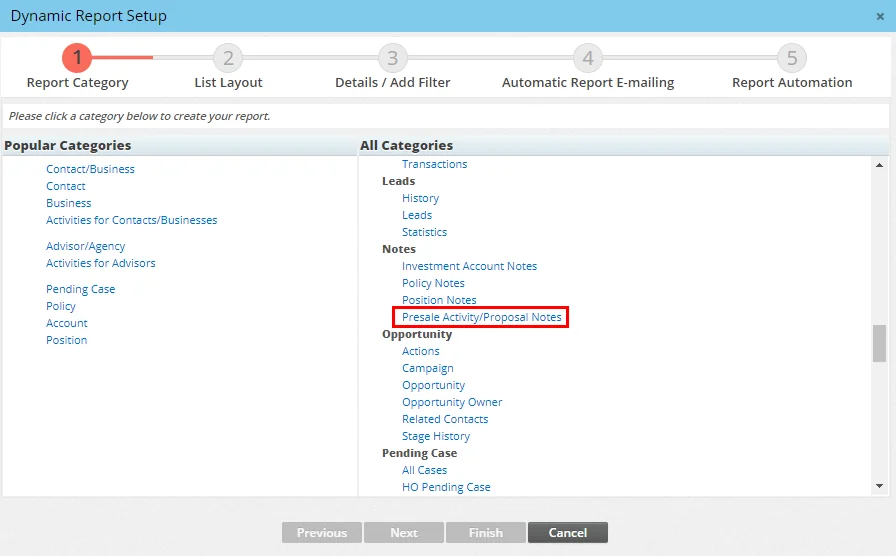
Users can now report on presale activity notes. A new Presale Activity/Proposal Notes report category is now available in the Notes family of Dynamic Reports.
(PMG-738397)
Resolved Issues
General
- After opening an advisor license record from a list of Dynamic Report results, users who tried to add a line of business under the Selected LOB section were finding that the Variable Annuity and Life options were not available. This issue was resolved. (PMG-677139)
- When an advisor record contained contract records but no other linked records (such as policies or pending cases), deleting the advisor was opening the Advisor & Agency List. This issue was resolved. (PMG-724665)
- An error that occurred when users tried to convert presale activities into pending cases was resolved. (PMG-725168)
- When Office Security was enabled, users were able to see Advisor Statement records for advisors whose records they did not have access to. This issue was resolved. (PMG-727713)
- An issue with creating Contracting-type advisor requests was resolved. When users tried to select a supervisor contract by clicking the Supervisor Contract hyperlink, the system was displaying a message stating that the supervisor had no contract, even when contracts were set up correctly. (PMG-730921)
- After using the Advisor Reassignment feature, users were finding that the Advisor column from the Advisor Basic Info table was still displaying the old primary advisor in policy lists. This issue was resolved. (PMG-731537)
- Several issues with advisor contracts were resolved:
- When editing an advisor contract, clicking the Supervisor Name hyperlink was not opening the Supervisor Contract List.
- When using the Contract Change Utility, clicking the Supervisor Contract hyperlink was opening two Supervisor Contract List dialog boxes.
- When users opened an advisor contract, cleared the contract name, selected another contract and then clicked the OK button, the dialog box was not closing.
(PMG-732792)
- On the advisor Personal content link, the Pick Date button on the Hire Date field was not working. This issue was resolved. (PMG-745300)
- The size of the Remarks field in the Advisor Appointment dialog box was reduced to decrease the size of the entire dialog box. (PMG-745523)
SmartPolicies
Enhancements
- New column displaying full owner names in policy lists: Policy lists and Dynamic Reports can now display policy owners' names complete with titles (Mr., Ms., etc.) using the new Owner Full Name column, which was added to the Policy and Policy Alternate tables. (PMG-734155)
- Interested party names in reports: The Name column in the Interested Party table is now available for use in policy and pending case Dynamic Reports that provide access to that table. This column enables users to sort and filter reports by interested party contact. (PMG-748596)
Resolved Issues
- An issue that was causing SmartView for Clients to display incorrect plan type information was resolved. (PMG-699306)
- An issue that was preventing the Record Merge feature from working on critical illness, dental and vision policies was resolved. (PMG-706920)
- On the Benefits content link of disability policies, the lengths of the Accident fields were too small in Internet Explorer, causing large values to appear cut off. This issue was resolved. In addition, several other similar issues affecting the Benefits/Coverage content links of other policy types were resolved. (PMG-720582)
- Users who navigated to the Policy Custom or Life Custom content link of a policy were not seeing information about the contact and policy at the top of the page. The missing information was restored. (PMG-727709)
- In the Policy Detail PDF report, the Convertible field was incorrectly displaying a No value when the corresponding database column's value was actually null. The report now displays a blank value in those instances. (PMG-739916)
Insurance Products and Carriers
Featured Enhancements
New Product Types
Several individual and group insurance product types were added to the system. The individual product types are Cancer, Accident, Hospital and STD (short-term disability). The group product types are Group Cancer, Group Accident and Group Hospital. (PMG-722279)
Resolved Issues
- When creating a group insurance product record, users who added an entry to the record's Group Product Options section were finding that the entry was disappearing once the record was saved. However, when the user searched for and opened the product record again, the product option entry was visible again. This issue was resolved. (PMG-726063)
- On the product Underwriting Guidelines and Notes content link, the Copy Guideline to Another command was producing unexpected results under certain circumstances. These issues were resolved. (PMG-727743)
SmartCaseManager
Featured Enhancements
New Pending Case Statuses
The following new statuses (with associate stages in parentheses) are now available for pending cases:
- Appeal Decline (Underwriting)
- Appeal Postpone (Underwriting)
- Approved - Awaiting Funds (Approval)
- Inforce - 0 Commissions (Active)
- Inforce - Commission Pending (Active)
- Issued - Awaiting Commissions (Issued)
- Negotiation (Underwriting)
- NTO DS (Inactive)
- NTO GLIC (Inactive)
- Pending 1035 Rollover (Underwriting)
- Postponed Awaiting Requirement (Active)
- Received On-line (Underwriting)
- Reopened (Active)
(PMG-727806, PMG-741073, PMG-743239)
Resolved Issues
- An issue with default pending case letters was resolved. The issue occurred when the Select all advisors on case option was selected in Policy/Case Setup under PCM Communication. When correspondence based on a default template was created from a pending case record, the advisor's supervisor was being included as a recipient by default. (PMG-591090)
- When sending case status reports, Internet Explorer users were finding that column headings in the preview were missing. This issue was resolved. (PMG-708828)
- Two issues with the validation of advisor continuing education credits during pending case creation were resolved:
- The system was not considering the Date From and Date To fields of continuing education records.
- When an advisor had a continuing education record applicable to all states and another record applicable to a specific state, users creating a case for that specific state were being prompted to create an advisor request for continuing education credits, even when there were no outstanding credits.
(PMG-711134)
- When an agency was added to a pending case's Policy Advisor List, the case's data was not being included in the Production Dashboard statistics presented on the agency's Detail content link. This issue was resolved. (PMG-723887)
- In the Licensing/Contracting Setup section of Policy/Case Setup, the "Establish Licensing/Contract Managers" text was cut off. This issue was resolved. (PMG-729988)
- An issue that was causing the system to send duplicate case status e-mail reports was resolved. (PMG-733204)
- An issue that was causing pending case mass correspondence to be sent to unintended recipients was resolved. The issue affected e-mail correspondence containing pending case merge codes. (PMG-735896)
- In pending case records, the Letters/Documents content link was available to users who did not have the Letters/Documents user right. This issue was resolved. (PMG-747623)
SmartBenefits
Resolved Issues
- On the group policy Detail content link, there was no space between the Payment History and Future Premium buttons in the Premium Information section. This issue was resolved. (PMG-726305)
- On the advisor or agency Group Policies tab, policies with the same policy number were appearing multiple times when the advisor was added multiple times to the policy's Policy Advisor List. This issue was resolved. (PMG-729902)
SmartCommissions
Enhancements
Speed Receipts
- Progress bar for speed receipt validation: In the Commission Data section of a speed receipt record, users who validate selected transactions now see a progress indicator. (PMG-730399)
Resolved Issues
General
- When a policy with the Single Pay premium mode contained a rider with a different premium mode, the following issues were occurring:
- The rider commission was not being calculated.
- The first-year commission transaction was being recalculated even when it was already present, which was resulting in two transactions for the same due date.
These issues were resolved. (PMG-719770)
- An issue affecting underwriting requirements in informal parent pending cases was resolved. Users who tried to select a service provider account number for the requirement were being presented with a blank list. (PMG-730898)
- The ability to add a commission rate to a contract was missing from the Show Hierarchy dialog box when accessed from a policy or pending case. The command was restored. (PMG-731441)
- Several issues with the Commission Hierarchy Detail dialog box were resolved:
- Users who clicked the Carrier Contract or House Contract hyperlink were finding that the command to add a contract was missing from the Advisor Contract List dialog box.
- After selecting a contract and clicking the Contract Information hyperlink, users were finding that the New button was missing from the Search Contracts dialog box.
- Adding an advisor contract from Advisor Contract List and clicking the OK button was opening a blank tab.
- Updating an advisor contract's status and clicking the OK button was opening a blank tab.
(PMG-734221)
- An issue with commissions in split cases was resolved. When the supervisor's commission was set up as a percentage of the amount retained by the agency, the commission calculation was incorrect. (PMG-734507)
Carrier Posting
- An issue with managing advisor transaction postings was resolved. While viewing a posting with a status of Ready To Process or Open with Enterprise View turned off, users who tried to link commission transactions to the posting were able to select transactions from child offices. (PMG-698427)
SmartWholesaler
Resolved Issues
- On the distributor Personal and Firm content links, the height of the Distributor Owner List section was not large enough to display records properly. The section was resized. (PMG-726402)
- When using the Add New button to create a producer or firm record, users with Enterprise View turned on were not being prompted to select an office. This issue was resolved. (PMG-726425)
- Layout and button issues affecting the Fulfillment By Request and Fulfillment by Items dialog boxes were resolved. (PMG-730417)
SmartInvestments
Featured Enhancements
Improved Investment Account Search
In the Search Accounts dialog box, entering a number in the Account # field now returns records containing that number anywhere in the field. For example, a search for 12345 now returns accounts with numbers like 00012345 and 01234567. Previously, searches were returning only those accounts whose numbers started with the number entered. (PMG-595465)
New Liabilities Column
An All Liabilities column is now available in the Contact, Investment Accounts and Investment Position tables. This column displays a consolidated listing of all liabilities linked to a contact, account or position.
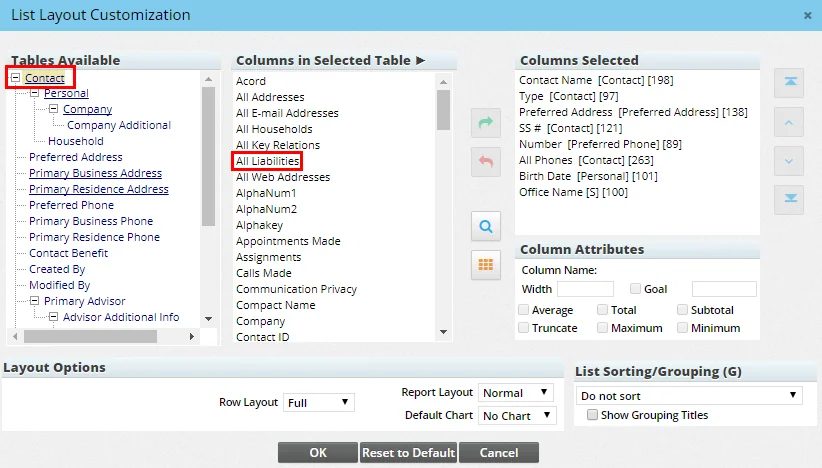
This enhancement also resolves an issue that was causing duplicate records to appear in lists containing columns from the Liability table. (PMG-719771)
Other Enhancements
Investment Accounts
- Mass modification of remarks: When mass modifying investment accounts or positions, users can now modify the Remarks field. (PMG-600712)
- Column showing source of interested party/advisor data: In investment account records, users can now customize the Interested Parties and Advisor Relationships lists to show where interested party and advisor data came from (manually entered, electronically downloaded, etc.). To do so, users with the appropriate rights can add the Source of Data column from the Contact Investment Account table to these lists. (PMG-731257)
Investment Positions
- Renamed variable annuity subaccount content links: For variable annuity positions, the content links for subaccounts were renamed to more accurately reflect their content. The word "Position" was replaced by "Subaccount," so that the content links are now Subaccount Detail, Subaccount Transactions, Subaccount History, Subaccount Performance and Subaccount Custom.
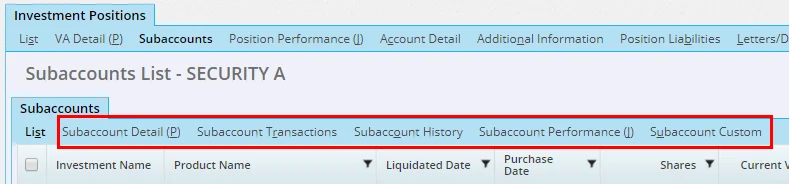
Users who customize the list layouts of these content links will also notice that the Investment Position table under the Holding Table was similarly renamed Subaccount. (PMG-599406)
Resolved Issues
Investment Accounts
- An issue affecting contacts linked to investment accounts as co-owners was resolved. On the contact's Investment Accounts tab, the page title was displaying the name of the primary contact of the first account in the list. (PMG-625436)
- An issue with entering Tax ID information in investment account records was resolved. Clicking the Save button was not saving the Tax ID unless the user first pressed the TAB key or clicked somewhere on the page. (PMG-722342)
- When adding investment accounts to an account group, users were finding that electronically downloaded accounts were not available for selection. This issue was resolved. (PMG-724603)
- On the contact Investment Accounts tab, selecting an option other than All from the Type drop-down list was not displaying any records. This issue was resolved. (PMG-726416)
- On the investment Account Detail content link, some custom fields in the Miscellaneous Information section were inaccessible to users who did not have the Custom Fields - Field Name Modification user right. This issue was resolved. (PMG-734648)
- An issue with the Link Account to Contact command was resolved. When the contact had no linked primary advisor, SmartOffice was improperly creating a null advisor entry for the account in the database that was not visible in the account's Advisor Relationships list. This issue was resolved. (PMG-739913)
Investment Positions
- When an advisor was linked to an investment account with a role other than Primary Advisor, the advisor's Investment Positions tab was not displaying positions for that account. This issue was resolved. (PMG-621784)
- In Office Settings, an issue with the Changes to Investment Position option on the SmartPad/New Contact/E-mail Posting content link was resolved. The system was not automatically posting SmartPad entries when positions relinked to other accounts were modified. (PMG-681125)
- An issue with creating positions from the contact Investment Positions tab was resolved. On the Position Detail content link, clicking the Symbol/Security ID (CUSIP) hyperlink was opening a dialog box listing existing securities, but the command for creating a security was missing. This command was restored. (PMG-702960)
- On the security Investment Positions tab, users who filtered the list to display only active positions were encountering a list printing issue. Selecting the Print All option without selecting any records was causing active and inactive positions to appear in the printout. (PMG-709658)
- An issue with adding the Account Position List portlet to an investment account page layout was resolved. When the Investment Name column from the Holding table was added to the portlet's list layout, the column was not visible in account records viewed from the household Investment Accounts content link. (PMG-720576)
- On the Account Positions tab of an investment account, users were able to select personal holding choices (Bank Account, Notes Receivable, Personal Property and Real Estate) from the Type drop-down list. These choices were removed because account position lists do not display personal holdings. (PMG-725140)
- Applying a custom page layout to the Position Detail content link of a bank account holding was producing an error. This issue was resolved. (PMG-740138)
Investment Reports
- In the following PDF reports, the maturity dates of bond positions were being retrieved from their linked security records instead of the position records, which was causing inconsistencies:
- Position Summary w/out Loan Info
- Investment Summary with Maturity Date
This issue was resolved. (PMG-647494)
- Users who tried to run the Summary of Accounts PDF report were encountering an error when any investment account name contained parentheses. This issue was resolved. (PMG-725499)
- In Performance-category investment reports, an issue that was causing dollar amounts and percentages to display too many decimal places was resolved. (PMG-732594)
- After creating a contact, users who ran the Investment Position Summary PDF report for that contact were encountering an error. The error was occurring when the Exclude Positions with Negative Share Balance report option was selected. This issue was resolved. (PMG-733927)
- Users were encountering errors when they ran the Position Summary w/out Loan Info PDF report. The errors were occurring when an investment account's roll-up options were set to Do not roll up. (PMG-740625)
Investment Securities
- Users who tried to retrieve security prices for a date range using the Internet Quote Service were seeing a message stating that no prices were available for that range. This issue was due to Yahoo's decision to discontinue its security price update service. Ebix is currently looking for an alternative provider of security price data for SmartOffice. In the meantime, users can enter prices manually on a security's Price History content link. (PMG-732333)
- On the security Price History content link, price history records were not sorted by price date. This issue was resolved. (PMG-734539)
Investment Validation
- An investment validation issue that was closing positions with share values greater than zero was resolved. (PMG-723761)
- An issue that was preventing zero-share positions from being closed following validation was resolved. (PMG-741057)
Liabilities
- When a list's available columns all belonged to the Liability table, adding the All Interested Parties with Percent column to the layout was producing an error every time the list was accessed. This issue was resolved. (PMG-720751)
Integrations and Data Services
Enhancements
Investment Data Download
- Better Albridge position closing: The way in which SmartOffice closes investment positions after processing Albridge data downloads was improved:
- Positions are now closed only if they are linked to the Custodian User of the current job.
- When a position is closed, the job ID is now included in the position history for better tracking.
(PMG-711706)
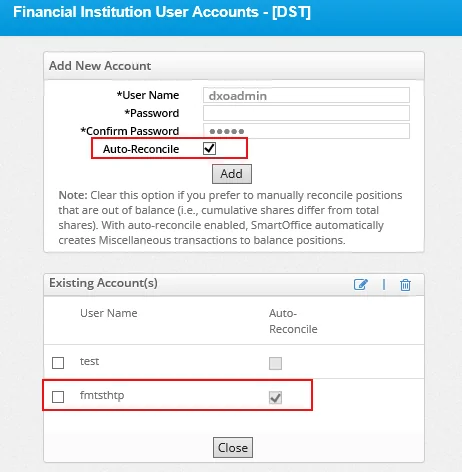
- Auto-reconcile option for DST: When setting up DST data downloads, users can now select a new Auto-Reconcile option. This option creates Miscellaneous-type transactions in SmartOffice to automatically reconcile out-of-balance positions.
(PMG-724123)
- Improved tracking of position liquidation: When a data download causes a position in SmartOffice to be liquidated, the processing job ID is now added to the Remarks field of the position history record. (PMG-737087)
SmartIntegrator and SmartXchange
- Better handling of notes in Insurance Sync: Improvements were made to the way in which pending case notes are synchronized from the agency office to the advisor's office for Insurance Sync. Previously, a pending case in the advisor's office displayed only the most recent note after sync occurred, and previous notes were overwritten. Now, all notes from the agency's office are synchronized to the advisor's office. (PMG-722863)
- More group policy properties exposed: The number of group policy properties exposed to developers through SmartIntegrator has been greatly expanded. More properties are now available in the existing GPPlan, GroupParticipant, GroupPlan and GroupPolicy objects. In addition, the following new objects can now be accessed:
- GPPlanDental
- GPPlanLTC
- GPPlanLTD
- GPPlanLife
- GPPlanOther
- GPPlanSTD
- GPPlanSection12
- GPPlanVision
- GroupDental
- GroupLTC
- GroupLTD
- GroupLife
- GroupMedical
- GroupOther
- GroupPolExtn
(PMG-734544)
Resolved Issues
General
- An issue with window names that was preventing third-party developers from deep-linking into specific pages in SmartOffice was resolved. (PMG-730631)
Inforce Policy Import
- The failure of any single policy during the import process was causing all other policies in a job to fail the import process. This issue was resolved so that problematic policies are skipped. (PMG-660925)
Investment Data Download
- An issue that was causing delays in the processing of data downloads from Albridge was resolved. (PMG-703228)
- An authentication issue that was causing Orion data imports to fail was resolved. (PMG-723818)
- An issue that was interrupting the processing of Orion data downloads was resolved. (PMG-732158)
- Investment data downloads were not working in some instances when offices that were renamed, disabled and later re-enabled. This issue was resolved. (PMG-740586)
Pending Case Download
- On the HO Pending Case List, users who selected the HOCase Jobs command and then clicked the Search button were encountering a prompt about closing the browser tab. This issue was resolved. (PMG-734272)
- An issue that was preventing pending case downloads from appearing in SmartOffice was resolved. The issue was caused by previously downloaded cases becoming stuck in the download queue. (PMG-734399)
SmartIntegrator and SmartXchange
- Users who had Enterprise View turned on were unable to submit E-Orders to EMSI. This issue was resolved. (PMG-737748)
- When an agency using Insurance Sync created a product in an advisor's office, modal factor and policy fee data was not being included. This was resulting in incorrect premium calculations in the advisor's office. That data is now included. (PMG-739891)
SmartOffice Anywhere Changes
Note: SmartOffice Anywhere changes are also summarized on the Release History page in SmartOffice Anywhere Help.
Enhancements
- More relevant notes in pending policies: The SmartPad section of pending policy records now displays notes specific to the policy instead of contact-level notes. (PMG-730910)
Resolved Issues
- Selections from fields on some screens were displaying as text across the bottom of the screens. This issue was resolved. (PMG-742998)
- When an opportunity stage was linked to an activity outcome in SmartOffice Pro, selecting that outcome in SmartOffice Anywhere was not advancing the opportunity to the linked stage. This issue was resolved. (PMG-644467)
- The contact import process was hanging when users selected a file to import and then tapped or clicked the Next button. This issue was resolved. (PMG-711973)
- When creating new activities, some users were seeing gibberish characters in the Start Date and End Date fields. This issue was resolved. (PMG-725429)
- Adding a policy to a new contact was removing the primary advisor information from the contact. This issue was resolved. (PMG-726298)
- A SmartPad issue that was causing notes to display a different status in SmartOffice Anywhere compared to SmartOffice Pro was resolved. (PMG-727722)
- Several opportunity issues related to the activity outcome workflow were resolved. The issues included improper or duplicate task creation as well as the display of incorrect stage designations. (PMG-730911)
- Updating the primary advisor on a policy was also updating the primary advisor linked to the policy's primary contact. This issue was resolved. (PMG-731558)