Last updated: 2025-12-03
Release Notes - SmartOffice 2018 Release 1
About This Document
For general information about SmartOffice release notes, visit the Release Notes home page.
Revision History
These release notes may be revised after their initial publication. This section lists the dates of any revisions as well as a list of changes.
February 12, 2018
- Initial publication.
February 14, 2018
- Core System: Added "Support for web-based Outlook (enterprise customers only)" enhancement (PMG-773229).
- Core System: Added "Improved tracking of archived contacts" enhancement (PMG-782842).
- SmartOpportunities: Added solution for incorrect calculation of opportunity estimated revenue (PMG-787361).
- SmartOffice Anywhere: Improved opportunity screens for mobile users (PMG-772855).
- SmartOffice Anywhere: Recategorized the phone number entry change (PMG-787870) as a resolved issue rather than an enhancement.
- Minor text and formatting corrections.
February 20, 2018
- Core System: Removed erroneous reference to page layout customization changes.
Release Overview
SmartOffice 2018 Release 1 features new integrations with Riskalyze, Financial Media Exchange and PaperClip Mojo among other improvements. This release also resolves performance, user interface and other issues identified in SmartOffice 2017 Release 3 and earlier. For a quick overview of this release, see our video.
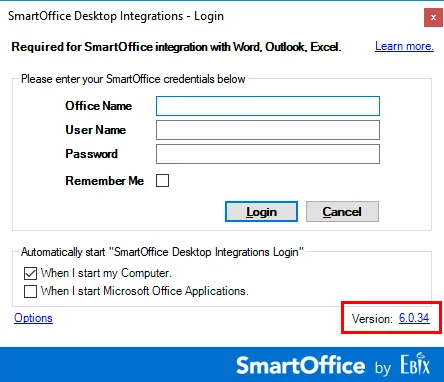
Important: This release of SmartOffice Pro requires Microsoft Plug-in for SmartOffice version 6.0.34 or later for correspondence and other important workflows. Earlier plug-in versions are not compatible with this release, and users with outdated plug-ins will see an alert prompting them to upgrade. If you have an older version, download the latest version of the plug-in. To check your plug-in version, look in the lower-right corner of the sign-in screen.
Enhancement Highlights
This section provides quick links to the featured enhancements in this release.
Core System
Agency Management
Integrations and Data Services
SmartOffice Anywhere
System Requirements
This release of SmartOffice Pro requires Microsoft Plug-in for SmartOffice version 6.0.34 or later. For more information, see the Release Overview section above.
There are no other changes to system requirements for this release. For current system requirements, see System Requirements.
Note Regarding Text Changes in SmartOffice
This release may contain minor changes to text in dialog boxes and other areas of the SmartOffice user interface. Changes of this type are typically made to correct spelling, grammar, punctuation and other language-related issues. Such changes normally are not listed in this document unless they affect the way the application works.
SmartOffice Pro Changes
Core System
Featured Enhancements
New Custom Field Merge Codes
Users can now include data from more custom fields in correspondence. The following merge code tables were added:
- Account Custom
- Advisor Custom
- Agency Custom
- Business Custom
- Candidate Custom
- PCM Custom
- Policy Custom
(PMG-766873)
Ability to Link to Local Documents
 in the Document List section and select Link to File Location.
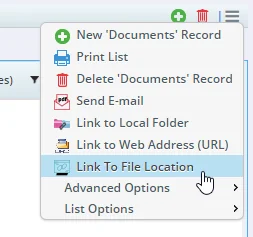
You can then enter the file's full path and other details. (PMG-781264)
Other Enhancements
Contact Management
- Tax ID column for business page layouts: The Tax ID column is now available for use in custom layouts created for the business Detail content link. (PMG-720037)
- Improved tracking of archived contacts: For offices that have the Protect Communication History feature enabled, two changes provide better tracking of archived and restored contacts:
- Two new columns are available in the Archived Records List (Utilities > Archived Records). The Archived By column indicates which user archived a record, and the Archived On column displays the date a record was archived.
- In offices that also use the Audit Trail feature, SmartOffice now treats the archiving or restoration of a contact as a change in record type from Contact or Business to Archived (or vice versa). Entries noting these changes now appear in the SmartPad Change List (Utilities > SmartPad Changes). If an archived contact is restored, entries also appear under the Changes tab in the contact's SmartPad.
(PMG-782842)
Correspondence
- Improved display of correspondence template names: In the Template Selection step of the Correspondence Wizard, long template names now wrap instead of pushing the other columns in the template list to the right. (PMG-772069)
- Support for web-based Outlook (enterprise customers only): Enterprise customers can now configure SmartOffice Pro to launch the web-based version of Outlook for certain correspondence workflows. This enhancement better integrates SmartOffice Pro with Office 365. After this feature is enabled, SmartOffice Pro automatically opens Outlook on the web when users click e-mail addresses and Launch E-mail links, or when they forward or reply to e-mail messages from the SmartPad. To enable this feature, change the new
(PMG-773229)
PDF Reports
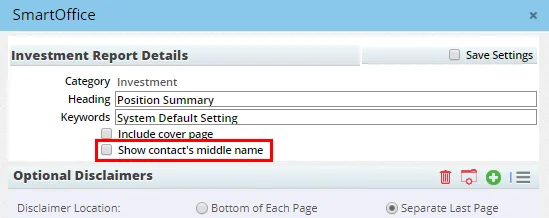
- Ability to show/hide middle names in reports: A Show contact's middle name option is now available for many PDF reports in the Account Master, Investment, Performance, Policy, Holding Statement and Transaction report categories. The option appears near the top of the report options dialog box.
(PMG-749290, PMG-792065)
SmartOffice Sync for Microsoft Exchange
Note: These changes apply to enterprise customers only.
- Control of notifications for synchronized activities: Enterprise Exchange sync users can now control whether activity participants receive e-mail notifications when an activity is created, changed or deleted in SmartOffice. A new Notify contacts when activity is created/changed option is available in the Activity Detail dialog box. (PMG-767775)
Resolved Issues
General
- Users were receiving alerts about unsuccessful sign-in attempts that were dated after the sign-in attempt actually occurred. This issue was resolved. (PMG-666991)
- Two issues with e-mail and SMS text reminders for calendar activities were resolved:
- The system was sending reminders to recipients with disabled user accounts.
- Users were continuing to receive reminders even after disabling that option in User Preferences > Basic Info.
(PMG-747197)
- Users who did not have the Letters/Documents user right still had access to documents in carrier, product, rider, group product and presale activity records. This issue was resolved. (PMG-748116)
- In User Preferences > Basic Info, users who entered a new mobile number or edited an existing number for receiving alert notifications were unable to save their changes. This issue was resolved. (PMG-766986)
- A web session hijacking vulnerability was resolved. (PMG-768167)
- A Call Center user right that was inadvertently added to SmartOffice Online servers was removed. (PMG-771246)
- An issue that was causing unexpected sign-outs was resolved. (PMG-771678)
- Layout issues in the record merge dialog box were causing the Merge and Cancel buttons to become hidden in some instances. In addition, the appearance of the merge confirmation message window was inconsistent with that of other SmartOffice Pro messages. These issues were resolved. (PMG-771992)
- Some offices that use a custom logo for branding in SmartOffice Pro were finding that the logo was changing unexpectedly. This issue was resolved. (PMG-774816)
- On the contact Personal content link, an issue with the map button in the Addresses section was resolved. Clicking the button was opening Google Maps as expected, but the address was not appearing in the originating address field in some instances. (PMG-777878)
- The Reset Password command was not available on the user account Detail content link. This issue was resolved. (PMG-780459)
- On the user account Detail content link, the Contact Record for This User link was not working. This issue was resolved. (PMG-780500)
- Several system-office issues were resolved (these issues affected enterprise administrators only):
- The system was not displaying a warning message when administrators tried to create offices using existing office IDs.
- Dialog boxes related to the Schema Consistency Check feature were not behaving properly.
(PMG-782237)
- After saving changes in Office Settings and User Accounts, users were encountering extra page refreshes. This issue was resolved. (PMG-783126)
- In Deleted Records, an issue with the deleted activities search was resolved. On the Activity Search Results list, the Modified On and Modified By columns belonging to the Activity table were mislabeled. These columns were renamed Deleted On and Deleted By. (PMG-784520)
- When a record alert was deleted, users who later opened that record were still seeing an alert in some instances, but the alert window was blank. This issue was resolved. (PMG-785776)
Alert Center
- In the Alert Center, an issue with PCM Follow Up Activities alerts was resolved. Clicking the Navigate To icon for these alerts was displaying a list of underwriting requirements by default. The system now displays all requirements needing follow-up. (PMG-723246)
- Deleted alerts were appearing again in the Alert Center the next time the user signed in to SmartOffice. This issue was resolved. (PMG-761107)
Contact Management
- In contact lists, no date was appearing in the Last Contact field, even after a user sent correspondence to the contact, or when the user made a call to the contact and tracked it with an activity in SmartOffice. This issue was resolved. (PMG-583058)
- An issue with contact custom page layouts containing the SS # field was resolved. When users typed a Social Security number in the field, tabbed out of the field and then saved the record, the field was displaying only five masked digits. In addition, clicking the field was revealing only the last four digits of the number. These issues were resolved. (PMG-721196)
- An issue with contact Quick Reports was resolved. On the report results list, when users selected Birth Date from the Look for drop-down list and is in range from the Range drop-down list, the From and To date fields were not appearing. (PMG-743819)
- An issue affecting contacts imported into SmartOffice with phone numbers was resolved. In correspondence, those contacts' phone numbers were not formatted properly when merge codes were expanded. (PMG-756151)
- On the contact Custom content link, when a section contained scroll bars because of a large number of custom fields, printouts of the content link were not displaying all of the fields. This issue was resolved. (PMG-765992)
- Issues with merging records on the Duplicate Contact List were resolved. When the merge process was complete and the system asked whether the source contact should be deleted, clicking Yes was having no effect; the user had to close the prompt manually. In addition, the user had to refresh the Duplicate Contact List manually to update it. (PMG-770027)
- When a contact, business, advisor or agency name contained the letters "EO," SmartOffice was instead displaying the word "Compliance" when users viewed the record's information card. This issue was resolved. (PMG-772031)
- The household Detail content link was displaying help text about consolidated policy and investment data, even when the user had no policy or investment user rights and no such data was being displayed. This issue was resolved. (PMG-774179)
- An issue with custom page layouts containing groups with custom fields was resolved. The Pick Date button was disappearing from some date fields when the field order was changed. (PMG-783712)
- Issues that were preventing key relation dialog boxes from loading properly were resolved. (PMG-786644)
- When contacts were exported to other offices, key relations were being lost in some instances. This issue was resolved. (PMG-794054)
Correspondence
- An issue that was causing gibberish data to appear in e-mail correspondence was resolved. (PMG-722380)
- An issue with resending letters from the contact Letter Log was resolved. When the letter contained run-time user input merge codes, the correspondence workflow was not prompting the user for input. Instead, the system was inserting blank spaces in place of the codes in the resent letter. (PMG-750310)
- In certain instances, HTML code was appearing in correspondence when run-time user input merge codes were expanded. This issue was resolved. (PMG-757689)
- Several issues with managing activity participants were resolved:
- On the Scheduling tab of the Activity Detail dialog box, deleting a participant was opening a blank message window.
- During the activity outcome workflow, some users who clicked the Check Participant(s) Availability button were encountering layout issues in the Scheduling dialog box that opens.
- Trying to delete participants from an activity without actually selecting any participants was causing layout issues.
- When the View Other Users' Calendars setting in User Preferences was set to No, the layout of the group scheduling screen was distorted.
(PMG-765587)
- Parent-office Enterprise View users were unable to post correspondence to the Letter Log of a child-office contact, policy or pending case. This issue was resolved. (PMG-770306, PMG-770439)
- When trying to create correspondence based on SmartOffice-provided letter templates, some users were encountering an error. This issue was resolved. (PMG-772980)
- An issue with the Use Default E-mail Signature from Outlook/Lotus Notes user preference was resolved. When the preference was disabled at the office level but enabled for a user account, correspondence sent to an advisor from the advisor's Policies tab did not include the signature. This issue was resolved. (PMG-773797)
- An issue with sending intra-office e-mail using Enterprise View was resolved. When prompted to select an office, users who clicked the "X" button to close the dialog box and cancel the process were being prompted to compose a message anyway. (PMG-774160)
- When users clicked a contact's e-mail address, the e-mail message window that opened was displaying extra contact information (title, suffix, middle name, greeting) in the To field. This issue was resolved in a new version of the Microsoft Plug-in for SmartOffice. (PMG-777591)
- When the Activity Log portlet was added to the contact Personal content link, users who deleted an activity from the portlet and later navigated back to the contact were seeing the deleted activity again. This issue was resolved. (PMG-779256)
- When entering text in run-time user input fields during the correspondence workflow, users of non-Chrome browsers were finding that the text was not wrapping properly. This issue was resolved. (PMG-779915)
- Several issues involving correspondence templates with long names were resolved:
- In the Method step of the Correspondence Wizard, long template names in the Recent Correspondence list were not wrapping and were causing horizontal scroll bars to appear.
- In the Template Selection step of the Correspondence Wizard, the Template Selected field at the bottom was truncating long template names.
- In the Search Templates dialog box, long template names in the Recently Visited section were not wrapping and were creating extra blank space.
(PMG-783085)
- Performance issues that were slowing down mass correspondence were resolved. (PMG-786452)
Data Import/Export
- When exporting a list in tab-separated format, users who chose to view the exported file in Excel were finding that the data was not appearing properly. This issue was resolved. (PMG-769432)
- When trying to export contact or advisor SmartPad records, users were finding that the export file contained column headings but no records. This issue was resolved. (PMG-773351)
Dynamic Reports
- In Dynamic Report results, issues with the Report Options section were resolved:
- Users who selected choices in the Look For and Range drop-down lists were finding that the Select Value drop-down list was not appearing under those fields.
- Selecting a range other than Popular Date Ranges from the Range drop-down list was not properly filling in the date fields.
(PMG-646747, PMG-782621)
- Two issues with printing or exporting Dynamic Reports using the Tree layout were resolved:
- When users printed the results of a report, the List Title field in the Print Options dialog box was blank.
- When users exported the results of a report, the exported file contained only the grouping labels and not the list data itself.
(PMG-741458)
- An issue with Policy-category Dynamic Reports containing multiple filters was resolved. When one of the filters was configured to match on the Tax Type column in the Policy - Annuity table, the system was ignoring the other filters and was generating inaccurate report results. (PMG-757928)
Filters
- Two filter-related issues were resolved:
- The Advanced Filter option was not working properly in column filters.
- In the Filter Setup dialog box, users who selected a column that defaults to “contains” were finding that the Enter value field was not visible.
(PMG-728007)
Home Page
- An issue that was preventing the SmartOffice home page from loading properly in certain single sign-on scenarios was resolved. (PMG-257672)
- An issue that was preventing users from adjusting the height of RSS portlets on home page tabs was resolved. (PMG-783149)
SmartOffice Sync for Microsoft Exchange
Note: These changes apply to enterprise customers only.
- In activities synchronized to SmartOffice from Exchange, the system was allowing users to edit the Task option on the Activity Detail dialog box. This issue was resolved so that the Task option is now read-only for activities synchronized from Exchange. (PMG-744151)
- The full refresh/preview prompt that users see after saving changes to an Exchange sync setup was not displaying properly. In addition, the changes were being saved in the background before the user could respond to the prompt. These issue were resolved. (PMG-767831)
SmartPad
- An issue that was causing record notes to open slowly was resolved. (PMG-755098)
- Some users were not seeing the text of SmartPad entries in the Notes column of the SmartPad when the entries contained hard returns. This issue was resolved. (PMG-759945)
SmartCalendar
Resolved Issues
- An issue with the Activity Detail dialog box was resolved. Adding an activity note from the dialog box was collapsing the expanded Options section and was preventing the user from expanding it again. (PMG-720661)
- An issue with activities linked to opportunities was resolved. When a user marked such an activity as Done and then created an activity during the activity outcome workflow, the system was not properly linking the new activity to the opportunity. (PMG-741477)
- When users opened the calendar Month view, the calendar was always jumping to the first week of the month. This was causing issues for users who had a lot of activities that increased the calendar's length. The calendar now jumps to the current week by default. (PMG-743036)
- A layout issue with the Stacked Week calendar view was making it difficult for users to view all-day activities. This issue was resolved. (PMG-743293)
- On the calendar Week view, right-clicking the activities section and selecting Maximize/Minimize Window from the shortcut menu was not maximizing the section properly. This issue was resolved. (PMG-745809)
- In the calendar Week and Month views, long URLs inserted into activity subject lines were not wrapping properly. This issue was resolved. (PMG-746281)
- In some instances, users were unable to set an activity's Status field to Done while creating the activity. This issue was resolved. (PMG-747200)
- In office hierarchies, users in parent offices were unable to view the calendars of users in child offices. This issue was resolved. (PMG-759192)
- Changing the end time of a calendar activity was also moving the activity's end date back one day. This issue was resolved. (PMG-760148)
- When a tracked activity linked to an opportunity was marked as Done, the Standard Activity Outcome wizard was opening by default, even when the user's preferences specified the Comprehensive Activity Outcome wizard as the default. This issue was resolved. (PMG-768820)
- In the Activity Detail dialog box, the Location field button that opens Google Maps was not displaying help text when users pointed to it. This issue was resolved. (PMG-773884)
- Newly entered activity notes were not being saved in some instances. This issue was resolved. (PMG-778577)
- Several usability issues with calendar were resolved:
- Users were unable to expand the length of an activity by dragging the top edge.
- The layouts of the Day and Week views were distorting when large numbers of activities were displayed.
- When a user's calendar time interval preference was set to one hour, activities that extended past 9:00 PM appeared to end at 9:00 PM on the calendar.
- Users were encountering errors when accessing the Week view.
- Rescheduling activities by dragging them was causing the page to refresh in some calendar views.
- In the Month view, dragging an activity to a date containing many activities was causing the application to freeze in Internet Explorer.
- Dragging from the timed activity portion of the calendar to the All Day Events section was not working.
(PMG-779929)
- Alert sounds for activity reminders were not working, even when the Disable activity reminder sound option in User Preferences was not selected. This issue was resolved. (PMG-780723)
- In the calendar Week view, maximizing the Tasks list was making certain columns in the list blank. This issue was resolved. (PMG-786083)
- An issue with the Add Important Dates to the Calendar feature was resolved. When users added contact birthdays to their calendars using this feature, SmartOffice was creating duplicate activities. (PMG-791544)
SmartOpportunities
Resolved Issues
- When added to a customized page layout, the Opportunity Detail portlet was missing several fields. These fields were restored. (PMG-760898)
- When a contact was advanced to the next stage in an opportunity, the system was not giving the user the option to cancel activities linked to the current stage. This issue was resolved. (PMG-765260)
- Users who had the Disable default outcome tracking for new activities option selected in User Preferences > Activity Options were finding that activities created through opportunities still had outcome tracking enabled by default. This issue was resolved. (PMG-772068)
- Adding certain portlets to the opportunity Detail content link page layout was causing the content link to become unresponsive. This issue was resolved. (PMG-780472)
- An error that occurred when users selected the Menu > Activity Options > Status Update command for an opportunity was resolved. (PMG-783623)
- An issue that was causing the incorrect calculation of the Est. Revenue field in opportunity records was resolved. (PMG-787361)
SmartRecruiting
Resolved Issues
- Candidate records containing multiple e-mail or web addresses were appearing multiple times in the Candidate/Recruit List. This issue was resolved. (PMG-757019)
- On the Personal content link of existing candidate records, users were unable to enter or change Social Security number information. This issue was resolved. (PMG-777842)
- When creating candidate records, users who selected the Create Initial Activity option were finding that the activity created contained the text "Follow-up with newly created candidate" in the Description field rather than the Subject field. This issue was resolved. (PMG-784974)
SmartEvents
Resolved Issues
- While creating an event, users who typed the name of a venue that did not exist in SmartOffice and then clicked the OK button were receiving an "insert/update failed" error. This issue was resolved. (PMG-785387)
Advisors/Agencies
Featured Enhancements
Contacts & Businesses Tab for Advisor Records
To see which contacts and businesses have a particular advisor as their primary advisor, users can click the new Contacts & Businesses tab while viewing an advisor record.

Because the new tab is at the end of the tab row, some users may need to point to the double chevron (>>) to see it.

This tab is also available for agency records. (PMG-745389)
Improved Bank Verification Tracking for Advisor ACH
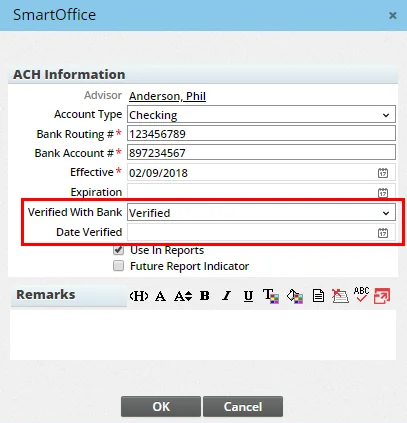
When entering bank account information for electronic payments to an advisor, users can now provide more detailed information about the status of bank verification for the account. In the ACH Information dialog box, the Verified with Bank check box was changed to a drop-down list containing three options: Failed, Pending and Verified. Selecting the Failed option displays a field for entering the reason, and selecting the Verified option displays a field for entering the verification date.
(PMG-769857)
Other Enhancements
- Advisor layout adjustments: The layout of the advisor Add'l Detail content link was revised to better position the Communication Privacy, Preferred Communication and User Assignment sections. (PMG-750125)
- Renewal date field for appointments: Users can now add renewal date information to advisor appointment records using the new Renewal Date field in the Appointment Information dialog box.
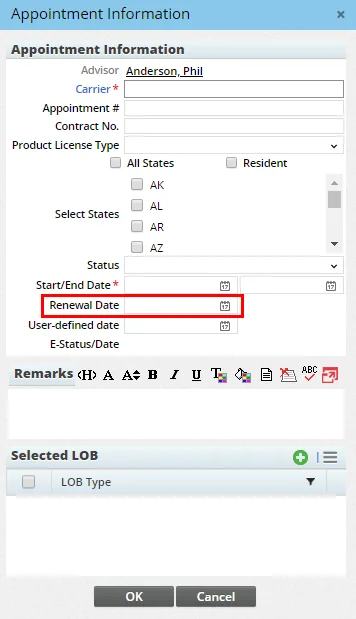
(PMG-786652)
Resolved Issues
General
- An issue with merging advisors from the Duplicate Advisor List was resolved. When the source advisor record had contracts and the target advisor record did not, the contracts were not being transferred to the merged record. (PMG-758250)
- In advisor appointment records, the system was hiding the Service field when the record's status was changed to something other than Electronic Request - New or Electronic Request - Renewal, even when the field contained a value. This issue was resolved. (PMG-758413)
- An issue related to the Carbon Copy List feature and pending case correspondence was resolved. When a carbon copy recipient's preferred communication method was set to Postal Mail, the system was appending the word "null" to the recipient's e-mail address in new correspondence. (PMG-760840)
- In advisor records, users who navigated to the linked agency record by clicking the agency hyperlink were unable to edit the agency record. This issue was resolved. (PMG-769712)
- Searching for advisor requests by advisor name was not returning results when the advisor had a middle name or middle initial. This issue was resolved. (PMG-777936)
- Some users who had the Advisors & Agencies user right were unable to view, create or search for advisor and agency records. This issue was resolved. (PMG-780907)
- Users who did not have the Report permission enabled for Advisor ACH were still able to access to ACH-related Dynamic Reports. This issue was resolved. (PMG-786800)
SmartView for Advisors
- A data visibility issue affecting SmartView Case Status user accounts was resolved. Advisors who did not have the Presale Activity/Proposals user right were still able to access presale activity records. (PMG-756779)
SmartPolicies
Enhancements
- Policy and PCM Custom keyboard shortcut: While viewing a policy or pending case record (or after selecting a policy or pending case in a list), users can now press ALT+C on the keyboard to quickly access the Policy Custom or PCM Custom content link. (PMG-711127)
- New expiration date fields for term life policies: Two date fields were added to the policy and pending case Benefits content link for term life policies:
- Level Premium Expiration Date: This is the expiration date for the initial level premium. It is not applicable for annual renewable term policies.
- Final Expiration Date: This is the final expiration or maturity date for the term policy, when no further premium can be paid to keep the policy inforce.
(PMG-718683)
- Policy contact key relation reports: A new category of Dynamic Reports named Policy Key Relations was added to the Advisor/Agency report family. These reports can pull policy contact data stored on the Advisor Key Relations content link. (PMG-750307)
- Policy on-access validation: The On-Access Validation feature now applies to the Policy List, Pending Case List and Group Policy List, as well as the policy, pending case and group policy Detail content links. When users access those pages, SmartOffice automatically updates important policy data such as annualized premium. (PMG-763276)
Resolved Issues
- When using the Copy Policy command on an individual or group policy record, users were finding that the value in the original policy's Sys Paid-to date field was being copied to the new policy record. This issue was resolved. (PMG-757042)
- On several policy and pending case screens, the name of the insurance product was being truncated in the title, even when there was enough space to display the full name. This issue was resolved. (PMG-771592)
- The Policy Detail PDF report was not displaying rider information for LTC-type policies. This issue was resolved. (PMG-775588)
- Several issues with updating primary advisor information in policies were resolved:
- In the Policy Advisor List, users who opened the existing primary advisor entry, deleted the current advisor's name, reselected the same advisor and saved the record were finding that SmartOffice was creating an "Old - Primary Advisor" entry for the current advisor.
- During policy import, when the user selected the Advisor and Insured options under "Add as contacts if not already existing," the import process was adding the commission hierarchy twice. In addition, SmartOffice was creating an "Old - Primary Advisor" entry for the current advisor.
- When the primary advisor on a policy was updated through policy import, the contract information was not being updated with the new advisor's contract, and SmartOffice was showing the old commission hierarchy.
(PMG-787582)
- The following advisor fields were not being imported into SmartOffice during policy imports: Expire Date, Hierarchy Locked, Interest, Remarks. This issue was resolved. (PMG-789187)
Insurance Products and Carriers
Featured Enhancements
Improved Product Copying Feature
The Copy Product command now copies any product options (and any commission rates linked to those options) from the source insurance product to the target product. (PMG-744177)
Resolved Issues
- The contents of the carrier Detail content link were not expanding properly to fill the screen on wide displays. This issue was resolved. (PMG-645028)
- An issue with adding product options to an insurance product was resolved. After clicking the Options hyperlink in the Options dialog box to open the Product Options list, users who selected Menu > List Options were finding that the Customize List Layout command was partially obscured. (PMG-773209)
- On the carrier Underwriting Guidelines and Notes content link, when a user began entering a new underwriting guideline but decided to cancel the process, an error was occurring. This issue was resolved. (PMG-788683)
SmartCaseManager
Featured Enhancements
Ability to Link Presale Activities to Existing Cases
Users can now associate a presale activity/proposal with a pending case that already exists in SmartOffice. To do so, open the presale activity record and select Menu > Link Presale Activity/Proposal to Existing Pending Case.
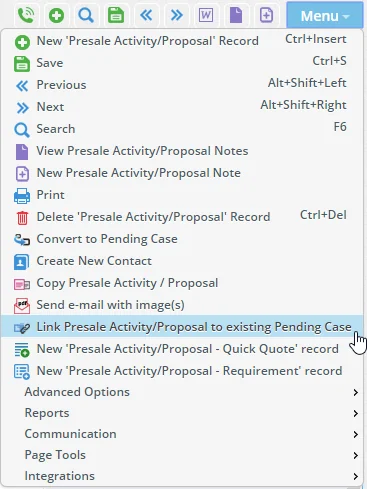
SmartOffice then prompts you to search for and select the case. (PMG-679809)
Other Enhancements
- Correspondence for multiple requirements at once: On the pending case Requirements and Delivery content links, users can now reference more than one requirement in a single letter or e-mail when sending correspondence. To do so, select multiple requirements from the list, and then select the Correspondence command from the Options menu . (PMG-710276)
- Improved control over case status rights: Administrators now have finer control over how users can send case status reports. On the user account User Rights content link, the Case Status Reports user right was removed, and the following licenses were added to replace it:
- Side menu case status (mass send): Enables the Insurance > Case Status command in the side menu. This command is the only method through which a user can send case status reports to all advisors in the office at once.
- Button case status (selective send): Enables the Menu > Case Status command on advisor, agency, policy, group policy and pending case lists. This command enables the sending of case status reports only for the selected records.
Note that users who have the Side menu case status (mass send) license automatically receive the Button case status (selective send) license. Disabling both licenses completely removes a user's access to case status features. (PMG-791223)
Resolved Issues
- When users sent pending case correspondence using the Launch E-mail command from a case record, the correspondence was not being posted to the SmartPad. This issue was resolved. (PMG-740063)
- Two issues with linking opportunities to informal child pending cases were resolved:
- The system was linking the opportunity to the parent case instead.
- In multi-life policies, the opportunities available for selection were linked to the contact associated with the parent case.
(PMG-770568)
- An issue with Dynamic Reports that display pending case requirements was resolved. When the reports were configured to be sent automatically to a list of recipients, some recipients were receiving blank reports. This issue was resolved. (PMG-770615)
- Office/agency requirements listed on a resource-office carrier's Detail content link were not being created automatically in new pending case records. This issue was resolved. (PMG-770676)
- On the pending case Detail content link, several issues with the Current Premium Information section were resolved:
- In disability insurance cases with customized layouts, the FYC field was not available.
- In disability insurance cases, the Lump Sum and 1035 fields were not available.
- In informal child cases, the Lump Sum, 1035 and Weighted %/Premium fields were not available.
(PMG-780640)
- With Impersonate Mode enabled, Enterprise View users signed in to child offices were encountering unexpected results when creating pending cases linked to resource-office carriers. The system was not prompting these users to resolve issues with advisor items (licenses, appointments, etc.), even when those prompts were configured correctly on the carrier's PCM Options content link. These prompts were restored. (PMG-781984)
- When customizing the page layout of the pending case Detail content link, users who added a Requirements-category Dynamic Report to the layout were encountering an issue. The report was displaying requirement data for other pending cases. This issue was resolved so that the report displays requirement information for that specific case only. (PMG-782976)
- On pending case lists, when users selected multiple cases and selected Menu > Case Status, SmartOffice was presenting options for selecting advisors and cases. This issue was resolved so that all advisor and case selection options are disabled except for By selected pending cases, which is selected automatically. (PMG-785845)
- When attempting to add a requirement to a pending case type that does not have requirements, users were encountering a blank dialog box, and clicking the OK button was not closing the box. This issue was resolved. (PMG-786456)
- When certain Dynamic Reports showing pending case requirements were configured for automatic e-mailing, recipients were receiving blank reports. This issue was resolved. (PMG-786643)
- In the Pending Case Add dialog box, the default value of the Insurance Type field was always Life, even when a different default type was configured in Policy/Case Setup > PCM Workflows > PCM Add Setup. This issue was resolved. (PMG-788525)
SmartBenefits
Enhancements
- Default stage for group policy searches: Administrators can now specify the Policy Stage value on the Search Group Policies dialog box. In Policy/Case Setup, go to PCM Workflows > Initial PCM Workflow and look for the new Default Stage for Group Policy Search option. (PMG-647162)
- Remarks on group policy detail: A Remarks section was added to the group policy Detail page, enabling users to add comments to a group policy that other users can see when they open the policy record. (PMG-658329)
Resolved Issues
- An issue with creating a group policy from the business Group Policies tab was resolved. Clicking the Product Name link in the new record was displaying a list of existing products, but the command to create a product was missing. (PMG-768570)
- In group policy records, users who tried to customize the list layout of the Group Plan List were seeing a blank dialog box. This issue was resolved. (PMG-779411)
SmartWholesaler
Resolved Issues
- On the producer and firm Add'l Detail content links, the buttons in the Remarks section and the Immediate Variable Annuity check box in the Line of Business section were misaligned. These issues were resolved. (PMG-784538)
- In the New - Producer dialog box, the Lookup button for the Last Name and First/Middle fields was not working. This issue was resolved. (PMG-769980)
SmartCommissions
Featured Enhancements
Ability to Copy Commission Rate Bands
While editing multiple commission rates at once, users can now copy specific commission rate bands (previously, users were able to copy entire rates only). To access this feature, select Menu > Copy Band in the Edit Commission Rates dialog box.
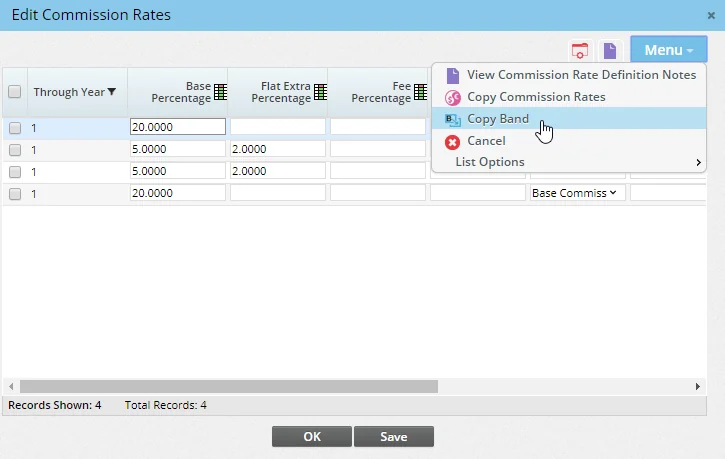
(PMG-750333)
Other Enhancements
General
- New policy commissions reports: A new report category called Policy – Include Commissions was added to the Commission family of Dynamic Reports. This new category allows users to display policies that have commissions and those with no commissions in a single report. (PMG-682716)
- Mass commission deletion capability for all users: A user with a Standard or Performance tier license can now mass delete commission records. Previously, this feature was available only to users who had the Brokerage Management or Brokerage Management + Commissions tier license. To turn on this feature, enable the Mass Deletion Commission Records user right. (PMG-692483)
Speed Receipts
- Ability to enter commission year for adjustment entries: In Speed Receipts, when a user accepts a "Policy Number Not found" commission transaction as an adjustment entry, the system now prompts the user to specify the commission year. (PMG-710315)
Resolved Issues
General
- When checking the status of a mass commission projection job in the Job Queue, users were finding that the Note section of the job detail page had an unnecessary horizontal scroll bar. This issue was resolved. (PMG-747147)
- A commission calculation error was occurring with rate setups in which house rates were available for renewal years and advisor/supervisor rates were available only for the first year. In this scenario, when users entered a target amount that was greater than the commissionable annualized premium (resulting in zero excess premium), the system was calculating commission only up to the target premium value with an excess commission. This issue was resolved so that the system now calculates commission for all renewal years as per the date entered. (PMG-752859)
- Users were encountering an issue with expected commission transactions that were generated based on future premium payment data. When a user changed the modal premium of one of these transactions and then recalculated commission, the system was creating a duplicate of the transaction as well as duplicate commission payable records. This issue was resolved. (PMG-753450)
- The system was calculating commission with excess banding in rates based on a policy's excess premium, with the times target defined in rates being used only until the excess premium was reached. This issue was resolved so that calculation of excess commission now continues until the times target is reached. (PMG-761093)
- An issue with the Mass Assign Contract feature was resolved. The Contract Information dialog box that opened after the user selected a carrier was not displaying the Assign Comm To field and the Selected LOB section. (PMG-764288)
- From the Advisor Payment List (Commission Utilities > Advisor Payments), users who selected the Generate Advisor Out-of-Batch-Cycle Commission Check command were encountering some layout issues when the General Information dialog box opened. This issue was resolved. (PMG-767845)
- When editing multiple commission rates at once using the Edit Commission Rates command, users who made changes to the Cumulative, Flat Amount, Paid Mode and Paid By columns were finding that their changes were not being saved. The issue occurred because these columns cannot be edited from the Edit Commission Rates dialog box. To prevent confusion, the values in these columns now appear as read-only. (PMG-769732)
- Layout issues that were causing buttons to be cut off in several pending case and commission dialog boxes were resolved. (PMG-773546)
- When a policy's premium mode was Single Pay and the house commission rate's paid mode was As Paid with Months Advance, the system was calculating commission incorrectly. This issue was resolved. (PMG-770580)
- When a user changed the non-primary advisor or contract on a policy, the system was not automatically updating the commission hierarchy. This issue was resolved. (PMG-786455)
- While editing rates using the Edit Commission Rates command, users who sorted on the Options column were encountering an error. This issue was resolved. (PMG-786796)
- While viewing an agency contract, users who tried to view the contract hierarchy were encountering an error. This issue was resolved. (PMG-789316)
Batch Processing
- An issue with commission batches linked to certain carrier postings was resolved. The issue occurred when a carrier posting was linked to a system- or resource-office carrier and the batch's Carrier Posting List included the Carrier Name column. When users clicked a carrier name, the carrier Detail content link was displaying errors in the Phone Numbers and Addresses sections. (PMG-770054)
- When attempting to post a processed commission batch that had the Job Queue option selected, users who clicked the Yes button on the confirmation message were seeing a blank dialog box. This issue was resolved. (PMG-787833)
Carrier Posting
- When the Last Name column was added to the Carrier Posting List, clicking the heading for that column was causing records to disappear from the list. This issue was resolved. (PMG-745021)
- When Enterprise View was turned on, the following Carrier Posting issues were occurring:
- The system was keeping payments to child-office advisors on hold due to licensing issues, even after the user updated the advisor's license information and rechecked for licensing.
- Carrier posting records linked to a child-office advisor were being placed in a hold status when reconciled.
These issues were resolved. (PMG-763490)
- Users who deleted a reconciled carrier posting, reset the transaction in Speed Receipts and accepted the transaction as an adjustment were encountering an error. This issue was resolved. (PMG-772811)
- An issue that was causing incorrect Posted On dates to appear on carrier postings was resolved. (PMG-786073)
- Adjustment entries created in Carrier Posting through auto-reconciliation were not appearing in Agency Commission-category Dynamic Reports. This issue was resolved. (PMG-788672)
- On the carrier posting Detail content link, the Re-Project Commission command was not working. This issue was resolved. (PMG-789686)
- An error that users were encountering when running Carrier Posting-category Dynamic Reports was resolved. (PMG-792382)
SmartInvestments
Enhancements
Investment Accounts
- Account roll-up setting warning message: When an investment account's roll-up option is set to Current Position Value, users who try to add transactions to positions linked to that account now see a warning message in the transaction detail dialog box. The message informs the user about the account's current roll-up setting and provides a link to the account page so that the user can change that setting. (PMG-780125)
Investment Positions
- Improved transaction entry from position list: The workflow for entering Buy and Sell transactions from the Investment Position List was revised to make it faster. The OK button on the Investment Transaction dialog box has been replaced by two new buttons:
- Save: Use this button to save the new transaction without causing the position list to refresh; this button is useful for adding multiple transactions quickly.
- Save & Validate: Use this button to save the new transaction and refresh the position list to view up-to-date values for all positions.
(PMG-766750)
- Improved position list filtering: Several enhancements were made to the contact Investment Positions tab:
- SmartOffice now remembers the choice selected from the Role drop-down list. When the user navigates away from the tab and then navigates back, the same choice is selected.
- Custom account interested party roles now appear as choices in the Role drop-down list.
As part of this enhancement, the Role drop-down list was also added to the advisor Investment Positions tab. (PMG-783560)
Resolved Issues
Investment Accounts
- When an advisor was assigned multiple roles in an investment account, the advisor's Investment Positions tab was displaying multiple entries for the same position. This issue was resolved. (PMG-763872)
- When a deleted investment account was restored, SmartOffice was not considering the account during validation. As a result, the account was not being reflected in the investment values that appear on the contact Benefits content link and the household Detail content link. This issue was resolved. (PMG-767512)
- When a contact was listed as an interested party on an investment account, the account's positions were appearing in the contact's Investment Positions tab regardless of the contact's role. The positions now appear only for the account's primary contact. (PMG-779211)
- An error that users were encountering when trying to access the investment Account Detail content link was resolved. The issue was occurring when the Account Groups list was sorted using one of the system sorting options. (PMG-788688)
Investment Positions
- Users who tried to liquidate an Active-status position with a negative share value were encountering an error stating that the position had already been liquidated. To resolve this issue, SmartOffice now creates a Buy transaction whose share value is a negative position share balance. In addition, the error message now appears only when the position's status is Liquidated, regardless of whether the share value is negative. (PMG-267590)
- Users were encountering blank message dialog boxes when relinking positions to other accounts or running PDF report packages. This issue was resolved. (PMG-773200)
- An issue with applying a customized page layout to the Position Detail content link was resolved. When the layout included the Position Transaction List portlet, the system was preventing users from updating fields on the page. This issue affected all position types except variable annuities and personal holdings. (PMG-775544)
- When the Investment Position List was sorted in descending order by transaction date, new transactions entered from the list were appearing at the bottom of the list instead of the top. This issue was resolved. (PMG-780414)
- When creating a personal holding from the Global Investment Position List, users were being prompted to select an investment account instead of a contact/business. This issue was resolved. (PMG-780628)
- When trying to relink a position or update a field on the Position Detail content link, users were encountering the message "Price and Price Date fields must both be populated or both be empty" even when the Transactions or Current Position Value roll-up option was selected on the account. This issue was resolved. (PMG-787055)
Investment Reports
- Users who had the Policy Tracking and Show Policy Transactions Content Link licenses were able to access several Investment-category Dynamic Reports despite having no SmartInvestments module rights. This issue was resolved. (PMG-773133)
Integrations and Data Services
Featured Enhancements
Riskalyze Integration
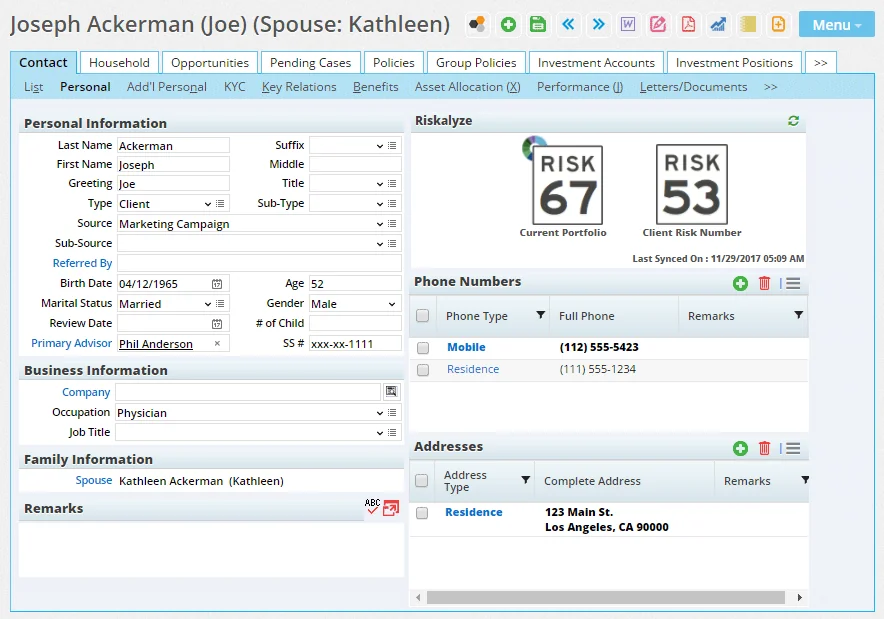
SmartOffice now integrates with Riskalyze, the popular risk assessment and portfolio analysis platform. This integration lets users export their clients' portfolios from SmartOffice into Riskalyze for analysis. Users can also display client Risk Number information in SmartOffice contact records and access Riskalyze directly from SmartOffice without having to sign in. Learn more. (PMG-644475, PMG-685736)
Financial Media Exchange Integration
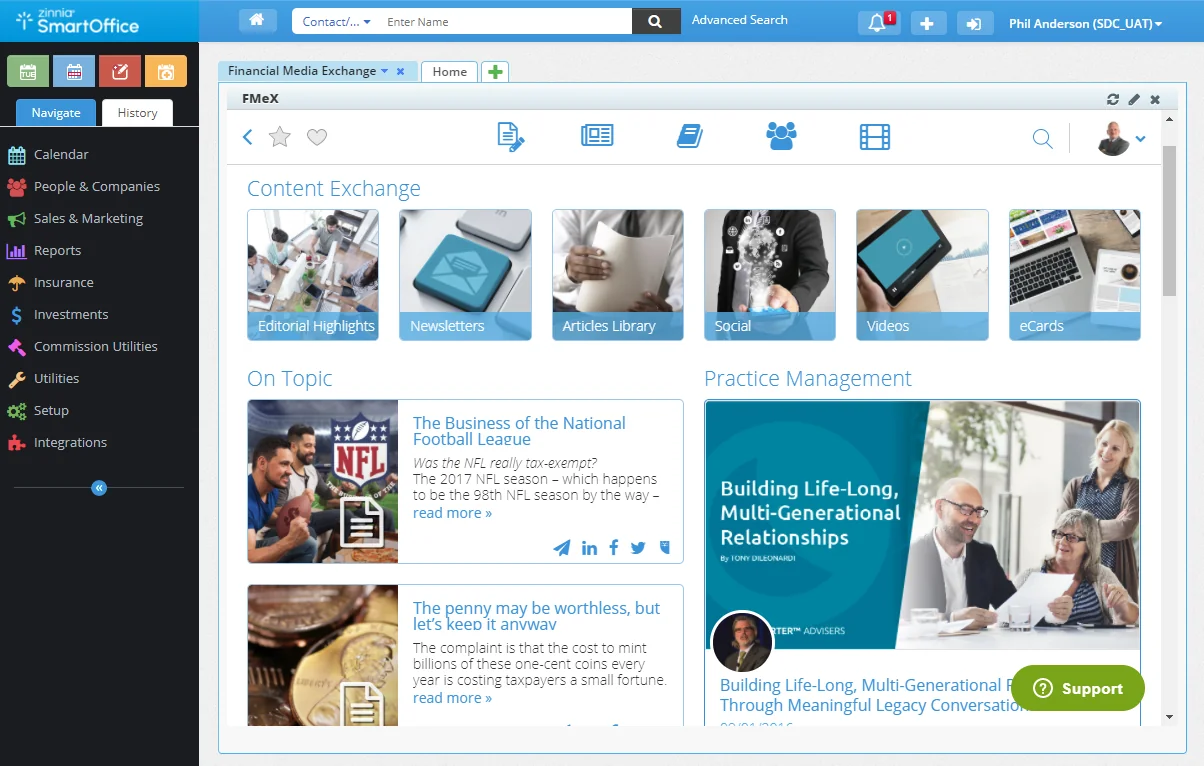
A new integration with Financial Media Exchange (FMeX) enables advisors to share articles, videos and other finance-oriented content with their clients directly from SmartOffice. From the SmartOffice home page, advisors can browse or search for timely, personalized, compliant content and send it by e-mail or post it to social media. Learn more.
PaperClip Mojo Integration
With this integration, users can submit handwritten insurance applications to PaperClip's cloud-based Mojo transcription service and have those applications delivered automatically to SmartOffice as new pending case records. Learn more.
Other Enhancements
Investment Data Downloads
- Improved error messages for manual file uploads: When users try to upload investment data .zip files that contain unsupported file name extensions or file formats, SmartOffice Pro now displays better error messages containing specific information about the cause of the issue. (PMG-778869, PMG-782215)
- Log information about skipped contacts: After processing an investment download, SmartOffice now includes information in the Data Import Log about non-matching contacts and businesses that were skipped. (PMG-785173)
Pending Case Downloads
- New underwriting type mappings: Pending case downloads were enhanced to map the Electronic and Paper values for the U/W Type field in SmartOffice. (PMG-769731)
- Enhanced mapping for blank policy numbers: The method for matching downloaded cases for Direct Download and Replace was improved. When downloaded cases contain no policy number, SmartOffice now attempts to match based on the tracking ID. If the downloaded case contains no tracking ID -- or if the tracking ID doesn't exist in SmartOffice -- SmartOffice tries to match the case based on the primary insured contact, primary advisor, carrier and product. (PMG-784176)
SmartIntegrator and SmartXchange
- Two-step authentication property exposed: The OTPCacheDays property of the UserProfile object was exposed to developers through SmartIntegrator. This property provides access to the Require verification code at sign-in every \_\_ days field on the 2-Step Authentication content link in User Preferences. (PMG-750136)
Resolved Issues
Inforce Policy Import
- In the Pacific Life inforce policy feed, policies with a status of Suspended Billing were being sent as Suspended and were therefore being marked as inactive in SmartOffice. To resolve this issue, SmartOffice no longer changes the status of Pacific Life policies when the Suspended status is sent in the feed. Instead, SmartOffice inserts a policy note stating, “Policy Status of Suspend sent from the carrier.” (PMG-785395)
Investment Data Downloads
- In Data Import Log entries, certain investment security columns (e.g., CUSIP) were not available on the Securities content link. This issue was resolved. (PMG-752869)
- An issue that was creating duplicate Job Queue entries for DST auto-reconciliation jobs was resolved. (PMG-760853)
- In Data Import Log entries for processed Charles Schwab imports, clicking the links in the statistical summary was not displaying data in the Detail section of the entry. This issue was resolved. (PMG-782255)
- Investment accounts downloaded from Pershing InfoDirect were not displaying on the contact Investment Accounts tab. This issue was resolved. (PMG-783841)
Pending Case Downloads
- An issue that was preventing SmartOffice from processing pending case data feeds containing large numbers of records was resolved. (PMG-752189)
- Parties designated as organizations in pending case downloads were being added to SmartOffice as advisors rather than agencies. This issue was resolved. (PMG-756548)
- Two issues with the way in which pending case downloads were updating stage dates in SmartOffice were resolved:
- When a policy's status was updated from Issued to Active (Inforce), the Issued stage date was being deleted.
- When a policy had a status in the Underwriting stage, the Underwriting stage date was inaccurate in some instances.
(PMG-766563)
- An issue that was preventing large pending case downloads from being imported into SmartOffice was resolved. (PMG-779165)
- In some instances, requirements from pending case downloads were not to appearing in HO pending cases in SmartOffice, and requirements in existing cases were being removed. These issues were resolved. (PMG-791627)
SmartOffice Anywhere Changes
Featured Enhancements
Improved Opportunity Screens for Mobile Users
SmartOffice Anywhere opportunity screens on mobile devices have been redesigned to help users manage opportunities more effectively:
- Opportunities List: The list layout now makes more efficient use of screen space and features a new filter/sorting button. Buttons for quickly calling the contact linked to each opportunity are also included. In addition, when the Opportunities List is open, the search bar at the top of the screen changes from a contact search to an opportunity search.
- Opportunity detail screen: The detail screen has also been redesigned to make more efficient use of screen space. The top portion displays the contact name, e-mail, phone, opportunity name, opportunity stage, potential revenue, and estimated close date. The bottom portion displays a list of activities linked to the opportunity, with buttons for creating activities, recording activity outcomes and calling the contact. Swiping left on the activity list displays the opportunity notes list, where users can quickly view, create and search for notes.
- Opportunity creation screen: This is now a single screen with fields for entering all relevant opportunity details. Previously, users had to step through a wizard to create an opportunity.
(PMG-772855)
Other Enhancements
- Date format consistency with SmartOffice Pro: SmartOffice Anywhere now displays dates using the format specified in the user's SmartOffice Pro user preferences. (PMG-773149)
Resolved Issues
- During the activity outcome workflow for activities linked to opportunities, SmartOffice Anywhere was not adding the opportunity owner as a participant in new activities. This issue was resolved. (PMG-768133)
- An issue with entering mobile phone numbers was resolved. Users who typed the entire number in the Dial Number field and saved the record were finding that SmartOffice Anywhere was not automatically splitting the number into the appropriate fields. (PMG-787870)