Last updated: 2025-12-03
Release Notes - SmartOffice 2018 Release 3
About This Document
For general information about SmartOffice release notes, visit the Release Notes home page.
Revision History
These release notes may be revised after their initial publication. This section lists the dates of any revisions as well as a list of changes.
August 6, 2018
- Initial publication.
Release Overview
SmartOffice 2018 Release 3 features improvements to SmartOffice Pro's correspondence, duplicate record and data import workflows. For agencies, this release includes the ability to customize the layout of carrier records, further enhancements to weighted premium calculations and improvements to the new pending case workflow. SmartOffice Anywhere users will see streamlined contact entry screens and opportunity visibility enhancements.
This release also resolves performance, user interface and other issues identified in SmartOffice 2018 Release 2 and earlier releases, including several issues related to the revamped page layout customization feature in Release 2.
Enhancement Highlights
This section provides quick links to the featured enhancements in this release.
Core System
Agency Management
SmartOffice Anywhere
System Requirements
There are no other changes to system requirements for this release. For current system requirements, see System Requirements.
Note Regarding Text Changes in SmartOffice
This release may contain minor changes to text in dialog boxes and other areas of the SmartOffice user interface. Changes of this type are typically made to correct spelling, grammar, punctuation and other language-related issues. Such changes normally are not listed in this document unless they affect the way the application works.
SmartOffice Pro Changes
Core System
Featured Enhancements
On-the-Fly Filter Creation in the Correspondence Wizard
Users who want to send correspondence to a list of recipients based on a filter can now create a filter without leaving the Correspondence Wizard. To do so, select the Using a Filter option on the Recipients step, and then click the New button in the Filter Name field.
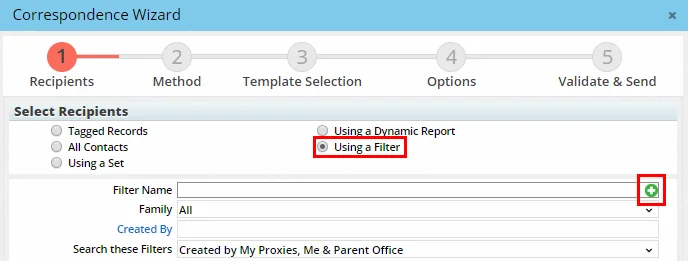
When prompted, select a filter category and create the filter (see Creating a Filter for help). Once the filter is created, it appears as the selected filter in the Correspondence Wizard, and the user can proceed to the next step. (PMG-792043)
Customizable Duplicate Record Detection
SmartOffice Pro now allows users to define their own methods for identifying duplicate records in the system. When users perform a manual check for duplicates (Utilities > Duplicate Records), the Duplicate Records dialog box now includes a Detection Method section that offers a choice between SmartOffice's default method or a custom method.
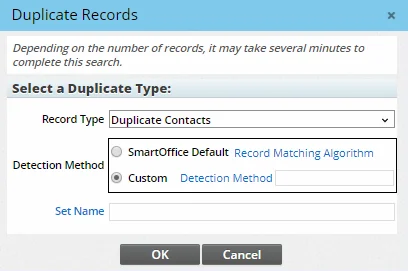
After selecting the Custom option, click the Detection Method hyperlink to select a custom detection method or create a new one. For more information, see Duplicate Records. (PMG-783740)
Ability to Specify a Set for Imported Records
When importing contacts, businesses, advisors and agencies into SmartOffice, users can now select the set that the imported records will be added to. In the Data Import Wizard, a Set field is now available in the Select Options step.
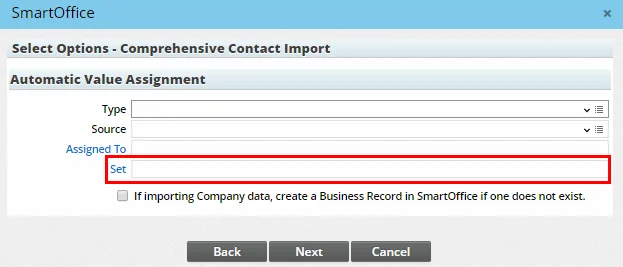
Enter the set name directly into this field or click the Set hyperlink to search for a set. Note that only ad-hoc and combination sets are supported (for information about different types of sets, see Creating a Set). If a user does not specify a set, SmartOffice still creates a set for the imported records automatically at the end of the import process. (PMG-811490)
Other Enhancements
General
- File compression option for browser-based file posting: When posting multiple files to SmartOffice Pro using the browser method, users can now select an option to compress the files into a single .zip file.
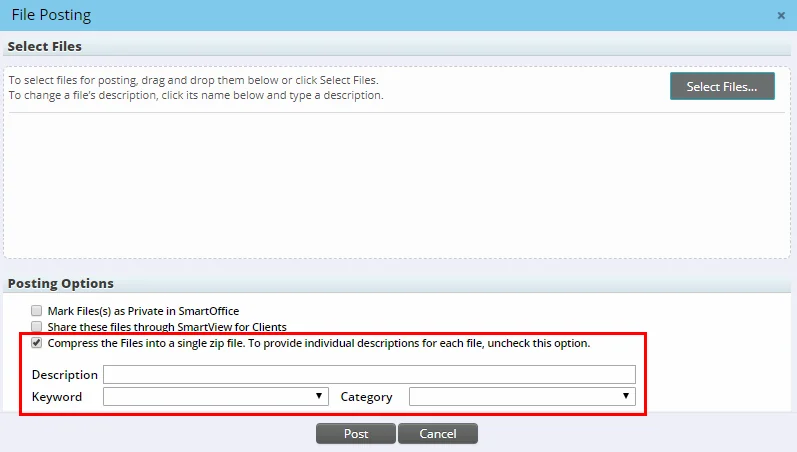
Note that this option does not allow the user to enter a separate description for each file. (PMG-781262)
- New columns in contact Key Relations portlet: When the Key Relations portlet is included in a contact custom page layout, users can now group, sort and filter the list by criteria such as relationship type (e.g., Family, Personal, Business). To do so, customize the portlet's list layout to add columns from the Relationship table, and then configure the appropriate grouping, sorting and/or filtering settings. (PMG-803566)
Contact Management
- Ability to mark e-mail addresses as "bad": To help users better manage contact e-mail addresses that have become invalid or otherwise unusable, SmartOffice Pro now displays a Mark as Bad E-mail option in the e-mail detail dialog box.
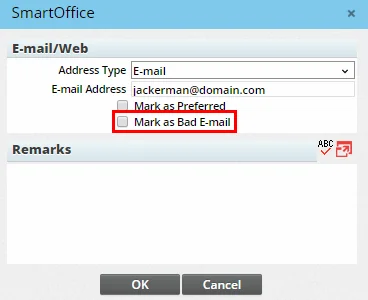
Selecting this option displays the e-mail address in red in the contact's E-mail/Web Addresses list. In addition, the Correspondence Wizard now warns users when an e-mail message is addressed to an e-mail address marked as bad. (PMG-242790)
Correspondence
- Correspondence command on Activity Log: Users can now send correspondence from the contact Activity Log tab. This enhancement makes it possible for users to send activity follow-up/reminder letters to linked contacts directly from that tab instead of having to navigate to the calendar first. While viewing the Activity Log, select an activity, and then select Menu > Communication > Correspondence (or use the F10 shortcut key). (PMG-792316)
- More columns in correspondence template list: In the Template Selection step of the Correspondence Wizard, two columns, Keyword and Purpose, were added to the template list to further help users select an appropriate template. (PMG-809505)
Dynamic Reports
- Renamed address column: On Dynamic Reports, the Complete Address \[Preferred Address\] column was renamed Preferred Address to make its purpose clearer. (PMG-795890)
SmartPad
- Parent record ID columns for audit trail: On the SmartPad Changes tab, customers who need more advanced reporting on field changes can add the following new columns to the list layout: Parent Record DB Table ID, Parent Record ID and Parent Record Office ID. These columns show identifier information for the parent record linked to the record whose field was changed, enabling more granular tracking of changes. (PMG-809502)
Resolved Issues
General
- Selecting the User Suggestions option in the profile menu was not opening the user's default e-mail application. This issue was resolved. (PMG-731570)
- Users were encountering word-wrapping issues when printing lists. These issues were resolved. (PMG-737365)
- When an error message appeared in a list and a confirmation dialog box opened simultaneously, the size of the confirmation dialog box was expanding. This issue was resolved. (PMG-738365)
- An issue that was preventing submenus from opening in Chrome was resolved. (PMG-785120)
- While posting a file to a contact shared from another office, users who opted for browser-based file posting were finding that the Keyword and Category drop-down lists in the posting dialog box were blank. This issue was resolved. (PMG-785770)
- When a user opted for browser-based file posting, the system was allowing the user to upload non-Excel documents as Excel templates. This issue was resolved. (PMG-785773)
- On the Department/Team Hierarchy content link in Office Settings, users who tried to create a user proxy for an existing team hierarchy that did not already have one were encountering an error stating that the process failed. This issue was resolved. (PMG-802259)
- An issue that was causing text in message prompts to be cut off was resolved. (PMG-807880)
- Several page layout customization issues were resolved:
- When the Policy List portlet was added to a contact custom page layout, the total policy count displayed in that portlet was not accurate in some instances. (PMG-807865)
- Some categories of Dynamic Reports belonging to the Other report family were not available for use in custom page layouts. (PMG-809506)
- The system was giving users with the Page Layout Customization - User user right the option to apply page layout templates to all users in the office and to all offices in the hierarchy. Now these users can apply layouts to their own user accounts only. (PMG-809668)
- When the SS # field was added to the advisor Personal content link under Personal Information, users who modified the field value and saved the record were finding that SmartOffice was reverting the field to the old value. (PMG-810973)
- When creating a custom page layout for advisor records, users were finding that the Agency field was not available for use in custom portlets. (PMG-811202)
- While creating a custom contact page layout, users who dragged the Company field from the predefined Business Information portlet into another portlet were no longer able to link to a business from that field. This issue was resolved. (PMG-811422)
- While creating a custom page layout for Medical-type policies, users who added the Benefit portlet to the layout were encountering an error. (PMG-815328)
- When the page layout of the policy Basic Information content link was customized, users were encountering display issues with icons in the Premium Information section. (PMG-817003)
- In new advisor custom page layouts, after repositioning the SS # field in the Personal Information portlet, users who clicked the Save & Apply button were encountering an error. (PMG-817255)
- While creating a custom page layout, users were encountering an error when they dragged a field from a predefined portlet to a custom portlet and then tried to save the changes. (PMG-811878)
- Users with two-step authentication enabled were not receiving their security codes in some instances. This issue was resolved. (PMG-811898)
Contact Management
- When two contacts were merged, any archived SmartPad Notes linked to the source record were not being merged into the target record. This issue was resolved (PMG-793717)
- In some instances, changing the business in a contact's Company field was not removing the contact from the business's employee census. In addition, when the user tried to manually delete the old employee census entry, SmartOffice was clearing the contact's Company field. These issues were resolved. (PMG-796123)
- From the Key Relations content link of a business or agency, users who selected a record under Business Hierarchy and tried to add it to the business/agency employee census were encountering a blank window. This issue was resolved. (PMG-808160)
- When contacts were exported to other offices, the contacts' associated calendar activities were not being exported in some instances. This issue was resolved. (PMG-812606)
Correspondence
- In the Correspondence Wizard, users who opted to create a follow-up activity were finding that the activity was not being created once the correspondence was sent. This issue was resolved. (PMG-727640)
- When sending correspondence from an advisor/agency list, users who tried to add a contact to the Confirmed Recipients list in the Correspondence Wizard were encountering an error. This issue was resolved. (PMG-762444)
- When creating correspondence using the Launch Word command, users were finding that the Date merge code was expanding to display the wrong date in some instances. This issue was resolved. (PMG-795646)
- A contact correspondence issue involving the Launch Word feature was resolved. When users created correspondence and clicked the Save & Close button in the SmartOffice tab in Word, the correspondence was not being saved to the contact's Letter Log. (PMG-800586)
- Sending a large number of e-mail messages containing large attachments was causing the E-mail Queue to stall. This issue was resolved. (PMG-807975)
Data Import/Export
- Two issues with the Data Import Wizard were resolved:
- The default date format for imported files was not reflecting the default date format selected in the user's preferences.
- On the field-mapping step, the SmartOffice database table drop-down lists were set to All Groups for fields that the wizard had automatically mapped.
(PMG-790524)
Dynamic Reports
- When displaying Active-status calendar activities, certain Dynamic Reports were including deleted activities that were still in an Active status. This issue was resolved. (PMG-795062)
- Users who tried to print the results of a Dynamic Report were finding that the Print command was not working. This issue was resolved. (PMG-806070)
Home Page
- Changing the name of a home page tab was causing the tab to be shared with the entire office. This issue was resolved. (PMG-807896)
- On home page tabs, an issue that was preventing RSS feeds from working was resolved. (PMG-809562)
SmartOffice Sync for Microsoft Exchange
Note: These changes apply to enterprise customers only.
- When the SmartOffice server was configured to block access to at least one calendar/task sync option in Exchange sync user setups, Chrome users were able to access all of the items. This issue was resolved. (PMG-792684)
SmartPad
- An issue with the SmartPad Audit Trail feature was resolved. When a user changed a field value in a contact record, then changed the value back and saved the record, an entry noting the change was being posted to the Changes tab in the SmartPad, even though the field value was unchanged. (PMG-564659)
- An issue that was causing the SmartPad to open slowly for some users was resolved. (PMG-806087)
SmartCalendar
Resolved Issues
- The rescheduling confirmation message that users are supposed to see when they drag an activity to a new calendar slot was not appearing. The message now appears as expected. (PMG-800969)
- On the calendar Month view, users who rescheduled activities by dragging them were finding that the activities were reverting to their original dates when the page refreshed. This issue was resolved. (PMG-809159)
- After creating calendar activities, users who tried to send confirmation e-mail messages were finding that the system was not generating the correspondence. This issue was resolved. (PMG-803540)
- An issue that was preventing the activity reminder dialog box from opening completely was resolved. (PMG-808892)
SmartLeads
Resolved Issues
- After importing leads into the system, users were finding that the Lead Type field for each lead record was blank, even though that information was specified during the import process. This issue was resolved. (PMG-807455)
SmartOpportunities
Enhancements
- Benefit data in opportunity reports: Users can now include contact benefit information in opportunity lists and Dynamic Reports by adding columns from the Contact Benefit table. (PMG-801485)
Advisors/Agencies
Enhancements
General
- Ability to mass-assign advisors to an agency: From an advisor list, users can now assign multiple advisors to a single agency at once using the Mass Modify feature. To do so, select Menu > Advanced Options > Mass Modify, and then select the Agency field. (PMG-802685)
- Agency parent office import: When importing agency records into SmartOffice, users can now create and link parent agency office records (if that data is present in the import file). In the Data Import Wizard, users can select a new option to create a parent agency office record if it doesn't already exist in SmartOffice. In addition, the Select Mapping step of the wizard enables users to map the parent agency office column in the import file to the advisor Parent Office field in SmartOffice. (PMG-811299)
SmartView for Advisors
- Pending case benefit data for advisors: Advisors who sign in to SmartOffice using a SmartView for Advisors - SmartOffice Format account can now view pending case benefit/coverage information. The Benefits content link (or Coverage content link for long-term care, medical, homeowner and auto insurance policy types) now appears in pending case lists and records for these users. (PMG-806953)
Resolved Issues
General
- While creating a Quick Quote presale activity, users who clicked the Insured Risk Class hyperlink were seeing two Class List dialog boxes. This issue was resolved. (PMG-805404)
- Using the Send e-mail with image(s) command for presale activity records was producing unexpected results, including missing or incorrect prompts. These issues were resolved. (PMG-805747)
- SmartOffice was deleting data from fields in advisor and agency records in the following situations:
- The user selected all records in the record's User Assignment or Set Membership lists and then saved the record.
- The user deleted records from the record's User Assignment list.
This issue was resolved. (PMG-815678)
SmartPolicies
Enhancements
- Declined status date in policy/case lists: Policy and pending case lists can now display the most recent date on which a policy was changed to a Declined status. To see this information, add the new Declined column to those lists' column layouts. The column displays the most recent Declined status date from the policy's status history. (PMG-172238)
- Ability to mass modify policy renewal date and priority: Two additional policy fields can now be mass-modified from policy and pending case lists: Renewal Date and Priority. (PMG-795500)
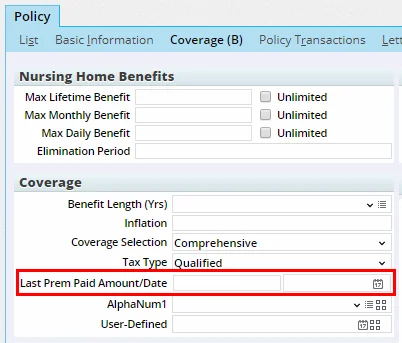
- Last premium paid/date fields for LTC policies: On the Coverage content link of long-term care policies, Last Prem Paid Amount/Date fields were added under Coverage.
(PMG-796626)
- New policy status choice: For situations in which a policy's coverage continues for a spouse (e.g., after the insured dies), a Spousal Continuation status was added to the standard system choices available for policy records. (PMG-800866)
- Separate benefit and cash value portlets for page layouts: When creating a custom page layout for policy records, users can now add Benefit and Cash Value portlets separately. In addition, these portlets are single-column width.
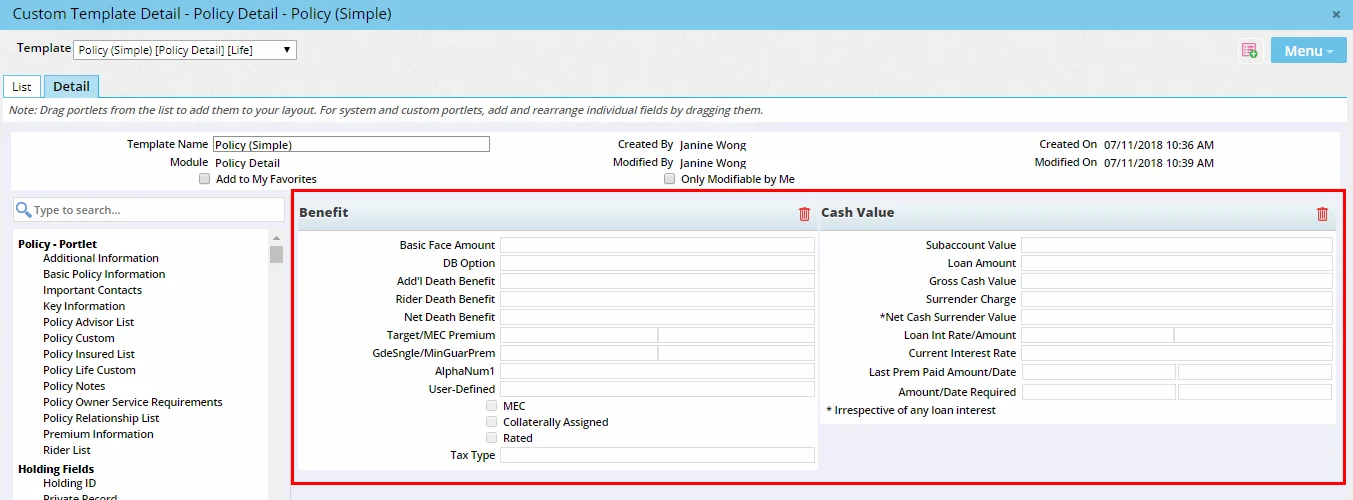
Previously, the Benefits portlet contained both benefit and cash value fields and was full-page width. (PMG-801716)
- Ability to access presale activity from policy: Policies linked to presale activities now feature a Presale Activity/Proposals content link. Users can access this content link to view details of the presale activity. (PMG-804706)
Resolved Issues
- A list-related issue affecting policies, pending cases and commissions was resolved. Users who selected multiple records and selected a command intended for a single record were encountering the message "Only the highlighted record will be processed. Continue?" as expected. But when users clicked the Yes button, the workflow was ending instead of processing the highlighted record. (PMG-700994)
- When users navigated to the contact Policies tab and selected the POS content link for a policy, no POS requirements were appearing in some instances. The issue affected policies that were not linked to products. This issue was resolved. (PMG-752656)
- When users sent e-mail mass correspondence from a policy or pending case list, two issues related to the Carbon Copy List feature were occurring:
- The primary advisor's carbon copy recipients were not receiving the message when the office's settings were configured to send correspondence through Outlook/Lotus Notes.
- When the Check here if the contact above is the only recipient of correspondence option was selected for a contact in the carbon copy settings, SmartOffice was inserting those contacts in the CC field of the message instead of the To field.
These issue were resolved. (PMG-775001)
- In policy lists, spacing and wrapping issues with LTC-specific column headings (e.g., Max Daily Benefit, Max Monthly Benefit) were resolved. (PMG-795721)
- While selecting options for Policy-category PDF reports, users were finding that the Dental and Vision options were not available in the Select Policy Types list. This issue was resolved. (PMG-804230)
- Extra space that was appearing along the right side of the Policy Advisor Information dialog box was removed. (PMG-806254)
- Two issues with missing policy field values were resolved:
- Users who opened a policy's rider hierarchy and then saved changes to the policy were finding that SmartOffice was removing the values from fields like Policy #, Carrier, Plan Name and Status.
- In speed receipt records, when users manually validated a commission transaction and opted to refresh the page when prompted, the transaction's status was displaying as blank and the validated amount was not being updated.
(PMG-809793)
- When a contact's policies were linked to resource-office carriers and products, exporting the contact to another office was creating duplicate policies in the target office. This issue was resolved. (PMG-813776)
- In policy and pending case records, clicking the name of the selected plan was opening a dialog box displaying a different product. This issue was resolved. (PMG-815493)
Insurance Products and Carriers
Featured Enhancements
Page Layout Customization for Carriers
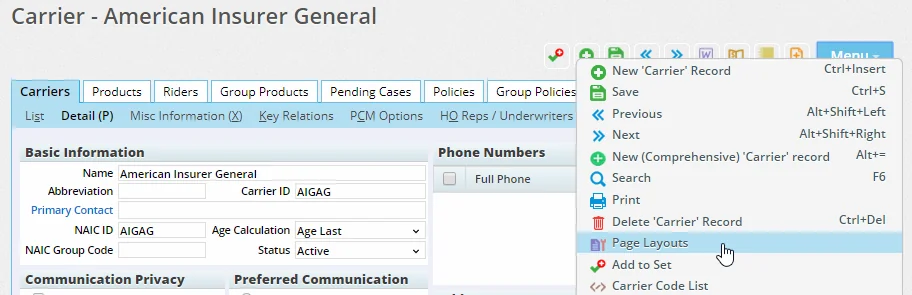
Users can now customize the layout of the carrier Detail and Misc Information content links. While viewing either content link, select Menu > Page Layouts. For more information, see Page Layout Customization.
(PMG-734050)
Other Enhancements
- Carrier Letters/Documents link: The carrier Documents content link was renamed Letters/Documents and now contains correspondence linked to the carrier in addition to documents. (PMG-802408)
Resolved Issues
- An issue that users encountered while trying to copy carrier underwriting guidelines was resolved. After selecting an option that should be different in the new guideline (Class, Gender or State), users who clicked the Cancel button in the next dialog box were finding the system was canceling the entire copy workflow. (PMG-803950)
- On the carrier Misc Information content link, users who tried to export route information for a GA ID List entry were finding that the Route Data Synchronization dialog box was not opening completely. This issue was resolved. (PMG-805415)
- When two product records containing the same product options were merged, the resulting record contained duplicate options. This issue was resolved. (PMG-805587)
- Several list-related issues on the product Rider Assignment content link were resolved. Clicking hyperlinks in the rider list was displaying the wrong data in some instances. (PMG-806802)
- When a life or annuity product in the resource office was designated as a variable product, users viewing the product in the local office were finding that the Variable Product option was not selected. This issue was resolved. (PMG-809507)
- An issue was resolved with copying products linked to rates that have product options. Users who created policies linked to the new product were finding that, when they selected a product option on the policy, the commission rates were not being selected on the commission hierarchy. This was preventing commissions from being calculated. (PMG-812881)
SmartCaseManager
Featured Enhancements
Automatic Weighted Premium Calculations
SmartOffice now automatically calculates the weighted premium on new policies and pending cases based on the default weighted percentage of the linked product. Users can specify a product's default weighted percentage using the Weighted Premium % field on the Product Settings content link.
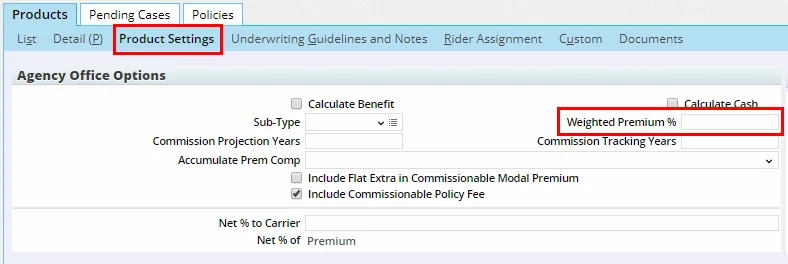
When a policy or case is created, SmartOffice multiplies this default percentage by the commissionable annualized (Comm Annlzd) premium value to derive the weighted premium value of the policy/case. (PMG-796621)
Improved Insured Search for New Pending Cases
Specifying an insured and a risk class in a new pending case in now easier. On the Pending Case Add Detail dialog box, the Insured-1 section was redesigned to include a Primary Insured hyperlink and a Risk Class hyperlink. Clicking either hyperlink opens a standard SmartOffice search dialog box.
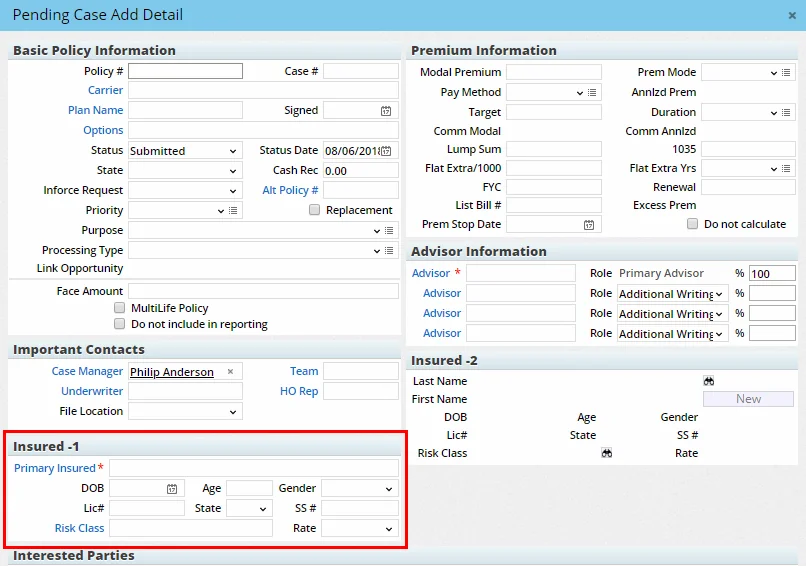
(PMG-808231)
Other Enhancements
- Ability to mass modify Team field: In policy and pending case lists, users can now change the Team field for multiple records at once using the Mass Modify feature. (PMG-704611)
- Ability to designate a policy owner as the required-of party for a requirement: Users can now specify that a policy or pending case requirement is required of the policy owner. In the requirement detail dialog box, an Owner choice was added to the Required Of field.
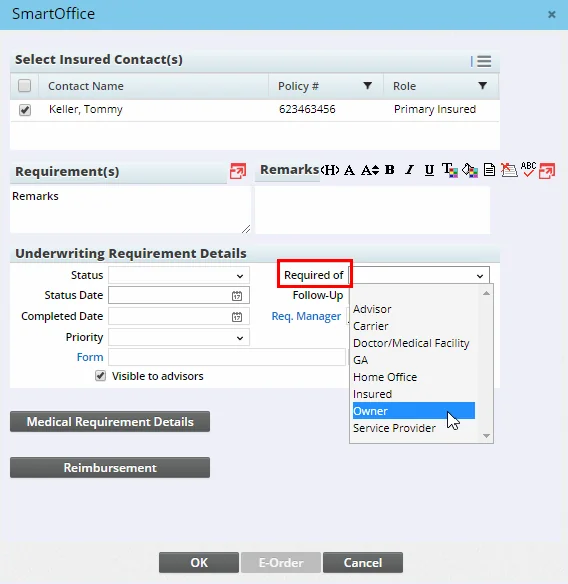
(PMG-796354)
- Quicker navigation from requirement follow-up to pending case: On the requirements follow-up list, users who select All from the Type drop-down list to display all requirement types now have access to the Menu > Pending Case Management command. (PMG-804292)
- Days to Active column: Users can now easily track the number of days it took for a policy/pending case to move from the Underwriting stage to the Inforce stage. This value is available through the new Days to Active column, which can be added to policy and pending case lists and Dynamic Reports. (PMG-804760)
- More accurate calculation of stage days: To provide more accurate data, the system now calculates Days in \[Stage\] columns (e.g., Days in Approval) based on the date on which a case entered its current stage. Previously, the system was using the current status date for the calculation. (PMG-804984)
- Advanced filters on pending case reports: Additional filtering options were added to certain Pending Case-family Dynamic Reports. When setting up a report in the All Cases or Pending Case - Include Child Cases category, users can now add advanced filters on the Details/Add Filter step. (PMG-807936)
- Improved editing of agent contract statuses: After performing a contract search (Insurance > Contracts), users who select the Menu > Edit Agent Contracts command can now edit the status of multiple contracts more quickly. To do so, customize the list layout of the Agent Contract Editable List to include the Status column from the Advisor Contract table, and then edit the values in that column. (PMG-809532)
- New supervisor columns for advisor request lists: Users can now display more supervisor information on the Advisor Request List and in advisor request Dynamic Reports by adding columns from the Supervisor Basic Info table (under Advisor Basic Info) and the Supervisor Info table (under ProposedAdvContract). (PMG-809669)
Resolved Issues
- On Contracting-type advisor requests, the system was allowing users to select contracts of carriers other than the carrier selected on a particular request. This issue was resolved. (PMG-768115)
- In pending case lists, the Days Since Last Status column was showing the same value for all cases. This issue was resolved. (PMG-792674)
- In Policy/Case Setup, extra space that appeared on the right side of the screen when users selected Follow-up > Presale Activity/Proposals was removed. (PMG-804874)
- When users selected the Print Envelope option during the pending case correspondence workflow, the final Correspondence dialog box was displaying options for selecting a printer tray. These options were removed. (PMG-808150)
- While viewing the requirements Follow-Up list, users who changed the manager for a requirement (Menu > Change Requirement Manager) were finding that the requirement follow-up was not being removed from their list. This issue was resolved. (PMG-812279)
SmartBenefits
Enhancements
- Record alerts for group policies: Users can now create alerts that appear as soon as any user in the office accesses a group policy record. To do so, open a group policy, and then select Menu > Add 'Group Policy' Alert. Learn more about record alerts. (PMG-580958)
Resolved Issues
- When users selected the Menu > New (Comprehensive) command from the Group Policy List, the system was presenting the list of available insurance types as check boxes instead of hyperlinks. This issue was resolved. (PMG-794046)
SmartWholesaler
Resolved Issues
- Issues with adding a producer contract were resolved. When only one supervisor contract existed and the user selected a supervisor, SmartOffice was not automatically filling in the Supervisor Contract field. In addition, clicking the OK button was not saving the record. (PMG-812865)
SmartCommissions
Enhancements
General
- Default commission tracking setting for rider products: Users can now specify a default commission tracking setting for riders at the product level. A Track Commission option was added to the Rider Settings content link of rider products. When a rider is added to a policy or pending case, this product-level setting is automatically applied to the policy rider. (PMG-634071)
- Ability to edit Through Year on existing rates: Users can now edit the Through Year field on the commission rate detail dialog box after a rate has been created. Previously, the Through Year field was read-only, requiring users to delete the entire record and recreate it in order to change the field value. (PMG-792190)
- Insurance company name in commission statements: While viewing the Advisor Payment List from a processed batch (Menu > Show Advisor Commission List), users can now display the carrier name as specified in the Insurance Company field of the carrier record (on the Misc Information content link). While customizing the list layout, add the Insurance Company column from the VendorExtension table. (PMG-792929)
- Better tracking of contract creation/modification: Users can now more easily track when a contract was created and by whom, as well as which user last modified the contract. In contract lists and Dynamic Reports, the column layout can now be customized to add the Created By, Created On and Modified By columns from the Contract table (the Modified On column was already available). (PMG-800583)
Batch Processing
- Additional columns for advisor commission reports: More columns are now available for use in the Advisor Payment List that users access from a processed commission batch (Menu > Show Advisor Commission List). The additional columns belong to the Commission Statement Transaction and Advisor Transaction Import Header database tables. (PMG-806076)
Speed Receipts
- Mass reset for validated transactions: While viewing a speed receipt record, users can now reset multiple validated commission transactions at once. To do so, select one or more transactions under Commission Data, and then click the Options button
 and select Reset Selected Transactions. (PMG-179124)
Resolved Issues
General
- The system was not considering manually entered gross or net commission amounts when calculating commissions for riders. This issue was resolved. (PMG-757016)
- A commission calculation issue was occurring in some instances when the supervisor was at level 3 of the hierarchy and was receiving a percentage of Net GA. This issue was resolved. (PMG-763038)
- Two issues related to held commissions were resolved:
- The Recheck Advisor for Lic/Cont/Appt command was not available for any commission transaction with a status of Reconciled (SRE) - Advisor Transaction on Hold, Waived (SRE) - Advisor Transaction on Hold or Waived - Advisor Transaction on Hold.
- In the Search Carrier Postings dialog box, the Reconciled - Advisor Transaction on Hold option was missing from the Status drop-down list.
(PMG-806095)
- Two issues with applying an advanced commission split to a policy were resolved:
- The Commission Split Hierarchy Details dialog box was missing the command for customizing the list layout.
- When users viewed the basic schedule information for advisor roles not specified on the policy, only the Base and Trail rate information was displayed, even when additional rates were configured in Commissions Setup.
(PMG-809190)
- An issue with removing advisors from policies was resolved. When the advisor contract specified that the commission be assigned to another advisor, SmartOffice was not informing the user that the advisor could not be deleted (advisors with linked commission payable records for a policy cannot be deleted). Instead, SmartOffice was removing the advisor and the commission payable records. (PMG-809311)
- An issue affecting pending cases with future premium payment entries and a Single Pay premium mode was resolved. In some instances, when a user tried to calculate excess commission from a commissionable policy transaction, SmartOffice was calculating a Base-type commission transaction for all years added in the future premium instead of a single Excess-type commission transaction. (PMG-811213)
- An issue that occurred when an agency had multiple active contracts was resolved. When a user rebuilt the commission hierarchy and selected a contract, the system was not automatically selecting the appropriate commission rate in some instances. This issue was resolved. (PMG-815345)
Batch Processing
- An issue was occurring when a commission batch with no linked carrier postings was processed with the Include Adjustment Commission Entries option. When the user reviewed the Advisor Checks Under the Minimum Check Amount dialog box, entries from other offices were appearing. This issue was resolved. (PMG-807877)
- When selecting options to generate an advisor commission report from a batch, users were finding that the List Title field was displaying a value of "Advisor Payment List" by default. Users who normally do not specify a title were being forced to delete this value manually. The field is now blank by default. (PMG-811699)
- An issue with advisor commission reports generated from commission batches was resolved. The PDF report was displaying the advisor's commission statement address without a ZIP Code when the address was not also marked as the advisor's preferred address. (PMG-814864)
Carrier Interface
- When users tried to import improperly formatted statements into the Carrier Interface, the resulting error message contained plus signs instead of spaces. This issue was resolved. (PMG-789291)
Speed Receipts
- In speed receipt records, certain actions performed on non-validated commission transactions were causing issues:
- When users tried to link a transaction to an existing carrier posting, the system was displaying two carrier posting search dialog boxes.
- The message asking the user whether the transactions should be validated was not appearing when expected or was appearing more than once. In addition, the subsequent message confirming the transaction's validation was not appearing.
These issues were resolved. (PMG-741456)
- In speed receipt records, the system was not updating the Total Transaction Amount field when the commission amount of any transaction was changed. This issue was resolved. (PMG-802595)
SmartInvestments
Resolved Issues
Investment Accounts
- Applications that integrate with SmartOffice were encountering an error when trying to delete certain SmartPad notes linked to investment accounts. This issue was resolved. (PMG-805575)
Investment Positions
- On the contact Investment Positions tab, users who selected a position, opened the position notes and selected the Menu > Upload/Link File command were finding that the command was not working. This issue was resolved. (PMG-785765)
- Parent-office users with Enterprise View turned on were unable to view investment account position lists in child offices. This issue was resolved. (PMG-795650)
Investment Reports
- An issue with the TWRR Investment Performance Summary report was resolved. The Value on \[date\] field was displaying a value of "N/A" in some instances, even when that data was available in the system. (PMG-807463)
Integrations and Data Services
Enhancements
Inforce Policy Import
- Improved advisor matching: The record-matching algorithm for advisors was enhanced to prevent policies from being linked to incorrect advisor records in SmartOffice. The previous algorithm was not taking into account differences in Social Security numbers and birth dates when multiple matching advisors with the same name were found in SmartOffice. (PMG-808155)
Investment Data Downloads
- SEI download enhancement: The system can now process refresh files from SEI in addition to regular files. (PMG-814733)
Pending Case Downloads
- New policy status mappings: The following policy status mappings were implemented for Side-by-Side Processing and Direct Download and Replace (the relevant policy stage is indicated in parentheses):
- Active - Preliminary Term (Active)
- Active - Some Insureds died (Active)
- Active Rider Terminated - Policy Converted to NFO (Inactive)
- Application Submitted (Proposed)
- Attained Age Conversion (Active)
- Block Conversion (Inactive)
- Claim pending without policy termination (Active)
- Conversion with same number (Inactive)
- Departure Extension (Active)
- Disability claim pending without policy termination (Active)
- Exercised (Inactive)
- Formal Proposed (Underwriting)
- Fully Paid Up (Active)
- Further information unobtainable rejection (Inactive)
- HO Withdrew (Inactive)
- Home Office Cancellation (Inactive)
- Illustration Declined (Inactive)
- Issued with Changes (Issued)
- Issued with Requirements (Issued)
- Invalid (Inactive)
- Lapsing on a daily cost basis (Inactive)
- Member Left (Inactive)
- Offer Sent (Approved)
- Paid up Rider Terminated - Policy Converted to NFO (Inactive)
- Pending Issue (Underwriting)
- Pending Transmission (Underwriting)
- Producer Withdrew (Inactive)
- Re-Entry Pending (Underwriting)
- Reconsider and Approve (Underwriting)
- Request Refused (Inactive)
- Under Disability (Inactive)
- Underwriting complete, policy paid (Underwriting)
- Underwriting incomplete, Policy paid (Underwriting)
In addition, the mapping of ACORD PolicyStatus type code 3 was changed from Paid to Paid Up. (PMG-803643)
SmartXchange and SmartIntegrator
- Parent option in presale records exposed: External applications can now access the presale activity Parent option using the IsParent property of the ProposalTracking object in the SmartIntegrator API. (PMG-803166)
- Policy commissionable annualized premium field exposed: To allow external applications to access the Comm Annlzd field in policy records, the CommAnnPrem property of the Policy object was exposed through the SmartIntegrator API. (PMG-806082)
- Searchable policy keyword property: For developer partners, the Keywords property of the Policy object is now searchable in the SmartIntegrator API. (PMG-809818)
Resolved Issues
Inforce Policy Import
- Issues caused by negative values in date fields in translated CSV files were resolved. (PMG-807799)
- When an inforce policy source file contained more than three records in the
element, only three of them were being inserted into the policy notes in SmartOffice. This issue was resolved. (PMG-805414)
Investment Data Downloads
- In the Data Import Log, SmartOffice was erroneously displaying a status of No Data Available for Processing for jobs that were actually processed. This issue was resolved. (PMG-806087)
- When manually uploaded .zip files contained investment data files with blank headers, SmartOffice was not processing any data below the blank headers. This issue was resolved. (PMG-811472)
Pending Case Downloads
- When a user unlinked an HO pending case and then downloaded the case again for updating, SmartOffice was creating a new, duplicate pending case instead of linking and updating the existing case. This issue was resolved. (PMG-802475)
- An issue with Direct Download and Replace was occurring when an HO pending case in SmartOffice was in a Not Process/Unmatched stage because the advisor was not found. When a user added an advisor to the case, the case was remaining in the Not Process/Unmatched stage instead of being processed and matched the next time the download service ran. This issue was resolved. (PMG-805596)
- In Direct Download and Replace scenarios, when SmartOffice processed multiple downloaded files with the same new case containing no policy number or tracking ID, the system was creating duplicate pending cases. This issue was resolved. (PMG-808603)
- During Direct Download and Replace operations, when the downloaded XML contained a missing element, the logs were displaying an error instead of a missing element message. This issue was resolved. (PMG-813271)
- When a Completed date was populated on a requirement through Direct Download and Replace, SmartOffice was continuing to add a new record under the Requirements History with every download of the case, even when there was no change in the requirement. This issue was resolved. (PMG-813784)
- In Direct Download and Replace scenarios, when a case number on a pending case matched the tracking ID in the incoming XML download, the case was being linked even when the policy number was different. The system now creates a new pending case when this occurs. (PMG-816234)
SmartIntegrator and SmartXchange
- A SmartIntegrator issue that was preventing SmartOffice records from updating properly during certain data import operations was resolved. (PMG-811160)
SmartOffice Anywhere Changes
Note: SmartOffice Anywhere changes are also summarized on the Release History page in SmartOffice Anywhere Help.
Featured Enhancements
Streamlined Screen for Adding Contacts
The screen for adding contacts on mobile devices now contains only the most essential fields for a better user experience. The new screen minimizes scrolling and makes contact entry more efficient.
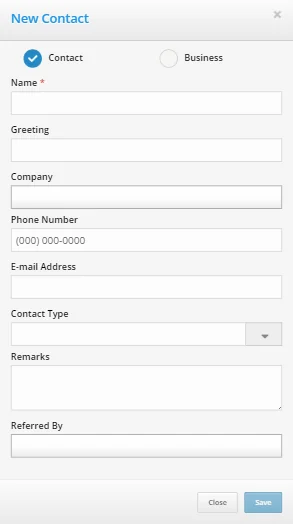
Once a new contact is saved, the user can edit the contact normally to access additional fields. (PMG-811883)
Ability to View Other Users' Opportunities
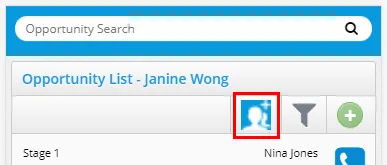
SmartOffice Anywhere users on mobile devices can now view the opportunities of other users in the office with whom they have proxy relationships. Tap the new button at the top of the Opportunity List and specify one or more users.
(PMG-811873)
Other Enhancements
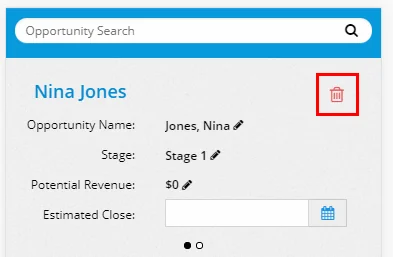
- Ability to delete opportunities in mobile app: The opportunity detail screen on mobile devices now features a Delete icon that a user can tap to delete the opportunity.
(PMG-811871)
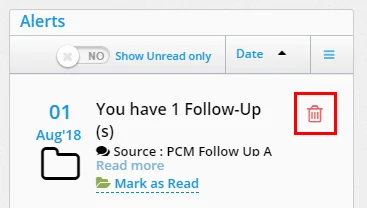
- Ability to delete alerts in mobile app: It is now possible to delete alerts when using SmartOffice Anywhere on a mobile device. Tap the new Delete icon on any alert to remove it.
(PMG-797310)
Resolved Issues
- An issue that was causing the More menu to remain open even after the user selected a button from the menu was resolved. (PMG-791515)
- An issue that was preventing the Settings link from working properly was resolved. (PMG-795312)
- Users who did not have the Advisors & Agencies user right were still able to change the contact linked to an advisor record using SmartOffice Anywhere. This issue was resolved. (PMG-800291)
- An issue with displaying the opportunities of contacts shared with other offices was resolved. (PMG-805937)
- Single sign-on issues that SmartView for Advisors users were encountering on mobile devices were resolved. (PMG-806653)
- A server configuration issue was preventing the navigation menu on mobile devices from appearing in some instances. This issue was resolved. (PMG-808372)
- The contact detail screen was loading slowly when the user did not have certain module licenses enabled. This issue was resolved. (PMG-808376)
- A non-functional Dashboard button was appearing in the navigation menu on mobile devices. This button was removed. (PMG-810295)
- Selecting the Investment Positions button in the navigation menu was displaying the Global Investment Accounts List. This issue was resolved. (PMG-810878)
- When recording an activity outcome in SmartOffice Anywhere, users who selected the Advice option and entered outcome notes were finding that those notes were not appearing in the Record Tag Notes column in SmartOffice Pro. This issue was resolved. (PMG-813554)