Last updated: 2025-12-03
Release Notes - SmartOffice 2024 Release 3
About This Document
For general information about SmartOffice release notes, visit the Release Notes home page.
Revision History
These release notes may be revised after their initial publication. This section lists the dates of any revisions as well as a list of changes.
November 21, 2024
- Initial publication
November 27, 2024
- Core System: Expanded the description of the "Menu Compact View" enhancement (PMG-940603).
- Corrected minor wording issues.
December 3, 2024
- Advisors/Agencies: Corrected the description of the Production Dashboard enhancement (PMG-926796) and added a screenshot.
December 9, 2024
- Release Overview: Added a link to the release highlights video.
Release Overview
SmartOffice 2024 Release 3 introduces the first of several user experience enhancements planned for release in the coming months. Users can try the beta release of a new visual theme for SmartOffice Pro, preview the redesigned SmartOffice Anywhere on mobile devices and access a new compact view for commands in the Menu button. In addition, this release resolves a number of issues identified in SmartOffice 2024 Release 2 and earlier releases.
For a quick overview of this release, see the release highlights video.
Enhancement Highlights
This section provides quick links to the featured enhancements in this release.
Core System
SmartOffice Anywhere
System Requirements
There are no changes to system requirements for this release. For current system requirements, see System Requirements.
Note Regarding Text Changes in SmartOffice
This release may contain minor changes to text in dialog boxes and other areas of the SmartOffice user interface. Changes of this type are typically made to correct spelling, grammar, punctuation and other language-related issues. Such changes normally are not listed in this document unless they affect the way the application works.
SmartOffice Pro Changes
Core System
Featured Enhancements
Visual Refresh and Theme Support
Users can now try the beta version of a new visual theme for SmartOffice Pro that updates the application's overall appearance and makes pages cleaner and easier to read.
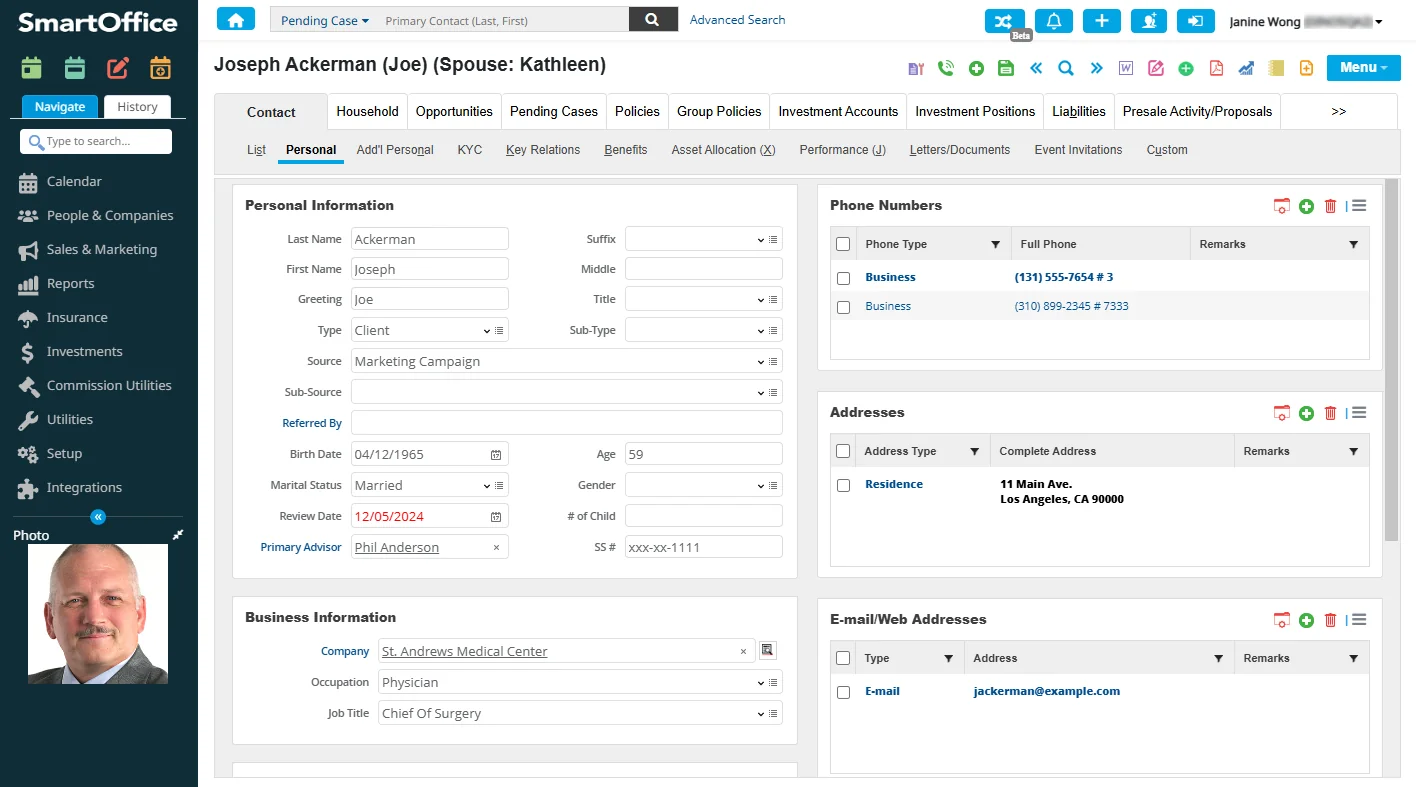

button near the Alert Center button (select the same button again to switch back to the classic look). After switching to the new theme, users can hover over the Themes button and select Send Feedback to submit their thoughts and suggestions or report any issues.
Office administrators can control whether the Themes button is available to their users via the new Allow users to change theme option in Setup > Office Settings. Additionally, enterprise customers can control the availability of this feature at the server level using the new
Theme support is the first in a series of enhancements planned for upcoming releases aimed at improving the SmartOffice Pro user experience. Additional themes are also planned. (PMG-928664)
Menu Compact View
To make Menu button commands easier to find and access, SmartOffice Pro now features a compact initial view for the Menu that displays only favorite and recently used commands. Users can display the full list of commands by selecting a Show Full Menu hyperlink at the bottom.
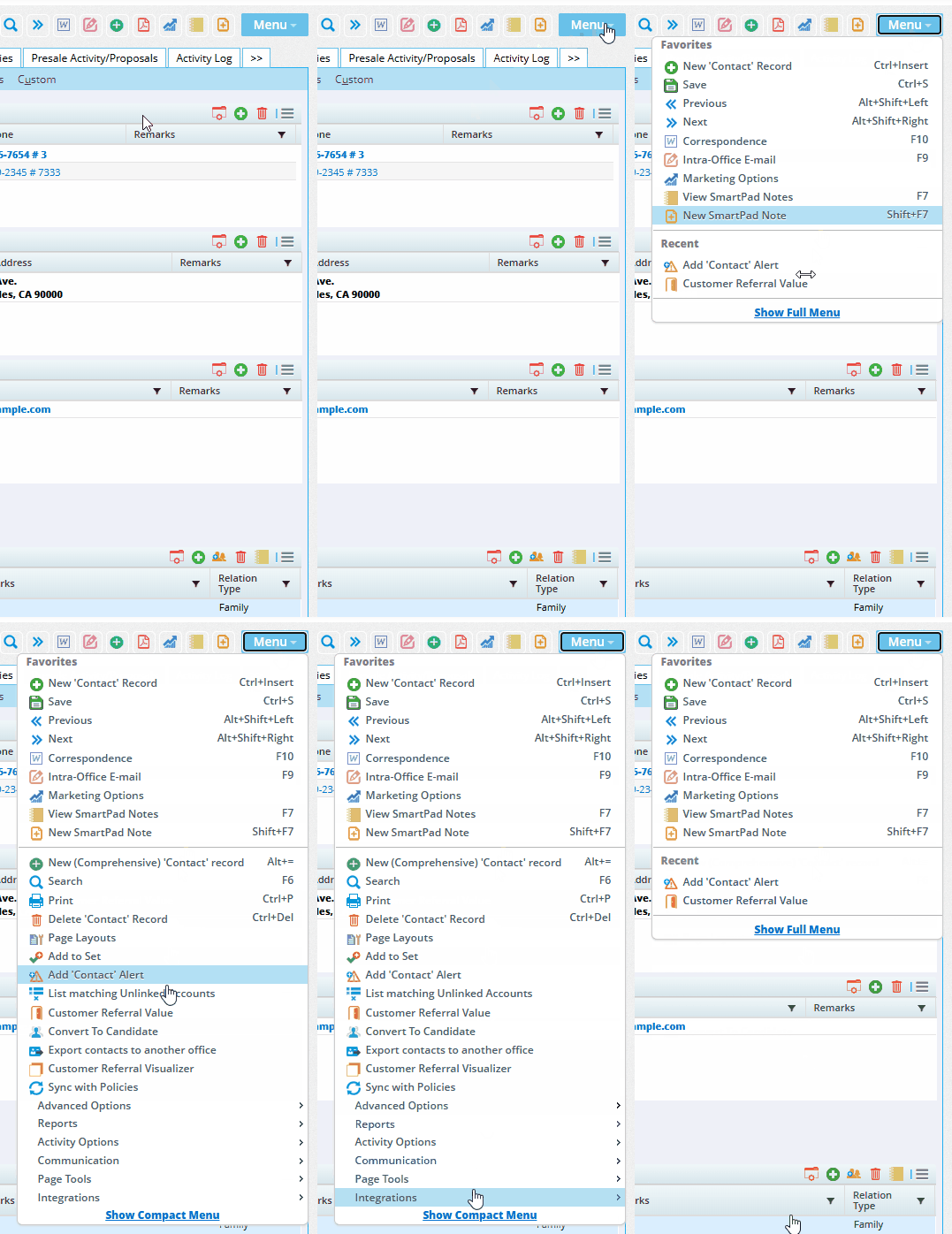
Users can add or remove a command from their favorites by right-clicking a command and selecting Add to Favorites or Remove from Favorites. Reorder favorites by dragging them up or down.
Office administrators can control whether this feature is available to their users via the new Allow users to enable compact view for Menu option in Setup > Office Settings. Once this setting is enabled, the Enable compact view for Menu option becomes available to each user under User Preferences > Basic Info. For more information about how to use this feature, see Navigation - Menu Button. (PMG-940603)
Other Enhancements
Contact Management
- Key relations setup for same-sex marriages: On the Key Relations content link of contacts and other record types, users can now set up husband-husband and wife-wife relationships. (PMG-941921)
- Field for maiden name: A Maiden Name field is now available on the contact Add'l Personal content link under Miscellaneous Personal Information. As part of this enhancement, the SmartOffice search box was updated so that users can search for contacts by maiden name. (PMG-942800)
Dynamic Reports
- Office List report category: A new Office List category of Dynamic Reports is now available in the Other report family. Intended primarily for enterprise customers with office hierarchies, these reports present the same office data that System- and parent-office users normally view on the Office List (Setup > Office Settings). In report format, that data can now be analyzed using advanced filtering, displayed on home page tabs/dashboards, automatically e-mailed to designated recipients, and more. Also, like all Dynamic Reports, these reports can be shared with other offices through import/export. (PMG-942911)
Resolved Issues
General
- Two issues with the SmartOffice sign-in page were resolved:
- SmartView for Clients users who signed in with the correct credentials were being redirected to a second sign-in page, where they were being prompted to re-enter the same credentials.
- An issue with sign-in security settings was resolved. When a value was entered in the Sign in attempts allowed before lock field on the Security Policies content link in Office Settings, users who exceeded that number of attempts were not seeing a message right away informing them about their accounts being locked.
(PMG-930671, PMG-942403)
- An issue that was preventing users from selecting the first record in a list using the space bar was resolved. (PMG-942166)
- Pop-ups throughout the system were not resizing properly for different screen resolutions. This issue was resolved. (PMG-942799)
- In office hierarchies, when an office was in read-only mode for maintenance or some other reason, Enterprise View users who accessed the office using Impersonate Mode were still able to modify data. This issue was resolved. (PMG-943524)
Contact Management
- Several issues with the Deleted Records area of the system were resolved to ensure that recovery of deleted SmartPad entries works as expected for Enterprise View users. (PMG-900632)
- An issue with user-defined key relationships was resolved. In some instances, the appropriate choices were not available for selection in the Add Key Relations dialog box when users tried to define a relationship. (PMG-931886)
- An issue with adding key relations to contacts was resolved. Searching for a key relation contact using the format Last Name, Greeting was not working. (PMG-942544)
- Users who had the Vonage Integration Suite extension installed in Chrome were finding that the click-to-call phone icons next to phone numbers in SmartOffice were disappearing unexpectedly. This issue was resolved. (PMG-942775)
- Several issues with privatizing sets were resolved:
- Users who did not have administrator or Super User rights were unable to privatize sets.
- Users were encountering inconsistencies in their ability to add proxy and/or non-proxy users to the access list.
(PMG-942880)
- An issue that occurred when users tried to print the contact Personal content link using Menu > Print was resolved. Selecting the Print button at the top of the print preview was closing the preview without printing the record. (PMG-942927)
- A "failed to load object" error that System-office users were encountering during key relation setup was resolved. The issue was occurring when users customized drop-down choices, created duplicate relationships, and then left blank values. When these users tried to add custom choices following these actions, SmartOffice was displaying the error. (PMG-943012)
- When the Record Sharing user right was enabled for a user without specifying an office name or user name to establish a "quick handshake" link, any attempt by the user to share a record was producing a "failed to load object" error. This issue was resolved. (PMG-943973)
- A layout issue that users were encountering when they maximized the Remarks field on the contact Personal content link was resolved. (PMG-943399)
- When a user in one office shared a contact with a user in another office, the latter was unable to access documents linked to the shared record. This issue was resolved. (PMG-944072)
Dynamic Reports
- An issue with privatizing Dynamic Reports was resolved. In the Privacy dialog box, users were not appearing in the Allows Access list even after they were moved there. (PMG-942248)
Home Page
- An issue that was causing pop-up dialog box opened from home page dashboards to be oversized was resolved. (PMG-942588)
SmartCalendar
Enhancements
- Activity deletion enhancements: The system's rules regarding the deletion of activities containing multiple participants were enhanced as follows:
- All user participants are now presented with the choice to delete the activity or to remove themselves as participants. Previously, only the activity creator had this choice; other participants who "deleted" the activity actually only removed themselves as participants.
- While viewing an activity in another user's calendar, a user who is not a participant in the activity can now delete it regardless of whether the activity contains one or multiple participants. Previously, non-participants were able to delete only those activities containing one participant.
(PMG-943772)
Resolved Issues
- Chrome users who had the Calendar Display option set to Pop-up in User Preferences were finding that they could not open the calendar. This issue was resolved. (PMG-942316)
SmartLeads
Enhancements
- Lead notes copied to contact record: When a user accepts a lead, SmartOffice now copies any lead notes to the SmartPad of the newly created contact record. (PMG-942870)
Resolved Issues
- On the lead Add'l Detail content link, users who maximized the Action field before entering any data were finding that the data was not being saved. This issue was resolved. (PMG-943122)
SmartOpportunities
Resolved Issues
- An issue that was occurring when users created opportunity processes was resolved. In some instances, when the user tried to add a stage to the new process, SmartOffice was displaying existing stages in the process's Opportunity Stages list. (PMG-942801)
- When the page layout of the opportunity Detail content link was customized and included the Campaign Name field, the system was not allowing users to save any changes to an opportunity when that field was filled in or blank. This issue was resolved. (PMG-943083)
- When the page layout of the opportunity Detail content link was customized, the Current Stage Date and Previous Stage Date fields were becoming editable when they should be read-only. This issue was resolved. (PMG-943240)
- In some instances, files uploaded or linked to opportunity notes were not displaying in opportunity note lists. This issue was resolved. (PMG-943718)
- An issue with sending contact SmartPad notes or opportunity notes as alerts and e-mails to other users was resolved. The recipients were receiving the alerts but not the e-mails, and the e-mails were not appearing in the E-mail Queue. (PMG-944052)
SmartRecruiting
Enhancements
- More advanced filter criteria for candidate records: When creating Recruiting-family filters to apply to candidate records, users now have additional choices for advanced filter criteria:
- Business Relationship
- Contact Assignments
- E-mail/Web Address
- Household Members
- Key Relations
- Opportunity
- Phone
- Postal Address
- Presale Activity/Proposals
- SmartPad
(PMG-941495)
Resolved Issues
- An issue that occurred when a user group was assigned to a candidate record was resolved. When a user mass assigned actions to a specific user, the system was assigning activities generated from those actions to the user group. (PMG-942469)
Advisors/Agencies
Enhancements
General
- Configurable time period for production statistics: SmartOffice now allows administrators to specify the time period covered by the statistics displayed in the Production Dashboard section of the advisor Personal content link and the agency Detail content link. Under Setup > Policy/Case Setup > Production Dashboard Setup - LOB Options, a new Production Period drop-down list presents three choices: Previous 12 Months, Previous Year, and Year to Date.
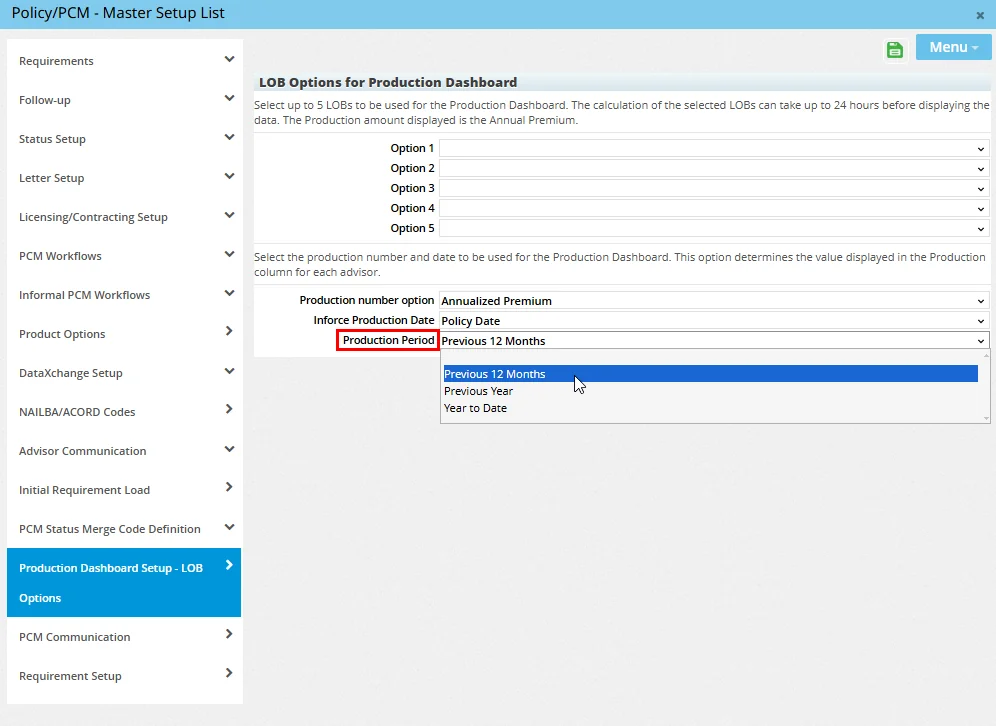
(PMG-926796)
SmartView for Advisors
- Ability to update multiple SVA user's rights and licenses: To make managing SmartView for Advisors user accounts easier, SmartOffice now allows administrators to update the user rights and licenses of multiple user accounts at once. From the list of SmartOffice user accounts (Setup > User Accounts), select two or more SmartView for Advisors accounts, and then select Menu > Update SVA User Rights & Licenses. Next, select the user rights and/or licenses you want to add to or remove from the selected user accounts, and then select the Add or Remove button. (PMG-943153)
Resolved Issues
General
- While creating a presale activity from the advisor Presale Activity/Proposals tab, users who selected the Presale Insured hyperlink and then searched for and selected a business were encountering an issue. When they viewed the details of the selected business, the dialog box displaying those details was distorted. This issue was resolved. (PMG-944144)
SmartPolicies
Enhancements
- New merge code for primary insured names: The new <
> merge code for policy/pending case correspondence enables users to insert the policy insured's name in the format First Initial, Middle Initial, Last Name. Example: J.R. Ackerman. (PMG-943121)
Resolved Issues
- Layout issues that users encountered while viewing the personal information of a policy's POS underwriter or POS rep were resolved. (PMG-941280)
- An issue with adding the Notes portlet to a policy or pending case custom page layout was resolved. Any notes added to the policy or case through that portlet were not appearing in the Latest SmartPad Notes (Manual) column of any Dynamic Report. This issue was resolved. (PMG-942012)
- In Medical- and Other-type policy records, certain custom lookup fields on the Medical Custom and Other Custom content links were displaying custom choices from contact record custom fields. This issue was resolved. (PMG-942305)
SmartCaseManager
Enhancements
- New pending case status choice: A pending case status, Ticket Incomplete, was added to the system. The new status is linked to the Inactive stage. (PMG-941986)
- UTMA custodian role for pending cases: In the Policy Relationship List of a policy or pending case, users can now designate a contact as a Uniform Transfers to Minors Act (UTMA) custodian. To do so, assign the new Custodian for UTMA role to a contact in the list. (PMG-943039)
- Inforce request enhancements: Users who enter policy details in pending case inforce request records will see a new Anticipated Amount field that is also available as a column in policy and pending case lists and Dynamic Reports. In addition, the Exc Policy # and Amt. Rcvd. fields are no longer mandatory when entering policy details. (PMG-943044)
Resolved Issues
- After converting a presale activity to a formal pending case, users who accessed the case from the presale activity's Pending Case content link were encountering two issues:
- After deleing the carrier, users were still able to save the pending case record.
- Clicking the Modal Premium hyperlink was not displaying the Premium Breakdown dialog box.
These issues were resolved. (PMG-940742)
- On the Related Policies tab of a multi-life pending case record, selecting the Show Requirement option from the Options
 menu was displaying two Underwriting Requirement List dialog boxes. This issue, which was occurring when the Related Policies list was blank, was resolved. (PMG-940963)
- On the pending case Requirements content link, an issue was occurring when a user selected multiple requirements and then selected the View Linked Form command from the Options menu. When the system displayed a message stating that only the highlighted record would be processed, nothing was happening when the user selected Yes. This issue was resolved. (PMG-941418)
- While creating a pending case, users were finding that the Link Opportunity drop-down list was disabled even when the primary insured was linked to an opportunity. This issue was resolved. (PMG-941560)
- Selecting Menu > Show History while viewing a pending case was not displaying the premium information dialog box in some instances. This issue was resolved. (PMG-942619)
- An issue was occurring when a pending case custom page layout containing the Pending Case Notes portlet was applied. While viewing the details of a record on the Related Policies content link of a multi-life case, users who tried to enter a note in the Pending Case Notes portlet were encountering an "insert/update failed" error. This issue was resolved. (PMG-943014)
- When a user edited multiple underwriting requirements for a child informal cases using the Switch to Edit Mode command, selecting a requirement record was causing the horizontal scroll bar in the dialog box to shift from right to left. This issue was resolved. (PMG-943045)
- The system was not saving changes made to custom field labels on the pending case Additional Info content link. This issue was resolved. (PMG-943493)
- When an activity linked to a pending case was marked Done, activities unrelated to the case were appearing in the case's Activity/Mail content link. This issue was resolved. (PMG-944588)
SmartBenefits
Resolved Issues
- Two issues with creating group policies using the New (Comprehensive) command were resolved:
- On Step 1, the system was allowing users to go to the next step without entering a policy number, even when the new policy's status was Active or Inforce.
- Users who navigated back to Step 1 after having selected a resource- or System-office carrier were finding that the Carrier field was blank. In addition, only local-office carriers were available for selection.
(PMG-941675)
SmartCommissions
Resolved Issues
General
- Issues were occurring when the Advisor Payments List was filtered to display commission payments with a status of On Hold due to Appointment. Users who tried to assign an advisor to multiple payments were encountering duplicate dialog boxes and "failed to load object" errors. These issue were resolved. (PMG-941703)
- An issue with expected commission records in policies linked to resource-office carriers and products was resolved. Selecting the carrier name hyperlink in the Carrier field was displaying a blank Carrier List pop-up. (PMG-943040)
- From the carrier Detail content link, users who ran any Commission-category PDF report created in the local office were encountering an "internal server" error. This issue was resolved. (PMG-943167)
Batch Processing
- In the Advisor Commission Check List of a commission batch, users who viewed a check's details were finding that the Primary Advisor column in the transactions list was not displaying data for some policies. This issue was resolved. (PMG-943061)
Integrations and Data Services
Enhancements
SmartIntegrator and SmartXchange
- Privacy option accessible through API: Developers can now use the SmartIntegrator API to access the Do Not Market communication option, which is located on the contact Add’l Personal content link in SmartOffice. The field is accessible using the new MarketPrivacy property of the Contact object. (PMG-943476)
Resolved Issues
Investment Data Downloads
- An issue with the processing of investment data downloads that was causing duplicate positions to appear in SmartOffice was resolved. (PMG-942007)
- An issue with processing Albridge investment data downloads was causing closed positions to remain active in SmartOffice. This issue was resolved. (PMG-943358)
Pending Case Downloads
- From the HO Pending Case List, users who navigated from a processed HO pending case to the matching agency pending case using the Menu > Pending Case Management command were encountering an issue. Once the pending case was displayed, selecting the Save button and navigating to the Home Office Status content link was displaying a "Missing primary keys in URL" error. This issue was resolved. (PMG-940964)
SmartOffice Anywhere Changes
Featured Enhancements
SmartOffice Anywhere Redesign - Contact Screens (Beta Preview)
When viewing SmartOffice Anywhere in a web browser on a smartphone or tablet, users will now see SmartOffice Anywhere's revamped design, which is currently in beta for contact screens only.
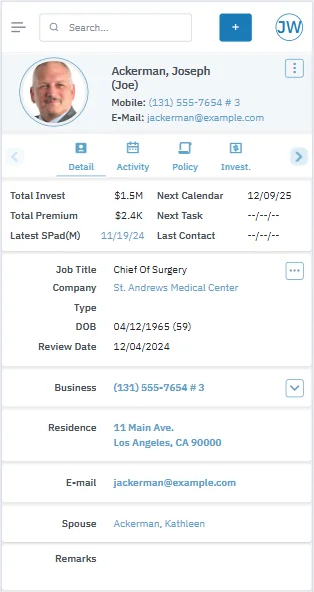
The redesign addresses several navigation and readability issues while also giving the app a fresh, up-to-date look. Major changes include:
- Quick-access buttons on the Contact List that allow users to call, e-mail, schedule activities and add notes without opening the contact record.
- Convenient buttons near the top of the contact detail screen for accessing documents, notes, activities, policies, investments and more.
- The ability to show/hide certain key fields on the contact detail screen.
- The elimination of scroll bars within various sections of the contact detail screen.
The new design will be applied to other screens in future releases.
To switch to the previous design at any time, open the side menu by selecting the menu button in the upper-left corner, and then select Classic View. To switch to the new design again, select More at the bottom of the screen, and then select Modern View (Beta).
Additionally, enterprise customers can control the availability of this feature at the server level using the new
Resolved Issues
- An issue with SmartOffice Anywhere sign-in security settings was resolved. Users who exceeded the number of sign-in attempts allowed by the office were not seeing a message right away informing them about their accounts being locked. (PMG-930870)
- Compatibility issues with the mobile app on Android 13 and later were resolved. (PMG-932986)
- In the SmartOffice Anywhere mobile app for Android, an issue that was preventing users from opening PDF, Word and Excel documents was resolved. (PMG-933656)
- When creating activities in SmartOffice Anywhere, users were unable to add cross-office proxy users as participants. This issue was resolved. (PMG-942498)
- When a user selected an activity's description to view the activity's details in SmartOffice Anywhere, the activity was displaying the wrong time. This issue was resolved. (PMG-943902)
- In the SmartOffice Anywhere mobile app, typing characters into the Participants field was not initiating a search for matching users in some instances. This issue was resolved. (PMG-945284)