Last updated: 2025-12-03
Release Notes - SmartOffice Pro Australian Edition 11.1.3.6
About This Document
For general information about SmartOffice release notes, visit the Release Notes home page.
Enhancement Highlights
This section provides quick links to the featured enhancements in this release.
Core System
Agency Management
SmartOffice Anywhere
System Requirements
There are no other changes to system requirements for this release.
Note Regarding Text Changes in SmartOffice
This release may contain minor changes to text in dialog boxes and other areas of the SmartOffice user interface. Changes of this type are typically made to correct spelling, grammar, punctuation and other language-related issues. Such changes normally are not listed in this document unless they affect the way the application works.
SmartOffice Pro Changes
Core System
Featured Enhancements
Improved Password Reset Process
The process of resetting a user's password using the "Forgot password?" link on the SmartOffice sign-in page has been improved. When SmartOffice asks the user to provide the answer to his or her security question, users who have forgotten the answer can now click a new I forgot the answer to my security question link. This action sends a new, temporary password to the e-mail address associated with the user's SmartOffice account. (PMG-703390)
Multiple Selection Using Shift-Click
Shift-clicking has been implemented in lists to make selecting multiple records easier. After clicking the check box for a record, hold down the SHIFT key and click the check box for another record further down the list to automatically select all of the records in between.
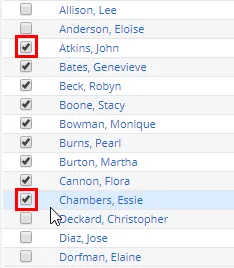
(PMG-830442)
Mobile App Option for Two-Step Authentication
Users who have two-step authentication enabled in SmartOffice Pro can now choose to generate one-time codes using the SmartOffice Anywhere mobile app, which is now available for SmartOffice Australia users (learn more).
To get started, install the app for your Android or Apple iOS device and sign in to the app (this step is important; make sure the app is working on your device before you proceed).
Next, in SmartOffice Pro, go to User Preferences > 2-Step Authentication and select the Mobile App option for receiving codes.
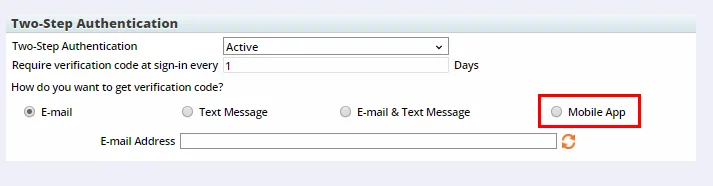
The next time you sign in to SmartOffice Pro and see the prompt requesting a one-time code, open the SmartOffice Anywhere app and tap the Authenticate button at the bottom to generate a code.
Also, as part of this enhancement, the Both option for receiving one-time codes through e-mail and text was renamed E-mail & Text Message for improved clarity. (PMG-836774)
Option to Designate Imported Addresses and Phone Numbers as Primary
For certain import setups in the Data Import Wizard, users can now specify that imported addresses and phone numbers should be marked as "primary" in SmartOffice. The new option is available in the Select File to Upload section of the initial import settings dialog box.
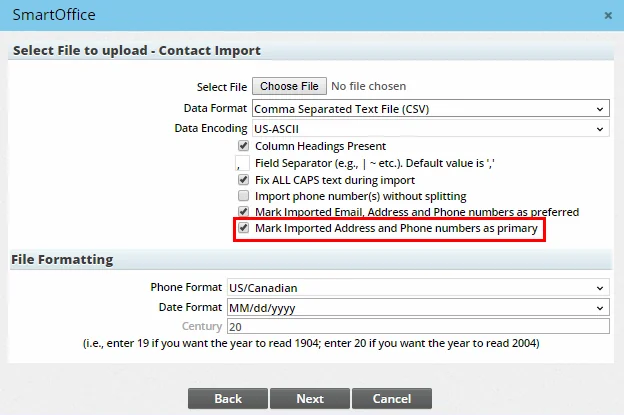
This option is available for advisor, candidate, contact, employee census and event invitee import setups. (PMG-835890)
Ability to Turn Off Prompt to Add Record Post-Search
Previously, when a user searched for a record that did not exist in SmartOffice, the system always asked whether the user wanted to create the record. Users can now turn off this prompt. In User Preferences > Basic Info, select Do not prompt to add record after search under Default Settings.
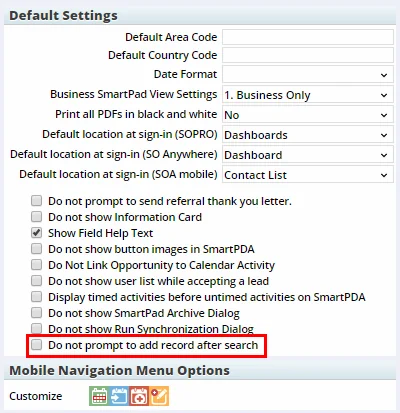
Once this preference is enabled, record searches with no results will just display an empty list. (PMG-618758)
Limited Broadcast Alerts
Users who have the Alerts user right can now send broadcast alerts to limited lists of recipients filtered by office/user. For Enterprise View users, this includes users in child offices. For example, you could send a broadcast alert about employee benefits to all Staff-type users in a particular office or in all offices in a hierarchy.
To get started, create a Dynamic Report using the new Limited Broadcast Alert report category (under the Other report family). Learn more about setting up Dynamic Reports.
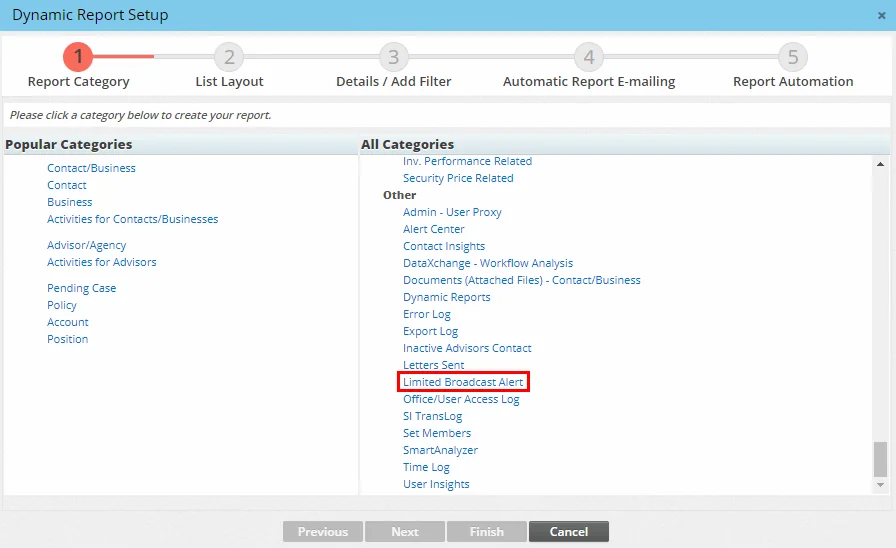
In the report setup, define your office and/or user filters. Run the report to generate your recipient list, and then select Menu > Send Alert to compose and send your message. (PMG-551662)
Ability to Send Notes as Alerts to User Groups
In the SmartPad and other areas of the system, the option to send a note as an alert and e-mail to other users was enhanced.
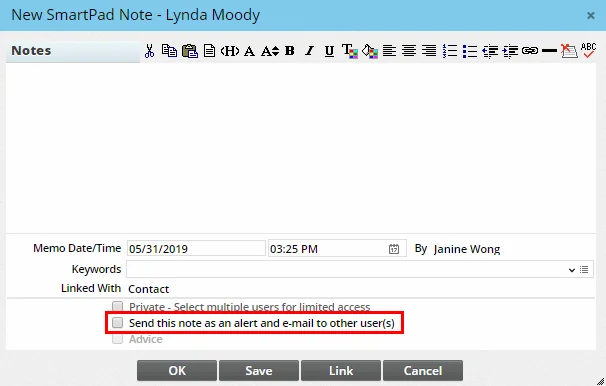
Now, the list of available recipients that opens when users select this option includes user groups in addition to individual users.
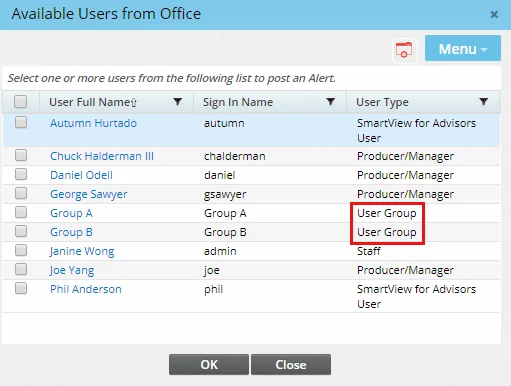
(PMG-851850)
Column Displaying All Mobile Numbers
On many lists throughout the system (e.g., contact, business, household, advisor, agency), users with the appropriate rights can now add a new column labeled All Mobile Phones. This column displays all mobile numbers, with the preferred phone number, if any, appearing in bold.

(PMG-838767)
Other Enhancements
General
- Updated support e-mail address for license removal: When a user tries to disable a user account, the confirmation message that appears now includes an Australia-specific support e-mail address for requests to remove the associated SmartOffice license.
- Date-based list grouping by year: When creating a custom sort for a list, users who opt to use a date column for list grouping can now choose to group based on the year. Previously, the only date grouping options available were Month, Week and Day.
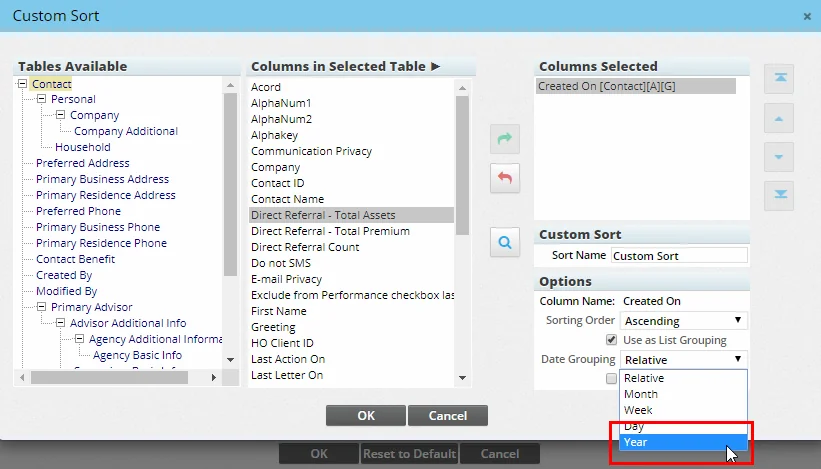
(PMG-587555)
- Enhanced progress indicators: Progress indicators in many areas of SmartOffice have been improved to include an Abort button that users can click to stop the current request from being processed. (PMG-828935)
- Side menu search improvements: When users search for commands on the Navigate tab of the side menu, SmartOffice Pro now automatically expands all menu categories to display the matching commands. Previously, the search was displaying the categories unexpanded, and users had to click them to see the commands. (PMG-834124)
- Date ranges improvements: In areas of the system where users can select predefined date ranges, the following changes were made:
- All Events in Future was renamed All Days in Future + Today to clarify its meaning.
- All Events in Past was renamed All Days in Past to clarify its meaning.
- A new date range called All Days in Future was added.
(PMG-853156; PMG-853157)
Alert Center
- Enhanced e-mail alerts for new activities: Users who opt to receive new-activity alerts by e-mail outside of SmartOffice now receive additional activity details. The improved e-mail alert includes the activity description as well as the contact's primary residence and business phone numbers. (PMG-835340)
Contact Management
- Spouse Title column: Users can now display the title of a contact's spouse (Mr., Mrs., etc.) in its own column by adding the Spouse Title column to lists and Dynamic Reports. (PMG-543046)
Dynamic Reports
- Dates in e-mail Dynamic Reports: Dynamic Reports that are automatically sent to recipients by e-mail now include the current date in the header. (PMG-791741)
- New contact columns for phone number reports: In Phone Numbers-category Dynamic Reports, users can now add columns from the following contact tables: Personal, Household, Preferred Address, Primary Residence Address, Contact Benefit, Created By, Modified By and Primary Advisor. (PMG-823768)
Resolved Issues
General
- An issue that was preventing the CTRL+P keyboard shortcut from printing SmartOffice pages properly was resolved. (PMG-720741)
- Issues with the arrangement of buttons in SmartOffice's top bar that occurred in small browser windows were resolved. (PMG-758446)
- On a list of business records, users who tried to apply a filter on the Sub-Type column or mass modify the Sub-Type field were finding that the sub-type choices available for selection were incorrect. This issue was resolved. (PMG-761551)
- When a user created a page layout template and marked it as Only Modifiable by Me, other users who viewed the template layout were seeing Save and Save & Apply buttons at the bottom. To accurately reflect what the user can do with such templates, the system now displays only an Apply button. (PMG-809833)
- Users who tried to delete a user group from the user account User Groups content link were seeing a blank dialog box instead of a confirmation message. This issue was resolved. (PMG-834280)
- When two or more customized column labels were identical, only one of the columns was available for selection when users customized list layouts. This issue was resolved. (PMG-836188)
- A cross-site scripting vulnerability involving field input was resolved. (PMG-836592)
- When a user exported a list in Excel (.xls) format, the resulting file was not reflecting any custom sort options the user had applied. This issue was resolved. (PMG-838548)
- SmartOffice Pro was displaying a session timeout message to users even when the office's security settings specified a longer timeout interval. This issue was resolved. (PMG-843744)
- Users who created a set containing a filter were finding that they could not manually validate the set. This issue was resolved. (PMG-844597)
- The Run Dynamic Reports with Excel Templates user right was available for selection even when the Data Export user right was not enabled. This issue was resolved. (PMG-845728)
- In Office Settings and User Accounts, layout issues that were causing certain content links to disappear off the edge of the browser window were resolved. (PMG-846636)
- When Protect Communication History was enabled for the office, archiving a contact was not removing activities linked to that contact from the calendar. This issue was resolved. As part of this solution, when an archived contact is restored, the linked activities are also added back to the calendar. (PMG-847186)
- On the user account Detail content link, the Menu > Set Automatic Switch User Login command was visible to customers who were not in a single sign-on environment or part of an office hierarchy. This command applies only to customers who fall into those categories and was removed for all other customers. (PMG-849218)
- In grouped lists using the Tree View layout, users were encountering issues with overlapping column data. This issue was resolved. (PMG-850926)
- In some instances, the system was not displaying a message stating that the spelling checker had finished checking text. This issue was resolved. (PMG-850928)
- An unexpected session timeout that was occurring when users opened SmartOffice Pro in multiple browser tabs was resolved. (PMG-851088)
- An issue that was causing an office's Error Log to display entries from other offices' logs was resolved. (PMG-852181)
- An issue that was preventing users from merging records was resolved. (PMG-853327)
- Progress indicators were not working properly when users performed certain actions, such as running PDF reports, performance calculations and mass user assignment. This issue was resolved. (PMG-855919)
- In Office Settings, administrators who tried to see which users were assigned a particular license were seeing a blank dialog box. This issue was resolved. (PMG-857209)
Alert Center
- An error that some users were encountering when they tried to reply to alerts was resolved. (PMG-832182)
- An error that was occurring when users tried to reply to broadcast alerts was resolved. (PMG-848133)
Contact Management
- When viewing a business record with a long business name, users were encountering alignment issues in the user interface. This issue was resolved. (PMG-730103)
- An issue with linking an opportunity while creating a contact was resolved. Any documents posted to the contact later were not appearing on the contact's Letters/Documents content link unless the user signed out of SmartOffice and then signed back in. (PMG-803215)
- On the contact Personal content link, users who entered a value in the Occupation field and saved their changes were being prompted to save their changes again when they tried to navigate away from the page. This issue was resolved. (PMG-810071)
- An issue with specifying a set during an advanced contact search was resolved. The issue occurred when a user selected the Mass User Assignment command with the Mass Assign All Contacts option. SmartOffice was displaying a message incorrectly suggesting that the operation would apply only to the contacts listed, even though the Mass Assign All Contacts option actually applies to all contacts that the user is currently assigned to. This message was corrected. (PMG-829414)
- An issue that was preventing users from updating KYC custom field values in custom page layouts was resolved. (PMG-837657)
- An error that occurred when users exported contacts to other offices was resolved. (PMG-840117)
- On the contact Key Relations content link, users who tried to add a business key relation were encountering an error when the business did not exist in the SmartOffice database. This issue was resolved. (PMG-842416)
- Users were able to mass assign users to contacts that they normally could not access when those contacts were part of a set. This issue was resolved. (PMG-845860)
- An issue that was preventing users from editing web links added to the contact Letters/Documents content link was resolved. (PMG-846462)
- When a contact had a Domestic Partner key relation, the heading on the contact record was displaying the relation as “Spouse.” This issue was resolved. (PMG-846943)
- An error that some users were encountering when they tried to import custom page layout templates was resolved. (PMG-849891)
- A contact age calculation issue was resolved. Age was being increased by one on the day before the contact's birthday. (PMG-849955)
- Some users who imported contact lists containing spouse information were finding that SmartOffice was not creating the spouse records and associated household records. This issue was resolved. (PMG-850555)
- An issue with custom fields on the contact Personal content link was preventing record sharing from working properly. This issue was resolved. (PMG-852822)
- Users who customized the Contact List layout to include the Spouse Preferred E-mail column were encountering an error. This issue was resolved. (PMG-857061)
- Users who applied a custom page layout to the business Detail content link were finding that they could not save values in the Tax ID field. This issue was resolved. (PMG-858318)
Correspondence
- An issue with auto-send letters configured for presale activities was resolved. When a presale status change triggered the letter, SmartOffice was not expanding the merge codes in the letter template. This issue was resolved. (PMG-817014)
- An issue with the household-related F\_HH\_SALUTATION merge code that was causing unexpected results in correspondence was resolved. (PMG-822021)
- An issue with the household-related HHAddress merge code was resolved. When used in correspondence, it was always expanding to display the head of household's preferred address. This issue was resolved so that the merge code gives precedence to the household's address, if one exists; otherwise it displays the head of household's address. (PMG-822026)
- During manual e-mail posting from Outlook to SmartOffice, the Selected Contacts list was displaying archived contacts in some instances. This issue was resolved. (PMG-838710)
- An issue with creating correspondence templates was resolved. When a user opted to create a template based on an existing document stored locally, selecting the document was producing an error stating that the template was corrupt. (PMG-843994)
- In the Correspondence Wizard, users who selected the Using a Set option on the Recipients step were finding that the list of available sets was loading slowly. The Members column was identified as the cause, so that column was removed. (PMG-844013)
- In the Letter Template detail dialog box, the Pick Date button in the Expires On field was not working. This issue was resolved. (PMG-844920)
- An issue that was preventing run-time user input merge codes from populating was resolved. (PMG-847684)
- The system was not alerting Outlook users when they tried to post e-mail messages that had already been posted to SmartOffice. The alert was restored. (PMG-851269)
Data Import/Export
- When an Enterprise View user in Impersonate Mode imported records into a child office, the resulting set was showing incorrect Created By user information. This issue was resolved. (PMG-830229)
Dynamic Reports
- An issue with the Automatic Report E-mailing feature was resolved. When a report was configured to include a large number of characters in the e-mail body, users who tried to add more recipients were encountering an error. (PMG-732083)
- An issue with Letters Sent-category Dynamic Reports was resolved. When users selected the Sent By sorting/grouping option, SmartOffice was sorting the report by the Created By date instead. (PMG-829876)
- Issues with running Export Log-category Dynamic Reports in a multi-office enterprise environment were resolved:
- When the user running the reports had Enterprise View turned on, the reports were displaying results from the user's office only and not from any child offices.
- When the user running the reports was signed in to a specific child office (i.e., impersonating a child-office user), the reports were displaying no results when they should have been displaying results from the child office.
(PMG-833797)
- An issue that was preventing users from exporting the results of Dynamic Reports based on the Interested Parties table was resolved. (PMG-838529)
- An issue affecting Dynamic Reports that prompt for filter criteria when they are run was resolved. In some server environments, when such a report was configured for automatic e-mailing using the CSV option, the report was failing and generating processing errors. (PMG-848145)
Home Page
- When adding a tab to the SmartOffice home page, users who selected an existing dashboard to populate the tab were initially seeing a blank tab. The dashboard was displaying in the tab only after the home page was refreshed. This issue was resolved. (PMG-823548)
- A loading error that was displaying in RSS portlets on the home page was resolved. (PMG-854999)
PDF Reports
- In the Policy Summary PDF report, Benefit Amount field values were missing commas, making the numbers hard to read. The commas were restored. (PMG-830494)
SmartOffice Sync for Microsoft Exchange
- An issue with synchronizing business phone numbers with Exchange was resolved. The issue occurred when a SmartOffice contact had two business phone numbers and one was marked as Preferred. After sync, duplicates of the preferred business number were appearing in the Exchange contact record, while the non-preferred business number was not appearing at all. (PMG-830207)
- When the SmartOffice Sync & E-mail Posting for Microsoft Exchange user right was cleared for a user account, any active Exchange sync setups for that account were not being automatically deleted from the database. Similarly, when the SmartOffice Sync for Microsoft Exchange license was disabled for an office, any active sync setups created for users in that office were not being deleted. These issues were resolved. (PMG-836202)
- An issue with creating Exchange sync setups was resolved. Users who selected a choice other than the default choice from the Contact Sync Options drop-down list and then saved the record were finding that the drop-down list was reverting to the default choice. This issue was resolved. (PMG-849899)
SmartPad
- An issue that occurred when users pasted text from an e-mail message into a new SmartPad note was resolved. When the note was saved, SmartOffice was removing spaces between some words. (PMG-748247)
- Printed SmartPad notes were not retaining line breaks in some instances. This issue was resolved. (PMG-821382)
- Opening the SmartPad for two or more households was causing an error for Enterprise View users who selected the View Data from All Offices within the Hierarchy below a Selected Office option. This issue was resolved. (PMG-844931)
- An error that some users were encountering when searching SmartPad entries was resolved. (PMG-844933)
- For some users, the Notes column in the SmartPad was displaying only the first line of the note instead of the entire note. This issue was resolved. (PMG-847596)
- An issue that was causing SmartPad notes to overlap for some users was resolved. (PMG-850354)
SmartCalendar
Resolved Issues
- Issues with printing activity lists were resolved:
- The contents of the Description column were difficult to read in some instances because text formatting was not being retained.
- Long e-mail addresses were extending into adjacent columns.
(PMG-811361)
- Changing a new activity from a task to a timed activity or vice versa was not automatically updating the Type field to the correct default value. This issue was resolved. (PMG-820937)
- In activity Dynamic Reports, when users pointed to the Activity Date column and selected the Mark Done option in the information card, SmartOffice was displaying a message stating that the feature was not available. This issue was resolved. (PMG-833620)
- An issue affecting users who enabled the Show Other Users' Calendar option was resolved. When these users ran an activity Dynamic Report, the results were including data from users whose status was Disabled, even though the user's View Other Users' Calendars setting in User Preferences was not set to Yes (All Statuses). (PMG-837548)
- When a user's View Other Users' Calendars setting in User Preferences was set to No, the user was still being prompted to select users when running Calendar-family Dynamic Reports. This issue was resolved. (PMG-838402)
- While viewing the results of an activity search, users who tried to mark an activity as Done when it had previously been marked as Done were seeing a blank dialog box. The issue was occurring when users tried to mark the activity as Done from the information card or the icon in the Mark Done column. This issue was resolved. (PMG-842426)
- Users were unable to mark activities Done from the contact Activity Log tab using the icon in the Mark Done column. This issue was resolved. (PMG-845308)
- When SmartOffice automatically moved an unfinished task to the current day, the system was not properly updating the database, which was preventing the updated task from synchronizing with Microsoft Exchange. This issue was resolved. (PMG-851764)
- An issue with the Comprehensive Activity Outcome Wizard was resolved. Users who edited the Activity Details section of the outcome dialog box and entered an end date falling before the start date were not receiving a warning message. The message was restored. (PMG-852052)
- Users who ran the Activity Statistics Report and then printed the report were finding that the Letters count was displaying as "NaN" in some instances. This issue was resolved. (PMG-853348)
- When marking an activity as Done, users who selected the Sale Made outcome option but did not complete all required fields were not seeing the appropriate warning message. This issue was resolved. (PMG-855769)
SmartOpportunities
Resolved Issues
- An issue affecting offices configured with a default opportunity process was resolved. While creating an opportunity record, users who clicked the More button in the New - Opportunity dialog box were finding that the Process drop-down lists under Add Additional Opportunities were not set to the default process. (PMG-780913)
- The Next and Previous buttons in the Custom Button Bar were not working when users tried to view opportunity records from an opportunity list. This issue was resolved. (PMG-822304)
- Two issues with the Opportunity Dashboard's Pipeline Report option were resolved:
- Clicking the Refresh button was switching to the Forecast Report option.
- The Tree Control and Summary layout options were not working.
(PMG-834653)
- On the Global Opportunity List and the contact Opportunities tab, users who opened a record and then tried to navigate to the next record were seeing the message "You have reached the end of the list," even when the end had not been reached. This issue was resolved. (PMG-837601)
- An issue affecting opportunities linked to records shared from another office was resolved. When a user ran an opportunity Dynamic Report containing the Actions - Update column, the Mass Modify Opportunity Stage button in that column was not working properly if the opportunity resided in the other office. (PMG-839874)
- When users changed an opportunity's stage from the activity outcome dialog box, the Close Probability (%) field on the opportunity Detail content link was not being updated. This issue was resolved. (PMG-852879)
- In Opportunity Setup, users who tried to create an opportunity stage during the process creation workflow were encountering an incorrect message stating: "No stages were created for this Process. Mark it Inactive?" This issue was resolved. (PMG-853982)
- In opportunity and leads lists, the color coding in the Priority column was not appearing for records that were assigned a priority. This issue was resolved. (PMG-855100)
SmartLeads
Resolved Issues
- When accepting a lead, Internet Explorer users were unable to select the Apply Correspondence default options check box in the Select Action for Accepted Leads dialog box. This issue was resolved. (PMG-832235)
- Users who tried to navigate to their office’s Web Leads URL were encountering a 404 error. This issue was resolved. (PMG-832921)
SmartRecruiting
Resolved Issues
- On the candidate Interviews/Actions content link, users who viewed the details of a record in the Interviews section were running across layout issues. These issues were resolved. (PMG-842111)
- Several issues with importing candidate records were resolved:
- The record source options available in the import wizard applied to contact records, not candidate records.
- SmartPad entries in the import file were not being imported.
- The Source to Hire, Recruiting Source and other candidate fields were not mappable.
- The set created after import was a contact/business set, not a candidate set.
(PMG-849898)
SmartEvents
Resolved Issues
- For certain events, the Event Status History dialog box was missing the Select the appropriate Event Status and Remarks sections. This issue was resolved. (PMG-846643)
Advisors/Agencies
Featured Enhancements
New Commands for Adding Contracts and Rates
From a policy or advisor contract record, users who click the Supervisor Contract hyperlink can now create a contract record from the Supervisor Contract List dialog box by selecting Menu > New 'Advisor Contract' Record.
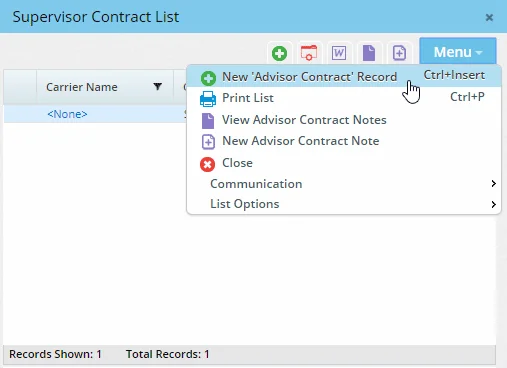
Similarly, a command for adding a rate was added to the Commission Rates List dialog box that opens when a user views a policy rider hierarchy record and clicks the Carrier Rate or House Rate hyperlink. (PMG-845849)
Other Enhancements
General
- Advisor field audit tracking: Changes to the advisor Remarks and Marketing Mgr fields are now tracked using the Audit Trail feature and can be viewed from the Changes tab in the SmartPad. (PMG-829217)
- Mass modification of follow-up date for presale records: Users can now modify the Follow-Up date column for multiple presale activity records at once. The column has been added to the list of available columns when users select Menu > Advanced Options > Mass Modify from any list of presale records. (PMG-844195)
- Commission E-mail Address columns for advisor/agency reports: When creating Advisor/Agency-category Dynamic Reports, users can now include columns displaying information about the commission statement e-mail addresses of advisors/agencies. In the list layout of the report, select the Commission E-mail Address table to access columns like Address, Created On and Preferred. (PMG-848310)
SmartView for Advisors
- Renamed user rights: On the User Rights content link of SmartView for Advisors user accounts, the Riders & Reinsurance user right was renamed Show Riders & Reinsurance to SVA users to make its purpose clearer. Similarly, the Show Additional Info. Content Link user right was renamed Show Additional Info. Content Link to SVA users. (PMG-834923)
Resolved Issues
General
- An issue with agencies assigned as supervisors on advisor records was resolved. The issue occurred when users opened an agency record by clicking the agency name in the Supervisor field of the advisor record. In the these instances, the Appointment List on the agency Cont./Appt. content link was always blank, even when the agency had appointments. (PMG-828122)
- When an advisor with a middle name was added as the supervisor for an agency, clicking the supervisor's name in the agency record was displaying a message stating that the record did not exist. This issue was resolved. (PMG-828550)
- An issue with advisor searches was resolved. When a user searched for an inactive advisor, the system was displaying SmartSearch results that included the advisor's name, and clicking the name was displaying the advisor as a contact record. (PMG-833351)
- On the advisor Requests/Requirements content link, issues with the Mass Assign Current Manager command on the Advisor Request List were resolved. After a user selected a manager, the manager dialog box was not closing. In addition, if a user clicked the OK button without selecting a manager, the prompt to select a manager was not appearing. (PMG-835715)
- In the New - Advisor dialog box, users who clicked the Customize Choice button for the Sub-Type, Suffix and Title drop-down lists were encountering incorrectly sized and/or labeled dialog boxes. This issue was resolved. (PMG-837365)
- On the advisor Personal content link, when an agency was entered in the Supervisor field, users who clicked the Supervisor hyperlink were being taken to the agency record, but the page layout was that of an advisor record. This issue was resolved. (PMG-841727)
- An issue with viewing the details of a presale activity from the advisor Presale Activity/Proposals tab was resolved. When users clicked the Opportunity hyperlink, the Opportunity List dialog box that opened was not displaying any existing opportunities. In addition, when the user added an opportunity from the dialog box, the new opportunity was not appearing in the list. (PMG-842093)
- While using the Advisor Reassignment command, users were finding that the associated correspondence workflow was not working properly. The .sopro configuration file needed to complete the workflow was not downloading to the user's computer. This issue was resolved. (PMG-842141)
- The system was resetting the Popular Date Ranges and LOB fields on the Production Dashboard report every time the report was run. This issue was resolved. (PMG-843044)
- An issue that was preventing Production Dashboard data from updating properly in some instances was resolved. (PMG-844050)
- After clicking the New button and selecting the Presale - Quick Quote option, users who entered a face amount and clicked the Save & Repeat button were finding that the dialog box was displaying a different face amount. This issue was resolved. (PMG-844701)
- Users who added a SmartPad - Advisor/Agency-category Dynamic Report to an advisor custom page layout were encountering an error when they saved and applied the layout. This issue was resolved. (PMG-845243)
- On the advisor Cont./Appt. content link, an error that users were encountering when they tried to view policies related to a contract was resolved. (PMG-845681)
- Modifying an advisor ACH record was not updating the Modified By column from the Modified By table. This issue was resolved. (PMG-853588)
SmartView for Advisors
- The Menu > Advanced Options > Mass Assign Advisor command was available to SmartView for Advisors users who have SmartOffice-format accounts. This command is not intended for these users and was removed. (PMG-844405)
- The ability to send broadcast alerts was inadvertently enabled for SmartView for Advisors users. This feature has been disabled because it is not intended for use by advisors. (PMG-846038)
SmartPolicies
Enhancements
- Policy beneficiary column change: On policy lists, the Beneficiary column now displays names in first name last name format instead of last name, first name. This makes the column more consistent with other policy relationship columns, such as Payor. (PMG-829473)
- Fast updating of requirements when changing an insured: When a user changes the insured or annuitant on a policy or pending case, the system now asks whether any associated requirements should be updated as well. Clicking the Yes button updates all requirements to link them to the new insured/annuitant. (PMG-831474)
- New "uninsurable" inforce policy status: A new status, Inforce - Uninsurable, is now available for policies in the Active stage. One possible use of this status is to indicate that the insured has become uninsurable since the policy was put inforce (e.g., due to a change in health) and could face difficulties securing new coverage if the policy were to lapse. (PMG-831674)
- New "uninsurable" table rating: Insureds and annuitants linked to policies and pending cases can now be assigned a table rating to indicate that they are uninsurable. To do so, open the appropriate entry in the Policy Insured List or Policy Annuitant list of a policy or case, click the Rate drop-down list, and then select the new Table U (Uninsurable) choice. (PMG-833798)
- Ability to add longer remarks for policy transactions: In policy transaction records, the character limit of the Remarks field was increased to 4,000 from 255. (PMG-850470)
Resolved Issues
- An issue that occurred when users clicked the Options hyperlink in a policy, pending case or group policy record was resolved. In the Options dialog box that opened, users who selected Menu > List Options were finding that the submenu was not visible. (PMG-687233)
- Two issues with merging policies, products, riders and pending cases were resolved:
- When the records were of different insurance types, the dialog box prompting the user to select records of the same type was blank.
- When the records were not in the Active stage, the dialog box warning the user that the records are not active was blank.
(PMG-831336)
- An issue with e-mail correspondence generated from a policy or pending case list was resolved. When a user selected multiple policies/cases and then selected the Launch E-mail command, SmartOffice was forcing the user to select a letter template before displaying the e-mail message window. (PMG-833353)
- An issue with updating policies, group policies and pending cases was resolved. The issue occurred when an office was set up to automatically generate SmartPad entries when users made changes to policies. Instead of monitoring for changes to policy names, numbers and plan names/carriers only, the system was monitoring many other fields. The result was an excessive number of SmartPad entries being generated. (PMG-838799)
- A policy issue related to exporting contacts to other offices were resolved. When two policies linked to the same product were exported, the product record was being created twice in the target office. (PMG-845528)
- While creating a policy, users who entered the last and first name of an interested party (i.e., not selecting an existing contact) were finding that the new interested parties were not appearing in contact searches, even though the appropriate contact records were being created. This issue was resolved. (PMG-855771)
Insurance Products and Carriers
Enhancements
- Mass modification of product settings: Users can now modify certain fields on the Product Settings content link for multiple products at once. To do so, select the products on the Product List, and then select Menu > Advanced Options > Mass Modify Product Settings to see the list of modifiable fields/columns. (PMG-837811)
Resolved Issues
- In custom page layouts for the carrier Detail content link, the Class List portlet was missing a height-adjustment control. The control was restored. (PMG-837804)
- When users added HO rep and underwriter entries on the carrier HO Reps/Underwriters content link, the default Preferred Communication setting was always set to Postal Mail, regardless of the default setting configured for new contacts in Office Settings > SmartPad/New Contact/E-mail Posting. This issue was resolved. (PMG-843144)
- The Product Merge workflow was ending abruptly when users selected the product they wanted to merge. This issue was resolved. (PMG-843759)
- From the product Detail content link, users who clicked the carrier name hyperlink to view the carrier record were encountering a blank Class List, even when risk classes were defined at the carrier level. This issue was resolved. (PMG-859124)
SmartCaseManager
Enhancements
- New pending case status choices: The following choices were added to the Status drop-down list for pending cases (the associated stage is indicated in parentheses):
- Electronically Delivered (Issued)
- Free Look Terminated (Inactive)
- Paid Pending Delivery (Active)
- Transferred Agent (Inactive)
(PMG-712384)
- More fields for contacts added during case creation: When creating a contact record for an insured directly from the Pending Case Add Detail dialog box, users can now add phone number and address information. Previously, fields for adding this data were not present in the New - Contact dialog box. (PMG-829008)
- Enhanced licensing/contracting for Enterprise View users: Enterprise View users can now select parent-office users when configuring licensing/contracting managers for a child office. In addition, these users can assign parent-office users to manage advisor requests linked to child-office pending cases. (PMG-832564)
- Specify underwriting type at case creation: A U/W Type field was added to the Pending Case Add Detail dialog box so that users can define the underwriting type when creating pending case records. As part of this enhancement, the Replacement option was moved down under the Face Amount field. (PMG-836418)
- "Visible to Advisors" sorting/filtering: Users can now sort/filter policy lists based on whether the policies are visible to advisors (based on office advisor privacy settings). To do so, add the Visible to Advisors column from the Policy table to any policy, group policy or pending case list and then filter or sort as needed. (PMG-839506)
- Column showing last letter template: In policy, group policy and pending case lists, users with the appropriate rights can now add the Last Letter Template column to the list layout to quickly see the most recent letter template sent for each policy. (PMG-844803)
- Improved case status option selection: On the Pending Case List, users who select Menu > Case Status to open the Case Status dialog box can now edit the options under Advisor. Previously, these options were read-only. (PMG-847168)
- Ability to add advisor personal data to reports: When creating or editing Dynamic Reports from the Policy, Pending Case, Group Policy and Commission families, users can now add columns from the Personal table under the Advisor Basic Info table. (PMG-850595)
- Letters/documents list for service providers: A Letters/Documents content link was added to service provider records. This content link lists any correspondence sent to a service provider from a pending case. (PMG-851706)
Resolved Issues
- An issue was occurring when SmartOffice was set up to automatically generate a letter for pending cases that reached the Issued stage. When a user opted not to send the letter but did opt to rebuild the commission hierarchy and reproject commissions, SmartOffice was displaying the policy's expected commissions on the home page. (PMG-828935)
- A pending case issue affecting Enterprise View users was resolved. The issue occurred when a child-office user created a pending case requirement and selected a parent-office user as the requirement manager. When viewing the requirement from the Requirement Follow-Ups list in the parent office, an Enterprise View user who selected the Menu > Pending Case Management command was encountering an error in some instances stating that the action could not be completed. (PMG-831399)
- In the premium history of a pending case, the following issues were resolved:
- Changing the issued modal premium was not recalculating the annualized premium.
- Changing the submitted or issued commissionable modal premium was not recalculating the commissionable annualized premium.
(PMG-834447)
- After running a Requirements-category pending case Dynamic Report, clicking a policy number in the list of results was opening the pending case record with no tabs. This issue was resolved. (PMG-834469)
- An issue with custom page layouts applied to pending case records was resolved. When an informal life pending case was formalized, clicking the Plan Name hyperlink in the formalized case was not opening the product list. This issue was occurring when the Benefit and Cash Value portlets were in the layout. (PMG-834663)
- On the requirement Follow-Up list, an issue with running correspondence was resolved. When a user selected multiple requirements and then selected the Correspondence command, the system was displaying the message: "Only the highlighted record will be processed. Continue?" But when the user clicked the Yes button, nothing was happening. (PMG-834902)
- When users created informal pending cases, the plan type options available for selection were always related to the Life insurance type, even when a default insurance type other than Life was defined for informal cases in Policy/Case Setup (under PCM Workflows > PCM Add Setup). This issue was resolved. (PMG-835506)
- On the requirement follow-ups list, users who selected Menu > Pending Case Management to view the associated pending case were finding that they could not view case notes. This issue was resolved. (PMG-837671)
- An issue that was causing the pending case Letters/Documents content link to load slowly for some users was resolved. (PMG-838726)
- While viewing informal child pending case records, users were unable to navigate to other records using the Previous and Next commands. This issue was resolved. (PMG-840797)
- In some instances, users who tried to view the Informal Application content link of a pending case were encountering issues with the page layout that were preventing them from viewing some data. This issue was resolved. (PMG-842567)
- When copying a pending case, users who opted to copy letters and documents were finding that duplicates of those items were being created in the original case. In addition, those items were not appearing in the new case. This issue was resolved. (PMG-845220)
- The Await Approval pending case workflow was inserting a requirement and making the insured the primary contact instead of the primary insured on the case. This issue was resolved. (PMG-847909)
- When a custom page layout was applied to pending case records, changing a case's status to Approved or Issued using the Status drop-down list was causing underwriting and delivery requirements to disappear from the record. This issue was resolved. (PMG-851721)
- An error that users were encountering when they navigated to Follow-Up > Presale Activity/Proposals in Policy/Case Setup was resolved. (PMG-856037)
- In some instances, when users added underwriting, delivery or POS requirements for second insureds, co-insureds or dependent insureds and then tried to access these contacts by clicking the Insured column hyperlink in the requirement list, a "Your action cannot be completed" error was occurring. This issue was resolved. (PMG-857604)
SmartBenefits
Resolved Issues
- On the Group Policy List, an issue that was causing the Lookup columns from the Group Policy Custom table to display incorrect values was resolved. (PMG-833977)
- Several issues that were occurring when users created group policies using the New (Comprehensive) command were resolved:
- The business's primary advisor was not being automatically added to the new record.
- In the Employer field, the business search button was not changing to a Clear button once a business was selected.
- An error was occurring when users tried to cancel out of the policy creation workflow.
(PMG-837356)
- From the Group Policy List, users who clicked the Activity/Mail content link and added an activity were unable to mark the activity as Done from the same page. SmartOffice was becoming unresponsive. This issue was resolved. (PMG-843898)
- The Policy # column from the Interested Party table was blank for the primary contact in group policy records. This issue was resolved. (PMG-852730)
SmartWholesaler
Resolved Issues
- An issue with the producer/firm Request/Requirement content link was resolved. When a user added an entry to the Advisor Request List, the list was not refreshing automatically to display the new entry. (PMG-829814)
SmartCommissions
Featured Enhancements
Carrier-Level Projection Validity Date Ranges
For the validation of commission transactions in Speed Receipts, administrators now have the option of defining projection validity date range values at the carrier level (previously, these values could be defined only at the office level). To do so, go to the carrier CTM Options content link and enter the values in the new Projection Validity Date Range section.
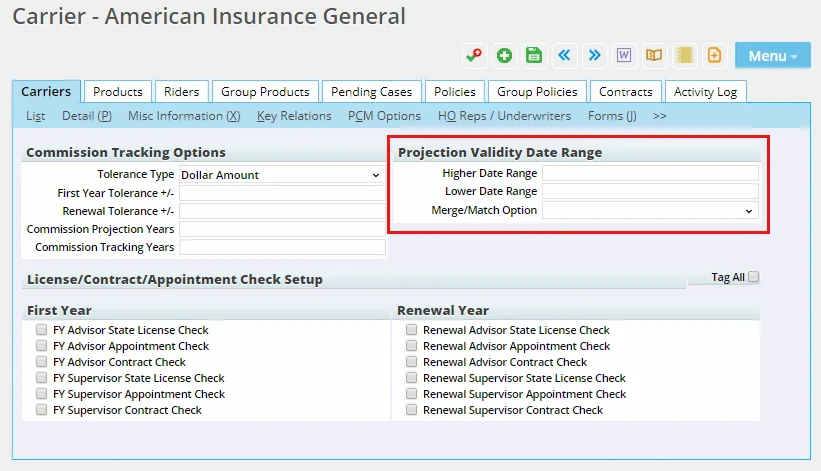
During validation in Speed Receipts, the system will look at the carrier record first for the appropriate date ranges; if no values exist there, the system will look for the values defined in Commissions Setup. (PMG-578636)
Negative Commission Rates
When setting up commission rates in the system, users can now specify negative rates. This change applies to the house, supervisor and advisor levels. (PMG-831620)
Better Tracking of Rate Creation/Modification
Users can now more easily track when a commission rate was created and by whom, as well as which user last modified the rate. In commission rate lists and Dynamic Reports, the column layout can now be customized to add the Created By, Created On and Modified By columns from the Commission Rate table. (PMG-845959)
Other Enhancements
General
- New columns for agency commission reports: In Agency Commission-category Dynamic Reports, users can now include columns from the Manual Commission Transactions and Speed Receipt tables. (PMG-848859)
Resolved Issues
General
- When a product option was deleted from a product, the system was not properly unlinking the option from the commission rate and band. This issue was resolved. (PMG-833340)
- In the Edit Commission Rates dialog box, the Copy Band command was not working when the commission banding type was Excess Banding, Number of Members Banding or Premium Banding. This issue was resolved. (PMG-834120)
- When a column from the Product Extension table was included in a Projected Advisor Commission-category commission Dynamic Report, users who tried to export the report results were encountering an error. This issue was resolved. (PMG-835307)
- On the advisor Smart Checks content link, users who tried to generate a PDF statement for a commission check entry were encountering an error. This issue was occurring when the advisor's contact record contained an ampersand (&) in the AlphaNum1 or AlphaNum2 field on the Add'l Personal content link under Miscellaneous Information. (PMG-835712)
- An issue with Advisor Commission-category Dynamic Reports was resolved. When a report included certain columns and filters, reconciled adjustment commissions were not appearing in the results. (PMG-843213)
- After calculating commissions from the Illustration Import dialog box, users who then closed the Expected Commission List were ending up back in the policy record instead of the Commission Records from Illustration dialog box. This issue was resolved. (PMG-847427)
- Two issues with the Copy Commission Rates command were resolved:
- When users opted to copy rates by product or contract from a blank rates list, nothing was happening. Now the system prompts users to select a source and target product or contract.
- When users opted to copy rates by product and reached the editable rates list, clicking the Cancel button was returning users to source/target selection instead of the commission rates list.
(PMG-839702)
- The columns Insured Name, Second Insured or Annuitant, Owner and Beneficiary from the Policy table were not displaying names in last name, first name format on the Commission List, the Advisor Payment List and in Commission-family Dynamic Reports. This issue was resolved. (PMG-839884)
- An issue with commission rates with a paid mode of As Paid with Months Advance was resolved. When a user modified the premium on a commission record that was not the first accumulated commission and then recalculated commission, the calculation was incorrect. (PMG-840903)
- An issue with excess banding calculations that occurred when policy modal/annualized premium was more than the times target defined in commission rates was resolved. (PMG-844020)
- On the Detail content link of a commission rate record, users who clicked the name of the linked product were seeing a number of issues in the dialog box that opened, including an incorrect window title and several layout issues. These issues were resolved. (PMG-846144)
- In certain instances, when the projection validity date range in Commissions Setup was set to Merge and a policy had an advanced commission split, calculating commissions for the policy from Speed Receipts was incorrectly resulting in an amount of $0 retained by the house. This issue was resolved. (PMG-846245)
- An issue that was preventing users from adding a commission rate for a carrier-specific contract from the Policy Advisor List of a group policy record was resolved. (PMG-847005)
- When calculating commissions, users were encountering an error and a missing commission record when the target amount completed in a renewal year and renewal rates were missing. This issue was resolved. (PMG-851215)
- When a user modified the primary contact on a policy (or removed and then re-selected the same primary contact), the Policy # column from the Interested Party table on the Advisor Payment List was becoming blank. This issue was resolved. (PMG-852290)
- When manually adding commission records, users were finding that the Paid-to/Next Due Date field was not being populated in these instances:
- The policy's premium mode was Single Pay.
- The policy's premium mode was Monthly, Annually, Quarterly, etc., and the commission record's type was Adjustment Commission.
(PMG-852844)
- Advisor/supervisor Fee-type commissions payable were being calculated incorrectly when the rates were set up using the Annualized First Year Only option. This issue was resolved. (PMG-856173)
Batch Processing
- When sending an e-mail commission statement from a posted batch, users who entered formatted text for the e-mail body were finding that the formatting was being removed when recipients received the message. This issue was resolved. (PMG-794871)
- From a posted batch, users who tried to e-mail commission statements to multiple advisors who had no e-mail address were seeing multiple Specify E-mail Body dialog boxes. This issue was resolved. (PMG-844934)
- An issue with unposting commission batches was resolved. The issue occurred when an advisor's check was put on hold in one batch because it was below the minimum check amount. When the check was later released in a second batch that was posted, users who tried to unpost the first batch were not seeing the message explaining that the other batch must be unposted first. In addition, the checks generated in the second batch were being deleted. (PMG-845507)
Speed Receipts
- In speed receipt records, the Create Payments by Interest % of Policy command in the Commission Data list no longer runs calculations when the interest percentage for any advisor shown is zero. (PMG-834371)
- An issue was occurring when a user created a carrier posting from a speed receipt such that the commission transaction was automatically reconciled. In the commission transaction record, the Paid On date for the House commission payable was not being populated even though the transaction's status was Assumed Paid. This issue was resolved. (PMG-848338)
- Commission calculations performed for a policy from Speed Receipts were incorrect when the product included lump sum as a premium component to be accumulated against target premium. This issue was resolved. (PMG-850124)
SmartInvestments
Resolved Issues
Investment Accounts
- When the page layout of the investment Account Detail content link was customized to include the Account Position List portlet, users who tried to open an account record from the results of a Global Search were encountering an error. This issue was resolved. (PMG-849884)
Investment Positions
- An issue affecting users who included activity Dynamic Reports on their home page dashboards was resolved. When a user viewed an activity's contact (by clicking the contact's name in the report), the contact's Investment Positions tab was displaying positions linked to another contact. (PMG-834400)
- An issue with the contact Investment Positions tab was resolved. When the position list layout contained the Account Name column from the Investment Accounts table, users who filtered the list to show only closed positions were encountering an error. (PMG-834752)
Investment Reports
- An error that users were encountering when they ran the TWRR Performance Summary of Accounts PDF report was resolved. (PMG-842136)
- An error that was occurring when users ran the Investment Position Summary PDF report at the household level was resolved. (PMG-849948)
Performance Calculations
- Users who tried to run performance calculations were being incorrectly prompted to select accounts first. This issue was resolved. (PMG-828935)
SmartOffice Anywhere Changes
Featured Enhancements
Mobile App Now Available
SmartOffice Australia user now have access to the SmartOffice Anywhere mobile app, which provides additional features and an improved SmartOffice user experience on mobile devices compared to the SmartOffice Anywhere website. The mobile app is available from the iTunes App Store for iPhones and other iOS devices and the Google Play Store for Android devices.
Features of the mobile app include:
- One-time code generator for signing in to SmartOffice Pro using two-step authentication
- Biometric authentication on devices that support it (Face ID/Touch ID on iOS devices and fingerprint authentication on Android devices)
- Quick-access navigation bar for accessing mobile app features, navigating to the previous screen and signing out
Resolved Issues
- An issue that was causing annual premium to display incorrectly for General-type policies was resolved. In addition, fields not required for General-type policies (Mode, Issue Age and Policy Date ) were removed.
- Including an apostrophe in SmartOffice Anywhere searches was producing unexpected results. This issue was resolved. (PMG-822490)
- An issue with the See Data For feature was resolved. In the user selection dialog box, selecting the Clear all selected items option was not clearing the check boxes next to selected users. (PMG-839489)
- SmartView for Advisors users were not seeing Delete buttons for alerts in SmartOffice Anywhere. This issue was resolved. (PMG-841982)
- In cross-office proxy scenarios, when a participant from a different office was added to an activity, that user was unable to see the activity in the SmartOffice Anywhere calendar. This issue was resolved. (PMG-843508)
- Several issues with SmartOffice Anywhere access for SmartView for Advisors users were resolved. These issues made the user experience inconsistent between SmartOffice Anywhere and SmartOffice Pro for SmartView Case Status-format users:
- The visibility of presale records was being determined by the presale insured instead of the presale advisor.
- Users were able to view the presale records of users they proxied for in addition to their own presale records.
- Group policies were not visible unless they were in the Underwriting stage.
(PMG-850460)