Last updated: 2025-12-03
Release Notes - SmartOffice Pro Canadian Edition 11.1.19
About This Document
For general information about SmartOffice release notes, visit the Release Notes home page.
Revision History
These release notes may be revised after their initial publication. This section lists the dates of any revisions as well as a list of changes.
September 18, 2024
- Initial publication.
Enhancement Highlights
This section provides quick links to the featured enhancements in this release.
Core System
Agency Management
SmartOffice Anywhere
System Requirements
There are no changes to system requirements for this release. For current system requirements, see System Requirements.
Known Issues
- Some text strings in this release have not been translated into French.
Note Regarding Text Changes in SmartOffice
This release may contain minor changes to text in dialog boxes and other areas of the SmartOffice user interface. Changes of this type are typically made to correct spelling, grammar, punctuation and other language-related issues. Such changes normally are not listed in this document unless they affect the way the application works.
SmartOffice Pro Changes
Core System
Featured Enhancements
E-mail Automation (Beta)
Users can now set up automated e-mail messages to contacts, businesses, advisors and agencies that the system will send on important dates (e.g., birthdays, review dates). To turn this feature on for a user account, enable the E-mail Automation license on the user account User Rights content link. The user can then select Utilities > E-mail Automation from the side menu to open the E-mail Automation List, and then select Menu > New 'E-mail Automation' Record to begin setup.
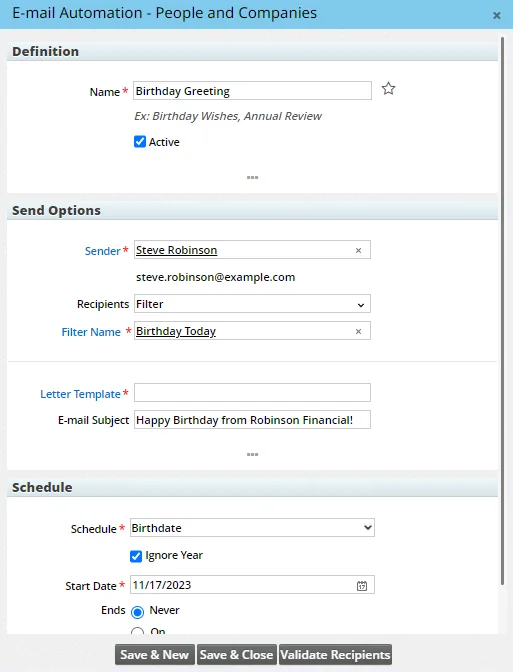
For more details, see the E-mail Automation help topic. (PMG-929611)
Data Import Wizard Improvements
The Data Import Wizard was enhanced to provide more flexibility in how records are matched an updated. While creating an import setup, users can now choose whether to insert all imported records without matching, update only matching records, or insert new and update existing records.
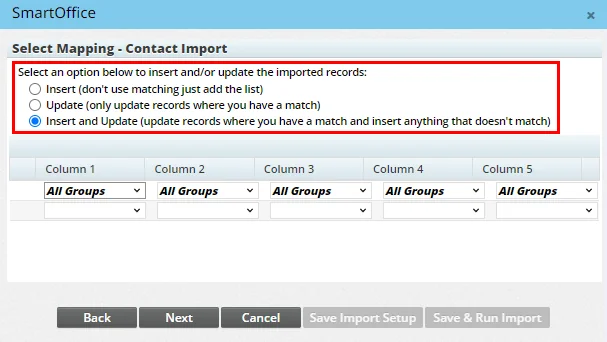
In addition, users now have a choice between using SmartOffice's default record-matching algorithm and creating their own algorithm.
Another new feature for contact imports in the ability to assign a primary advisor to the imported contacts. For more information about all of these changes, see Data Import - Import Process. (PMG-938005)
Ability to Recover Deleted SmartPad Entries
In offices that allow the deletion of SmartPad entries, users with administrator rights can now restore those entries. The Utilities > Deleted Records area of the system has been enhanced to enable users to search for and recover deleted SmartPad entries by date as well as content.
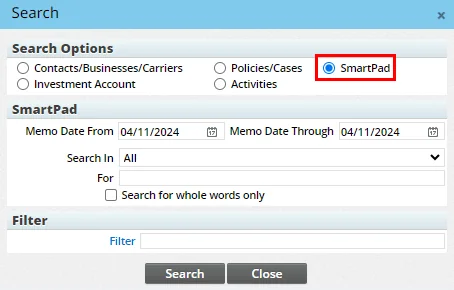
This enhancement applies to the contact SmartPad as well as opportunity, policy, pending case and other record notes. (PMG-900632)
Other Enhancements
General
- User-level settings for outgoing e-mail: Administrators can now allow individual users to configure their own outgoing e-mail settings that override any outgoing e-mail settings configured at the office level. This capability can be useful in some situations where outgoing e-mails (e.g., automatically e-mailed Dynamic Reports and advisor commission statements) are ending up in recipients' junk e-mail folders. To turn this feature on for a user account, enable the User-Level SMTP Setup user right for the account. A new Outgoing E-mail (SMTP) Settings section will display on the Detail content link of the user account. For more information, see User Accounts - Detail Content Link.
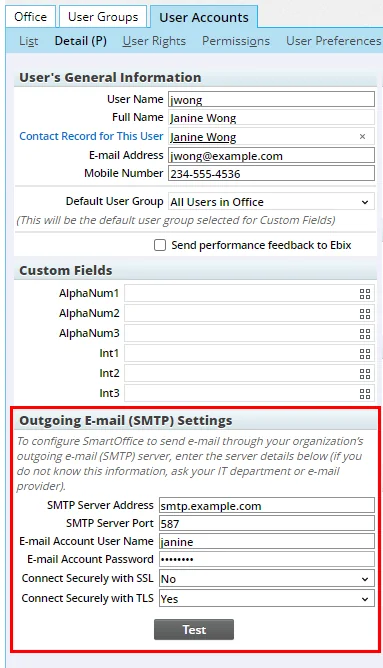
(PMG-927730)
- Updated office-level outgoing e-mail settings: On the office Detail content link, several fields and options for configuring outgoing e-mail settings were relabeled for improved clarity. Under Send Options - Form Letters, the following options in the Send From drop-down list were relabeled:
- Send from SmartOffice was relabeled SmartOffice E-mail Server.
- SMTP Settings (Below) was relabeled Custom E-mail Server (SMTP).
In addition, the SMTP Settings - Form Letters (Send Locally) section was renamed Outgoing E-mail (SMTP) Settings, and the following fields and options in that section were relabeled:
- SMTP Server was relabeled SMTP Server Address.
- Port was relabeled SMTP Server Port.
- User Name was relabeled E-mail Account User Name.
- Password was relabeled E-mail Account Password.
- SSL was relabeled Connect Securely with SSL.
- TLS Encryption was relabeled Connect Securely with TLS.
(PMG-927730)
- Reduced visual clutter in lists: To streamline the display of records, SmartOffice no longer displays the Records Shown, Total Records and Records Tagged counts at the bottom of certain lists that typically contain only a few entries. This change applies to contact, business, advisor, agency and candidate records for the following lists:
- Phone Numbers
- Addresses
- E-mail/Web Addresses
- User Assignment
- Set Membership
Note that if any of these lists has enough records to require scrolling and/or multiple pages, the counts are visible. (PMG-929615)
Contact Management
- Postal code-only address entry: When adding an address to a contact, business, advisor or agency record, users can now save the address with only the Postal Code field populated. (PMG-933940)
- Referral column name change: On contact lists, one of the Referred By columns in the Referred By table was renamed Referrer Referred By. This change better reflects the fact that this column displays the name of the contact two levels up in the referral chain, i.e., the contact who referred the referrer of a contact. (PMG-937144)
- Additional custom fields: Most record types in SmartOffice now support an additional 21 custom alphanumeric fields, expanding users' ability to track data that SmartOffice does not track out of the box. The additional fields are accessible on the Custom content link of contacts, households, advisors, policies, pending cases, and other record types. (PMG-940194)
- Ability to hide Custom content links: Enterprise customers can now hide Custom content links across the system from non-admin users who do not have the Custom Field & Record Tag Customization user right. To make this change, enterprise administrators can edit the SmartOffice server config.xml file to change the value of the
tag to true. (PMG-941469)
Correspondence
- Merge code for ID issue date: In contact correspondence, users can now insert the ID issue date using the new «F\_PE\_DLISSUEDATE» merge code. (PMG-934680)
- New annuity merge codes: Three new merge codes allow users to display additional data from annuity policies in form letter correspondence:
- «F\_ANNUITY\_GUARANTEEDRATE»
- «F\_ANNUITY\_YEARSRATEGUARANTEED»
- «F\_ANNUITY\_INCOMESTARTDATE»
(PMG-939580)
Resolved Issues
General
- On the Global Proxy content link in Office Settings, when the list was displayed using the Tree layout, users had to select the Expand All button twice before it worked. In addition, when the user then pointed to the Collapse All button, they were seeing an "Expand All" ToolTip. (PMG-876132)
- Two issues occurred when a user selected the View More link to display up to 1,500 records at a time
- The page drop-down list at the bottom was displaying page 30 by default. When the list contained 3,000 records or more, selecting the Next link was displaying page 60.
- When a user viewed the first 1,500 records and then selected page 5 from the drop-down list, SmartOffice was showing only 50 records, and the View More button was no longer visible.
These issues were resolved. (PMG-930499)
- An issue with Department/Team Hierarchy configuration in Office Settings was resolved. While creating a root department/team or department/team hierarchy record, users who tried to customize the Members in the current Department/Team list were not seeing any default columns in the Columns Selected section of the List Layout Customization dialog box. (PMG-933755)
- While configuring default user preferences for the office, administrators viewing the Correspondence Options content link were finding that the obsolete RTF option was present under E-mail Attachment Options instead of the newer MS Word option. This issue was resolved. (PMG-934717)
- When signed in to the System office, enterprise administrators were encountering an issue when they tried to reset users' passwords in other offices. SmartOffice was displaying a message stating that passwords cannot be reset in disabled offices, even when those users were in active offices. This issue was resolved. (PMG-934918)
- When customizing the columns in certain list layouts, users were seeing a duplicate instance of the Gender column under the Personal table. This issue was resolved. (PMG-935094)
- A layout issue was requiring users to scroll horizontally to access the Options menu on the following two user account content links:
- Proxy: Whose data this User can see
- Proxy: Who can see this User's data.
This issue was resolved. (PMG-935230)
- An issue with the See Data For feature was resolved. In the See Specific Users' Data dialog box, selecting Data for specific users and applying a column filter to the User Full Name column was reselecting the All records option, forcing the user to reselect Data for specific users. (PMG-935369)
- An issue was occurring in office hierarchies in which all offices had the Automatically display 1,500 records per page in a list after the user selects View More option enabled. With Enterprise View turned on and configured to display data from all offices, a user who viewed the Leads List and selected the View More link was seeing a total record count that differed from the actual record count. This issue was resolved. (PMG-935641)
- Two issues related to file posting were resolved:
- When a user's File Opening, File Posting and Correspondence Method settings in User Preferences > Correspondence Options were set to the same setting (Plug-in or Browser), the file size displayed in the file posting dialog box was slightly higher than the actual size of the file.
- When the same user preferences were all set to Browser, selecting the Compress the Files into a single zip file option in the file posting dialog box was not reducing the size of the posted file.
(PMG-936962)
- Calculated columns were displaying incorrect results when calculating column values that exceeded 9,999,999.99. This issue was resolved. (PMG-938081)
- Logos, text and other elements of the user interface were updated to reflect Zinnia branding as part of Zinnia's acquisition of SmartOffice. (PMG-940273, PMG-940897)
- The two Custom Fields portlets on the user account Detail content link were merged into a single portlet. (PMG-940524)
Alert Center
- When a user selected a website hyperlink in an Alert Center message, SmartOffice was opening the website in multiple browser tabs. This issue was resolved. (PMG-933519)
- An issue that was causing the Alert Center button to display an incorrect number of alerts was resolved. (PMG-936246)
Contact Management
- While posting a file to a contact shared from another office, users who opted for browser-based file posting were finding that the Keyword and Category drop-down lists in the posting dialog box were blank. This issue was resolved. (PMG-785770)
- When an Enterprise View user posted documents to a contact in a child office, issues with the display of parent-office category and keyword choices were occurring. These issues were resolved. (PMG-925689)
- On the contact Custom content link, some users were encountering an error when they selected the Menu > Custom Page Settings > Customize Field Labels command. This issue was resolved. (PMG-932830)
- Two issues with Know Your Client (KYC) features were resolved:
- When attempting to add fields to a KYC template, users were finding that fields from the KYC\_CUSTOM table were not available.
- In some instances, users were encountering an "insert/update failed" error when they tried to delete a group in a KYC template without first saving the template.
(PMG-933288)
- Customizing the layout of the contact Letter Log list to add the Opportunity Name column was causing the list to display only those letters linked to opportunities. This issue was resolved. (PMG-935412)
- On the Letters/Documents content link of contact and other records, users who displayed the Letter Log and Document List in a combined list were encountering errors when they tried to print the list. This issue was resolved. (PMG-937815)
- On the business Key Relations content link, sorting the Business Hierarchy list by a custom field was resulting in a "failed to load object" error. This issue was resolved. (PMG-938334)
- When the page layout of the business Detail content link was customized to add or remove fields from the Business Information portlet, the choices in the Sub-Type drop-down list were being replaced by contact sub-type choices. This issue was resolved. (PMG-939004)
- An issue that was causing custom field labels to display incorrectly on the contact Custom content link and in the Page Layout Customization dialog box was resolved. (PMG-939648)
- A "failed to load object" error that users were encountering when they applied custom page layouts was resolved. The error was occurring when the contact Letter Log and Document List were combined and the Date Disclosure was Provided column was added to the list. (PMG-940715)
- An issue with some contact Personal content link page layouts was resolved. When the browser window size or screen resolution changed, the first column's width was shrinking while the other columns' widths remained the same. This issue was resolved so that columns now resize more consistently. (PMG-940814)
Correspondence
- Activity meeting-type merge codes were not displaying correct text when expanded in some instances. This issue was resolved. (PMG-935342)
- An issue affecting users who have a default signature template specified in User Preferences > Correspondence Options was resolved. When these users selected Sales & Marketing > Mass Correspondence and selected a set as their recipient, the signature template was not being included in the correspondence. (PMG-935526)
- An issue was occurring after a user selected Menu > Add to Office Favorites (All Users) for a correspondence template. When the user then tried to remove the template from favorites, the system was displaying a blank message box. This issue was resolved. (PMG-937034)
- An issue that was causing long delays between the time outgoing e-mails were queued and when they were sent was resolved. (PMG-937345)
- The merge codes under the Compliance, Continuing Education and License categories were not expanding properly when included in correspondence templates. Because field codes are already available for inserting the same fields into correspondence, those categories were removed. (PMG-937413)
- When a user's account was configured to send browser-based correspondence, an issue with dropping a contact into a marketing campaign was occurring. When the campaign was set up with handling options to send correspondence, the system was displaying prompts for plug-in based correspondence. This issue was resolved. (PMG-939373)
Data Import/Export
- Browser-based list exports were failing when users tried to export contact lists containing the Primary Advisor column and more than 500 contact records linked to the same primary advisor. The issue, which was occurring when the list was grouped by the Primary Advisor column, was resolved. (PMG-936123)
- Users who tried to import data using a System-office import setup were encountering an error stating, "The requested record or page cannot be displayed before Mapping screen." This issue was resolved. (PMG-940892)
Dynamic Reports
- An issue with Activities for Contacts/Businesses-category Dynamic Reports was resolved. While viewing the results of a report, users who tried to apply an advanced "does not contain" filter to the Subject column were unable to enter text in the field when they clicked inside the field. (PMG-821043)
- An issue with Dynamic Reports in the Activities for Contacts/Businesses category was resolved. When the report included the Contact-Spouse Names column and the first record had a domestic partner key relation, the next record was incorrectly displaying a spouse key relation as a domestic partner key relation. (PMG-933614)
- An issue with running parent-office Dynamic Reports with Enterprise View enabled was resolved. Child-office records were not appearing in the report results when the report was filtering on a custom column value, even when that value existed as a custom choice in the parent and child offices. (PMG-933838)
- Graphs were displaying improperly in Activities for Advisors-category Dynamic Reports when the data in those reports was grouped in certain ways. This issue was resolved. (PMG-935525)
- An issue with the Search Report dialog box was resolved. When the user selected a report family and category and then selected a different report family, the previously selected category was still appearing in the Report Category drop-down list. (PMG-938080)
- Dynamic Reports that use the Summary layout were not displaying all expected results in some instances. This issue was resolved. (PMG-940160)
- An issue was occurring when a user belonging to multiple user groups created Dynamic Reports containing custom columns. Changing the user's default user group was improperly changing the custom column headings in existing reports to match the column headings linked to the user's current group. This issue was resolved. (PMG-940353)
Home Page
- When a user opened an activity record from a home page tab, the Activity Detail dialog box was oversized and contained excessive empty space. This issue was resolved. (PMG-940975)
- When Dynamic Report results spanning multiple pages were displayed in home page tabs, the View More link was not appearing at the bottom of the first page as expected. This issue was resolved. (PMG-941035)
Households
- On the household Detail content link, an issue was occurring when the Household Members list was customized so that the Contact Name column was not the first column. Users who edited a field in the household record and then opened a record from the Household Members list were seeing the message "Save changes before continuing" on the contact detail screen instead of the household record. (PMG-933052)
PDF Reports
- When the Holding Statement - By Primary Contact and Holding Statement - By Owner PDF reports were run, the order in which beneficiaries were listed in the Owner/Beneficiary column was different from the order shown in the SmartOffice policy record. This issue was resolved. (PMG-933700)
- Text issues affecting some PDF reports were resolved:
- Quotation marks in contact names were appearing as ".
- When a contact's name contained a hyphen, the first letter after the hyphen was being capitalized automatically.
- When a contact's name contained an apostrophe, running the report was producing a "Failed to load PDF document" error.
- For pie charts, total amounts were missing commas.
(PMG-938043)
Sets
- When the filter list in a set was empty, the system was still allowing users to select the Add set members by filter only (no ad-hoc selection) option. This issue was resolved. Users must now add at least one filter before that option becomes available. (PMG-934081)
- Performance issues affecting set validation were resolved. (PMG-935085)
- Two issues with the Menu > Add to Office Favorites (All Users) command on the Set List were resolved:
- When the user selected the Show My Favorites option at the top of the list and selected Menu > Remove from Favorites, the command was not working. That command now removes the set from all users' favorites. (PMG-876318)
- When a user added the same set to office favorites more than once, the set was appearing multiple times when the user selected the Set List's Show My Favorites option. (PMG-937033)
SmartCalendar
Enhancements
- Activity ID column: An Activity ID column is now available on activity lists throughout the system, including the Activity Log, Tasks lists, calendar Agenda view and Dynamic Reports. Users with the appropriate user rights can customize their list columns to add it. (PMG-938079)
- Ability to hide contact notification option in activities: For users of SmartOffice's enterprise Exchange sync solution, administrators can now prevent the Notify contacts when activity is created/changed option from appearing in the Participants section of the Activity Detail dialog box, regardless of whether users are set up for sync. To hide that option, set the new
element in the server config.xml file to false. (PMG-938882)
Resolved Issues
- An issue with entering data in the Activity Details dialog box for a new activity was resolved. Entering a character in the Contact Field and then clicking inside that field was opening two identical Contact & Business List dialog boxes. (PMG-922382)
- A "failed to load object" error that some users were encountering when trying to create activities was resolved. (PMG-940332)
SmartLeads
Enhancements
- New fields for leads: Two new fields are available on the Detail content link of lead records:
- Best Time to Call: This field was added to contact, business and advisor leads.
- Occupation: This field was added to contact leads.
(PMG-937064)
Resolved Issues
- An issue with inconsistent availability of Menu commands across leads lists and reports was resolved. (PMG-931162)
- An issue that occurred when a leads coordinator assigned leads to himself/herself was resolved. The issue occurred if the leads coordinator then rejected those leads and tried to assign them to another user. After the new user was selected, SmartOffice was displaying a blank dialog box. (PMG-933008)
- While forwarding a lead, users who entered invalid office or advisor information were encountering a blank dialog box. This issue was resolved. (PMG-933084)
- An issue was occurring when a leads coordinator assigned a lead with a status of Created from a leads Dynamic Report. When the coordinator then selected Menu > Show My Leads, the same report results were reloading. This issue was resolved. (PMG-933117)
- Users who added data to the Custom content link of a lead and then tried to forward the lead were encountering a "failed to load object" error. This issue was resolved. (PMG-939764)
- After being assigned to advisors, forwarded leads were retaining their Forwarded status instead of updating to the Assigned status. This issue was resolved. (PMG-940355)
SmartOpportunities
Resolved Issues
- E-mail messages sent as part of an opportunity stage action did not contain subject lines in some instances. This issue was resolved. (PMG-939221)
- On the opportunity Detail content link, an issue was occurring when the page layout was customized to place the Opportunity Notes portlet above the Stage Actions for Current/Previous portlet. Users were unable to sort and group the contents of the latter portlet by the Completed column. This issue was resolved. (PMG-940516)
SmartEvents
Enhancements
- Event activity enhancements: Several improvements were made to event-related activity management:
- On the event Activities content link, users can now assign contacts to one or more activities using the new Assign Contact to Activity command in the Options
 menu.
menu.
- Users can now delete event activities from the event Activities content link using the new Delete ‘Activity’ Record command in the Options menu.
- In Event Setup, new tasks now have a default task type of Meeting and a default priority of High.
- The system no longer classifies event activities as system-generated.
(PMG-938815)
Resolved Issues
- When a user selected the name of the event venue on the event Detail content link, the dialog box that opened was missing the heading for the Venue Contacts section. This issue was resolved. (PMG-938680)
SmartRecruiting
Resolved Issues
- Candidates imported into SmartOffice were not being assigned the default position specified in Recruiting Setup. This issue was resolved. (PMG-936174)
- In some instances, the system was changing the position selected for a new candidate record to the default position. This issue was resolved. (PMG-939972)
Advisors/Agencies
Featured Enhancements
Page Layout Customization for Presale Activities
Users can now change the fields that display on the presale activity Detail content link and customize the arrangement and grouping of those fields by selecting Menu > Page Layouts. For help, see Page Layout Customization. (PMG-931242)
Advisor Document Upload for Requirements
SmartView for Advisors - SmartOffice Format user accounts can now be configured to allow advisors to upload documents related to pending case requirements. This enhancement is useful for situations in which a document needs to be completed by the advisor. The advisor can download the document, have it filled out, and then upload it to the requirement record.
To enable this capability, select the Allow SmartView for Advisors users to upload documents option under Setup > Policy/Case Setup > Advisor Communication > Advisor Privacy or under Setup > SmartView for Advisor Setup > PCM/Policy Setup.
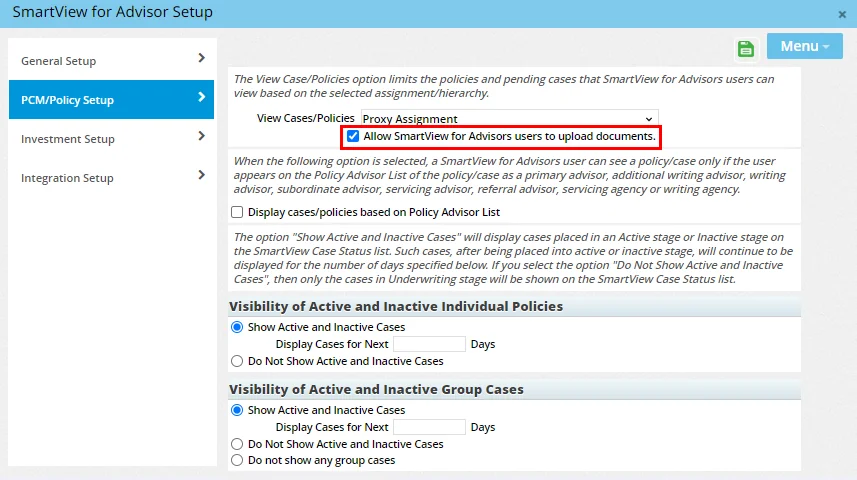
Once the option is enabled, a PCM Document field will appear in pending case requirement records. Advisors will also see an Upload PCM Document button.
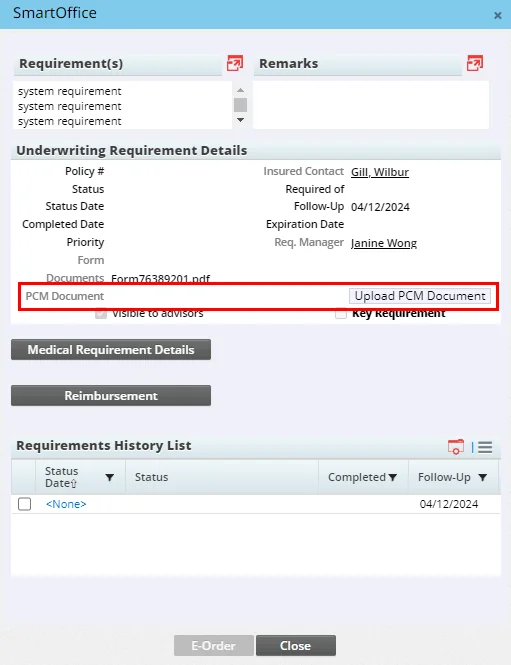
After downloading the document from the Documents field, the advisor completes it and then selects the Upload PCM Document button to upload it. The uploaded document appears in the PCM Document field, where it can be accessed by the case manager. (PMG-937955)
Other Enhancements
SmartView for Advisors
- Improved column layouts for SmartView users: For SmartView for Advisors - SmartOffice Format users, the default columns for record lists throughout the system have been reviewed and revised to provide more useful data. (PMG-933301)
Resolved Issues
General
- On the advisor Cont./Appt. content link, an issue was occurring when a user tried to add an advisor contract in which the effective and expiration dates were the same. The system was correctly warning the user that the effective date must be earlier than the expiration date but was creating the contract record anyway. This issue was resolved. (PMG-932729)
- Users who created advisor requests from the advisor Request/Requirement content link were seeing multiple correspondence dialog boxes after they closed the Automatic Correspondence dialog box. This issue was resolved. (PMG-932767)
- While creating an advisor or agency record, users were able to specify a date/time in the Follow-Up Options section even when the Create Initial Activity option was not selected. This issue was resolved. (PMG-933025)
- In some instances, advisors were receiving correspondence from SmartOffice even when the Do Not Market option was selected in their Communication Privacy settings. When the advisor had a carbon copy recipient configured as the only recipient of correspondence, the system was sending correspondence to the advisor instead of the carbon copy recipient. This issue was resolved. (PMG-933377)
- Customizing the page layout of the advisor Personal content link to add the Case Manager field to any portlet was causing that field to become mandatory. This issue was resolved. (PMG-933993)
- Two issues with editing contracts were resolved:
- An issue was impacting the performance of the Contract Change Utility.
- While editing multiple advisor contracts at the same time using the Edit Agent Contracts command, users were encountering a calculation error when they tried to recalculate commissions.
(PMG-934581)
- An issue that was preventing users from saving their selections in the Product License Type field of advisor appointment records was resolved. (PMG-934874)
- On the advisor Key Relations content link, users were encountering an issue when adding policy contacts. If a user selected an advisor role from the Contract Role drop-down list (e.g., Old Primary Advisor, Referral Advisor) and then tried to add a record under the Selected LOB section, two LOB dialog boxes were opening. This issue was resolved. (PMG-936705)
- When one advisor record was merged into another, the advisor's Carbon Copy List was not transferring to the merged record. This issue was resolved. (PMG-939569)
- For users with the Production Dashboard license, the page layout of the advisor Personal content link was misaligned when accessed from the Policy Advisor List of a pending case. This issue was resolved. (PMG-941380)
Insurance Products and Carriers
Resolved Issues
- In the New - Insurance Carrier dialog box, the Postal Code Lookup button was unlabeled and misaligned. This issue was resolved. (PMG-768440)
- In the New - Insurance Carrier dialog box, selecting the Lookup button was not displaying System-office carriers. This issue was resolved. (PMG-846991)
- In carrier underwriting guidelines, incomplete requirement information was appearing in Face/Age cells of the Underwriting Requirements dialog box. This issue was resolved. (PMG-932705)
- The system was improperly allowing users to select a different product while adding a rider assignment for a specific product from the carrier Products tab. This issue was resolved so that the Product Name field is now read-only in this workflow. (PMG-933307)
- While trying to merge risk classes in the Class List of a carrier record, users who tried to add a risk class were seeing a blank dialog box. Because the ability to add risk classes is not necessary during the merge workflow, this capability was removed. (PMG-934214)
- When adding a product from the carrier Products tab, users who entered the name of an existing product and saved the record were finding that the product was being created without a name. In addition, refreshing the page after creating such a record was returning an "insert/update failed" error. These issues were resolved. (PMG-937454)
- Two issues on the product Underwriting Guidelines and Notes content link were resolved:
- When the Description column was present in the Product Underwriting Notes section, users who selected the hyperlink in that column to view the requirement detail were encountering an "Invalid Officeid, Request rejected" error.
- When users selected multiple records in the Office/Agency Requirements section and then selected Options > Copy Guideline to Another, nothing was happening.
(PMG-939320)
- On the carrier Misc Information content link, users who tried to add a record to the Carrier Service Provider List were encountering an error when they selected the Service Provider hyperlink. This issue was resolved. (PMG-939911)
SmartPolicies
Featured Enhancements
Automated Import of Policy and Commission .csv Files (Beta)
For policy and certain commission imports, the Data Import Wizard can now be configured to monitor a folder on an SFTP or FTP server and automatically download and import new .csv files when they appear in that folder.
To get started, create a new import setup under Utilities > Data Import Wizard, selecting either Policy Import or Commission Import for Speed Receipt Entry as the record type. Then select SFTP/FTP (Beta) from the new Setup Connector drop-down list on the Select File to upload screen.
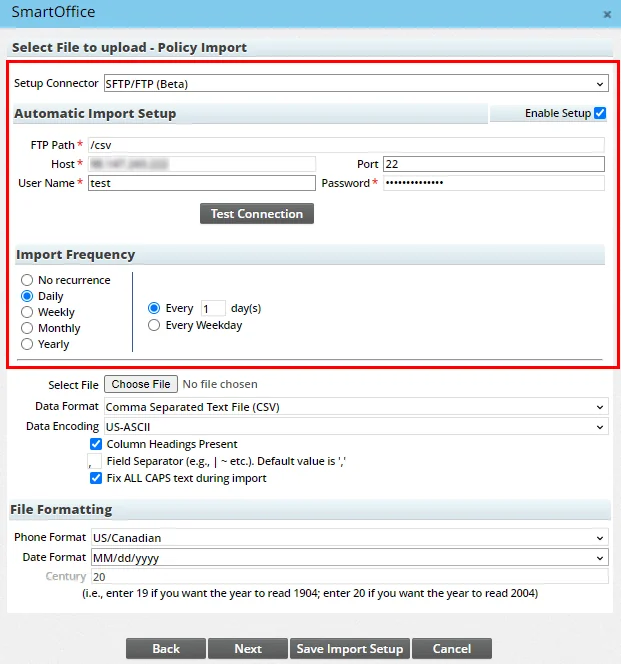
As part of this enhancement, two date columns named Last Occurrence and Next Occurrence were added to the Data Import Wizard's Import Setup List. These columns enable users to track when automatic imports last ran and when they are scheduled to run again. For more details, see SmartPolicies - Policy Import and SmartCommissions - Speed Receipts. (PMG-931903)
Other Enhancements
- Ability to resize policy detail dialog box: When a policy record's details open in a dialog box, the system now allows the user to resize the dialog box. This enhancement makes policy information more readable in offices that heavily customize the policy Basic Information content link. (PMG-921118)
- Stage change for Replaced status: The Replaced policy status is now linked to the Inactive stage (previously, it was linked to the Active stage). (PMG-938130)
Resolved Issues
- When a policy was copied, the copy was displaying the name of the user who created the original as well as the original's creation date. This issue was resolved. (PMG-933930)
- On policy lists, an issue was occurring when users tried to view policy warnings for multiple records at once. After the user selected the Yes button to confirm that only the highlighted record would be processed, SmartOffice was not displaying the Policy Warning List. This issue was resolved. (PMG-934415)
- An issue with Policy-category Dynamic Reports was resolved. In some instances, including columns from the Interested Party table was causing problems with calculated columns. To resolve this issue, columns from the Interested Party table are no longer available for that report category. (PMG-939228)
- An issue with adding an inactive advisor while creating a policy or group policy was resolved. When SmartOffice asked for confirmation that the user wanted to add an inactive advisor, selecting No was not removing the advisor. (PMG-939638)
SmartCaseManager
Featured Enhancements
Option to Not Auto-Generate Underwriting Requirements
Administrators can now configure the system to not generate standard underwriting requirements automatically. Under Setup > Policy/Case Setup > PCM Workflows > PCM Add Setup, a new Standard Underwriting Requirements section provides the option not to generate requirements for System-office carriers, office-hierarchy carriers, or all carriers. (PMG-932311)
Other Enhancements
- Ability to enter keywords while creating cases: The Pending Case Add Detail dialog box now features a Keywords field in the Basic Policy Information section under the Processing Type field. (PMG-932265)
- Column showing days from app signed to inforce: A new column labeled Days from App Signed to Inforce can now be added to pending case lists and Dynamic Reports. The column calculates the number of days between the signing of an insurance application and the placing of the case. To determine the signed date, SmartOffice looks at the case's Signed field or Application Signed status date; if both are present, the system uses the earliest of the two. (PMG-932386)
Resolved Issues
- An issue that was changing the labels on certain pending case fields to match the labels on certain custom fields on the same page layout was resolved. (PMG-911813, PMG-933834)
- Several user interface issues in policies and pending cases were resolved:
- Users were encountering missing, non-functioning and misaligned Pick Date buttons when updating the status histories of group policies, creating inforce request entries in pending cases or adding riders to new policies.
- In the Pending Case Add Detail dialog box, several date fields were not wide enough to display dates completely.
(PMG-932355)
- On the Pending Case content link of a presale activity, users who tried to change the status of the pending case more than once were finding that their changes were not being saved. This issue was resolved. (PMG-932374)
- Users who tried to recreate the standard underwriting requirements for a pending case were not seeing the results dialog box. This issue was resolved. (PMG-932440)
- In Policy/Case Setup, options selected in the PCM Add Setup and PCM Preferred Add sections were not being applied in some instances when users created pending cases. This issue was resolved. (PMG-932442)
- Several user interface issues affecting Edit Mode for underwriting requirements were resolved, including shuffled or uneditable columns, missing buttons, blank dialog boxes and unexpected scroll bar behavior. (PMG-932592)
- On the pending case Delivery content link, users who opened a record from the Policy Insured List were finding that the Address link was not working. This issue was resolved. (PMG-932701)
- In pending case Dynamic Reports, filtering on the Sub-Type column of the Product Extension table was not displaying the correct number of records. This issue was resolved. (PMG-933243)
- An issue with Interested Parties-category Dynamic Reports in the Pending Case report family was resolved. When the Product Name column was in the report but not as the first column, users who ran the report and selected a product name in the results were seeing rider details instead. (PMG-933433)
- On the Policy Insured List of a pending case, assigning the same contact to the Primary Insured role and the Co-Insured or Dependent Insured role was causing the page to freeze. This issue was resolved. (PMG-933807)
- When users attempted to customize the layout of the pending case Detail content link, the Important Contacts portlet was appearing blank in the layout editor. This issue was resolved. (PMG-933994)
- In Setup > Policy/Case Setup > Letter Setup > Requirement Generic, users who created an auto-send letter were not seeing the new letter on the Auto-Send Letter for Requirement Generic list because no columns were configured for the list layout. This issue was resolved. (PMG-934132)
- An issue with creating informal pending cases was resolved. The plan type that the user initially selected was not being reflected on the Pending Case Add Detail dialog box in some instances. (PMG-934213)
- In some instances, the following issues were occurring when users tried to access parent informal pending case information:
- Selecting the Formal Application content link was producing the error "The requested record or page cannot be displayed."
- Selecting any content link was displaying the message "Tag one record first."
- Selecting the Detail content link was displaying child case details.
(PMG-935818)
- Issues with pending cases created from presale activities were resolved:
- Selecting the Underwritten Amt link on the pending case Detail content link was producing a "failed to load object" error.
- In informal cases, the child case's Policy Advisor List was incorrectly displaying multiple advisor entries with different policy numbers and split percentages.
(PMG-935819)
- Users were encountering the error "Missing primary keys in URL" when they tried to add an E&O compliance status record during the pending case creation workflow. This issue was resolved. (PMG-935820)
- While creating an annuity pending case, users who added a risk class and then selected the new risk class to view it were encountering a "failed to load object" error. This issue was resolved. (PMG-935872)
- An issue with editing records in Policy/Case Setup under Licensing/Contracting Setup > Product License Types was resolved. Users who edited a record and then tried to save it with no province or LOB options selected were not being prompted to make those required selections. (PMG-936681)
- On the pending case Policy Transactions content link, adding a record to the Commissionable Premium Payment Transaction List was causing the information at the bottom of the list (Records Shown, Total Records and Records Tagged) to disappear. This issue was resolved. (PMG-937956)
- In new pending case requirement records, the toolbar icons in the Remarks section were misaligned. This issue was resolved. (PMG-938365)
- Clearing the Visible to Advisors option for POS and other requirements was making these records invisible to regular SmartOffice users as well as SmartView for Advisors users. This issue was resolved so that regular users can still view these records. (PMG-938870)
- In presale activities that have been converted to pending cases, selecting Menu > Link Opportunity from the presale Pending Case content link was producing a "failed to load object" error. This issue was resolved. (PMG-940272)
- On a list of informal pending cases, nothing was happening when users selected multiple cases and then selected Menu > Show Requirements. This issue was resolved. (PMG-940399)
- Two issues were occurring when a user with the SmartCase Viewer license selected the Menu > New (Comprehensive) 'Carrier' Record command on the Carrier List:
- Entering the carrier's name and selecting the Carrier-Specific Classes or Add SmartPad Entry button was closing the New (Comprehensive) - Insurance Carrier dialog box and creating the carrier record.
- The Business Address section of the New (Comprehensive) - Insurance Carrier dialog box was not aligned properly.
These issue were resolved. (PMG-940480)
- Users were unable to create pending cases using the Add New button when the Dynamic Report List was displayed. This issue was resolved. (PMG-940782)
- In the Medical Requirement Details section of pending case requirements, a dialog box layout issue was preventing users from entering new doctor information. This issue was resolved. (PMG-940853)
SmartBenefits
Featured Enhancements
Office/Agency Requirements for Group Cases
Users can now create office/agency requirements for group pending cases using new settings available at the carrier and group product levels.
On the carrier Underwriting Guidelines and Notes content link, when adding a record under Office/Agency Requirements, users can select the new For Group Policy option. This option displays group-specific options in the LOB drop-down list.
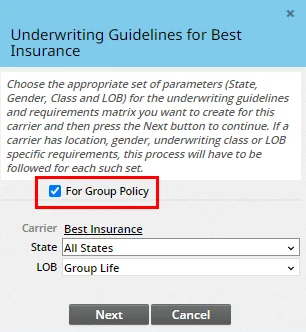
Also, in group product records, a new Office/Agency Requirements content link enables users to define product-specific office/agency requirements that override those defined in the carrier record. (PMG-932318)
Other Enhancements
- Changes for mandatory group policy numbers: The Policy # field is now mandatory only for group policies/pending cases in the Active or Inactive stage. Group policies/pending case records in all other stages can now be saved without a policy number. (PMG-937140)
Resolved Issues
- An issue with creating a group product while adding a group policy to the system was resolved. In the dialog box for entering the new product's details, users who tried to enter a product name that already existed were seeing an error, as expected, but the error was also causing the height of the dialog box to increase unnecessarily. (PMG-934082)
- Custom data associated with a group policy was not being deleted when the policy itself was permanently deleted. This issue was resolved. (PMG-936893)
- Copying a group product was not copying linked office/agency requirements to the new product record. This issue was resolved. (PMG-940662)
SmartCommissions
Featured Enhancements
Expected Commission Export
Users can now export the expected commissions for a policy or group policy to Excel, CSV, XML or tab-separated format. While viewing the Expected Commission List (Menu > List Commission Records), select Menu > List Options > Export List. Learn more about list export. (PMG-934204)
Other Enhancements
- Updated commission statement format: In the Generic Statement #4 commission statement format, the RIA Override column was renamed Agency Override to make the format usable by more SmartOffice customers. (PMG-938668)
Resolved Issues
General
- In Advisor Commission-category Dynamic Reports, the Plan Name column from the Policy table was not displaying any data. This issue was resolved. (PMG-932441)
- The SmartCommissions for Advisors module was calculating policy commissions based on the annualized premium instead of the annual premium with the modal factor. This issue was resolved. (PMG-937223)
- From the Deleted Records area, when a user tried to permanently delete a policy that had processed or reconciled commission records, the error that SmartOffice was returning was not appearing in the Error Log. This issue was resolved. (PMG-937375)
- On the advisor Commission content link, users who added records to the Advisor Payment List were finding that the toolbar icons in the Remarks section were not properly aligned. This issue was resolved. (PMG-938137)
- For SmartCommissions for Advisors users, the Menu > Commission Calculator command on the Policy List was not working. This issue was resolved. (PMG-938287)
- From the commission rate Detail content link, an issue was occurring when a user selected Menu > Related Policies to open the Linked Policy List. When the user printed the list using the Print All option, the printout contained random policy records instead of the policies displayed in the list. This issue was resolved. (PMG-941375)
Batch Processing
- An issue that was preventing users from opening PDF commission statements in batch processing records was resolved. (PMG-936058)
- An issue with exporting the Advisor Commission Check List was resolved. The record count and total cheque amount shown in SmartOffice Pro were different from the record count and total cheque amount shown in the export file. This issue was occurring when the list contained more than 500 cheques. (PMG-937104)
- Duplicate entries were appearing in the Advisor Commission Check List when certain commission batches were processed. This issue was resolved. (PMG-941953)
Speed Receipts
- Users were seeing an extra warning message when they tried to delete speed receipt transactions with a status of Partially Validated and Linked or Validated and Linked. This issue was resolved. (PMG-926951)
- In some instances, the system was not updating the status of commission records when transactions were reset in speed receipt records. This issue was resolved. (PMG-939479)
SmartInvestments
Resolved Issues
Investment Accounts
- After using the Advisor Reassignment feature, users were finding that the new advisor's name was not appearing in the Advisor Relationship List of reassigned investment accounts. This issue was resolved. (PMG-936208)
Integrations and Data Services
Enhancements
SmartIntegrator and SmartXchange
- Access to commission rate override points: Developers creating commission-related integrations with SmartOffice can now access the override point data in a commission rate record. This is possible using the new OverRideComm property of the CommRateDetail object in the SmartIntegrator API. (PMG-934377)
- Control of Hierarchy Locked option via API: To enable or disable the Hierarchy Locked option for records in the Policy Advisor List, developers can now use the newly exposed Locked property of the InterestParty object in the SmartIntegrator API. (PMG-935874)
- API access to commission rate paid mode: Developers creating commission-related integrations can now access the Paid Mode field in SmartOffice commission rate records using the PaidMode property of the CommRate object. (PMG-938336)
- Access to activity Web Meeting field through API: Developers using the SmartIntegrator API can now access the Web Meeting drop-down list in the Activity Detail dialog box through the new, searchable Activity.ActivityWebMeetingClients property. (PMG-939138)
- Simplified data dictionary access: Documentation of all objects and methods accessible via the SmartIntegrator API is now available from a new Setup > API Dictionary option in the SmartOffice side menu. Formerly known as the Data Dictionary, the API Dictionary is available only to users who have SmartOffice administrator rights. (PMG-939261)
SmartOffice Anywhere Changes
Featured Enhancements
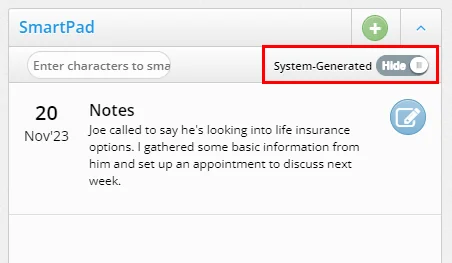
Ability to Hide System SmartPad Entries
In the SmartPad section of contact and other records in SmartOffice Anywhere, a new switch enables users to show or hide system-generated entries. Hiding these entries makes it easier to find manual entries.
(PMG-882251)
Resolved Issues
- When the SmartOffice Anywhere Dashboard was viewed on a large-screen device, the bottom border of the Recent Contacts section was extending too far down and was touching the calendar section. This issue was corrected. (PMG-935870)
- Buttons for accessing integrations were removed from the group policy detail screen and the investment positions list to restore consistency with SmartOffice Pro. (PMG-935964, PMG-937383)
- Users who accessed Settings in SmartOffice Anywhere were finding that their user information was not displaying. This issue was resolved. (PMG-936747)
- While using SmartOffice Anywhere on iOS devices, users were encountering an issue when they tried to add an activity action to an opportunity. Selecting View More on the Activity Details screen was pushing the Save button off the screen, making it inaccessible. This issue was resolved. (PMG-937007)
- When a user entered and saved an unformatted Mobile-type phone number in SmartOffice Anywhere, the system was not automatically formatting the number as it does with Business, Residence, and other number types. This issue was resolved. (PMG-938337)
- Access to integrations for SmartView for Advisors users in SmartOffice Anywhere was changed as follows to restore consistency with SmartOffice Pro:
- An integrations button was added to the advisor detail screen.
- The button for accessing integrations was removed from the investment positions list.
(PMG-940299)
- Elements of the user interface were updated to reflect Zinnia branding. (PMG-940971)
- An issue that was preventing users from saving mobile phone numbers in contact and advisor records was resolved. (PMG-941329)