Last updated: 2026-05-12
Release Notes - SmartOffice Pro Canadian Edition 11.1.23
About This Document
For general information about SmartOffice release notes, visit the Release Notes home page.
Revision History
These release notes may be revised after their initial publication. This section lists the dates of any revisions as well as a list of changes.
May 12, 2026
- Initial publication.
System Requirements
There are no changes to system requirements for this release. For current system requirements, see System Requirements.
French Locale
The strings for the new features are available in French locale.
What's New
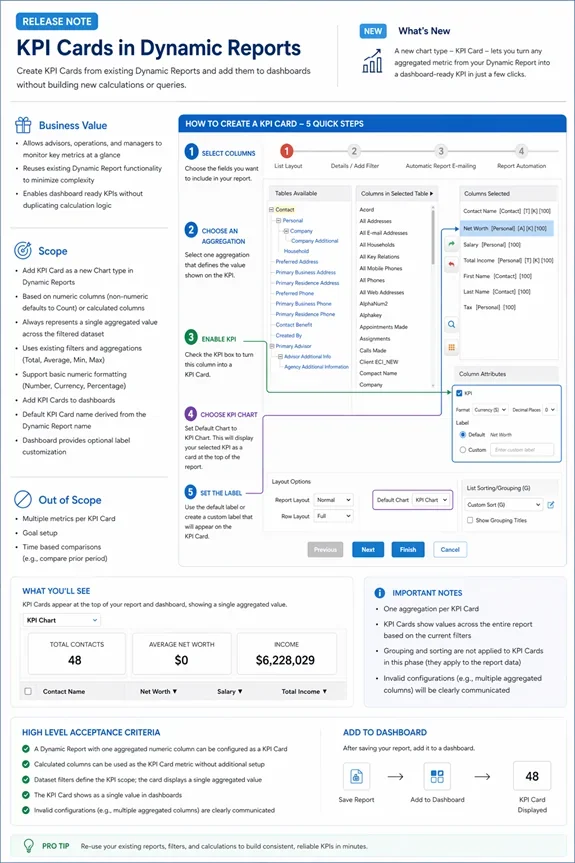
- New KPI Cards in Dynamic Reports, enabling users to turn report metrics into dashboard-ready KPIs using existing filters, aggregations, and calculated columns
- Faster, more flexible search across contacts, advisors, and cases
- Enhanced SmartOffice Anywhere (Mobile) experience with improved access to policies, investments, and client information
- Workflow, usability, and compliance improvements across the platform
Feature Enhancement
KPI Cards in Dynamic Reports
KPI Cards in Dynamic Reports let users turn report metrics into dashboard-ready KPIs with a single click, using existing filters, aggregations, and calculated columns — no duplicate setup needed.
- Create KPI Cards directly from Dynamic Reports with a single click
- Use your current filters, aggregations, and calculated columns — no duplicate setup needed
- Build KPIs from numeric fields or calculated columns; non-numeric fields automatically use Count
- Each KPI Card displays one aggregated value across your filtered dataset
- Define KPIs using existing aggregation options: Total, Average, Minimum, or Maximum
- Format KPI values as Number, Currency, or Percentage with configurable decimals
- Add KPI Cards to dashboards for quick, at-a-glance monitoring
- Default labels are auto-generated, with optional customization on dashboards
Faster & Smarter Search
Global Search Enhancements
Search has been upgraded to help you find records faster — even with partial or flexible inputs.
- Search using first name, last name, both, or "Last, First" format
- Supports partial and multi-word searches
- Matches across first, last, middle, maiden, and greeting fields
- Single-word searches return matches across both first and last names
- Multi-word searches intelligently match across name combinations
- Instant results as you type, with a "Show More" option for expanded results
Advisor Search Improvements
- Faster results for simple searches
- Improved accuracy for longer or more complex names
- Consistent behavior with contact search
Pending Case Search Improvements
- Search by first name, last name, full name, or "Last, First"
- Faster initial results with broader matching when needed
- Improved handling of multi-part and complex names
SmartOffice Anywhere (Mobile)
Enhancements to SmartOffice Anywhere make it easier to manage policies, investments, and daily tasks on the go.
Expanded Search on Mobile
You can now search directly within mobile for:
- Policies
- Investments (by account number, type, or contact)
- Policy notes
Investments & Accounts
- New Investments menu
- View recent accounts with key details
- Filter to show active accounts
Policy Management
- Access and manage policies directly from mobile
- Add new policies and view recent policies
Additional improvements:
- Cleaner, easier-to-read policy detail screens
- Key details remain visible across tabs
- Activities grouped into Upcoming and History
- Quick actions available via the ellipsis (…) menu
- Filter policies by type and stage
- Requirements tab shown only for pending cases
Faster Actions & Navigation
- Centralized Add button for quicker access
- Context-aware actions for contacts, activities, and SmartPad
- Activity actions moved into a simplified menu
UI & Navigation Improvements
- More consistent design across screens
- Alternating row colors for better readability
- Long text truncated with "…"
- Fixed bottom navigation (Contacts, Calendar, Tasks, Add)
- Slide-up menu for easier access
Smoother Mobile Interactions
- Swipe between tabs
- Action buttons hide on scroll and reappear when needed
- Activity actions accessible via menu instead of swipe
- Context-aware options for adding activities
Workflow & Task Management
Action & Task Improvements
- Create tasks while performing actions
- Reorder steps using drag-and-drop
- Mandatory steps clearly identified
Opportunity Updates
- Automatic stage ordering for consistency
- Custom stage order still supported
Action Visibility Improvements
- Action names are easier to view
- Improved visibility when adding actions
Email Automation Enhancements
- Send emails to individuals or groups
- Alerts for duplicate sends
- Email success/failure tracking
Required Field Validation
- Prompts when required fields are incomplete
- Helps prevent incomplete workflow steps
Additional Improvements
Feature Awareness
- New and beta features are clearly labeled
- Tooltips provide additional guidance
Activity Outcome Filtering
- Only relevant options shown based on workflow stage
Quick Notes Shortcut
- Press Ctrl + Q to quickly open Quick Notes
Button Clarity Improvements
- Improved visibility for Guideline and Requirement actions
Compliance
Automatic Email Archiving (BCC)
Outgoing emails can automatically include a BCC to support compliance and recordkeeping requirements.
- Applies to all email types
- Supports compliance and recordkeeping
- No impact to user workflow
Note: Available for SBE and Corporate environments only.