Last updated: 2026-01-12
Release Notes - SmartOffice 2026 Release 1
What’s New
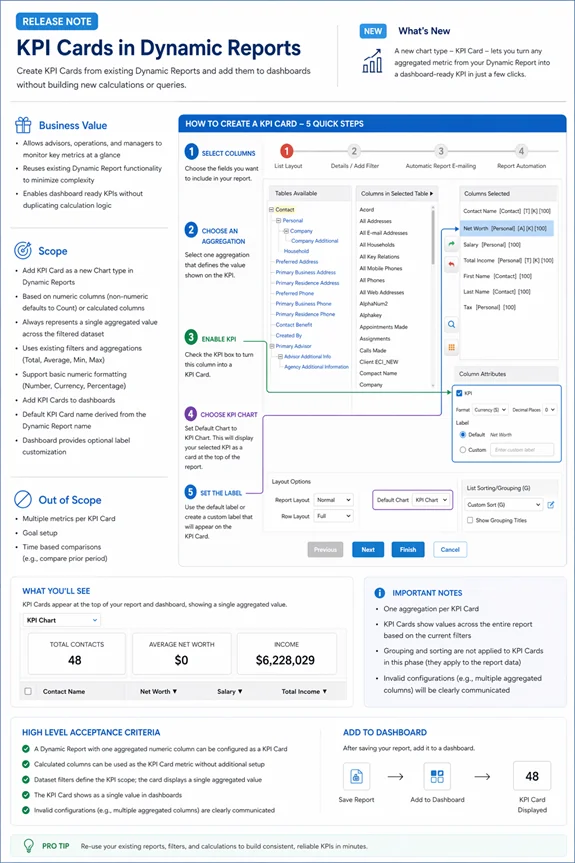
- New KPI Cards in Dynamic Reports, enabling users to turn report metrics into dashboard-ready KPIs using existing filters, aggregations, and calculated columns
- Faster, more flexible search across contacts, advisors, and cases
- Enhanced SmartOffice Anywhere (Mobile) experience with improved access to policies, investments, and client information
- Workflow, usability, and compliance improvements across the platform
KPI Cards in Dynamic Reports (SMART-3058, 2706, 2707, 2709, 2710, 2711, 2712, 2713, 2734,3589, 2848, 2708, 3311, 3357)
- Create KPI Cards directly from Dynamic Reports with a single click.
- Use your current filters, aggregations, and calculated columns—no duplicate setup needed.
- Build KPIs from numeric fields or calculated columns. Non-numeric fields automatically use Count.
- Each KPI Card displays one aggregated value across your filtered dataset.
- Define KPIs using existing aggregation options: Total, Average, Minimum, or Maximum.
- Format KPI values as Number, Currency, or Percentage with configurable decimals.
- Add KPI Cards to dashboards for quick, at-a-glance monitoring.
- Default labels are auto-generated, with optional customization on dashboards.
Faster & Smarter Search
Global Search Enhancements (SMART-923, 922, 884, 883, 882, 570)
Search has been upgraded to help you find records faster — even with partial or flexible inputs.
- Search using first name, last name, both, or “Last, First” format
- Supports partial and multi-word searches
- Matches across first, last, middle, maiden, and greeting fields
- Single-word searches return matches across both first and last names
- Multi-word searches intelligently match across name combinations
- Instant results as you type, with a “Show More” option for expanded results
Advisor Search Improvements (SMART-884, 883, 882)
- Faster results for simple searches
- Improved accuracy for longer or more complex names
- Consistent behavior with contact search
Pending Case Search Improvements (SMART-826)
- Search by first name, last name, full name, or “Last, First”
- Faster initial results with broader matching when needed
- Improved handling of multi-part and complex names
SmartOffice Anywhere (Mobile)
Enhancements to SmartOffice Anywhere make it easier to manage policies, investments, and daily tasks on the go.
Expanded Search on Mobile (SMART-1225, 1224, 731)
You can now search directly within mobile for:
- Policies
- Investments (by account number, type, or contact)
- Policy notes
Investments & Accounts (SMART-1263, 1149, 1148)
- New Investments menu
- View recent accounts with key details
- Filter to show active accounts
Policy Management (SMART-1116, 1114, 1051, 730, 729, 728, 727, 692, 691, 690)
- Access and manage policies directly from mobile
- Add new policies and view recent policies
Additional improvements:
- Cleaner, easier-to-read policy detail screens
- Key details remain visible across tabs
- Activities grouped into Upcoming and History
- Quick actions available via the ellipsis (…) menu
- Filter policies by type and stage
- Requirements tab shown only for pending cases
Faster Actions & Navigation (SMART-746, 745, 775, 807)
- Centralized Add button for quicker access
- Context-aware actions for contacts, activities, and SmartPad
- Activity actions moved into a simplified menu
UI & Navigation Improvements (SMART-1112, 1110, 1113, 1111, 656, 639)
- More consistent design across screens
- Alternating row colors for better readability
- Long text truncated with “…”
- Fixed bottom navigation (Contacts, Calendar, Tasks, Add)
- Slide-up menu for easier access
Smoother Mobile Interactions (SMART-655, 747, 807, 775)
- Swipe between tabs
- Action buttons hide on scroll and reappear when needed
- Activity actions accessible via menu instead of swipe
- Context-aware options for adding activities
Workflow & Task Management
Action & Task Improvements (SMART-1534, 1294, 556)
- Create tasks while performing actions
- Reorder steps using drag-and-drop
- Mandatory steps clearly identified
Opportunity Updates
- Automatic stage ordering for consistency
- Custom stage order still supported
Action Visibility Improvements (SMART-1253)
- Action names are easier to view
- Improved visibility when adding actions
Email Automation Enhancements (SMART-569, 387, 198, 197)
- Send emails to individuals or groups
- Alerts for duplicate sends
- Email success/failure tracking
Required Field Validation (SMART-1838)
- Prompts when required fields are incomplete
- Helps prevent incomplete workflow steps
Additional Improvements
Feature Awareness (SMART-800, 799, 798)
- New and beta features are clearly labeled
- Tooltips provide additional guidance
Activity Outcome Filtering (SMART-604)
- Only relevant options shown based on workflow stage
Quick Notes Shortcut (SMART-1320)
- Press Ctrl + Q to quickly open Quick Notes
Button Clarity Improvements (SMART-1290, 1346)
- Improved visibility for Guideline and Requirement actions
Compliance
Automatic Email Archiving (BCC) (SMART-2088)
- Outgoing emails can automatically include a BCC (when configured)
- Applies to all email types
- Supports compliance and recordkeeping
- No impact to user workflow
> Note: Available for SBE and Corporate environments only.