Last updated: 2025-12-03
Release Notes - SmartOffice 2016 Release 5
About This Document
For general information about SmartOffice release notes, visit the Release Notes home page.
Revision History
These release notes may be revised after their initial publication. This section lists the dates of any revisions as well as a list of changes.
September 30, 2016
- Initial publication.
October 20, 2016
- Core System: Added "New server-level sync configuration options" enhancement (PMG-680217) under "SmartOffice Sync for Microsoft Exchange" section.
- SmartInvestments: Added "Letters/Documents content link for account groups" enhancement (PMG-570899).
- Integrations and Data Services: Added solution for Orion investment data processing issue (PMG-648639).
- Integrations and Data Services: Added solution for reconciliation button issue for position-based investment data downloads (PMG-657727).
- SmartOffice Anywhere: Added "Opportunity search/add improvements" enhancement (PMG-663494).
- SmartOffice Anywhere: Added solution for activity access issue caused by navigating to SmartOffice Pro (PMG-668658).
- Minor text and formatting changes.
Release Overview
SmartOffice 2016 Release 5 is primarily intended to resolve performance and user interface issues identified in SmartOffice Pro Release 4. However, several SmartOffice Pro enhancements are included in the release. SmartOffice Anywhere has received enhancements in this release as well.
Enhancement Highlights
This section provides quick links to the featured enhancements in this release.
Core System
SmartOffice Anywhere
System Requirements
The system requirements remained unchanged in this release. For detailed system requirements, see System Requirements.
Note Regarding Text Changes in SmartOffice
This release may contain minor changes to text in dialog boxes and other areas of the SmartOffice user interface. Changes of this type are typically made to correct spelling, grammar, punctuation and other language-related issues. Such changes normally are not listed in this document unless they affect the way the application works.
SmartOffice Pro Changes
Core System
Featured Enhancements
Performance Improvements
SmartOffice Pro has been optimized to increase overall speed and performance. In particular, these enhancements boost the speed of menus and searches, as well as the responsiveness of the system when performing actions such as tagging and untagging records. (PMG-619721)
Other Enhancements
General
- Document viewing without plug-in: A new configuration setting (for enterprise customers only) allows all users on a SmartOffice server to view documents without having to install the Microsoft Plug-in for SmartOffice on their computers. When this setting is enabled, documents stored in SmartOffice open in read-only mode. Server administrators can enable this setting by editing the server config.xml file to change the content of the
element, which is a child of the element, to true. For example:
(PMG-657252)
- Changes for default landing page settings: On the Basic Info content link in User Preferences, users can now configure their default landing page for SmartOffice Anywhere as well as SmartOffice Pro. In addition, the landing page options are now labeled as follows for clarity:
- Default location at sign-in (SOPRO)
- Default location at sign-in (SO Anywhere)
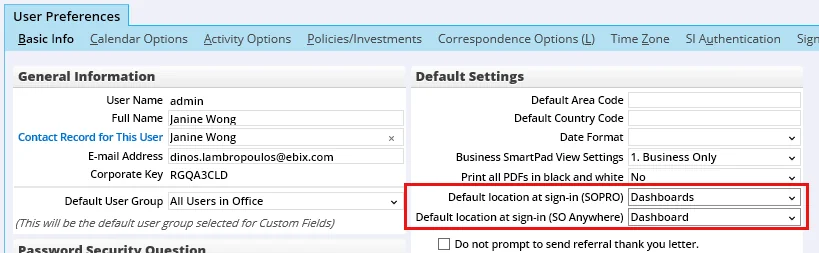
(PMG-664806)
- More custom fields: The number of custom fields in SmartOffice records was expanded to allow customers to track even more custom data. In any record containing a Custom content link, users will now find a total of 90 alphanumeric fields, 30 numeric fields, 61 date fields, 25 lookup fields, 30 integer fields and 30 yes/no fields. (PMG-665766)
- Sign-in/sign-out improvements: Changes were made to enhance the performance of the sign-in and sign-out processes. (PMG-675399)
- Activity reminder improvements: When users sign in, SmartOffice now checks for past activity reminders going back only two weeks and going forward one day. Previously, the system was checking for all past activity reminders, which was causing sign-in delays. This change optimizes the sign-in process. (PMG-675652)
Contact Management
- Database enhancement for deleted contacts: A RESTORELOG table was added to the SmartOffice database to record which user restored a contact from the Deleted Records area of the system. (PMG-666990)
PDF Reports
- More quote information for bunch reports: While configuring bunch reports, users now have access to additional information about any VitalTerm quotes displayed in the Document List. Previously, users had to open each file to determine which one to attach to the bunch. Now, a new Details column displays the term duration, basic face amount and insured risk class information for each quote. (PMG-667772, PMG-667792)
SmartOffice Sync for Microsoft Exchange
Note: These changes apply to enterprise customers only.
- New server-level sync configuration options: SmartOffice server administrators now have additional control over Exchange contact sync user setup options. Under the
element in the server config.xml file, a
The
The
SmartPad
- E-mail subject column in SmartPad: Users with list layout customization rights can now add the E-mail Subject column to the SmartPad list. The column displays the subject lines of posted e-mail messages. (PMG-666662)
Resolved Issues
General
- In lists, column totals were not aligning properly with their associated column values. This issue was resolved. (PMG-619443)
- In lists, the Primary Advisor column from the Contact, Business and Household Head tables was displaying a numeral instead of the advisor's name. This issue was resolved. (PMG-635151)
- An issue with custom contact page layouts containing the Investment Account List portlet was resolved. When the contact record was printed, the investment accounts listed in the printout did not match those displayed in the user's browser. (PMG-651032)
- An issue that was causing the search box's menu to remain open after the user selected a record was resolved. (PMG-656964)
- For Internet Explorer users, pressing the space bar to tag a record in a list was also causing the list to scroll down unexpectedly. In addition, the Page Up, Page Down, Up and Down keys were not working as shortcut keys for list navigation. These issues were resolved. (PMG-657266)
- When typing search queries in the Search box, users were noticing a flickering effect as the list of results dynamically refreshed. This issue was resolved. (PMG-660542)
- An issue with searches performed from the search box was resolved. In the list of matching results that appears as the user types, selecting a result using the keyboard was opening the wrong record. (PMG-660547, PMG-629950)
- After selecting the About option from the profile menu, users who tried to navigate to other areas of SmartOffice were finding that the application was unresponsive. This issue was resolved. (PMG-662562)
- Users who clicked the See Data For button and then selected the All Users or Inactive Users option were seeing no change in the list of available users. This issue was resolved. (PMG-664421)
- When attempting to use the Mass Copy and Apply command to copy user rights from one user account to other accounts, users were unable to select the source user account. This issue was resolved. (PMG-667975)
- An issue that was causing column labels to display an extraneous "ñ" character was resolved. (PMG-672315)
- Issues with goal chart colors were resolved. (PMG-672402)
- In some lists, users were seeing no columns or data, only check boxes. This issue was resolved. (PMG-672674)
- An issue with resizing column widths in lists was resolved. When users navigated away from a list and then navigated back, the modified column widths were not being retained. (PMG-674608)
- Chrome users who reloaded the page at any point during a SmartOffice session were seeing blank entries when they accessed the side menu's History tab. This issue was resolved. (PMG-674860)
Alert Center
- A performance issue affecting the Alert Center was resolved. (PMG-673322)
Contact Management
- On the contact Personal content link, users who clicked the primary advisor's name to navigate to the advisor record were finding that they could not access the advisor's Custom content link. This issue was resolved. (PMG-566290)
- In contact lists, the value displayed in the Age column was not reflecting the contact's age as displayed on the contact Personal content link. This issue was resolved. (PMG-668384, PMG-668420)
- An error that was preventing users from deleting column groups from custom contact page layouts was resolved. (PMG-674861)
Correspondence
- An error that was occurring when e-mail correspondence was sent to a contact with multiple preferred e-mail addresses was resolved. (PMG-656827)
- An e-mail posting issue was resolved. When the office was configured to post the e-mail subject only, SmartOffice was posting the message body if the subject was blank. This issue was resolved. (PMG-629603)
- In the Correspondence Wizard, users who tried to print labels for a set of contacts were finding that the sorting options they selected were being ignored in the final output. This issue was resolved. (PMG-662187)
- An issue with adding Cc e-mail recipients in the Correspondence Wizard was resolved. Users were finding that these recipients were being retained in the wizard when future correspondence was generated. (PMG-666725)
Dynamic Reports
- When configuring Dynamic Report filter criteria, users could not select the Ignore year option for date columns after selecting certain date ranges. This issue was resolved. (PMG-579516)
- In activity Dynamic Report results, an issue that was causing SmartOffice Pro to become unresponsive when users tried to edit activities was resolved. (PMG-664692)
- When creating filter criteria for a Dynamic Report, users who selected the Advanced option for a date column were unable to select a date range. This issue was resolved. (PMG-664877)
- An issue with activity Dynamic Reports added to home page tabs was resolved. Users were encountering page refresh and other issues when they tried to modify activities from these reports. (PMG-665114)
- When analytic (Excel) reports were run, custom column labels were being replaced by their default labels in the output. This issue was resolved. (PMG-671031)
- When run from a child office, Dynamic Reports configured to display activities created in a parent office were displaying activities created in other child offices. This issue was resolved. (PMG-672766)
- When a Dynamic Report included certain contact custom fields, running the report directly from Excel was displaying no results. This issue was resolved. (PMG-674494)
- An issue with running analytic (Excel) reports containing run-time filters from SmartOffice Pro was resolved. The dialog box that prompts users to enter filter values was missing fields for entering alphanumeric custom field values. (PMG-676058)
PDF Reports
- Users who tried to add a household to the Member List of a household report set were encountering an issue with the search feature. Blank household searches were working normally, but searching for a specific household was producing no results. (PMG-632776)
- Two issues with report set management were resolved:
- When a user created a set by clicking the New button in the Search Report Sets dialog box, the user was not being taken to the set Detail content link.
- On the Report Set List, users who selected the Mass Modify command or tried to customize the list layout were finding that the Description column was labeled "ssHeadRptDescription." This issue was resolved.
(PMG-636610)
- In PDF reports, an issue that occurred when users selected certain run-time options was resolved. Some options were not being saved after they were selected, even though the reports were being generated correctly. (PMG-671217)
SmartOffice Sync for Microsoft Exchange
Note: These changes apply to enterprise customers only.
- In the server config.xml file, setting the
- When contacts and activities were synchronized to SmartOffice from Exchange sync, SmartOffice was automatically overwriting the SourceApp column value (9) that indicated the record was created by Exchange sync. This issue was resolved. (PMG-674788)
- Exchange sync users were able to modify certain options in active Exchange sync setups despite not having administrator rights. This issue was resolved. (PMG-678900)
SmartPad
- An issue that was preventing users from resizing the SmartPad dialog box was resolved. (PMG-632481)
- After the user edited and saved a document previously posted to the SmartPad, the original memo date of the SmartPad entry was changing to the current date. This issue was resolved. (PMG-650301)
- When trying to use the Upload/Link File command in the SmartPad, users were encountering the following error: "Document will not be posted to SmartOffice as the contact information is not available." This error was resolved. (PMG-663851, PMG-670328)
- The Search Notes command in the SmartPad was returning an error when the date range was set to All. This issue was resolved. (PMG-669132)
SmartCalendar
Resolved Issues
- On the Calendar Agenda list, the Days in Active Status column was not sorting properly. This issue was resolved. (PMG-645313)
- An issue with the comprehensive activity outcome workflow was resolved. When synchronized from Outlook, activities containing text formatting in their descriptions were not allowing users to complete the workflow. (PMG-647274)
- In all calendar views, the Go to Linked Record command on the Tasks list was not working. This issue was resolved. (PMG-655997)
- An issue with new-activity alerts was resolved. When users created activities and opted to send e-mail alerts to participants, the alerts were not being sent, even when the participants' user preferences were configured to receive such alerts. (PMG-657044)
SmartOpportunities
Resolved Issues
- While adding a related contact to the opportunity Related Resources/Competition content link, users were finding that the List All Relations button was not working. This issue was resolved. (PMG-660305)
- When Google Chrome users accessed the Household tab of a business record and then navigated to the Policies content link, they were encountering an issue with the Show Linked Opportunity command. The command was displaying the opportunity record, but the Stage Actions for Current/Previous section of the record did not contain scroll bars. This issue was resolved. (PMG-661388)
SmartRecruiting
Resolved Issues
- On the candidate Interview/Action content link, users who viewed the details of an interview were finding that the Score 1 and Score 2 fields were too small. This issue was resolved. (PMG-666150)
- An issue with the candidate rejection workflow was resolved. When the user selected the Follow up with this candidate in option, no follow-up activity was being created. (PMG-672399)
- When the layout of the candidate Personal content link was customized to include the SmartPad portlet, users who tried to create a SmartPad entry from the portlet were encountering an error. This issue was resolved. (PMG-672408)
- During the candidate rejection workflow, users who clicked the Add to Set hyperlink were unable to create a set because the New button was missing. The button was restored. (PMG-672409)
Advisors/Agencies
Enhancements
General
- Presale result class field enhancement: On the presale activity Detail content link, the character limit of the Result Class field was increased to 256 from 64. (PMG-671250)
Resolved Issues
General
- Advisor continuing education records that did not contain detailed information were not appearing in advisor/agency compliance Dynamic Reports. This issue was resolved. (PMG-645049)
SmartView for Advisors
- For SmartView for Advisors user accounts, the Open Call Scripts command was removed from User Preferences as well as investment account, position and security records. (PMG-612468)
SmartPolicies
Enhancements
- New life plan types: Two new life insurance plan types were added to the system: group universal life (GUL) and survivorship universal life (SUL). (PMG-620065)
- New group policy paid-to field: The Sys Paid-to field, which was previously available only in individual policies, was added to the group policy Detail content link. The field, which is visible only to SmartCommissions users, is read-only and specifies the Paid-To/Next Due date of the last commission transaction at the point of reconciliation in Carrier Posting. (PMG-625624)
- Higher character limit for policy relationship remarks: In policy relationship records, the character limit of the Remarks field was increased to 1,024 from 255. This change resolves an issue that was preventing users from saving remarks. (PMG-628830)
Resolved Issues
- Riders added to parent multi-life policies were appearing in linked child policies as well. This issue was resolved. (PMG-634834)
- During the policy import process, an issue was causing the status of policy riders to be deleted in SmartOffice. This issue was resolved. (PMG-654745)
- When a user accessed an electronically downloaded policy by clicking the View Policy link in an activity record, the policy information was editable instead of read-only. This issue was resolved. (PMG-671367)
- Policy-category Dynamic Reports that were configured with e-mail rules were producing errors. This issue was resolved. (PMG-673854)
Insurance Products and Carriers
Enhancements
- New carrier name field for reports and letters: A field labeled Insurance Company was added to the carrier Misc Information content link. The field is intended for use in Dynamic Reports and correspondence when the user wants to refer to the carrier by a name other than the default name provided by the resource office. (PMG-667476)
Resolved Issues
- Users who selected Insurance > Underwriting Guidelines from the side menu were finding that the default line of business and gender in the Search Underwriting Guidelines dialog box were Annuity and Female, respectively. This issue was resolved so that the defaults are now Life and Unisex. (PMG-666637)
SmartCaseManager
Enhancements
- Improved workflow for closing cases: When the system asks the user whether any follow-up dates for a closed case should also be removed, clicking the Yes button now also changes the status of any outstanding requirements to Canceled. This change allows users to run reports for requirement aging that exclude closed cases and their requirements. (PMG-589302)
- Improved generation of requirements: Two change were made to enhance the way in which standard underwriting requirements are generated in pending cases:
- A lack of gender information for the insured no longer prevents unisex requirements from generating.
- Proper error messages now appear when generation does not occur, such as when the face amount or state was missing.
(PMG-636729)
- New case status choices: Two status options were added for pending cases: Await Exam and Await Agent Signatures. Both belong to the Underwriting stage. (PMG-667475)
- New requirement ID column for Insurance Sync: A Provider Requirement ID column is now available on all pending case requirement lists. The Insurance Sync feature uses this column to more accurately match requirements between the agency's office and the advisor's office. (PMG-670442)
Resolved Issues
- When the system created a Compliance-type advisor request, the associated carrier was appearing in the request itself but not in the Advisor Request List. This issue was resolved. (PMG-609528)
- Errors that users were encountering when trying to send case status reports to advisors were resolved. The errors were occurring when users selected the By selected pending cases or By selected advisors case status option. (PMG-665154)
- On the pending case Requirements content link, sorting the list of requirements on the Latest Changes column was producing an error. This issue was resolved. (PMG-666202)
- In the tables created when the PCMStatus2 and PCMStatus5 merge codes were expanded, the column widths were not aligned properly. This issue was resolved. (PMG-668089)
- When using the Quick Receipt feature for a pending case underwriting requirement, users were finding that the remarks they entered were not being saved. This issue was resolved. (PMG-670441)
- Two issues affecting the Pending Case Add Detail dialog box in newly created offices were resolved:
- Users who selected a carrier and then clicked the Plan Name hyperlink were seeing a blank product list.
- Several fields were missing.
(PMG-673162)
- On the pending case Detail content link, users who checked the Issued box for a submitted pending case were encountering layout inconsistencies on the Issued screen that were making information difficult to read. This issue was resolved. (PMG-677339)
SmartCommissions
Enhancements
General
- Export enhancement for commissionable transactions: When commissionable policy transactions are exported to Excel from the Policy Transaction content link, the Num1 and Num2 fields are now formatted as currency. (PMG-666198)
- New merge codes for commission premium: Two merge codes were added to display commission premium information in correspondence:
- ActiveLifePoliciesYTD: This merge code displays a five-column table showing life policies that have an Active-stage date within the year-to-date period and that are visible to advisors. The columns displayed are Carrier, Product, Policy #, Inforce Date and Commission Premium.
- ActiveLifeCommAnlzdPremYTD: This merge code displays the total commission premium for all life policies that have an Active-stage date within the year-to-date period and that are visible to advisors. Policy details are not displayed.
(PMG-671675)
Batch Processing
- Improved Enterprise View visibility: While processing a batch with the Include Adjustment Commission Entries option enabled, Enterprise View users can now see child-office advisors listed. (PMG-664273)
Resolved Issues
General
- An issue that was preventing parent-office Enterprise View users from seeing modal fee and product fee information for parent- and resource-office products was resolved. The issue was occurring when a child office had the Restrict Parent Office Impersonate Mode option enabled and the parent-office viewer was using the View Data from Selected Offices within your Hierarchy Enterprise View mode. (PMG-663179)
- Users who tried to assign an advanced commission split to a policy were finding that the drop-down list containing the available split definitions was too small. This made it difficult to select a split definition, especially when many definitions were available. This issue was resolved. (PMG-663600)
- Several issues affecting SmartCommissions for Advisors users were resolved:
- Users were encountering issues when they tried to manually add commission records to the Expected Commission List of an advisor check posting.
- The Advance Commission command accessible from the advisor check posting Detail content link was not working.
- When users entered a paid commission that was not equal to net expected amount and then created a balance due, the payable commission value was not being updated accordingly.
(PMG-664998)
- Two issues with policy rider commissions were resolved:
- Commissions were not being calculated for riders with a status other than Inforce.
- Users were unable to select resource-office product options for riders.
(PMG-665468)
- Two issues with SmartCommissions users and licensing/user rights were resolved:
- When a user's SmartOffice tier license was downgraded to Performance from Brokerage + Commissions, the user still had access to Commission-category Dynamic Reports.
- Users who did not have rights to the SmartCommissions module were still able to access Commission-category Dynamic Reports.
(PMG-671716)
- On the Contract List, the Unlink Associated Cases command was not working. This issue was resolved. (PMG-672833)
- Chrome users who tried to apply an advanced commission split to a policy were finding that the OK and Cancel buttons in the dialog box were missing. This issue was resolved. (PMG-677333)
- After selecting Insurance > Contracts from the side menu, users who searched by carrier name were encountering an issue. On the Contract List, when these users created a contract, they were unable to use the Edit Agent Contracts and Mass Delete Agent Contracts commands on the new contract. This issue was resolved. (PMG-678538)
Batch Processing
- An error that was occurring when users generated advisor commission statement PDFs was resolved. The issue was caused by carrier names containing parentheses. (PMG-675249)
- After a batch was processed, users who viewed the list of checks under the minimum check amount were finding that some checks were missing. This issue was resolved. (PMG-676981)
Carrier Posting
- When any alphanumeric column from the Advisor Custom table was added to a carrier posting Dynamic Report, the report was not displaying all of the expected records. This issue was resolved. (PMG-651487)
SmartInvestments
Enhancements
Investment Accounts
- Letters/Documents content link for account groups: A Letters/Documents content link was added to account group records, enabling users to post correspondence and files related to an account group. As part of this enhancement, PDF report packages that are linked to an account group report set are now automatically posted to this content link instead of the associated contact's Letters/Documents content link. (PMG-570899)
Resolved Issues
General
- On the following lists, the filter drop-down list was positioned next to the page title instead of under it:
- Investment Security List
- Investment Asset Allocation Exception Report
- Report Set List
- PDF Report List
This issue was resolved. (PMG-663473)
Investment Accounts
- A merge code issue that was causing incorrect investment account numbers to be inserted into correspondence was resolved. (PMG-659820)
- Several issues with investment account custom fields were resolved:
- Customized field labels for these fields were not displaying properly in account list views.
- The Account Custom table was missing when users tried to customize the account list layouts.
- Accounts-category Dynamic Reports in the Investment report family were not visible in SmartOffice.
(PMG-671514)
- When columns from the Import table were added to the Global Investment Account List, the list was not displaying any records. This issue was resolved by removing the Import table from the list of tables users can choose from when customizing this list. (PMG-673191)
Investment Positions
- A navigation issue on the contact Account Position tab was resolved. When users tagged multiple positions and then tried to navigate to a different content link, the system was informing them that only the highlighted record would be processed. But when these users clicked the Yes button to continue, nothing was happening. (PMG-639961)
Integrations and Data Services
Enhancements
Inforce Policy Import
- Enhanced error handling: For policy feeds, the Import Log was improved to inform the user when a missing plan name in the feed may have caused a product record to not be processed. (PMG-646005)
Investment Data Downloads
- Improved logic for closed positions: The logic by which investment positions are closed in SmartOffice when data for a position is not present in the feed was enhanced.
- Positions are now closed on the first day that the data is missing from the feed.
- When a position is closed incorrectly due to a system issue, a position history record indicating the number of shares as zero is now inserted. When the corrected data is received, the system updates the position history to reflect the correct values.
- A "safety net" feature now prevents the system from closing any position if 70% of the positions in the office from the same data provider are being closed.
(PMG-657706)
- Improved logic for closed accounts: The logic by which investment accounts are closed in SmartOffice when data for an account is not present in the data feed was enhanced. Now, when an account is missing from the feed for more than a few days, all of the account's positions are closed, but the account remains open in SmartOffice. The task of closing the account is left to the user. This logic gives ultimate control over the status of each account to the user instead of the feed, and it leaves the account record intact should positive balance data reappear in the feed. (PMG-660342)
- Multi-file import for InfoDirect: Users who download client investment data from Pershing InfoDirect can now import more than one downloaded file into SmartOffice at the same time. (PMG-661310)
Pending Case Downloads
- Data mapping improvements: Two improvements were made to the way in which downloaded pending case data is mapped to SmartOffice fields:
- Data from the
- Data from the
(PMG-670064)
Resolved Issues
Investment Data Downloads
- An issue that was preventing investment data downloads from Orion from being processed in SmartOffice was resolved. (PMG-648639)
- In the Data Import Log, the link to start the reconciliation process was appearing for position-based investment data downloads. Because reconciliation applies only to transaction-based downloads, the link was removed for position-based downloads to prevent confusion. (PMG-657727)
- An issue that was causing the Reconciliation Report to regenerate when the user clicked the View More, Next and Record Count links was resolved. (PMG-659363)
- In the Data Import Log, users who clicked the first-column hyperlink on the Fixed Positions, New Positions or Out of Balance Positions report were encountering an error. This issue was resolved. (PMG-663940)
- Issues that were causing the processing of Albridge data downloads to fail were resolved. (PMG-670923, PMG-671249)
Pending Case Downloads
- A number of user interface and display issues that were interfering with HO pending case management were resolved. (PMG-663374)
SmartOffice Anywhere Changes
Note: SmartOffice Anywhere changes are also summarized on the Release History page in SmartOffice Anywhere Help.
Featured Enhancements
See Data Assigned to Other Users

next to the search box to specify the users (note that this button is available on large screens only). (PMG-652216)
Other Enhancements
- Business key relation enhancements: SmartOffice Anywhere now performs the following actions when the user adds a business to a contact record:
- The contact is added to the business's business relations with a contact role of Employee.
- The contact is added to the business's key relations.
- The contact is added to the business's employee census.
These same actions are performed when the user links an agency to an advisor record. (PMG-652632)
- Opportunity search/add improvements: On the Opportunities List, the search type is now set to Process by default. In addition, on the Add Opportunity screen, the first field is now Process. (PMG-663494)
- Landing page preference enhancement: When a user navigates from SmartOffice Pro to SmartOffice Anywhere using the profile menu option, the user is now taken to the landing page specified in the user's SmartOffice Anywhere settings. Previously, the user was always being taken to the SmartOffice Anywhere Dashboard. (PMG-665502)
- New Set List column layouts: The column layout of the Set List was changed to provide users with more relevant information. The changes are as follows:
- On small screens, the list now contains the Set Name, Members and delete button columns.
- On large screens, the list now contains the Set Name, Description, Members, Created On, Modified On, Filter Only and delete button columns.
(PMG-667988)
Resolved Issues
- When printed, the Presale List was displaying an extra column. This issue was resolved. (PMG-603617)
- Some Dynamic Reports were not displaying column totals when run in SmartOffice Anywhere. This issue was resolved. (PMG-610118)
- An issue that occurred when a user viewed another user's calendar was resolved. When the user refreshed the page, the calendar and task screens were displaying the sign-in user's name instead of the name of the user whose calendar was being viewed. (PMG-631950)
- An issue that was preventing key relations from displaying for business records was resolved. (PMG-652379)
- After accessing SmartOffice Pro using the SmartOffice Pro command in the SmartOffice Anywhere profile menu, users were encountering issues accessing activities in SmartOffice Pro. This issue was resolved. (PMG-668658)