Last updated: 2025-12-03
Release Notes - SmartOffice 2017 Release 3
About This Document
For general information about SmartOffice release notes, visit the Release Notes home page.
Revision History
These release notes may be revised after their initial publication. This section lists the dates of any revisions as well as a list of changes.
October 30, 2017
- Initial publication.
November 6, 2017
- Release Overview: Added a link to the Release 3 overview video.
- Minor text and formatting fixes.
Release Overview
SmartOffice 2017 Release 3 features improvements to SmartOffice's file posting, password management, two-step authentication and calendar management features. This release also resolves performance, user interface and other issues identified in SmartOffice 2017 Release 2 and earlier, including an issue that was preventing drag-and-drop rescheduling of calendar activities .
For a visual overview of this release, see our video.
Enhancement Highlights
This section provides quick links to the featured enhancements in this release.
Core System
Agency Management
Integrations and Data Services
System Requirements
Because Microsoft recently ended extended support for Office 2007, SmartOffice no longer supports integration with that product.
For current system requirements, see System Requirements.
Important Changes to Default Settings
This section highlights notable changes to SmartOffice settings and changes to system default settings that may alter existing workflows, reports and other areas of the system.
- New default account roll-up option: In new investment account records, the default roll-up option is now Current Position Value instead of Transactions. This makes the account creation process more convenient for the majority of SmartOffice users, who do not track transaction data. (PMG-676239)
Note Regarding Text Changes in SmartOffice
This release may contain minor changes to text in dialog boxes and other areas of the SmartOffice user interface. Changes of this type are typically made to correct spelling, grammar, punctuation and other language-related issues. Such changes normally are not listed in this document unless they affect the way the application works.
SmartOffice Pro Changes
Core System
Featured Enhancements
Browser-Based File Posting
Users now have the option to post files to SmartOffice entirely within the browser, without using the Microsoft Plug-in for SmartOffice. This enhancement makes file posting available to users who choose not to install the plug-in (or who are unable to install it for any reason).
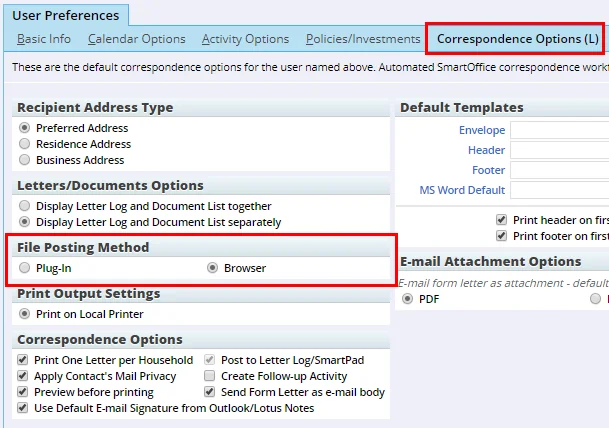
To switch to browser-based file posting, go to User Preferences > Correspondence Options and select Browser under the new File Posting Method section.
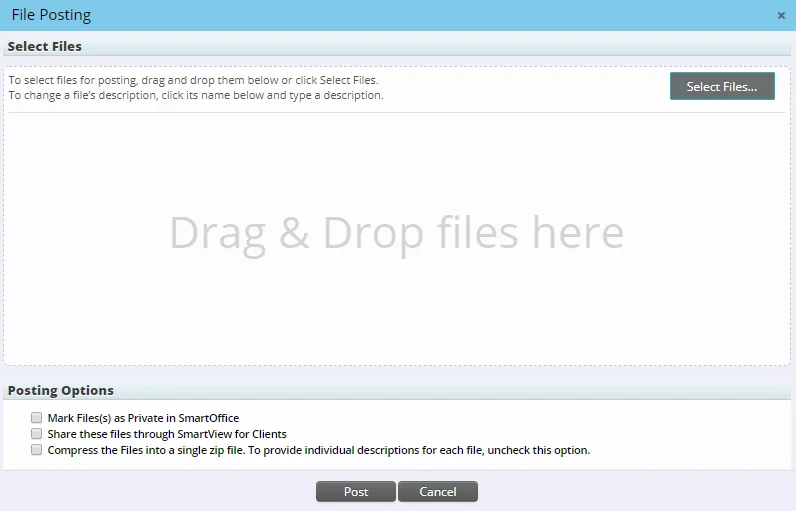
Once that option is enabled, users who try to post files to SmartOffice see the new File Posting dialog box, which features both drag-and-drop selection of files as well as a Select Files button for choosing the files to post.
Note that browser-based file posting currently has a few limitations compared to plug-in-based file posting:
- Multiple files cannot be posted as a single compressed (.zip) file.
- There is no option to link to the files on the local computer instead of posting them.
- No free-form keyword entry is available; users can assign only pre-defined keywords to posted files.
For more information, see the File Posting topic. (PMG-744195)
Improved Password Reset Process
The process of resetting a user's password using the "Forgot password?" link on the SmartOffice sign-in page has been improved. When SmartOffice asks the user to provide the answer to his or her security question, users who have forgotten the answer can now click a new I forgot the answer to my security question link. This action sends a new, temporary password to the e-mail address associated with the user's SmartOffice account. (PMG-703390)
Two-Step Authentication Enhancements
Two-step authentication now allows for greater flexibility in specifying how often the system prompts users for a verification code at sign-in:
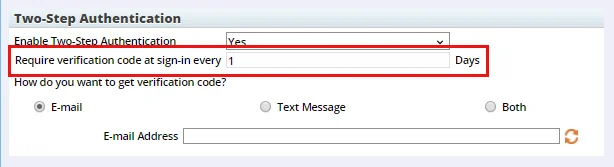
- Users can now tell the system to remember the last successful verification for a specified number of days. In User Preferences, on the 2-Step Authentication content link, users can enter the number of days in the new Require verification code at sign-in every \_\_ days field. For example, if the user enters a value of 5, the system will not ask for verification again for five days following a successful verification.
- Office administrators can specify the maximum number of days that users are allowed to enter in the field described above. In Office Settings, on the Security Policies content link, the administrator can enter this maximum in the new Two-Step Authentication Caching Maximum (Days) field.
Users who try to enter a value that exceeds the office maximum receive an error indicating the maximum number of days allowed. (PMG-757778)
Other Enhancements
General
- Expanded access to Compliance View: In enterprise environments, SmartOffice Pro now allows the Compliance View user right to be assigned to a user who has no administrator user rights. Previously, a Compliance View user had to have the Administrator: User Rights & Creation/Licenses/Groups user right. (PMG-748344)
Dynamic Reports
- Preferred phone info in household reports and lists: In household Dynamic Reports and lists, users can now add columns from the Preferred Phone table for the household head. The Preferred Phone table appears under the Household Head table in the List Layout Customization dialog box. (PMG-721540)
Correspondence
- More user input merge codes: Ten additional run-time user input merge codes are now available for use in correspondence, bringing the total to 20. The new merge codes are labeled UserInput11 through UserInput20. The new fields are also accessible to developer partners through SmartIntegrator. (PMG-711691)
- Better sender information in e-mail correspondence: Regular e-mail sent from SmartOffice now includes the sender's name in the From field in addition to the sender's e-mail address. Previously, only e-mail sent from specific modules (e.g., SmartCaseManager) was displaying the sender's name. (PMG-749427)
Resolved Issues
General
- When the Search box contained text, clicking the box was not automatically selecting all of the text. This issue was resolved. (PMG-722087)
- Two Protect Communication History issues were resolved:
- When attempting to open a document from the SmartPad, users were seeing the prompt about viewing the document in read-only mode, but clicking Yes was not displaying the document.
- When opening a document from the Letters/Document content link of a record, users were not seeing the prompt about viewing the document in read-only mode. Instead, the document was opening immediately and was editable.
(PMG-724040)
- When attempting to re-enable disabled user accounts, administrators were encountering an error stating that there were not enough tier licenses available, even when licenses were available. This issue was resolved. (PMG-727313)
- The Search box was not displaying the "X" button that enables users to quickly clear the contents of the box. The button was restored. (PMG-728223)
- Several issues with the Financial Calculator utility were resolved, including missing sections and section labels, non-functioning drop-down lists and buttons, errors and sudden sign-outs. (PMG-750098)
- An error that users were encountering when navigating the Detail content link of a job agent was resolved. (PMG-753287)
- An issue that was causing SmartOffice Pro to sign some users out of the system repeatedly was resolved. (PMG-753462)
Contact Management
- An issue with the business Employee Census content link was resolved. Users who imported employees using the Employee Census Import command were not seeing the imported records until the page was refreshed. (PMG-727931)
- Several record sharing issues were resolved:
- When a specialist tried to accept a shared record, the Accept Shared Records From These Offices dialog box was excessively large, and some buttons were not working as expected.
- When the specialist clicked the sharing notification in the Alert Center, the system was displaying the accept/reject options in the main SmartOffice window instead of a dialog box.
(PMG-744173)
- An issue that was causing custom fields from one SmartOffice module to appear in records from other modules was resolved. (PMG-745313)
- On the contact Key Relations content link, an issue with using the Household-Key Relations Sync command on a contact with no associated household was resolved. The system was asking whether a household should be created for the selected contact, but clicking the Yes button was doing nothing. (PMG-749043)
- In the List Layout Customization dialog box for the Contact List, users who clicked the Search Column button were finding that the cursor was not automatically appearing in the Column Name field. This issue was resolved. (PMG-752609)
- Users were unable to copy information from SmartOffice contact fields using the shortcut menu (i.e., by right-clicking). This issue was resolved. (PMG-752858, PMG-756328)
- An issue with mass modifying columns on the business Employee Census content link was resolved. When the system displayed a confirmation message and the user clicked the Yes button, the confirmation was not closing. (PMG-754910)
- An issue with the Make/Receive Phone Call command was resolved. The issue occurred after the user selected the Outgoing Call option and filled in the activity details. An error was occurring when the user tried to mark the activity done to complete the workflow. (PMG-755428)
- Chrome users who tried to print the contact Personal content link were seeing only a partial screen. This issue was resolved. (PMG-756202)
- The warning message that appears when users delete contacts was stating incorrectly that SmartOffice periodically empties the Deleted Records area of the system. The message was revised to provide instructions to users about how to restore or permanently remove deleted records. (PMG-759541)
Correspondence
- Several Correspondence Wizard issues were resolved:
- In Step 4, when a user added a header and footer in the Preferences section, these choices were not being retained the next time the wizard was run.
- In Step 5, users were receiving an error when they applied a Hide Column filter to the Reason column in the recipient problem list.
(PMG-651360)
- In correspondence, merge codes for household custom fields were not displaying any data when expanded. This issue was resolved. (PMG-725541)
- Users who did not have the Post to Letter Log/SmartPad option selected in User Preferences were finding that the system was still posting sent letters to the Letter Log. This issue was resolved. (PMG-745596)
- On the contact Letters/Documents content link, users who tried to add a letter directly from the Letter Log were finding that the Correspondence Wizard was not downloading the letter configuration to complete the process. (PMG-757752)
- SmartOffice was not printing letters to contacts who had no address, even when the user overrode the recipient validation process in the Correspondence Wizard. This issue was resolved. (PMG-762609)
Dynamic Reports
- Issues with grouping titles in Dynamic Reports were resolved:
- In certain instances, a printed report would display grouping titles even when the report was configured not to display them.
- When Enterprise View was turned on, reports grouped by a custom field were displaying incorrect grouping titles.
(PMG-662210)
- Layout issues with the Dynamic Report Setup dialog box that occasionally occurred when users selected the Modify Report command were resolved. (PMG-686671)
- An issue that was preventing users from running some Dynamic Reports from the Dynamic Reports List or from a home page tab was resolved. (PMG-747780)
- An issue affecting Dynamic Reports with certain special characters in the report title was resolved. When the report was configured to prompt users for filter criteria, the report title in the prompt was displaying HTML character entities instead of the special characters. (PMG-750304)
Home Page
- On the home page, an issue with creating dashboards from tabs containing Dynamic Reports was resolved. In some instances, when these dashboards were created in a parent office, they were not available for selection by users in child offices. (PMG-753964, PMG-762500)
PDF Reports
- On the Report Packages list, selecting multiple packages and clicking the Processed Reports Log tab was producing an error. This issue was resolved. (PMG-647912)
SmartOffice Sync for Microsoft Exchange
Note: These changes apply to enterprise customers only.
- An issue with enterprise Exchange sync setups was resolved. The browser auto-complete feature was interfering with the ability to change the Exchange password. (PMG-728751)
SmartPad
- Text pasted from one SmartPad entry into another contained a blue background. This issue was resolved. (PMG-727784)
- SmartPad searches based on keywords or text within notes were not returning results, even when notes matching the search criteria existed. This issue was resolved. (PMG-735847)
- Freezes that occurred when users opened new or existing record notes were resolved. (PMG-738397)
SmartCalendar
Featured Enhancements
Ability to Restore Deleted Activities
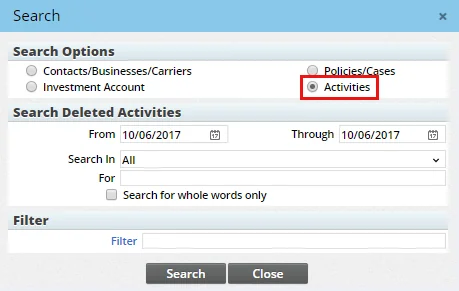
Deleted calendar activities are now stored in the Deleted Records area of the system, where users with administrator rights can restore them if necessary. To search for deleted activities, select Utilities > Deleted Records in the side menu, and then select the new Activities option on the deleted records Search dialog box.
For more information, see Deleted Records. (PMG-748300)
Resolved Issues
- A calendar issue that was preventing users from dragging activities from one time slot to another was resolved. (PMG-621300)
- In the standard Activity Outcome Wizard, users who selected the Contact Made outcome and the Schedule New 'Appointment' Activity outcome option were encountering an issue. Clicking the Check Participant(s) Availability button in the New Activity Details section was not opening the scheduling dialog box. This issue was resolved. (PMG-722740)
- Layout issues with the Group Scheduling interface were causing participants' names to be misaligned. This issue was resolved. (PMG-723237)
- When recording the outcome of a task, users who entered the duration and saved the outcome were finding that the task's Minutes Spent field was blank. This issue was resolved. (PMG-752087)
- An issue that was preventing users from filtering on text in the activity Description field was resolved. (PMG-755727)
SmartOpportunities
Resolved Issues
- Issues affecting opportunity ownership and stage visibility were resolved:
- On the opportunity Related Resources/Competition content link, changing the role of a non-primary owner resource was causing the opportunity owner to change as well.
- On the opportunity Detail content link, the Stages filter under Stage Actions for Current/Previous was not working properly.
(PMG-735626)
- On the Contact List, an issue with creating an activity for a contact linked to several opportunities was resolved. SmartOffice was not automatically linking the activity to the contact's most recent open opportunity, even when the user cleared the Do Not Link Opportunity to Calendar Activity option in User Preferences. (PMG-750496)
- In some instances, updating an opportunity's stage was clearing certain fields in the opportunity record. This issue was resolved. (PMG-755183)
Advisors/Agencies
Enhancements
- Updated button for presale quick quote: On the Presale Activity/Proposal List, the button icon for the New 'Presale Activity/Proposal - Quick Quote' Record command was changed to make it look less similar to the New 'Presale Activity/Proposal' Record command. This enhancement should help users distinguish the buttons more easily when both buttons are present on the Custom Button Bar.

(PMG-661422)
Resolved Issues
General
- An issue affecting users who customized the page layout of the advisor Personal content link was resolved. When the layout included the Investment Account List or Investment Position List portlet, users who tried to export these lists were encountering an error. (PMG-741716)
- An issue with the Advisor Reassignment feature was resolved. The issue affected remarks added to the primary advisor entry in the Policy Advisor List of a pending case. When the case was reassigned, the new advisor's entry in the Policy Advisor List contained the remarks from the old advisor entry. (PMG-745087)
- When the page layout of the advisor Personal content link was customized to include a Dynamic Report portlet, updating the advisor's birth date was not automatically updating the advisor's age. This issue was resolved. (PMG-746666)
- Several issues with advisor ACH records were resolved:
- In Dynamic Reports that include ACH data, the Bank Account # column value was not hyperlinked so that users could click it to open the ACH record.
- When an ACH record was updated through a data import so that the Future Report Indicator option was enabled, SmartOffice was not automatically clearing the Use in Reports option on the record.
(PMG-747156)
- In the Contract Information dialog box for new advisor contracts, the Clear button in the Supervisor Contract field was missing even when a contract was selected. The button was restored. (PMG-748930)
- For existing advisor contract records, the system was allowing users to edit the read-only Advisor & Agency field on the Contract Information dialog box. This issue was resolved. (PMG-767796)
SmartPolicies
Featured Enhancements
Weighted % and Premium Fields
Weighted %/Premium fields were added to the policy Basic Information and pending case Detail content links. These fields enable policies and cases to be "weighted" so that the value of an advisor's book of business can be determined more accurately. For example, an annuity policy or case might be weighted at 5%, while a life policy or case might be weighted at 85%. The new fields are available as columns (Weighted Percentage and Weighted Premium) in many lists and Dynamic Reports related to commissions, policies, group policies and pending cases.
As part of this enhancement, the FYC, Renewal Comm, Prem Stop Date and List Bill # fields were repositioned. (PMG-754146)
Other Enhancements
- New policy advisor role: A Managing Partner advisor role is now available for selection when users edit entries in the Policy Advisor List of a pending case or policy. (PMG-697570)
- Automatic updates for policy advisor fields: When the advisor on a policy changes—whether manually or using the Advisor Reassignment feature—the new advisor's entry in the Policy Advisor List now automatically displays the current date in the As of Date field. In addition, the old advisor entry's Expiration Date field now updates automatically to reflect the current date. (PMG-719047)
- New premium payment modes: In policies and pending cases, two premium payment modes were added to the system: 3 Pay and 4 Pay. For these new modes, the annual premium and annualized premium are the same as the modal premium. (PMG-734425)
- Contact columns for interested parties in reports: In Dynamic Reports belonging to the Policy and Pending Case report families, users can now include information from the contact records of interested parties. While customizing the columns of a report, users will now find the Contact table available under the Interested Party table. As part of this enhancement, the Name column of the Interested Party table was removed for these reports, as it is no longer needed. (PMG-758678)
Resolved Issues
- On the policy rider Detail content link, the Product and Rider options were misaligned. This issue was resolved. (PMG-700345)
- In dental and vision policies, the Primary Insured List was missing. This issue was resolved. (PMG-755335)
- In policies and group policies, users who changed the carrier and product and then elected to rebuild the commission hierarchy were finding that the hierarchy was not being rebuilt. (PMG-748931)
Insurance Products and Carriers
Resolved Issues
- Several property and casualty plan types were missing from the Plan Type drop-down list in the policy and pending case search dialog boxes. These choices were restored. (PMG-722279)
- On the product Detail content link, issues with the size and layout of the Product Fee List was preventing entries from displaying properly. These issues were resolved. (PMG-746922)
SmartCaseManager
Enhancements
- New grouping option for Advisor Request List: On the Advisor Request List, the Current Manager table was added to the list of tables available for list layout customization. With this addition, users can now display advisor requests grouped by current manager. Previously, users were able to group the list by original manager only, even when the manager had changed. (PMG-557063)
- New mass modification option for requirement reports: Users can now mass modify the Completed date when viewing the results of a Pending Case-family Dynamic Report in the following report categories:
- Requirements
- Requirements - Include Child Cases
(PMG-704817)
Resolved Issues
- On the Pending Case List, cases with a status of Informal Declined/Closed were appearing when the Underwriting All policy stage filter was applied to the list. This issue was resolved. (PMG-743654)
- In some instances, default follow-up dates were not being set according to the Follow-Up Days setting for requirements configured in Policy/Case Setup. This issue was resolved. (PMG-745454)
- After sending a pending case status report to advisors, users who tried to print the report status list that appears afterward were encountering an error. This issue was resolved. (PMG-751045)
- On the pending case Detail content link, users who customized the AlphaNum1 field label under Important Contacts were encountering an issue. The new field label was replacing the Policy # field label in the Pending Case Add Detail dialog box. This issue was resolved. (PMG-756546)
- Several issues affecting pending case requirements were resolved:
- Uses were encountering an error when they tried to add an Inspection Report-type requirement.
- On the requirement detail dialog box, the Status and Required Of drop-down lists and the Medical Requirement Details and Reimbursement buttons were not working for Inspection Report-type requirements.
- Users were encountering several layout issue when trying to view the details of a requirement, including hidden buttons, overlapping sections and improperly sized fields.
(PMG-764817)
- An issue that occurred when a case status change triggered the Inactive workflow was resolved. When the user entered the Inactive Activity Date and clicked the OK button, a blank dialog box was opening. In addition, the Inactive Workflow dialog box was closing before creating the activity. (PMG-768819)
- If a pending case requirement record contained a blank space in the Remarks field, the space was appearing as empty parentheses when requirement merge codes were expanded in correspondence. This issue was resolved. (PMG-768835)
SmartBenefits
Resolved Issues
- In group policy records, documents posted to the Letters/Documents content link were not appearing in the Document List, even after the user refreshed the browser. This issue was resolved. (PMG-743917)
SmartRecruiting
Resolved Issues
- In Step 4 of the Position Setup Wizard, users who accessed the Interview and Action Assignment dialog box by clicking a stage were encountering an issue. Attempts to create interview and action records from that dialog box were resulting in an error. This issue was resolved. (PMG-748565)
SmartWholesaler
Resolved Issues
- The system was allowing users to delete producer and firm records containing contract records instead of displaying a message stating they cannot be deleted. This issue was resolved. (PMG-724665)
SmartCommissions
Featured Enhancements
Ability to Set Product Options at the Office Level
The product options feature, which allows users to accommodate multiple commission structures for the same insurance product, was improved. Now, administrators define product options at the office level using the new Product Options section in Policy/Case Setup (previously, these options were defined at the individual product level). The options are then available for selection across all products. For more information, see Policy/Case Setup - Product Options.
As part of this enhancement, the Copy Commission Rates feature was enhanced to include product options as well. (PMG-744178)
Other Enhancements
General
- Improvements for editing multiple rates at once: The Edit Commission Rates feature that allows user to edit multiple commission rates using a spreadsheet-style list was enhanced as follows:
- The Age From, Age Through, Face From, Face Through, Options and State columns are now editable.
- The Dollar Percentages column was renamed Commission Amount.
As part of this enhancement, two issue were also resolved:
- When the list layout was customized to add the Cumulative column from the Commission Rate table, users who changed data in any customized column were finding that those changes were not being saved.
- After adding a large number of columns to the list layout, users were finding that the horizontal scroll bar no longer worked and many columns were no longer visible.
(PMG-744184)
- Commission statement improvements: Several enhancements related to advisor commission statement addresses were made:
- In PDF advisor commission reports generated using the Show Advisor Commission List command from a processed batch, the address displayed on the report is now the commission statement address defined on the advisor record. If no such address is defined, the advisor's preferred address is displayed.
- When viewing the Advisor Commission Check List for a batch, users can now add columns from the Commission Address table to the list layout.
- Columns from the Commission Address table are now available for inclusion in Commission-family Dynamic Reports in the Advisor Commission Check and Advisor Commission Check - Include ACH report categories.
(PMG-745326)
Resolved Issues
General
- Two issues with the Modified On and Modified By columns in the commission system were resolved:
- On the carrier posting Detail content link, when a commission transaction was reconciled using the Write Off the Difference option, the columns were not being updated.
- On the speed receipt Detail content link, the columns were not available for addition to the Commission Data list. The columns are now available in the Manual Commission Transactions table.
(PMG-733040)
- An issue with commission calculations involving rates that use the Premium Banding option was resolved. The last Base transaction just before Excess commission was not taking the calculated premium and Target amount into consideration. (PMG-742704)
- An issue with the Edit Multiple Records feature for commission transactions was resolved. The issue occurred when the last column in the editable list was a date column. When users added a row, entered the date in the last column of that row and then pressed TAB to create another row, the cursor was not appearing in the first column of the new row. (PMG-742971)
- Users who tried to mass modify commission rates were being presented with a blank list of available columns/fields to modify. This issue was resolved. (PMG-743895)
- An issue that was preventing users from mass modifying the Cumulative, Flat Amount and Paid Mode fields of commission transaction records in certain lists was resolved. (PMG-754546)
- An issue with recalculating commissions with Enterprise View turned on was resolved. The issue occurred when the user selected the Calculate Commission command for a parent-office policy and selected the Recalculate option. The Expected Commission List was opening as expected, but the list was also displaying commission transactions from any child-office policies that had the same holding ID. (PMG-755165)
- When manually adding a rider commission to a policy, users were receiving an error if the linked product had one of the following Accumulate Prem Comp settings:
- Base + Rider
- Base + Rider + Flat Extra
- Base + Rider + Flat Extra + LumpSum
This issue was resolved. (PMG-756791)
Carrier Interface
- Electronic commission statements downloaded into SmartOffice in NAILBA format were creating duplicate entries in the Carrier Interface in some instances. This issue was resolved. (PMG-753965)
Carrier Posting
- On the Carrier Posting List, users who applied a filter to the Posted On date column were finding that records with a "Speed Receipt Entry" status, such as Open (Speed Receipt Entry) and Reconciled (Speed Receipt Entry), were not appearing. This issue was resolved. (PMG-735594)
- In carrier posting records, an issue with reconciling multiple commission transactions at once was resolved. The issue affected transactions with a status of Open (Speed Receipt Entry). When a user reconciled the records using the Create a Balance Due/Excess Pay Record or Modify Advisor Commissions option, the Sys Paid-to dates on the linked policies were not being updated correctly. (PMG-746907)
- In carrier posting records, users were encountering an error when they updated the modal premium in a commission transaction record and then tried to recalculate the commission. This issue was resolved. (PMG-749360)
- A carrier posting issue affecting users who do not have the Administrative Database Maintenance user right was resolved. When these users reconciled a commission transaction using the Create a Balance Due/Excess Pay Record or Modify Advisor Commissions option, the resulting transaction's Type field was blank. (PMG-763440)
Speed Receipts
- In the Commission Data list of a speed receipt record, users who selected multiple commissions that were missing contract or rate information were encountering an issue when using the Calculate Commission command. An error message gave the user the option of viewing the error log, but clicking the Yes button was not displaying the log. (PMG-748891)
SmartInvestments
Enhancements
Investment Accounts
- New default account roll-up option: In new investment account records, the default roll-up option is now Current Position Value instead of Transactions. This makes the account creation process more convenient for the majority of SmartOffice users, who do not track transaction data. (PMG-676239)
Investment Reports
- Improved account summary for households: A Sort by Household Members option was added to the Summary of Accounts PDF report. When run at the household level using this new option, the report now combines all holdings in the household into a single report that is sorted, grouped and subtotaled by household member. Previously, the report contained separate pages for each household member. (PMG-162544)
Resolved Issues
Asset Allocation
- The Asset Allocation Exception Report was displaying investment accounts that had no asset allocation specified. This issue was resolved. (PMG-764806)
Investment Accounts
- When a contact was listed as an interested party in an investment account with a role of Owner, account positions were not appearing in the contact's Investment Positions tab if the account's primary contact was different. This issue was resolved. (PMG-620450)
- After customizing the page layout of the Account Detail content link of an investment account record, users were finding that the changes were not being applied to the Account Detail content link of investment position records. This issue was resolved. (PMG-627453)
- When a user tried to create an investment account using an existing account number, the hyperlink in the error message that points to the existing account was not working properly. This issue was resolved. (PMG-655369)
- An issue that occurred when users navigated to the Investment Accounts tab of a contact was resolved. When the user uploaded a document to the Letters/Documents content link of an investment account, refreshed the page and then clicked the Contact tab, SmartOffice was displaying an error. (PMG-686578)
- An issue that was preventing users from restoring deleted investment accounts from the Deleted Records area was resolved. (PMG-760909)
Investment Positions
- The Investments > Link Position to Account command was removed from the side menu, as it is no longer needed in SmartOffice Pro. As part of this enhancement, the Show Link Accounts/Positions side menu user license was renamed Show Link Accounts side menu. (PMG-646083)
- An issue with manually created variable annuity subaccount positions was resolved. The New Subaccount dialog box was displaying the Initial Purchase section even when the investment account's roll-up setting was Current Position Value. As a result, the system was not allowing the user to save the new position until the mandatory fields in Initial Purchase section were completed. (PMG-734273)
- The Delete 'Investment Positions' Record command was missing from the Investment Positions List of variable annuity security subaccounts. The command was restored. (PMG-744205)
- An issue with deleting an investment position linked to an activity was resolved. Opening the activity from the contact Activity Log tab was producing an error. (PMG-753232)
- When users customized the list layout of the contact Investment Positions tab, the system was applying those changes to the Global Investment Position List as well. This issue was resolved. (PMG-766759)
Investment Reports
- Pie charts were displaying incorrectly in PDF reports when there was one investment position record whose current value contained a decimal. This issue was resolved. (PMG-752797)
- An issue with the Date Options drop-down list in the report options dialog box for Performance-category PDF reports was resolved. Selecting any choice except Custom was properly filling in the From and Through date fields, but when users changed the option to Custom and then changed it again to another date option, the date fields were not being filled in. (PMG-750141)
Investment Securities
- An issue that occurred when a user changed the name of a variable annuity security was resolved. When the user navigated from a contact record's Investment Accounts tab to a position linked to that security, the position's Subaccounts List title was displaying the security's old name. (PMG-732451)
- When a user tried to use the Update Exclude from Performance command on Comparative Index and Blended Index securities, SmartOffice was not displaying a message explaining that the command does not apply to those security types. This issue was resolved. (PMG-735601)
- When creating a security record from the Position Detail content link, users were finding that the fields were too small. The width of the dialog box was increased to make all of the fields wider. (PMG-760820)
Investment Validation
- An issue that was preventing notifications from being posted to the Alert Center for completed household, age and asset allocation validation jobs was resolved. (PMG-746277)
SmartView for Clients
- An issue with SmartView for Clients document sharing was resolved. Sharing a document from the Letters/Documents content link of a record was not working when the document was an e-mail attachment. (PMG-759646)
- SmartView for Clients users were unable to open documents using Google Chrome because the Open icons in the Document List were missing. This issue was resolved. (PMG-764828)
Integrations and Data Services
Featured Enhancements
Docupace ePACS Connect Integration
The Docupace ePACS Connect integration for SmartOffice enables advisors to:
- Prefill forms in Docupace ePACS Connect using SmartOffice contact data.
- Open a client's documents stored in Docupace ePACS Connect directly from SmartOffice.
- Navigate to a client's folder in Docupace ePACS Connect directly from SmartOffice.
- Access Docupace from SmartOffice without having to sign in to Docupace ePACS Connect.
For more information, see Integrations - Docupace ePACS Connect. (PMG-684722)
Other Enhancements
Investment Data Download
- Job ID added to liquidated position history: When a position is closed (liquidated) due to a processed data download, SmartOffice now adds the Job ID to the Remarks field of the relevant position history record. (PMG-747430)
Pending Case Download
- Product name matching for downloaded cases: When pending cases are processed using Direct Download and Replace, SmartOffice now tries to match on the product name if it finds the same product code on more than one product from the same carrier. Previously, matching was done on the product code only, and when any duplicates were found, those cases were not being processed. (PMG-715037)
- Status history update improvements: Several enhancements were made to the way in which pending case status history is updated from the downloaded pending case XML file through Direct Download and Replace:
- The Issued status is now added to the status history based on the
- When entries for
-
- The Application Signed date no longer updates the Underwriting stage date.
- The Underwriting stage date is now updated based on the following in order of precedence:
(PMG-732463)
SmartIntegrator and SmartXchange
- Option to enable or disable Constant Contact e-mail posting: Users of SmartOffice's integration with Constant Contact can now control whether Constant Contact e-mail messages are automatically posted to the SmartPad. In Office Settings, on the SmartPad/New Contact/E-mail Posting content link, users will now find a Constant Contact option under SmartPad Posting Options. Select this option to enable posting of Constant Contact e-mails to the SmartPad, or clear the option to disable posting. (PMG-727582)
Resolved Issues
Investment Data Download
- In Fidelity data downloads, when an existing non-bond security with a price factor or 1.00 was sent as a bond, its price factor in SmartOffice was being updated to 0.01. This issue was resolved. (PMG-708040)
- An issue that was preventing users from entering multiple Albridge partner IDs when setting up Albridge downloads was resolved. (PMG-737985)
- For Envestnet data downloads, details about updated variable annuity securities were not appearing in the data import history. This issue was resolved. (PMG-742306)
- In the Data Import Log, an issue that was causing incorrect labels to display on the import Detail content link was resolved. (PMG-743358)
- An issue with processing household data from Orion data downloads was resolved. (PMG-758425)
- A date format issue that was causing an error in Fidelity data downloads was resolved. (PMG-759528)
- Users who tried to manually upload data files before their SmartOffice accounts were set up to receive that data were encountering a blank upload dialog box. Now, SmartOffice displays a message stating that setup is still in progress and disables the Upload button. (PMG-764755)
Pending Case Download
- When a downloaded pending case contained two advisor entries with the same role but different
values, SmartOffice was not adding both advisors to the pending case. This issue was resolved. (PMG-738398)
- An issue that was causing Direct Download and Replace to link to an expired product record when creating a case was resolved. (PMG-743364)
- When updating cases using Direct Download and Replace, SmartOffice was improperly mapping the
element in the downloaded XML file to the Case # field in SmartOffice pending case records. This issue was resolved. (PMG-758082)
- An issue with updating the U/W Type field in SmartOffice pending case records was resolved. The system now uses the
element in the downloaded pending case XML file to update the U/W Type field if the element is missing or contains no value. (PMG-763265)
SmartOffice Anywhere Changes
Note: SmartOffice Anywhere changes are also summarized on the Release History page in SmartOffice Anywhere Help.
Resolved Issues
- New activities created from contact records were not being linked automatically to the contact's latest open opportunity, even when the user's preferences were configured accordingly. This issue was resolved. (PMG-582010)
- When users customized the Marketing Mgr field label on the advisor Personal content link in SmartOffice Pro, the change was not being reflected in advisor records in SmartOffice Anywhere. This issue was resolved. (PMG-607033)
- Opportunities created for child-office contacts were appearing in the parent office with the opportunity name "Unknown." This issue was resolved. (PMG-740157)
- While editing opportunity records, users were finding that the opportunity process name displayed on the screen was incorrect. (PMG-752862)
- SmartOffice Anywhere was creating opportunity stage history entries when the user marked linked activities as Done. This issue was resolved. (PMG-753729)
- Issues that users were encountering when trying to select choices from drop-down lists were resolved. (PMG-754793)