Last updated: 2025-09-19
Insurance Carriers - Creating a Carrier

- Do one of the following:
- Click the Add New button and select Carrier. - From the side menu, select Insurance > Carriers to open the Search Carriers dialog box. Then click the New button.
- In the New - Insurance Carrier dialog box, fill in the carrier's basic information, address and phone numbers. For help with other fields, see Insurance Carriers - Detail Content Link.
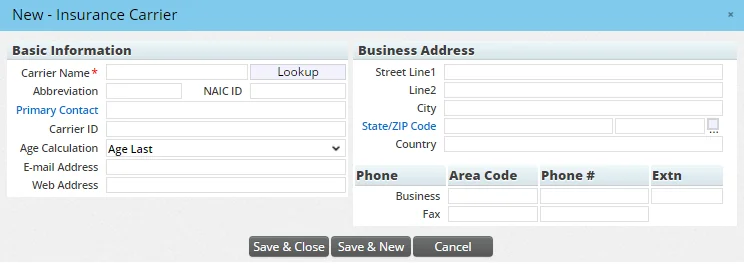
- Do one of the following:
- Click the Save & Close button to save the changes and open the full carrier record, where more information can be entered. For more information about the information that can be entered for a carrier, see Viewing and Editing Carrier Information.
- Click the Save & New button to save the current record and open another New - Insurance Carrier dialog box.