Last updated: 2025-11-30
Products - Detail Content Link
- Overview
- Product Information Section
- Options Section
- Conversion Options Section
- Class List Section
- Product Validity Parameters Section
- Product Options Section
- Modal Fee Information Section
- Product Fee List Section
- GA ID List Section
Overview
While viewing a product, the user can access the Detail content link to view basic product information, risk classes, product fees, modal fees and more.
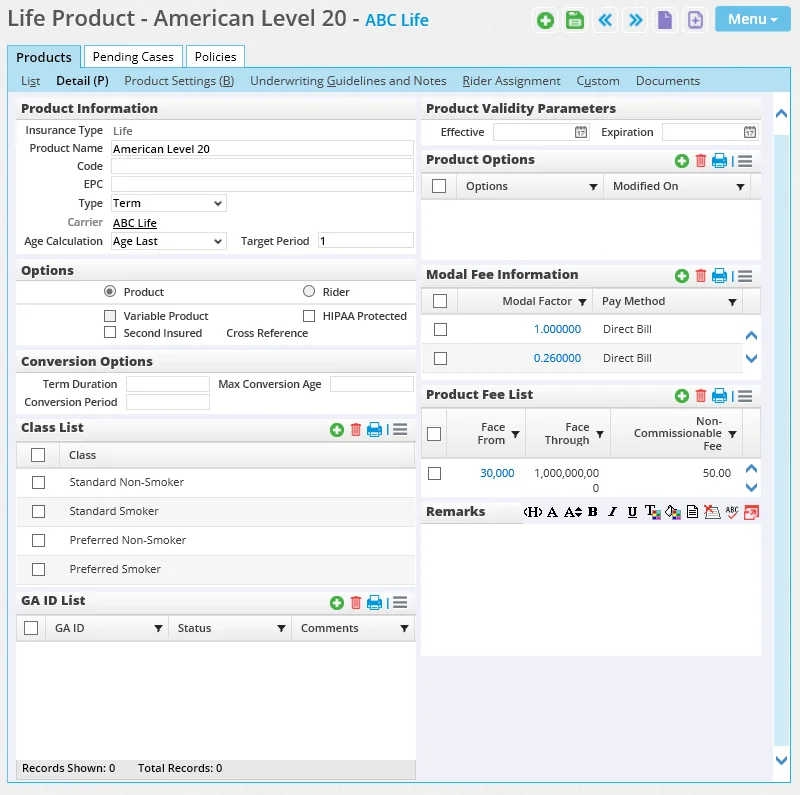
Product Information Section
The Product Information section track information such as the product name, code, insurance and plan type, carrier and age calculation method.
- Insurance Type: The insurance type is determined when the product is created. It cannot be modified from the product record.
- Code: Multiple products within a carrier can have the same product code.
- EPC: This field stores a unique identifier code that will be used for future SmartOffice enhancements.
- Type: The plan type options vary depending on the insurance type. The available plan types are listed in the following table.
Insurance Type Plan Types
Annuity EIA (Equity-Indexed Annuity), Fixed, Flexible Premium, Single Premium, SPDA (Single-Premium Deferred Annuity), SPIA (Single-Premium Immediate Annuity), Traditional, VA (Variable Annuity)
Auto All Terrain Vehicle, Assigned Risk, Basic, Deluxe, High Risk, Motorcycle, Recreational Vehicle, Watercraft
Critical Illness CI, Other, SEG, STR, Women's Cancers
DI (Disability) DI Buyout, DI Income, DI Overhead, Expense, Disability, Reducing Term DI
Homeowner HO1, HO2, HO3, HO4, HO5, HO6
Life IUL (Indexed Universal Life), Term, UL (Universal Life), VUL (Variable Universal Life), VWL (Variable Whole Life), WL (Whole Life)
LTC (Long-Term Care) LB, LTC
Medical HMO, Medical, Medicare, PPO
Other Multiple, Other, Single
Property Casualty
Agriculture, Boiler and Machinery, Bonds, Business Auto, Business Owners, Commercial Fire, Commercial General Liability, Commercial Package, Commercial Property, Commercial Umbrella, Computers, Condominium, Contractors Equipment Floater, Crime, Directors & Officers Liability, Dwelling Fire, Employee Benefit Liability, Environmental Liability, Errors & Omissions, Excess Liability, Fireworks, Flood, Garage and Dealers, Glass, Homeowner, Information & Technology Liability, Inland Marine (Corporate), Inland Marine (Personal), Installation/Builders, Liquor Law Liability, Mobile Homeowners, Other, Owners & Contractors Protective Liability, Personal Auto, Personal Inland Marine, Personal Package, Personal Umbrella, Personal Umbrella (Excess Liability), Private Passenger Automobile, Professional Liability, Renters, Signs, Transportation, Truckers, Watercraft, Workers Compensation
Umbrella Basic Umbrella, Excess Liability
- Carrier: If the Carrier field is blank, click the Carrier hyperlink to search for and select a carrier (see Searching for Carriers) or create a new one (see Creating a Carrier). Once a carrier is specified for the product, the user can display the carrier record by clicking the carrier's name.
- Age Calculation: The product's default age calculation method determines the issue age of a policy and is used when SmartOffice automatically adds requirements to a pending case or policy. If the Age Calculation field is undefined, the age calculation method specified in the carrier Detail content link is used.
Options Section
- Product: Product is selected if the product is not a rider product.
- Rider: This option is selected if the product is a rider product. A rider is an amendment to a policy that adds or deletes coverage. A rider can originate from a rider product in the same way that a policy originates from a product; however, the user does not have to select a rider product when adding a rider.
- Variable Product: Selecting this option enables the product Subaccounts content link as well as the policy Subaccounts content link for policies associated with that product. The Variable Product option is available for annuity and life insurance products.
- Second Insured/Second Annuitant: When this option is selected, the Second Insured or Second Annuitant section becomes available when the user creates a policy or pending case linked to this product. In addition, users can add second insureds/annuitants to the Policy Insured List or Policy Annuitant List of an existing policy and case. However, the product can still be used as an individual-insured product as well.
- HIPAA Protected: When this option is selected, the HIPAA validation flag at the contact level is automatically set when the contact is insured on the HIPAA-protected policy.
Conversion Options Section
SmartOffice uses these fields to automatically calculate a value for the Conv Ends field on the policy Basic Information content link.
- Term Duration: The length of the policies based on this product (in years).
- Max Conversion Age: The age of the insured.
- Conversion Period: The number of years in the life of policies based on this product during which conversion is possible.
Class List Section
 and select New 'Product Risk Class' record to add a risk class. The choices available are defined on the carrier's Detail content link.
Product Validity Parameters Section
The Product Validity Parameter section specifies when the product is available. When a pending case is created, SmartOffice checks the effective and expiration dates for the product. If the case's creation date falls outside the product validity date range, the product is not available to be selected for that case.
The expiration date does not prevent inforce policy creation.
Product Options Section
A single product may have different features that affect commissions. Instead of requiring multiple products to be created to accommodate different commission structures, SmartOffice enables the user to define multiple options that point to different commission rates within a single product record. Each option becomes a band similar to state banding in the rate file.
and select New 'Options' record to select one or more product options. The available product options are defined in Policy/Case Setup - Product Options.
For more information about commission rates, see SmartCommissions - Rates.
Modal Fee Information Section
When a policy is created, the annualized premium, commissionable annualized premium and commissionable modal premium for that policy are calculated using the product's modal fee information.
The modal fees for all of a carrier's products are defined on the carrier's Product Fees content link. Any modal fee information entered in the product's Modal Fee Information section overrides the carrier settings. For more information, see Insurance Carriers - Product Fees Content Link.
Product Fee List Section
Note: This section is not available for rider products. Commissionable and non-commissionable fees are used to help calculate the commissionable annualized premium and the commissionable modal premium on a policy by the designated age and face bandings.
The product fees for all of a carrier's products are defined on the carrier's Product Fees content link. Any product fee information entered in the product's Product Fee List overrides the carrier settings. For more information, see Insurance Carriers - Product Fees Content Link.
GA ID List Section
The GA ID List can be used to manage product-specific general agency ID (GA ID) information. To enter GA ID information at the carrier level, go to the carrier's Misc Information content link.
