Last updated: 2025-12-03
Release Notes - SmartOffice 2022 Release 1
About This Document
For general information about SmartOffice release notes, visit the Release Notes home page.
Revision History
These release notes may be revised after their initial publication. This section lists the dates of any revisions as well as a list of changes.
April 27, 2022
- Initial publication
April 28, 2022
- Advisors/Agencies: Corrected description for "Improved Tracking of Series Licenses" enhancement (PMG-912758).
May 3, 2022
- Integrations and Data Services: Added "E-mail posting policy search enhancement for Outlook 365" enhancement (PMG-916162).
- Integrations and Data Services: Added details to the description for the "Zoom and Webex integrations" enhancement (PMG-885630, PMG-904217).
May 20, 2022
- Release Overview: Added a link to the release highlights video.
Release Overview
SmartOffice 2022 Release 1 brings Zoom and Webex integrations to SmartOffice, as well as improvements for phone/address entry and page layout readability. For agency users, this release contains enhanced advisor appointment and series license tracking, a better product search experience, and more configuration settings for auto-sent letters based on pending case updates. This release also resolves issues identified in SmartOffice 2021 Release 3 and earlier releases.
For a quick overview of this release, see our video.
Enhancement Highlights
This section provides quick links to the featured enhancements in this release.
Core System
Agency Management
Integrations and Data Services
System Requirements
There are no changes to system requirements for this release. For current system requirements, see System Requirements.
Note: Beginning on June 15, 2022, Ebix will no longer support SmartOffice on the Internet Explorer 11 web browser. Ebix has made this decision in response to Microsoft's announcement that Internet Explorer 11 support is ending. We recommend that Internet Explorer 11 users transition to a supported browser as soon as possible. SmartOffice is compatible with the latest versions of Google Chrome, Mozilla Firefox and Microsoft Edge. If you have any questions or concerns, please contact SmartOffice Technical Support.
Note Regarding Text Changes in SmartOffice
This release may contain minor changes to text in dialog boxes and other areas of the SmartOffice user interface. Changes of this type are typically made to correct spelling, grammar, punctuation and other language-related issues. Such changes normally are not listed in this document unless they affect the way the application works.
SmartOffice Pro Changes
Core System
Featured Enhancements
Default Types for New Phone and Address Records
Users can now define the default types for addresses and phone numbers added to contacts. In User Preferences > Basic Info, select the preferred types from the new Default Phone Type and Default Address Type drop-down lists under Default Settings.
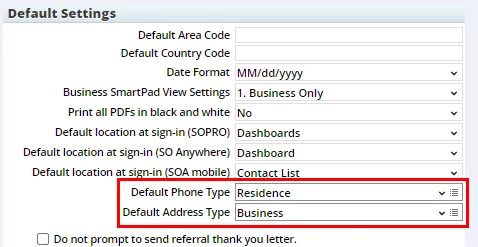
When no option is selected, the default type is Business, as it was previously. (PMG-900187)
Ability to Add Space Between Fields in Page Layouts
To provide additional flexibility for organizing fields in custom page layouts, SmartOffice now allows users to insert horizontal space between fields. The new Add Line Space item is located under the list of available fields.
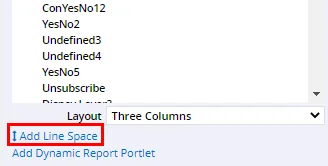
Drag the Add Line Space item into any portlet above or below a field. The words “Line Space” appear in the layout to show where the space has been inserted.
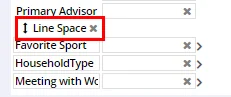
Reposition the space by dragging it to a new location, or remove it by selecting its x button. (PMG-913088)
Other Enhancements
General
- New maximum length for user account e-mail addresses: The maximum length of the e-mail address associated with a SmartOffice user account was increased to 256 characters. (PMG-915512)
Contact Management
- Enhanced phone number search: The phone number portion of the advanced search for contacts was improved. When the user enters a partial number in the Phone # field, SmartOffice now looks for that string of digits anywhere in the phone number. Previously, the system looked only for phone numbers that started with those digits. (PMG-910455)
- Ability to customize Gender drop-down list: In contact, advisor, and other records containing the Gender field, the options available in the Gender drop-down list can now be customized. Users with the appropriate rights can select the Customize Choice button in the drop-down to specify the choices that users can see. (PMG-916777)
Data Import/Export
- Improved activity import: When importing activities, the Data Import Wizard now attempts to match the imported records to the appropriate contacts in SmartOffice based on first name, last name, and birth date when the import file contains no Social Security number or tax ID information. (PMG-917539)
Resolved Issues
General
- After using the Menu > Page Layouts command to open the Custom Template Detail dialog box, users who tried to apply a template from the List content link were unable to do so. This issue was resolved. (PMG-914739)
- Some users were finding that custom drop-down list choices created before the SmartOffice 2021 Release 3 upgrade were no longer available. This issue was resolved. (PMG-914742)
- The system was using the plug-in method for opening files, even when the user's preferences were configured for browser-based file opening. This issue was resolved. (PMG-914944, PMG-915013)
- Two spelling checker issues affecting the contact Remarks field were resolved:
- In some instances, the spelling checker was not identifying misspelled words in the Remarks field after identifying and correcting the first word.
- When the Remarks field was maximized and the spelling checker was run, any corrections made to misspelled words were not appearing once the Remarks field was minimized.
(PMG-915362)
- An issue that was causing record alerts to not display properly was resolved. (PMG-916515)
- An issue that occurred when users reset a forgotten password was resolved. After providing the security answer and creating a new password, these users were seeing a blank page when they signed in to SmartOffice. (PMG-918315)
Contact Management
- When a user had the Display Letter Log and Document List together option enabled in User Preferences > Correspondence Options, files that the user uploaded to the investment account Letters/Documents content link were not appearing, even after the user refreshed the page. This issue was resolved. (PMG-911925)
- When a custom page layout was applied to the contact Detail content link, some users who tried to send correspondence from that content link were seeing duplicate Correspondence Wizard dialog boxes. This issue was resolved. (PMG-913305)
- On the contact Key Relations content link, the option to modify the layout of the Referred Contacts list was missing. This option was restored. (PMG-913596)
- An issue with creating contacts in offices using office security was resolved. The issue occurred when the Assign new contacts to the users who create them option was not enabled in Setup > Office Settings > SmartPad/New Contact/E-Mail Posting, During contact creation, when the system displayed a list of users who could be assigned to the contact, closing the list without selecting a user was resulting in the new contact having no user assignment. Now, if the user list is closed, SmartOffice automatically assigns the signed-in user to the contact. (PMG-917540)
Dynamic Reports
- In list and Dynamic Report charts, the system was displaying integer values as decimals (i.e., with a decimal point followed by two zeroes). This issue was resolved. (PMG-837816)
- An issue with exporting advisor Dynamic Reports to Excel was resolved. When a report contained advisor custom columns, the user-defined labels for those columns were not appearing in the exported file. (PMG-914122)
- Users were encountering the error "Spreadsheet is not defined for the selected dynamic report join" when they tried to create Dynamic Reports in the following report categories: Pending Case Notes, Opportunity Notes, Documents for Pending Case/Policy. This issue was resolved. (PMG-916403)
- An error that users encountered when they tried to create a copy of a Dynamic Report was resolved. (PMG-916782)
SmartCalendar
Resolved Issues
- An issue with entering start and end dates for activities using the Pick Date button was resolved. When users selected any date quickly more than twice, SmartOffice was inserting a random date into those fields. (PMG-916158)
SmartOpportunities
Resolved Issues
- An issue with opportunity Dynamic Reports was resolved. In some instances, users who sorted report results by selecting a column heading and then tried to open a record were encountering an error. This issue was resolved. (PMG-916009)
SmartLeads
Resolved Issues
- On the Leads List, selecting Unassigned from the Lead Status drop-down list was not filtering the list properly. The list was displaying records with other statuses as well. This issue was resolved. (PMG-917382)
Advisors/Agencies
Featured Enhancements
Improved State Selection for Appointment Records
In advisor and agency appointment records, the options for editing state information have been revised for improved usability:
- A new State drop-down list enables users to quickly select a single state (this field cannot be edited when any of the options described below are selected).
- To specify more than one state, the user can now select the new Multiple States option, which reveals the scrolling list of states (previously, this list was always visible).
- To specify all states, the user can select the All States option as before, but selecting this option now hides the list of states and automatically selects the Multiple States option.
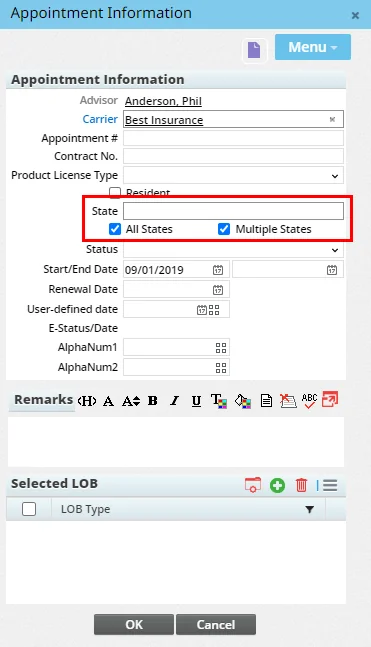
(PMG-912088)
Improved Tracking of Series Licenses
SmartOffice now provides clearer and more complete tracking of series license information for advisors and agencies. The FINRA information dialog box has been enhanced as follows:
- The FINRA Series drop-down list was renamed Exam Code.
- The Effective Date field was renamed Window Begin.
- The Expiration Date field was renamed Window End.
- A State drop-down list was added.
- A customizable Result drop-down list was added to track the exam result.
- A customizable Validity drop-down list was added to track the status of the license.
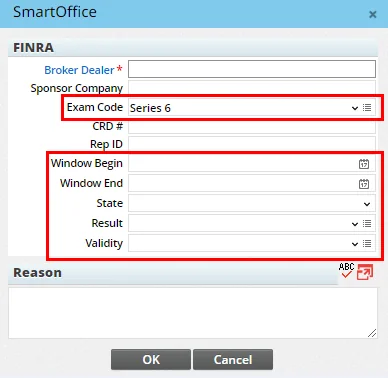
The new fields are also available as columns that can be added to advisor/agency lists and Dynamic Reports.
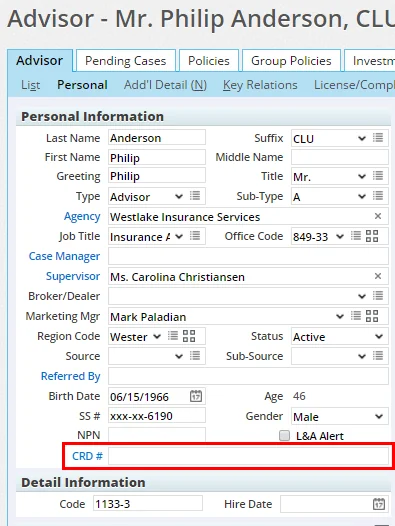
As part of this enhancement, users can now also track the CRD # using a new field on the advisor Personal content link (under Personal Information) and the agency Detail content link (under Business Information).
(PMG-912758)
Other Enhancements
General
- Enhanced mass editing of advisor/agency appointments: From the Advisor & Agency List, selecting Menu > Advanced Options > Mass Edit Appointment Records now allows users to mass edit three additional appointment fields: Appointment No., Contract No., and Remarks. (PMG-913877)
SmartView for Advisors
- Improved security for advisor access: To help protect the user accounts of advisors who sign in to SmartOffice, SmartView for Advisors accounts now support two-step authentication. (PMG-914313)
Resolved Issues
General
- An issue with the Production Dashboard that was preventing users from calculating the top-performing agents/brokers for the month of December was resolved. (PMG-916206)
Insurance Products and Carriers
Featured Enhancements
Default Status Setting for Product Searches
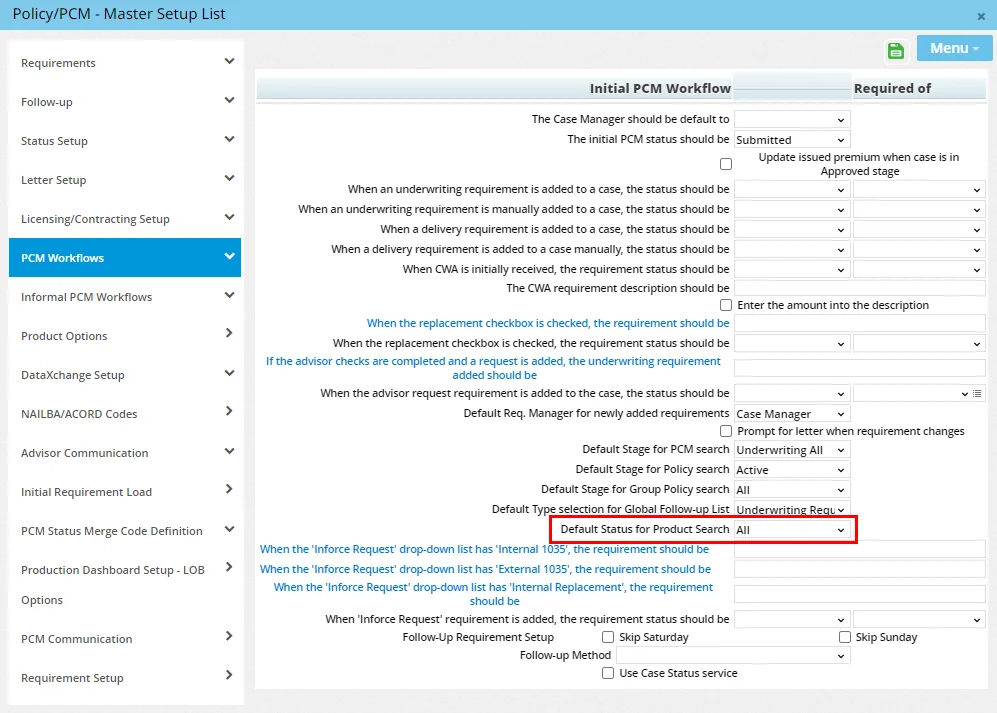
Administrators can now specify the status that will be selected by default when users in the office search for individual insurance product records. In Setup > Policy/Case Setup, navigate to PCM Workflows > Initial PCM Workflow to locate the new Default Status for Product Search option. Then choose Active, Inactive or All. to indicate the default.
(PMG-911027)
Other Enhancements
- New P&C plan types: For the Property and Casualty policy type, two new plan types are now available in the system: Cyber Liability and Builders Risk. (PMG-914435)
- Ability to copy resource-office products: The system now allows users to copy resource-office products into the local office and modify the copies. (PMG-914480)
SmartPolicies
Enhancements
- New merge codes for insured information, premium and remarks: Four merge codes were added to the system for policy and pending case correspondence:
- «LumpSum»: Displays premium lump sum information.
- «FlatExtraYrs»: Displays premium flat extra number of years.
- «PrimaryInsuredInfo»: Displays a table containing the insured's greeting, preferred name, best time to call, preferred communication method, preferred e-mail address and preferred phone number, as well as an indication of whether the insured in the policy owner.
- «F\_PCM\_Remarks»: Displays the text in the Remarks field located on the policy/pending case Benefits/Coverage content link.
(PMG-916085, PMG-916213)
- New policy roles: Two additional interested party roles are now available for entries in the Policy Relationship List: Irrevocable Beneficiary and Regional Director. (PMG-906756, PMG-911199)
- Higher character limit for additional info fields: In policy and pending case records, fields on the Additional Info. content link how accept a maximum of 255 characters (the previous maximum was 40 characters). (PMG-907129)
- Higher character limit for policy Purpose field: On the policy Basic Information and pending case Detail content links, the Purpose drop-down list now supports custom choices up to 128 characters in length (the previous maximum was 25 characters). (PMG-908279)
- Source product code field/column: A Source Product Code field is now available for use in policy and pending case custom page layouts, and a corresponding column is available for use in policy and pending case lists. (PMG-914317)
Resolved Issues
- On the Policy List, sorting by the Servicing Advisor column was causing a browser error. This issue was resolved. (PMG-908029)
- An issue with contact and policy/pending case custom page layouts was resolved. When a page layout contained custom fields from the contact Add'l Personal or policy/pending case Additional Info content link arranged side by side in a portlet, the system was mislabeling the left field with the label of the right field. (PMG-908523)
- An issue with editing policy Detail page layouts was resolved. When a user edited the fields in the Premium Information portlet and saved the page layout, the first field in the portlet was disappearing from the layout. (PMG-913501)
- For policies containing subaccounts (e.g., variable annuities), the values in the Actual Allocation column on the Subaccount list were not totaling 100% in some instances. This issue was resolved. (PMG-915639)
SmartCaseManager
Featured Enhancements
Enhanced Auto-Send Letter Configuration
Settings for letters that are automatically sent based on pending case updates were improved:
- Letters can now be configured to auto-send when a user updates the case manager (previously, only status updates could trigger an automatic letter). In the Auto Send Letter Detail dialog box, a new Case Update Field drop-down list enables the user to specify whether the letter applies to case manager or status updates.
- The e-mail address displayed in the From field of the letter can now be specified using the new E-mail From field in the Auto Send Letter Detail dialog box. If this field is blank, SmartOffice uses the e-mail address of the person whose role is selected in the From field.
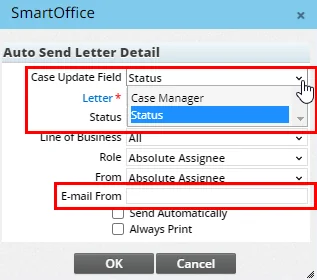
As part of this enhancement, the Pending Case by Status section under Setup > Policy/Case Setup > Letter Setup was renamed Pending Case Update. (PMG-916651, PMG-917628)
Other Enhancements
- Policy number in single-case status reports: When a user sends pending case status reports from the side menu (Insurance > Case Status) and selects the Send one case per letter option, the reports now include policy numbers. (PMG-895706)
- New pending case status: A new pending case status, IGO - Electronically Submitted, is now available. The status is mapped to the Underwriting stage in SmartOffice. (PMG-911193)
- User information in case status history reports: Status History-category Dynamic Reports in the Pending Case report family can now display information about the user who last updated a case's status. The User table was made available in these reports to provide access to that data. (PMG-912756)
- Case manager reassignment for SmartCase Viewer users: Users with the SmartCase Viewer license can now change the case manager on individual pending cases. To do so, open the case record and select Menu > Advanced Options > Case Manager Reassignment. This opens a list of SmartOffice users who can be assigned to the case. (PMG-917628)
Resolved Issues
- An issue affecting pending case users who do not have the Investment Tracking license was resolved. When the Basic Policy Information portlet for pending case records was customized, these users were not seeing the Plan Name field, even when the field was included in the layout. (PMG-913090)
- In the Auto Send Letter Detail dialog box for configuring automated pending case correspondence, the labels for the From and Send Automatically fields were not displaying properly. This issue was resolved. (PMG-913201)
- Users who updated non-Manual pending case requirements and saved the changes were seeing HTML characters in the Requirement column for those records. This issue was resolved. (PMG-914727)
- An issue with the Mass Edit Appointment Records feature was resolved. After adding the Product License Type column to the Appointment Editable List, users who edited data and then selected Save were seeing a blank list. (PMG-915122)
- In the Status Setup section of Policy/Case Setup, administrators who tried to remove entries from the Policy Status Exclusion list were encountering an error. This issue was resolved. (PMG-918119)
- In some instances, pending cases updates that contained policy status data and were initiated by SmartIntegrator adapters were causing multiple notification e-mails to be sent to users. This issue was resolved. (PMG-918549)
SmartBenefits
Resolved Issues
- An issue with Retirement-type group policies was resolved. After navigating to the Contribution Plan sub-content link for any of the policy's group plans, users were unable to add entries to the Group Options List. (PMG-912468)
- Several issues with the group policy renewal feature were resolved:
- The case manager was not being copied over to the new policy.
- When a custom page layout was applied to group policies, the policy number and customer number were not being copied over.
- The system was not calculating commissions on the new policy if the primary advisor was assigned 100% interest and additional advisors were assigned 0%.
- The status of the old policy was being changed to Terminated, and any associated commission transactions were being closed. Now, the old policy's status changes to Replaced, and any associated commission transactions remain open.
(PMG-915663, PMG-916510)
SmartRecruiting
Resolved Issues
- When a user rejects a candidate and opts to follow up with that candidate, the system now creates an activity with the subject "Follow-up with rejected Candidate." Previously, the system was inserting that text in the activity description. (PMG-914400)
SmartWholesaler
Resolved Issues
- Two portlets in custom page layouts were removed because they were not applicable to certain record types and were not working properly:
- On the Firm and producer Personal content links, the Line of Business portlet was removed.
- On the carrier Detail content link, the License/Contract/Appointment Check Setup portlet was removed.
(PMG-833630)
SmartCommissions
Resolved Issues
General
- An issue affecting policy records that contain commission records with a status of Open or Reconciled was resolved. When the user viewed a policy's commission transaction list (Menu > List Commission Records) and tried to delete multiple transactions (including Open and/or Reconciled transactions), the system was displaying the inline error message in the wrong place. (PMG-914841)
Carrier Posting
- In Carrier Posting-category Dynamic Reports, the Batch Name column was blank for some records that were linked to the proper batch. This issue was resolved. (PMG-915218)
- An issue was occurring when the Enable Comm. Track Yrs. Filter field in Setup > Commissions Setup > Carrier Posting Setup was set to Project from the policy Date or Project for previous month. The system was calculating commissions for policies containing policy dates that were in the Inactive stage with a status of Not Taken. This issue was resolved. (PMG-915220)
- Several layout issues affecting Carrier Posting-category Dynamic Reports were resolved, including an issue that was causing incorrect values to display in the Check Amount field of records accessed from the report results list. (PMG-915255)
- When a user ran a Carrier Posting-category Dynamic Report, the total record count for the results list was changing after the user exported the list. This issue was resolved. (PMG-915289)
Speed Receipts
- An issue that was causing Base-type commission transactions to be linked to Bonus-type transactions after speed receipt validation was resolved. The issue was affecting customers with specific office hierarchy configurations. (PMG-914015)
- When the Commission Data section of a speed receipt record included the Policy Alert column, the column was not displaying alerts for group policies linked to listed commission transactions. This issue was resolved. (PMG-915358)
SmartInvestments
Resolved Issues
Investment Securities
- An issue that was causing downloaded investment security price dates to be off by a day was resolved. (PMG-913869)
- An error that was preventing users from adding subaccounts to variable annuity security records was resolved. (PMG-918486)
Integrations and Data Services
Featured Enhancement
Zoom and Webex Integrations
SmartOffice now integrates with the Zoom and Cisco Webex web meeting platforms, enabling users to schedule Zoom and Webex meetings directly from SmartOffice, track those meetings in the SmartOffice calendar and save Zoom transcripts and Webex recordings in the SmartPad. Once setup is complete, a user can select a service from the new Web Meeting drop-down list under Options in the Activity Detail dialog box (currently, the Web Meeting drop-down list is available for activities created directly from the calendar, not from other areas of SmartOffice).
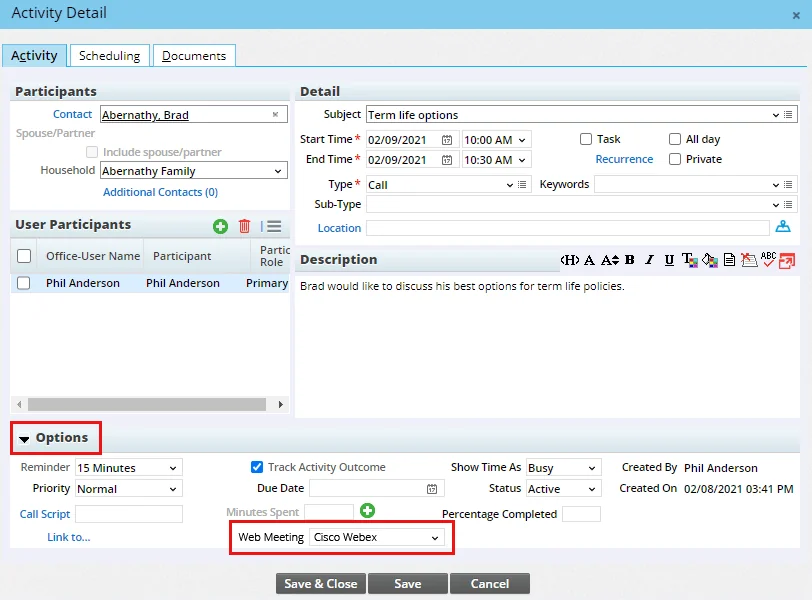
These integrations work only with paid Zoom and Webex accounts. For more information, see Integrations - Zoom and Integrations - Cisco Webex. (PMG-885630, PMG-904217)
Other Enhancements
General
- E-mail posting policy search enhancement for Outlook 365: In the SmartOffice add-in for Outlook 365, the policy/pending case search integrated into the e-mail posting feature was improved. For any policy or case containing a List Bill # value in SmartOffice Pro, the add-in search result displays an Invoice # field containing that value. The Invoice # field can help users distinguish among multiple policy records that have the same policy number. (PMG-916162)
Inforce Policy Import
- AgencyWorks import improvements: When processing policies imported from AgencyWorks, SmartOffice now populates the AlphaNum1 custom field on the policy Basic Information content link with the AgencyWorks case ID. In addition, the case ID is now the first value that SmartOffice checks when attempting to match policy records. These changes help resolve an issue in which duplicate cases were appearing in SmartOffice. (PMG-914367)
Pending Case Downloads
- New column for HO job list: The Job ID column is now available for addition to the HO Case Job List (a user must have the appropriate rights to edit column layouts). (PMG-907546)
- Improved matching of HO case jobs: When a new HO case job is being added to SmartOffice, the system now looks for matches to existing records based on tracking ID in addition the existing match criteria (policy number, carrier code and case status). (PMG-915964)
SmartIntegrator and SmartXchange
- Modified On columns exposed in API: Developers can now access the Modified On date property for the following objects through the SmartIntegrator API: Person, CommPostCheck, AcctMaster. (PMG-914046)
- Searchable custom field property: For developers using the SmartIntegrator API, the AlphaNum3 property of the CustomData object is now searchable. (PMG-915516)
- API access to policy underwriting type: Developers can now access policy underwriting type data through the SmartIntegrator API. The new Policy.UnderWriterType property is searchable and corresponds to the U/W Type field, which is located on the policy Basic Information and pending case Detail content links in SmartOffice. (PMG-917419)
- Insured impairment data available through API: Developers accessing SmartOffice pending case data through the SmartIntegrator API can now access impairment information for insured parties:
- A HasImpairment property added to the InterestParty object indicates whether an insured’s record in the Policy Insured List has any impairments indicated.
- A new Impairment object provides access to properties of any impairment entries on insured records. In SmartOffice, this is the data that displays when a user selects the Impairments command in the Policy Insured List.
(PMG-917870)
- Access to pending case team data via SmartIntegrator: Developers can now access team information from SmartOffice pending cases through the SmartIntegrator API. Two searchable properties, Team and TeamOfficeID, were added to the NewBusiness object. These properties relate to the Team field in the Important Contacts section of the pending case Detail content link. (PMG-918221)
Resolved Issues
Investment Data Downloads
- An issue that was causing processing errors with investment data downloads from DST was resolved. (PMG-916057)
Pending Case Downloads
- On the HO Case Job List, several issues with the Menu > Rollback command were resolved:
- The command was not working for jobs with a Failed status in some instances.
- The system was not allowing users to roll back jobs with a Cancelled status, and an error message was erroneously stating that only failed records could be processed.
(PMG-914591)
- An issue with pending case downloads processed using Direct Download and Replace was resolved. When
was missing or blank in the download and a policy was updated from Issued to any other stage, the Issued date under Stage Dates was not being cleared. (PMG-915514)
- When a pending case download contained case status information but no requirement and attachment data, the system was still updating the requirements and notes/documents of the original case. This issue was resolved. (PMG-915865)
SmartIntegrator and SmartXchange
- For users of the 3CX IP phone system, an issue that was preventing SmartOffice from matching incoming calls properly was resolved. (PMG-768326)
- Selecting the Post E-mail to SmartOffice button in Outlook was producing an “Invoke method GetContactsForEmail failed” error. This issue was resolved. (PMG-912706)
- E-mail posting performance issues affecting the SmartOffice for Microsoft 365 add-in for Outlook were resolved. (PMG-916165)
SmartOffice Anywhere Changes
Resolved Issues
- Issues with searching by Social Security number or Tax ID were resolved. (PMG-914128)
- The calendar section on the dashboard was not displaying the current date. This issue was resolved. (PMG-914639)