Last updated: 2025-09-19
SmartRecruiting - Reports
- Overview
- Recruiting Status Report – Monthly
- Recruiting Status Report – Year to Date
- Dynamic Reports and Excel Reports
Overview
There are two reports specific to SmartRecruiting that can be run from the SmartOffice side menu under Reports:
- Recruiting Status Report – Monthly
- Recruiting Status Report – YTD
Recruiting Status Report – Monthly
The Recruiting Status Report – Monthly report tracks the progress of the recruitment process each month, providing a snapshot of a manager's accomplishments.
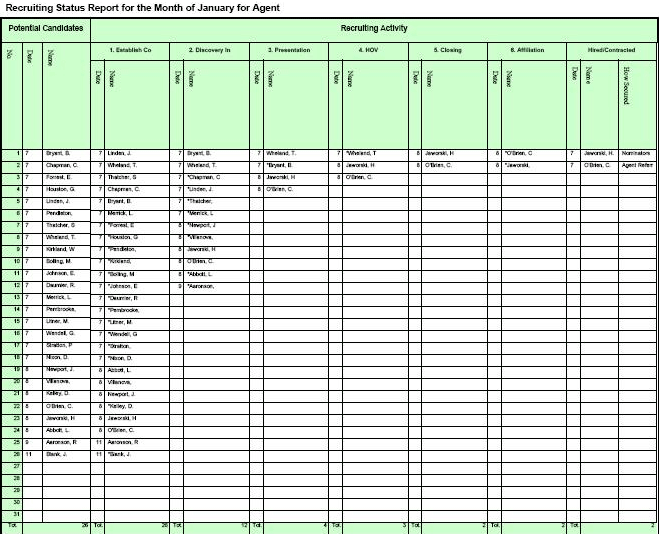
Standard columns include Potential Candidates and Recruiting Activity. Data shown in this report enables management to track how many candidates exist in the pipeline and how much activity revolves around them.
To save or distribute the report, click the Print button. The report displays in PDF format and can be saved or printed.
Recruiting Status Report – Year to Date
This report provides a comprehensive overview of recruiting activity and results, displaying both monthly averages and year-to-date totals.
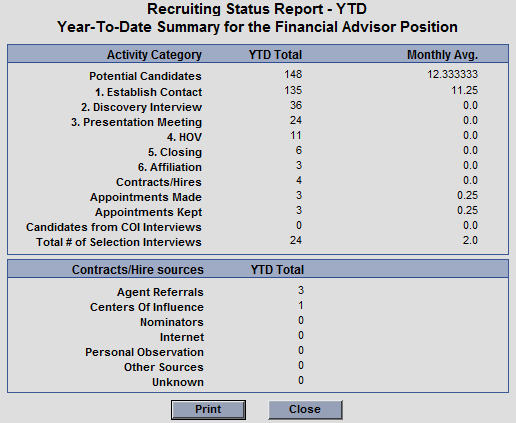
In the first section, the report includes YTD totals and monthly averages for the following:
- Potential Candidates: The number of candidates whose status is set to Potential Candidate.
- Stages Completed: The report includes an entry for each stage created during SmartRecruiting setup and the number of times each stage has been completed.
- Contracts/Hires: The total number of hires. See Recruiting Process for information about hiring candidates.
- Appointments Made: The number of interview-linked calendar activities created. See Recruiting Process for information about linking activities to interviews.
- Appointments Kept: The number of interview-linked calendar activities completed. See Recruiting Process for information about completing interviews.
- Candidates from COI Interviews: The number of candidates who were secured through a center of influence. Refer to the information about the How Secured field of a candidate record in Searching, Viewing and Creating Candidates.
- Total # of Selection Interviews: The number of interviews completed, regardless of whether those interviews were linked to activities. See Recruiting Process for information about completing interviews.
In the second section, the report lists the total contracted agents or reps secured from different sources. Refer to the information about the How Secured field of a candidate record in Searching, Viewing and Creating Candidates:
- Agent Referrals
- Centers of Influence
- Nominators
- Internet
- Personal Observation
- Other Sources
- Unknown
To save or distribute the report, click the Print button. The report displays in PDF format and can be saved or printed.
Dynamic Reports and Excel Reports
For more extensive reporting on candidates, Dynamic Reports and Analytic (Excel) Reports provide a variety of reporting options. See Dynamic Reports and Analytic (Excel) Reports.