Last updated: 2025-09-19
Advisors/Agencies - Creating Advisors/Agencies

- Do one of the following:
- Click the Add New button and select Advisor or Agency. - From the SmartOffice side menu, select People & Companies > Advisors/Agencies to open the search dialog box. Select the Advisors or Agencies option, and then select the New button.The New - Advisor or New - Agency dialog box opens.
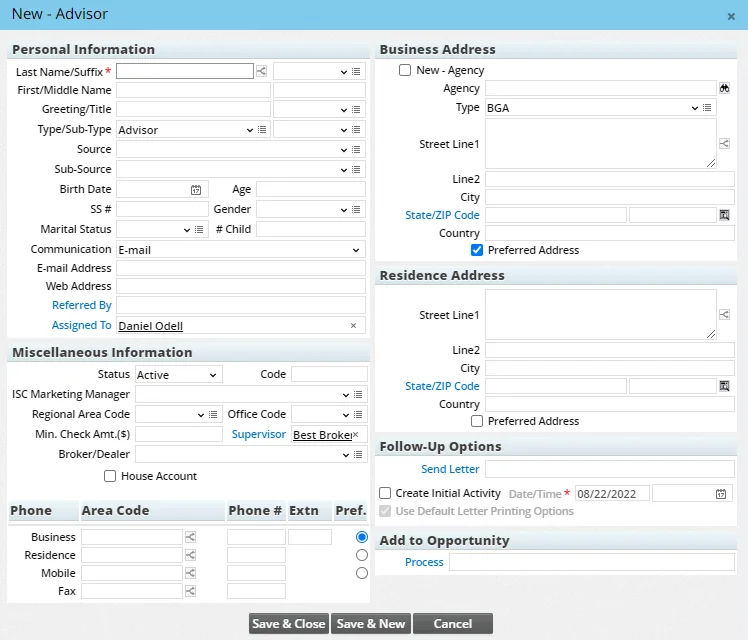
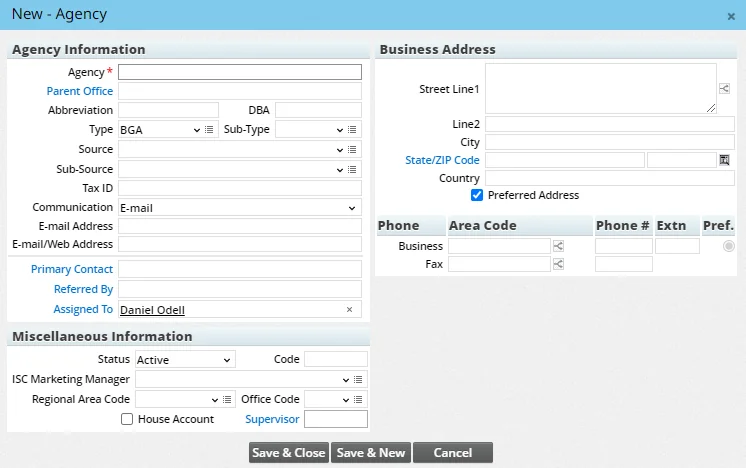
- Complete the fields. For help, see Advisor Personal Content Link or Agency Detail Content Link.
- For advisor records, note the following options:
- Follow-Up Options: This section makes it possible to send a letter to the new advisor and/or schedule an initial call, meeting or other activity.
To send a letter, select the Send Letter hyperlink, and then search for the appropriate correspondence template. To schedule and activity, select the Create Initial Activity option, and then enter the activity date and time.
- Add to Opportunity: If the SmartOpportunities module is enabled for your user account, this section allows you to quickly create an opportunity record for the advisor. Select the Process hyperlink to search for and select the appropriate opportunity process. Once created, the opportunity appears under the advisor's Opportunities tab.
- Click the Save & Close button. If you opted to send the advisor a follow-up letter, the Correspondence Wizard will open, enabling you to complete the correspondence workflow.
Note: To save the record and immediately create another record, click the Save & New button instead.