Last updated: 2025-11-30
Advisors/Agencies - Advisor Personal Content Link
- Overview
- Personal Information Section
- Detail Information Section
- Remarks, Phone Numbers, Addresses and E-mail/Web Addresses Sections
Overview
When viewing an advisor, the user can access this content link to view basic personal, professional and contact information about the advisor.
If the user has the Production Dashboard license enabled on the User Accounts - User Rights content link, the advisor Personal content link has a different layout and also displays production information. For more information, see Production Dashboard.
You can customize this content link to display different content if you have the appropriate user rights (see Page Layout Customization). This topic describes the contents of the SmartOffice default layout.
Personal Information Section
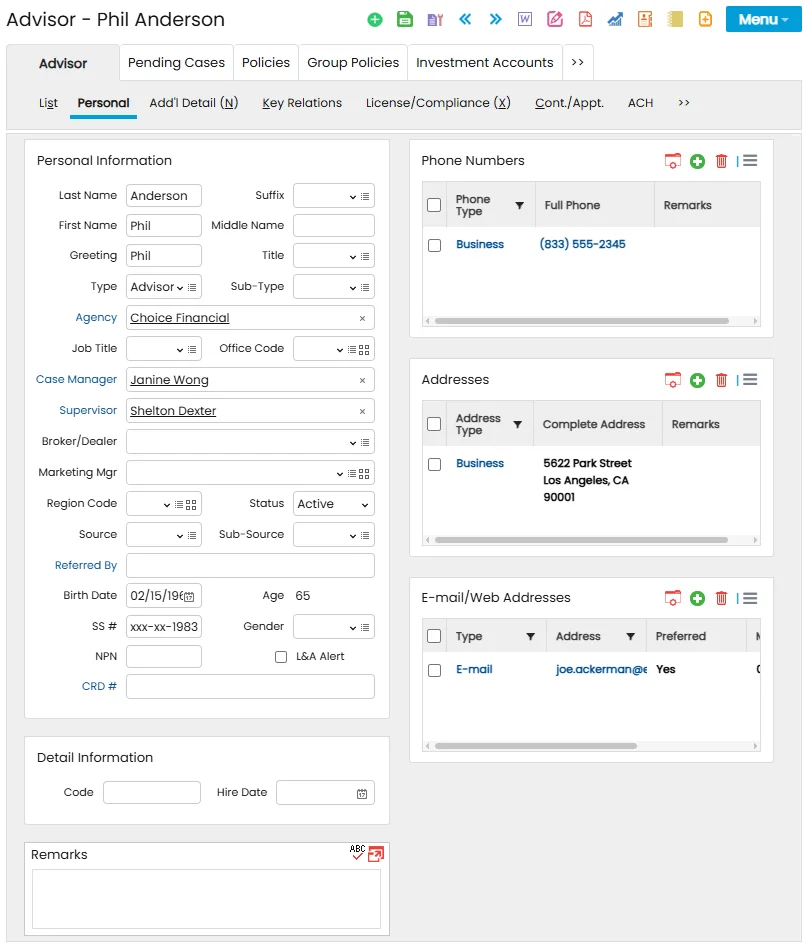
This section contains much of the same information found on the contact Personal content link. The fields that are unique to advisors are:
- Type: The individual's role in the agency. SmartOffice uses this information in part to establish advisor hierarchies.
- Agency: The agency the advisor is associated with. Click the Agency hyperlink to search for the agency. If the agency does not exist in SmartOffice, click the New button when the agency search dialog box opens. Specifying an agency creates a business relation entry on the advisor's Key Relations content link and adds the advisor to the agency hierarchy.
- Office Code: When the advisor appears in a policy's Policy Advisor List (located on the policy's Basic Information content link), this is the default value that is automatically entered in the corresponding Office Code field/column in that list. Users with the appropriate user rights can click the Customize Field Label
 button to rename this field.
 - Case Manager: Click this hyperlink to specify the SmartOffice user who manages this advisor's cases. When the advisor is designated as the primary advisor on a new case, the user specified here is automatically assigned as the case manager on the new case.
- Supervisor: The supervisor field links the advisor to a supervisor. SmartOffice uses the term "supervisor" to identify an individual or business that may receive a commission over and above the writing advisor's compensation (see House, Advisor and Supervisor Setup). As the next entity in the hierarchy chain, the supervisor may have rights to view the advisor's business using SmartView for Advisors. When a supervisor is specified, a SmartPad entry is posted to the supervisor's SmartPad if the Advisor Diary option is selected on the Office Settings - SmartPad/New Contact/E-mail Posting content link.
- Broker-Dealer: If the advisor is affiliated with a broker-dealer, enter that information in this field.
- Marketing Manager: When the advisor appears in a policy's Policy Advisor List (located on the policy's Basic Information content link), this is the default value that is automatically entered in the corresponding Marketing Manager field/column in that list. Users with the appropriate user rights can click the Customize Field Label button to rename this field.
- Region Code: When the advisor appears in a policy's Policy Advisor List (located on the policy's Basic Information content link), this is the default value that is automatically entered in the corresponding Region Code field/column in that list. Users with the appropriate user rights can click the Customize Field Label button to rename this field.
- Status: This field indicates the current status of the advisor (active, inactive, deceased, retired, etc.).
- NPN: Use this field to store the advisor's National Producer Number.
- L&A Alert: This option relates to an enhancement planned for an upcoming SmartOffice release. For more information, see Integrations
- National Insurance Producer Registry (NIPR).
- CRD #: The advisor's FINRA Central Registration Depository number. Select the CRD # hyperlink to open a list of FINRA records entered in SmartOffice (see Viewing an Advisor's Broker-Dealer/FINRA Information), and then select a record containing the advisor's CRD number.
Detail Information Section
- Code: The advisor code is a unique identifier that references the advisor. This field is useful for organizations that have developed advisor identification systems that do not use standard identifiers (e.g., Social Security numbers). Any combination of letters and numerals can be used.
Remarks, Phone Numbers, Addresses and E-mail/Web Addresses Sections
These sections contain the same information found on the contact Personal content link.
