Last updated: 2025-11-30
Navigation - Profile Menu

The profile menu is located in the upper-right corner of SmartOffice. To access it, click your name.
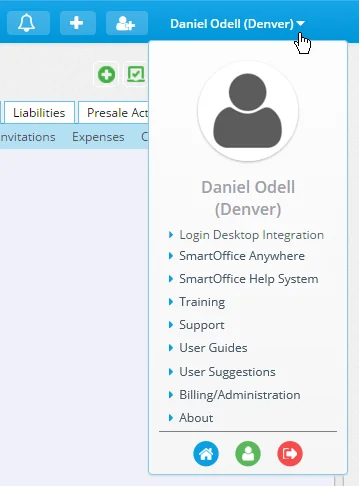
The options available from this menu are as follows:
- Login Desktop Integration: Sign in to the Microsoft Plug-in for SmartOffice. Normally, SmartOffice Pro signs the user in to the plug-in automatically when necessary to complete specific actions in SmartOffice Pro (e.g., correspondence). For scenarios in which automatic sign-in does not occur, such as using the plug-in directly from within Outlook or other Microsoft Office applications, this command provides a quick, manual method for signing in to the plug-in.
- SmartOffice Anywhere: Switch to SmartOffice Anywhere, the lighter, more mobile-friendly SmartOffice user interface.
- SmartOffice Help System: Search or browse for help topics, user guides, training movies and more.
- Training: This is a direct link to the Training Center of the SmartOffice Help System, which contains information about live web-based training and on-site training.
- Support: This is a direct link to the Technical Support contact information page in the SmartOffice Help System.
- User Guides: This is a direct link to the User Guides page in the SmartOffice Help System, which contains links to user guides for all SmartOffice modules and integrations.
- User Suggestions: Click this link to send the SmartOffice team a suggestion for improving SmartOffice.
- Billing/Administration: Get help with billing questions or purchasing additional SmartOffice modules.
- Home: Click the Home button
 from any page in SmartOffice to return to your home page.
- Profile & Settings: Click the Profile & Settings button
 to view or change your User Preferences.
 - Sign Out: Click the Sign Out button
 to end the current SmartOffice session. Do this before closing the browser window. See Signing Out of SmartOffice.