Last updated: 2025-09-19
SmartCommissions - Commission Tracking Overview
- Overview
- Projecting Commissions
- Validating Commissions
- Reconciling Commissions
- Generating Statements and Paying Advisors
Overview
The power and versatility of the SmartCommissions module make it ideal for practically any organization's commission tracking needs. To help new users gain a basic overall understanding of the system, this section briefly describes the module's components and how they work together. The rest of the SmartCommissions documentation delves into these topics in detail.
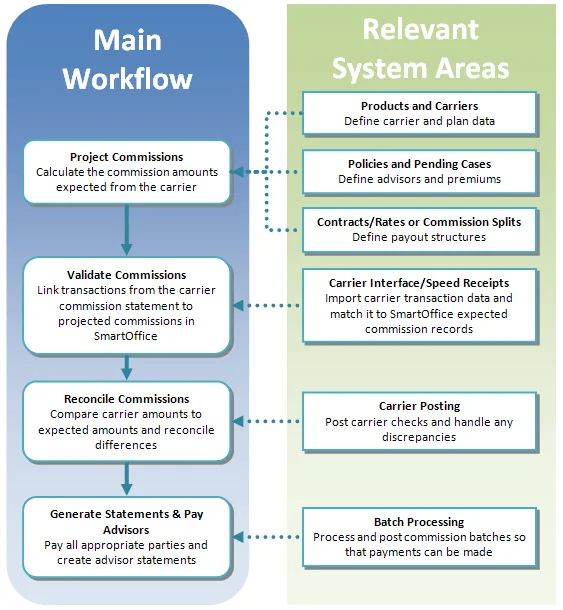
The following diagram provides an overview of the basic SmartCommissions workflow and which areas of the system are involved in each portion of that workflow.
Projecting Commissions
One of the primary functions of the SmartCommissions system is to help agencies project the commission amounts that all parties (agency, managers and writing advisors) should receive from carriers for selling those carriers' products.
With this data, the agency can identify differences between the expected commission amounts and the actual amounts received and forecast future revenues.
SmartCommissions can make these projections in different ways based on an organization's needs. There are different module configurations to choose from. One establishes a commission hierarchy or hierarchies based on contracts and rates defined for every carrier/product combination. Another establishes commission splits on a policy-by-policy basis.
Validating Commissions
Once the system has generated commission projections, those projections can be compared to the actual amounts received from the carrier.
This process begins with the commission statement that the agency receives from a carrier. The transactions from that statement are entered into SmartCommissions so that those comparisons can be made. Carrier statement data can be brought into SmartOffice in a variety of ways, ranging from direct electronic import to manual entry from paper statements; the method varies by carrier. The Carrier Interface and Speed Receipts are the primary portions of the system used to import/enter those transactions. Another method for importing commission transactions (particularly non-policy commissions) is Advisor Payment Import.
When the carrier statement data is in the system, the user is ready to "validate" the data, i.e., link each carrier transaction to the corresponding projection calculated by SmartOffice. Validation happens primarily in Speed Receipts.
Reconciling Commissions
Once validated, transactions can be reconciled with the commission projections in SmartOffice. Reconciliation takes place in the Carrier Posting portion of the system. SmartCommissions identifies any overpayments or underpayments from the carrier and offers a number of reconciliation options for handling those discrepancies, such as recording write-offs or balances due.
This reconciliation process is explained in detail in Reconciliation and Statement Generation.
Generating Statements and Paying Advisors
With reconciled transactions in the system, the agency can begin the process of paying the appropriate commission amounts to all parties. This process includes generating checks as well as statements containing detailed breakdowns of the commission transactions that make up the final check amount. This process takes place in the Batch Processing area of the SmartCommissions system.