Last updated: 2025-09-19
Deleted Records
Overview
In SmartOffice, deleted activities, SmartPad entries, contacts, businesses, carriers, policies (including group policies), pending cases and investment accounts are not permanently removed from the system. Instead, those records are moved to the Deleted Records area, where they can either be restored or permanently deleted.
Note: Only users with administrator rights can access the Deleted Records area.
Accessing Deleted Records
- From the side menu, click Utilities and then select Deleted Records from the expanded menu to open the Search Deleted Records dialog box.
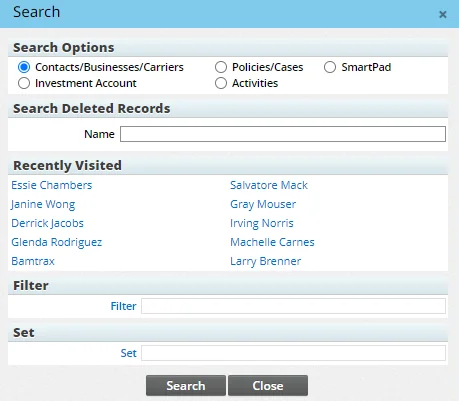
- In the Search Options section, select the appropriate record type.
- (Optional) Enter the record name/primary contact, or specify a filter or set to narrow the search. For activities or SmartPad entries, you can also specify a date range and/or specific text to search for in specific fields.
- Click the Search button to display the Deleted Records List.
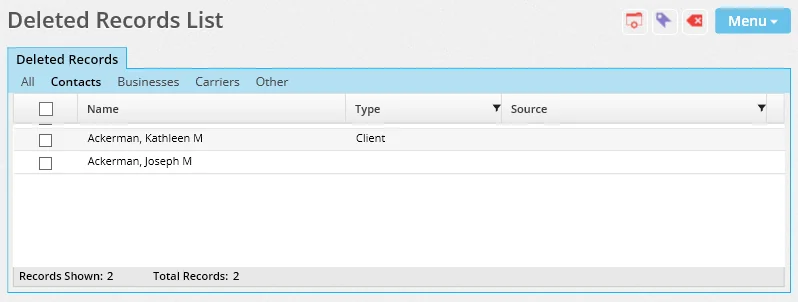
Use the list's content links to narrow down the list by record type.
Restoring Deleted Records
- Tag the appropriate records in the Deleted Records List.
- Select Menu > Restore Tagged Record(s).
Restrictions apply when users try to restore deleted policies, pending cases or investment accounts that are linked to deleted contacts:
- Policies and pending cases: A restored policy or case remains hidden in SmartOffice until the linked contact is also restored.
- Investment accounts: An investment account cannot be restored unless the linked contact is also restored.
Restoring a record in SmartOffice creates an entry in the RESTORELOG table of the SmartOffice database. The entry indicates the user who restored the record and the office in which the user resides.
Deleting Records Permanently
Caution: Permanently deleted records are removed from the system and cannot be restored.
- Tag the appropriate records in the Deleted Records List.
- Select Menu > Delete Tagged Records Permanently.