Last updated: 2025-12-02
Information Card

Information Card

)
The link for this help topic is:
Copy
Link)
In this Topic ShowHide)
- Overview
- Enabling or Disabling the Information Card
- Opportunity Information Card
- Policy/Pending Case Information Card
Overview
The information card is a window that appears about two seconds after
the user points to certain types of text in SmartOffice. In most cases,
the card is available when the user is viewing a list of records.
With this feature, the user can obtain a quick summary of information
about an item without having to open it.
Enabling or Disabling the Information Card
Users can control whether the Information Card displays through an option
on the [User Preferences -
Basic Info content link](/help/pro/user/preferences/-/basic/info).
Contact Information Card
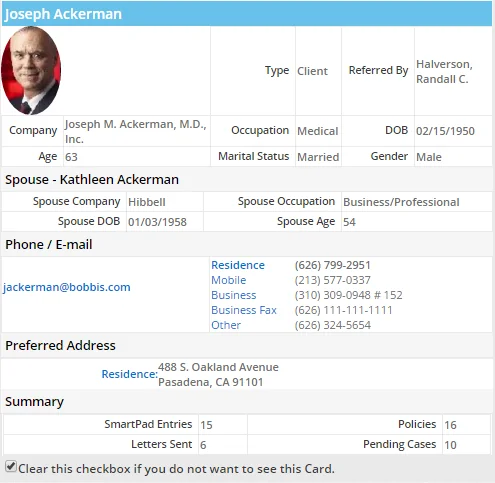
The information card for contacts
displays the following information:
-
Basic demographic information
-
Spouse information (if any)
-
Contact information
-
Counts for the following:
-
Letters sent
-
SmartPad entries
-
Policies
-
Pending cases
On the Add'l Personal content link of a contact, positioning the mouse
pointer over the date and time in the Last Calendar On or Next Calendar
On field displays an information card with more detailed information.
Activity Information Card
The information card for activities
displayed includes buttons across the top for marking the activity Done,
deleting it, opening the SmartPad
or displaying the full menu of options available for the activity.
Moving the mouse to the right arrow (next to the SmartPad button) displays
a menu with additional options.
Opportunity Information Card
The information card for opportunities
displays information such as the process, current and previous stages,
status.
Lead Information Card
The information card for leads displays
the lead type, status, campaign and contact information.
Policy/Pending Case Information Card
The information card for policies and
pending cases displays policy number,
carrier, status and date information, as well as details about the insured
and the primary advisor. For pending cases, the card also displays the
name of the case manager.