Last updated: 2025-09-19
Integrations - Paperless Solutions Group
- Overview
- Requirements
- SmartOffice Setup
- User Setup
- Data Setup
- Using the Integration
- Creating an Application from SmartOffice
- Viewing/Editing an Existing Application from SmartOffice
- Reference
- Record Matching
- Supported Carriers and Products
Overview
The Paperless Solutions Group (PSG) integration enables SmartOffice users to fill out life insurance application forms quickly by pushing SmartOffice contact data into the PSG electronic application form system.
Once an application is created in PSG's system, SmartOffice automatically creates an associated presale activity and pending case record. The user can then access the electronic application form system from those records to make any necessary changes to the application. The latest version of the application is also saved as a PDF document in the SmartOffice pending case record.
For a list of carriers and products supported by this integration, see Supported Carriers and Products.
For more information about Paperless Solutions Group, visit the Paperless Solutions Group website.
Requirements
- Paperless Solutions account
SmartOffice Setup
User Setup
A SmartOffice user with administrator rights must enable the appropriate license for each SmartOffice user who will use the integration.
- Sign in to SmartOffice Pro.
- Do one of the following:
- If you are setting up the integration for the user account your are currently signed in to, select the profile menu in the upper-right corner, and then select Profile & Settings
 .
. - If you are setting up the integration for another user account, select Setup > User Accounts on the SmartOffice side menu, and then search for the user account.
- With the user account record open, select the User Rights content link.
- In the Licenses column, select the PSG eApp license under Integration.
- Select Menu > Save.
- Repeat these steps for each additional user.
Data Setup
A SmartOffice contact record must contain the following data at minimum before you can use it to create an application through PSG's system:
- Birth Date
- Social Security Number
In addition, the contact record must contain the following data if you plan to request an electronic signature from the contact through PSG's system:
- Driver's License \#
- Residence Address (with ZIP Code)
To ensure that the correct contact residence and business addresses are sent to Paperless Solutions, be aware of how SmartOffice determines which addresses to send. Generally speaking, SmartOffice sends the address marked as the Preferred Address. If the contact has no preferred address, SmartOffice sends the primary address. If no preferred or primary address exists for the contact, SmartOffice sends the address added most recently.
Using the Integration
Creating an Application from SmartOffice
Follow these steps to launch PSG's electronic application editor from a SmartOffice contact.
Note: Accessing PSG's application system from a SmartOffice contact record always creates a new application. If you want to access an existing application, you can do so from the associated presale activity or pending case (see Viewing/Editing an Existing Application from SmartOffice).
- In SmartOffice, search for a contact or business whose data you want to use to prefill a form.
- In the list of search results, select or open the record, and then select Menu > Integrations > PSG eApp to open the product selection dialog box.
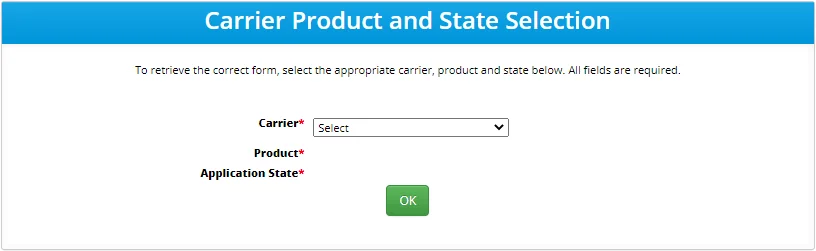
- Select the carrier, product and state.
- Select OK to see the summary page. Note that the eSignature Status column appears only when the selected product supports electronic signature.
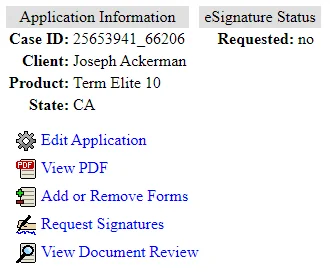
- Select Edit Application to open the form editor. Note that some of the fields are prefilled using data from the SmartOffice contact record.
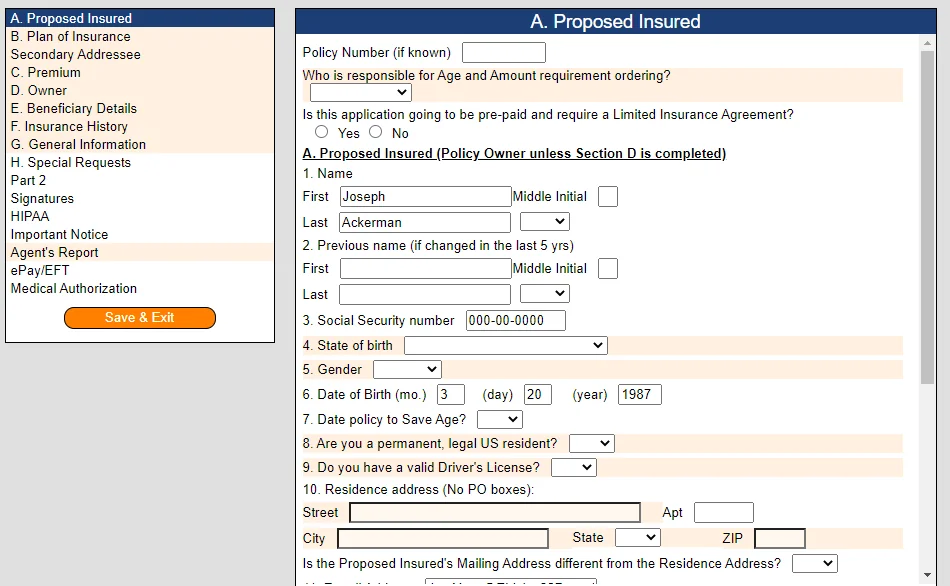
- Use the menu on the left to quickly navigate to different sections of the form, noting the following:
- The purple-highlighted sections in the menu are the ones you are currently viewing.
- The orange-highlighted sections in the menu contain required fields that have not been completed..
- Complete the form fields on the right, making sure to fill in all required fields.
- When finished, select Save & Exit in the left menu to return to the summary page.
- Select any of the following options, if necessary:
- View PDF: See how the forms currently look with the information entered. A PDF preview opens in a new browser tab/window.
- Add or Remove Forms: Change the forms included in the application.
- View Document Review: This option appears only for applications that have required fields. Select it to confirm that all required form fields have been completed.
- If the selected product supports electronic signature, select one of these options:
- Request Proposed Insured Signature: To send the proposed insured a signature request by e-mail, select this option, make sure the proposed insured's name and e-mail address are correct, and then select Request Signatures.
- Don't request signatures, just save the application: This options allows you to save the application without sending an electronic signature request (you can send the request at a later date while viewing or editing the application).
- Select Save Application.
Once you save the application, SmartOffice creates the following records:
- Presale activity: A presale activity linked to the appropriate contact, carrier and plan. The Action field of the presale activity is set to Electronic Application, the status is set to Open, and the status date reflects the current date. You can view the presale activity by navigating to the contact's Presale Activity/Proposals tab.
- Pending case: A pending case linked to the appropriate contact, carrier and plan. The status is set to Application Entered and the status date reflects the current date. In addition, a PDF copy of the application is saved to the case's Letters/Documents content link. You can view the pending case by navigating to the contact's Pending Cases tab.
Viewing/Editing an Existing Application from SmartOffice
If you have already created and saved an application in PSG's system using this integration, you can view the PDF version in the Letters/Documents content link of the associated SmartOffice pending case. To view or make changes to the application in PSG's system, you can reopen the application directly from the associated presale activity or pending case in SmartOffice.
Note: Applications remain in Paperless Solution Group's system for 90 days before they expire and are purged. Once an application is purged, any attempt to access it from SmartOffice will produce an error.
- In SmartOffice, search for the presale activity or pending case associated with the application.
- In the list of search results, select the presale activity or pending case, or open the record.
- Select Menu > Integrations > PSG eApp. The associated application's summary page opens in PSG's system.
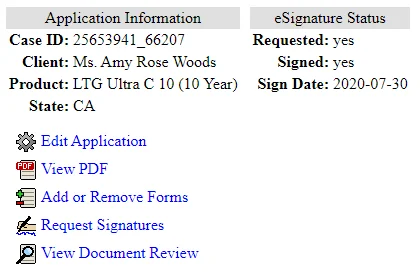
From the summary page, you can edit or review the application, add or remove forms, view a PDF version of the forms, or request an electronic signature (if supported by the insurance product). For more information about these options, see Creating an Application from SmartOffice.
When you view/edit an existing form in Paperless Solution Group's electronic application system, note the following:
- If the contact's information has been updated in SmartOffice since the last time the application was accessed, the contact information in the application is updated automatically.
- If you make changes to the application and save them, the associated SmartOffice contact and pending case records are automatically updated to reflect those changes. For details about how SmartOffice matches carrier, product, and other information from the application form when updating these records, see Record Matching.
- If you make changes to the application and save them, the PDF version of the application that was saved to the pending case record in SmartOffice is automatically overwritten with a new version reflecting the changes.
Reference
Record Matching
This section describes how SmartOffice matches data from a saved electronic application to update the appropriate records in SmartOffice.
Carrier and Product
SmartOffice uses the carrier name, product name, and product code information from PSG's system to match the appropriate records in SmartOffice.
Primary Insured, Owner (Person), Payor, Beneficiary, and Advisor
SmartOffice uses the Social Security number to find a match for these parties. If a match is found, the appropriate contact is updated in SmartOffice.
If no match is found based on Social Security number, SmartOffice tries to find a match based on first name, last name and birth date. If a match is found, the appropriate contact is updated in SmartOffice.
If no match is found using any of these methods, SmartOffice assumes the record does not exist and creates it. Note that SmartOffice creates a full contact record only for the primary insured and advisor; for the other parties, a non-contact entry is added to the pending case's Policy Relationship List.
Owner (Trust or Corporation)
SmartOffice uses the tax ID number to find a match for the policy owner. If a match is found, the appropriate policy owner contact is updated in SmartOffice.
If no match is found based on tax ID, SmartOffice tries to match the policy owner based on the business name and established date. If a match is found, the appropriate policy owner contact is updated in SmartOffice.
If no match is found using any of these methods, a non-contact entry for the owner is added to the pending case's Policy Relationship List.
Supported Carriers and Products
PSG's electronic application system supports the carriers and products listed in the following table.
| Carrier Name | Product Name | Product State List |
|---|---|---|
| American General Life Insurance Company | LTG Ultra C 10 | Not in NY |
| LTG Ultra C 15 (Issue Age 20 - 70\) | Not in NY | |
| LTG Ultra C 15 (Issue Age 20 - 75\) | Not in NY | |
| LTG Ultra C 20 ( Issue Age 20 - 60 ) | Not in NY | |
| LTG Ultra C 20 ( Issue Age 20 - 65 ) | Not in NY | |
| LTG Ultra C 30 ( Issue Age 20 - 45 ) | Not in NY | |
| LTG Ultra C 30 ( Issue Age 20 - 50 ) | Not in NY | |
| Select-A-Term 10 YR | All States | |
| Select-A-Term 15 YR | All States | |
| Select-A-Term 16 YR | All States | |
| Select-A-Term 17 YR | All States | |
| Select-A-Term 18 YR | All States | |
| Select-A-Term 19 YR | All States | |
| Select-A-Term 20 YR | All States | |
| Select-A-Term 21 YR | All States | |
| Select-A-Term 22 YR | All States | |
| Select-A-Term 23 YR | All States | |
| Select-A-Term 24 YR | All States | |
| Select-A-Term 25 YR | All States | |
| Select-A-Term 26 YR | All States | |
| Select-A-Term 27 YR | All States | |
| Select-A-Term 28 YR | All States | |
| Select-A-Term 29 YR | All States | |
| Select-A-Term 30 YR | All States | |
| Select-A-Term 35 YR | All States | |
| Banner Life Insurance Company | OPTerm 10 | Not in NY |
| OPTerm 15 | Not in NY | |
| OPTerm 20 | Not in NY | |
| OPTerm 25 | Not in NY | |
| OPTerm 30 | Not in NY | |
| OPTerm 35 | Not in NY | |
| OPTerm 40 | Not in NY | |
| John Hancock Life Insurance Company USA | John Hancock Term 10 | All States |
| John Hancock Term 10 (2011\) | All States | |
| John Hancock Term 10 (2015\) | All States | |
| John Hancock Term 10 (2016\) | All States | |
| John Hancock Term 10 (2016\) With Vitality | All States | |
| John Hancock Term 10 (2017\) | All States | |
| John Hancock Term 10 (2017\) With Vitality | All States | |
| John Hancock Term 10 (2018\) | All States | |
| John Hancock Term 10 (2018\) With Vitality | All States | |
| John Hancock Term 10 With Vitality | All States | |
| John Hancock Term 15 | All States | |
| John Hancock Term 15 (2011\) | All States | |
| John Hancock Term 15 (2015\) | All States | |
| John Hancock Term 15 (2016\) | All States | |
| John Hancock Term 15 (2016\) With Vitality | All States | |
| John Hancock Term 15 (2017\) | All States | |
| John Hancock Term 15 (2017\) | All States | |
| John Hancock Term 15 (2017\) With Vitality | All States | |
| John Hancock Term 15 (2018\) | All States | |
| John Hancock Term 15 (2018\) With Vitality | All States | |
| John Hancock Term 15 With Vitality | All States | |
| John Hancock Term 20 | All States | |
| John Hancock Term 20 (2011\) | All States | |
| John Hancock Term 20 (2015\) | All States | |
| John Hancock Term 20 (2016\) | All States | |
| John Hancock Term 20 (2016\) With Vitality | All States | |
| John Hancock Term 20 (2017\) | All States | |
| John Hancock Term 20 (2017\) | All States | |
| John Hancock Term 20 (2017\) With Vitality | All States | |
| John Hancock Term 20 (2018\) | All States | |
| John Hancock Term 20 (2018\) With Vitality | All States | |
| John Hancock Term 20 With Vitality | All States | |
| North American Company For Life And Health Insurance | North American Legacy SPWL | All States |
| North American BenefitSolutions | All States | |
| North American BenefitSolutions 10 | All States | |
| North American BenefitSolutions 14 | All States | |
| North American BenefitSolutions II | All States | |
| North American BenefitSolutions II 7 | All States | |
| North American Builder | All States | |
| North American Charter Plus 10 | All States | |
| North American Charter Plus 14 | All States | |
| North American Charter Plus II 10 | All States | |
| North American Charter Series 10 | All States | |
| North American Charter Series 14 | All States | |
| North American Charter Series 7 | All States | |
| North American Director 9 | All States | |
| North American Escalating Rate Annuity | All States | |
| North American Flex I | All States | |
| North American Flex II | All States | |
| North American Flex III | All States | |
| North American Formula Choice 5 | All States | |
| North American FoundationChoice 10 | All States | |
| North American FoundationChoice 7 | All States | |
| North American FoundationChoice Plus 10 | All States | |
| North American FoundationChoice Plus 7 | All States | |
| North American Freedom Choice 10 | All States | |
| North American Freedom Choice 14 | All States | |
| North American Freedom Choice 6 | All States | |
| North American Freedom Choice 8 | All States | |
| North American Guarantee Choice 10 | All States | |
| North American Guarantee Choice 3 | All States | |
| North American Guarantee Choice 4 | All States | |
| North American Guarantee Choice 5 | All States | |
| North American Guarantee Choice 6 | All States | |
| North American Guarantee Choice 7 | All States | |
| North American Guarantee Choice 8 | All States | |
| North American Guarantee Choice 9 | All States | |
| North American Guarantee Choice II - 10 | All States | |
| North American Guarantee Choice II - 3 | All States | |
| North American Guarantee Choice II - 4 | All States | |
| North American Guarantee Choice II - 5 | All States | |
| North American Guarantee Choice II - 6 | All States | |
| North American Guarantee Choice II - 7 | All States | |
| North American Guarantee Choice II - 8 | All States | |
| North American Guarantee Choice II - 9 | All States | |
| North American Income Life-All Other Options | All States | |
| North American Income-Period Certain 5-9 Years | All States | |
| North American IncomeChoice 10 | All States | |
| North American IncomeChoice 14 | All States | |
| North American IncomeChoice 7 | All States | |
| North American Legacy SPWL | All States | |
| North American Paramount Choice 10 | All States | |
| North American Performance Choice 12 | All States | |
| North American Performance Choice 12 Plus | All States | |
| North American Performance Choice 8 | All States | |
| North American Performance Choice 8 Plus | All States | |
| North American Pillar | All States | |
| North American PrecisionSeries 10 | All States | |
| North American PrecisionSeries 14 | All States | |
| North American PrecisionSeries 7 | All States | |
| North American Prizm 10 | All States | |
| North American Prizm 14 | All States | |
| North American Prizm 7 | All States | |
| North American Prizm Plus 10 | All States | |
| North American Prizm Plus 14 | All States | |
| North American Prizm Plus 7 | All States | |
| North American RetireChoice 10 | All States | |
| North American RetireChoice 14 | All States | |
| North American SecureChoice 10 | All States | |
| North American SecureChoice 14 | All States | |
| North American Ten | All States | |
| North American VersaChoice 10 | All States | |
| Protective Life And Annuity Insurance Company | Empire Term 10 | NY Only |
| Empire Term 15 | NY Only | |
| Empire Term 20 | NY Only | |
| Empire Term 25 | NY Only | |
| Empire Term 30 | NY Only | |
| The Savings Bank Mutual Life Insurance Company Of Massachusetts | Level Term 10 | Not in MT, NY |
| Level Term 15 | Not in MT, NY | |
| Level Term 20 | Not in MT, NY | |
| Level Term 25 | Not in MT, NY | |
| Level Term 30 | Not in MT, NY | |
| Transamerica Life Insurance Company | TransACE | All States |
| TransACE 2012 | All States | |
| TransACE 2013 | All States | |
| TransACE 2014 | All States | |
| TransACE CV | All States | |
| TransACE CV 2013 | All States | |
| TransACE 2008 | All States | |
| TransACE 2010 | All States | |
| TransACE 2012 | All States | |
| TransACE 2013 | All States | |
| Trendsetter Express 10 (June-2012\) | All States | |
| Trendsetter Express 15 (June-2012\) | All States | |
| Trendsetter Express 20 (June-2012\) | All States | |
| Trendsetter Express 25 (June-2012\) | All States | |
| Trendsetter Express 30 (June-2012\) | All States | |
| Trendsetter LB 10 (Living Benefits) | All States | |
| Trendsetter LB 10 (Living Benefits) 2015 | All States | |
| Trendsetter LB 15 (Living Benefits) | All States | |
| Trendsetter LB 15 (Living Benefits) 2015 | All States | |
| Trendsetter LB 20 (Living Benefits) | All States | |
| Trendsetter LB 20 (Living Benefits) 2015 | All States | |
| Trendsetter LB 25 (Living Benefits) | All States | |
| Trendsetter LB 25 (Living Benefits) 2015 | All States | |
| Trendsetter LB 30 (Living Benefits) | All States | |
| Trendsetter LB 30 (Living Benefits) 2015 | All States | |
| Trendsetter ROP 20 | All States | |
| Trendsetter ROP 30 | All States | |
| Trendsetter Super 10 | All States | |
| Trendsetter Super 10 (2012\) | All States | |
| Trendsetter Super 10 (2013\) | All States | |
| Trendsetter Super 10 (2015\) | All States | |
| Trendsetter Super 15 | All States | |
| Trendsetter Super 15 (2012\) | All States | |
| Trendsetter Super 15 (2013\) | All States | |
| Trendsetter Super 15 (2015\) | All States | |
| Trendsetter Super 20 | All States | |
| Trendsetter Super 20 (2012\) | All States | |
| Trendsetter Super 20 (2013\) | All States | |
| Trendsetter Super 20 (2015\) | All States | |
| Trendsetter Super 25 | All States | |
| Trendsetter Super 25 (2012\) | All States | |
| Trendsetter Super 25 (2013\) | All States | |
| Trendsetter Super 25 (2015\) | All States | |
| Trendsetter Super 30 | All States | |
| Trendsetter Super 30 (2012\) | All States | |
| Trendsetter Super 30 (2013\) | All States | |
| Trendsetter Super 30 (2015\) | All States | |
| Trendsetter Super YRT | All States | |
| Trendsetter Super YRT (2012\) | All States | |
| Trendsetter Super YRT (2013\) | All States | |
| Trendsetter Super YRT (2015\) | All States | |
| United of Omaha Life Insurance Company | Guaranteed Universal Life | Not in NY |
| Guaranteed Universal Life Complete | Not in NY | |
| Guaranteed Universal Life Express | Not in NY | |
| Guaranteed Universal Life Plus | Not in NY | |
| Guaranteed Universal Life Survivor | Not in NY | |
| Term Life Express 10 | All States | |
| Term Life Express 15 | All States | |
| Term Life Express 15 - Guarantee Full With ROP Nontobacco | All States | |
| Term Life Express 15 - Guarantee Full With ROP Tobacco | All States | |
| Term Life Express 15 - Guarantee Full Without ROP | All States | |
| Term Life Express 20 | All States | |
| Term Life Express 20 - Guarantee 5 With ROP Nontobacco | All States | |
| Term Life Express 20 - Guarantee 5 With ROP Tobacco | All States | |
| Term Life Express 20 - Guarantee 5 Without ROP | All States | |
| Term Life Express 20 - Guarantee Full With ROP Nontobacco | All States | |
| Term Life Express 20 - Guarantee Full With ROP Tobacco | All States | |
| Term Life Express 20 - Guarantee Full Without ROP | All States | |
| Term Life Express 30 | All States | |
| Term Life Express 30 - Guarantee 5 With ROP Nontobacco | All States | |
| Term Life Express 30 - Guarantee 5 With ROP Tobacco | All States | |
| Term Life Express 30 - Guarantee 5 Without ROP | All States | |
| Term Life Express 30 - Guarantee Full With ROP Nontobacco | All States | |
| Term Life Express 30 - Guarantee Full With ROP Tobacco | All States | |
| Term Life Express 30 - Guarantee Full Without ROP | All States | |
| William Penn Life Insurance Of New York | Penn Term 10 | NY Only |
| Penn Term 15 | NY Only | |
| Penn Term 20 | NY Only | |
| Penn Term 30 | NY Only | |
| The Lincoln National Life Insurance Company | Lincoln LifeElements Level Term (10\) 2011 | Not in NY, MD |
| Lincoln LifeElements Level Term (10\) 2012 | Not in NY, MD | |
| Lincoln LifeElements Level Term (10\) 2013 | Not in NY, MD | |
| Lincoln LifeElements Level Term (10\) 2014 | Not in NY, MD | |
| Lincoln LifeElements Level Term (15\) 2011 | Not in NY, MD | |
| Lincoln LifeElements Level Term (15\) 2012 | Not in NY, MD | |
| Lincoln LifeElements Level Term (15\) 2013 | Not in NY, MD | |
| Lincoln LifeElements Level Term (15\) 2014 | Not in NY, MD | |
| Lincoln LifeElements Level Term (20\) 2011 | Not in NY, MD | |
| Lincoln LifeElements Level Term (20\) 2012 | Not in NY, MD | |
| Lincoln LifeElements Level Term (20\) 2013 | Not in NY, MD | |
| Lincoln LifeElements Level Term (20\) 2014 | Not in NY, MD | |
| Lincoln LifeElements Level Term (2011\) - To Age 95 | Not in NY, MD | |
| Lincoln LifeElements Level Term (30\) 2011 | Not in NY, MD | |
| Lincoln LifeElements Level Term (30\) 2012 | Not in NY, MD | |
| Lincoln LifeElements Level Term (30\) 2013 | Not in NY, MD | |
| Lincoln LifeElements Level Term (30\) 2014 | Not in NY, MD | |
| Lincoln LifeElements Level Term 10 | Not in NY, MD | |
| Lincoln LifeElements Level Term 10 (2009\) | Not in NY, MD | |
| Lincoln LifeElements Level Term 10 (2010\) | Not in NY, MD | |
| Lincoln LifeElements Level Term 15 | Not in NY, MD | |
| Lincoln LifeElements Level Term 15 (2009\) | Not in NY, MD | |
| Lincoln LifeElements Level Term 15 (2010\) | Not in NY, MD | |
| Lincoln LifeElements Level Term 20 | Not in NY, MD | |
| Lincoln LifeElements Level Term 20 (2009\) | Not in NY, MD | |
| Lincoln LifeElements Level Term 20 (2010\) | Not in NY, MD | |
| Lincoln LifeElements Level Term 30 | Not in NY, MD | |
| Lincoln LifeElements Level Term 30 (2009\) | Not in NY, MD | |
| Lincoln LifeElements Level Term 30 (2010\) | Not in NY, MD | |
| Lincoln LifeElements One-Year Term | Not in NY, MD | |
| Pacific Life Insurance Company | Pacific Elite Term 10 | Not in GU, NY, PR, VI |
| Pacific Elite Term 20 | Not in GU, NY, PR, VI | |
| Pacific Elite Term 30 | Not in GU, NY, PR, VI | |
| PL Promise Term 10 | Not in NY, CT, DE | |
| PL Promise Term 20 | Not in NY, CT, DE | |
| PL Promise Term 30 | Not in NY, CT, DE | |
| PL Promise Term 40 | Not in NY, CT, DE | |
| PL Promise Term 50 | Not in NY, CT, DE | |
| Protective Life Insurance Company | Protective Secure T 10 | Not in NY |
| Protective Secure T 10 - July 2012 | Not in NY | |
| Protective Secure T 15 | Not in NY | |
| Protective Secure T 15 - July 2012 | Not in NY | |
| Protective Secure T 20 | Not in NY | |
| Protective Secure T 20 - July 2012 | Not in NY | |
| Protective Secure T 25 | Not in NY | |
| Protective Secure T 25- July 2012 | Not in NY | |
| Protective Secure T 30 | Not in NY | |
| Protective Secure T 30- July 2012 | Not in NY | |
| Pruco Life Insurance Company | Term Essential 10 | All States |
| Term Essential 10 (Jan 2011\) | All States | |
| Term Essential 10 (July 2011\) | All States | |
| Term Essential 10 (June 2010\) | All States | |
| Term Essential 10 (June 2012\) | All States | |
| Term Essential 15 | All States | |
| Term Essential 15 (Jan 2011\) | All States | |
| Term Essential 15 (July 2011\) | All States | |
| Term Essential 15 (June 2010\) | All States | |
| Term Essential 15 (June 2012\) | All States | |
| Term Essential 20 | All States | |
| Term Essential 20 (Jan 2011\) | All States | |
| Term Essential 20 (July 2011\) | All States | |
| Term Essential 20 (June 2010\) | All States | |
| Term Essential 20 (June 2012\) | All States | |
| Term Essential 30 | All States | |
| Term Essential 30 (Jan 2011\) | All States | |
| Term Essential 30 (July 2011\) | All States | |
| Term Essential 30 (June 2010\) | All States | |
| Term Essential 30 (June 2012\) | All States | |
| Term Elite 10 | All States | |
| Term Elite 10 (Jan 2011\) | All States | |
| Term Elite 10 (July 2011\) | All States | |
| Term Elite 10 (June 2010\) | All States | |
| Term Elite 10 (June 2012\) | All States | |
| Term Elite 15 | All States | |
| Term Elite 15 (Jan 2011\) | All States | |
| Term Elite 15 (July 2011\) | All States | |
| Term Elite 15 (June 2010\) | All States | |
| Term Elite 15 (June 2012\) | All States | |
| Term Elite 20 | All States | |
| Term Elite 20 (Jan 2011\) | All States | |
| Term Elite 20 (July 2011\) | All States | |
| Term Elite 20 (June 2010\) | All States | |
| Term Elite 20 (June 2012\) | All States | |
| Term Elite 30 | All States | |
| Term Elite 30 (Jan 2011\) | All States | |
| Term Elite 30 (July 2011\) | All States | |
| Term Elite 30 (June 2010\) | All States | |
| Term Elite 30 (June 2012\) | All States |