Last updated: 2025-09-19
Job Queue
The Job Queue manages asynchronous processes in the system. These processes are managed through the creation of agents to establish the parameters of the jobs initiated by various workflows. These agents, called Job Agents, can be created at either the System Office Level or the Local Office Level. The Data Validation Job Agent is only available in the System Office due to the nature of its operation. A user must have specific rights to add, modify, or delete agents and different rights to view jobs that were created. Information about the specific types of Job Agents and their uses are detailed in this document.
Creating job agents provides the ability to set and forget these procedures. In other words, the configuration is performed once in the User Interface (UI) and then the other users in the system can take advantage of these capabilities. It also enables the users to run processes, such as Data Validation or large print jobs during off-peak system times to prevent slow down of the system for intensive operations.
- Job Queue Menu and Access)
Three separate components comprise the Job Queue. A user may have rights to view/modify all, some, or none of these elements. Depending on other rights they are assigned, they may have the ability to use one or more of the agents. Security for the Job Queue components, as with the other parts of the SmartOffice system, is highly customizable.
A user assigned the right of Job Queue Agent Maintenance has the ability to add, modify, and delete Job Agents. This user can also view agents created in the System Office. Job Agents created in a specific office are not available to lower offices in a hierarchy. The only agents that are available to other offices are those created in the System Office. The Job Queue is not part of the hierarchy in an Enterprise system.
A user assigned the right of Created Jobs Maintenance can view jobs that they created in their local office. A user with this right has the ability to add, modify, and delete jobs that they created. No user has the ability to affect the jobs created by other users in the office.
When an office is created, a SmartOffice Printer Queue is automatically created. An Admin user in the office must assign one user the responsibility to manage this Job Agent for the other users. Otherwise, any correspondence sent to the Printer Queue from this office could become lost. It is very important to assign one user in the office this responsibility, or to delete this entry from the Job Agents List.
- Config.xml Requirements)
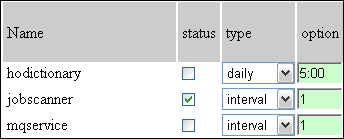
If a SmartOffice server is set up to only have the SmartOffice Printer Queue enabled and no other agents, then the default settings for the Config.xml file need not be changed. If a SmartOffice server will utilize one or more of the other agents, then the Job Scanner section of the Config.xml file must have its status set to On. The other component that can be modified is the Interval setting. The interval is measured in minutes and the default of 1 is how often the Job Scanner checks for jobs needing to be processed.