Last updated: 2025-09-19
SmartInvestments - Investment Alerts
Overview
Investment Alerts are special, predefined Dynamic Reports that help financial advisors by delivering time-sensitive information about their clients. Investment alerts are typically added to the SmartOffice home page, where advisors can see them right away when they sign in to SmartOffice.
This feature is available to users of the SmartInvestments module.
Note: To get the most out of Investment Alerts, the user should first understand how to use and customize the SmartOffice home page.
Adding Investment Alerts to the Home Page
Users can add Investment Alerts to the home page while creating a home page tab or adding content to an existing tab. While creating a tab, select one of the following options from the Dashboards list:
- Inv Alerts – Perf, Out of Balance or Maturing
- Inv Alerts – Account Value
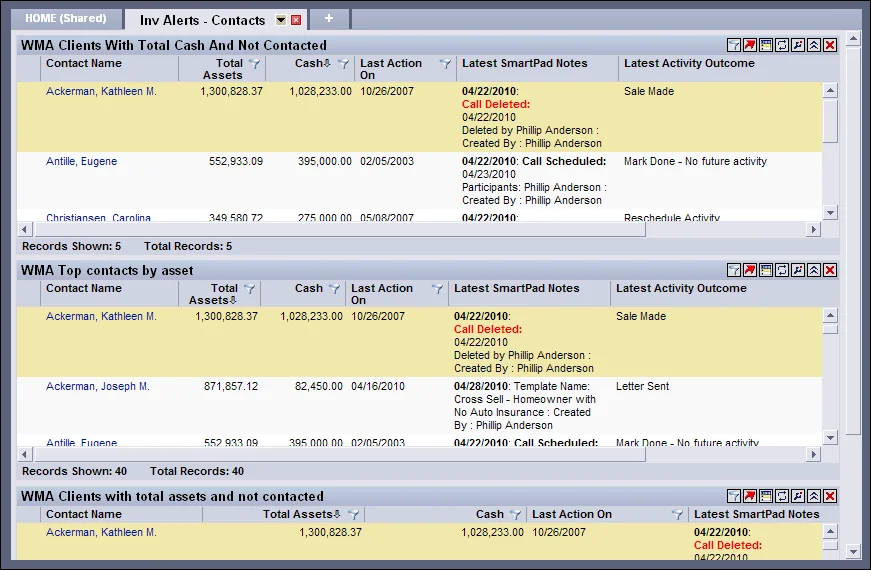
- Inv Alerts – Contacts
- Inv Alerts – Positions
- Investment Alerts – Complete List
Customizing Investment Alerts
To make Investment Alerts address their business needs more directly, users can customize an alert's filters, sorting and column layout.
Because alerts are Dynamic Reports, they can be modified in the same way as Dynamic Reports. To customize an Investment Alert directly from the SmartOffice home page, click the Change Filter and/or Edit Report buttons in the upper-right corner of the alert's portlet.
Note: Changes made to an Investment Alert from the home page are not permanent. To make permanent changes to an Investment Alert, locate it by performing a Dynamic Report search. Then modify the report.