Last updated: 2025-09-19
SmartLeads - Rejecting Leads
Overview
There are two types of lead rejection in SmartLeads:
- Rejecting unassigned leads from the office
- Rejecting assigned leads
Rejecting Unassigned Leads from the Office
A leads coordinator can reject leads from the office and return them to the Corporate Office. Only leads sent by the Corporate Office or other offices can be rejected; leads created by the same office cannot be rejected.
- From the Unassigned Leads List, tag one or more leads.
- Select Menu > Reject Leads from Office.
- When the confirmation message displays, enter the reason for the rejection and then click the OK button.
The rejected lead is removed from the Unassigned Leads List.
Rejecting Assigned or Accepted Leads
An advisor can reject assigned leads and send them back to the leads coordinator. Advisors can reject leads whether those leads have been accepted or not.
- Tag one or more assigned leads in the Leads List.
- Select Menu > Reject.
- When the confirmation message displays, click the Yes button to open the Reason for Rejection dialog box.
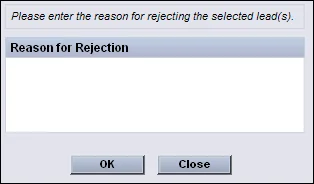
- (Optional) Enter the reason for the rejection.
- Click the OK button.
The rejected leads are sent back to the leads coordinator's Unassigned Leads List. Once a lead is rejected, it can be accepted again by the same advisor; when the leads coordinator attempts to reassign the lead to the same advisor, the system displays a confirmation message.