Last updated: 2025-09-19
SmartEvents - Event Reports
Overview
SmartEvents includes robust reporting functionality that enables the user to compile event statistics and list registered attendees. Event tables are also available for creating powerful Dynamic Reports.
Running Event Reports
To generate statistical and registered attendee reports:
- From the SmartOffice side menu, select Reports > Event Reports to open the Select an Event Report dialog box.
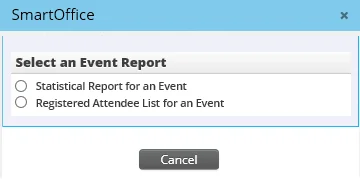
- Select one of the following options:
- Statistical Report for an Event: This report displays data such as the event date, venue, number of attendees, number of event activity outcomes and the number of participating spouses.
- Registered Attendee List for an Event: This report displays a check list of registered attendees with space to add walk-ins.
- When an option is selected, an Event field displays. Click the Event hyperlink to search for and select an event.
- Click the Run button.
The report displays in a new browser window. Click the Print button to produce a hard copy version of the report.
Event-Related Dynamic Reports
SmartEvents users have access to event-related tables when creating Dynamic Reports. In addition, an Event Management report family is available, with several related report categories.
For more information, see Dynamic Reports.