Last updated: 2025-09-19
SmartCommissions - Reports
Overview
SmartCommissions provides reporting tools that enable users to gain insights into projection transactions and historical records of actual commissions received and reconciled. The two methods for generating these reports are Dynamic Reports and PDF reports. In addition, SmartOffice provides ad hoc commission reporting directly from advisor records through the Commission content link.
This section describes each of these reporting methods.
Dynamic Reports
Note: The information in this section assumes that the user is familiar with using Dynamic Reports in SmartOffice. All commission data in SmartOffice can be accessed through Dynamic Reports. The available report categories are:
- Advisor Commission – Payment Import: This category covers imported data.
- Advisor Commission Excluding Adjusting Entries: This category covers all transactions linked to a policy and excludes generic adjusting entries that are not linked to a policy. Reports in this category generate results faster than reports in the Advisor Commission category.
- Advisor Commission: This category covers actual expected and actual received commission records for an advisor.
- Advisor Contract: This category covers advisor contract information and the relationships to supervisor contracts.
- Agency Commission: This category covers the actual expected and actual received commission records for the agency.
- All Commission Rates: This category covers the entered commission rates for auditing purposes.
- Batch Processing: This category covers all processed house transactions through a specific batch. Advisor payments may roll to a different batch because of under-minimum check amount restrictions.
- CTM Advisor Dashboard: This category enables reporting on the commission roll-up tables. This category focuses on totals by advisor.
- CTM Policy Dashboard: This category enables reporting on the commission roll-up tables, focusing on the policy as the main component. Using reports in this category, the user can retrieve totals by policy paid to advisors and supervisors.
- Carrier Posting: Reports in this category start with a specific carrier posting and drill into the records linked to it.
- Commission Split: This category covers the advanced commission split information assigned to policy records.
- Commission Upload: This category covers the information sent by the insurance carrier from the ACORD XML data feed.
- Projected Advisor Commission\*: This category covers the projected advisor payouts of cases that are still in a pending status.
- Projected Agency Commission\*: This category enables reporting against agency projection records, i.e., transactions attached to cases while they are still in a pending status (not active yet).
- Speed Receipt Entry: Reports in this category enable tracking of Speed Receipt entries all the way through to the actual posting of the transactions via batch processing.
\*The Projected Advisor Commission and Projected Agency Commission report categories are used to write projected commission reports against policies that are not yet active. The status of the given case must be used when writing reports using this category. Transactions are not removed from this table, so policies that were pending and have moved to an active status are still contained within this set of tables.
PDF Reports
Note: The information in this section assumes that the user is familiar with using PDF reports in SmartOffice. There are several commission PDF reports available:
- Commission Rate Report: This report provides a single line entry for a given commission rate structure showing first year and the first renewal rate. This report can be run form the following areas in SmartOffice:
- Advisor/agency Cont./Appt. content link (Contract List section) - Contract List (see Searching for Contracts) - Carrier Contracts tab
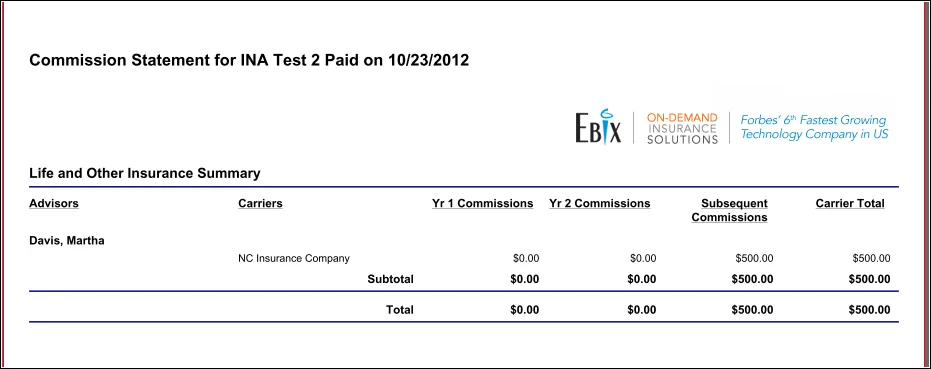
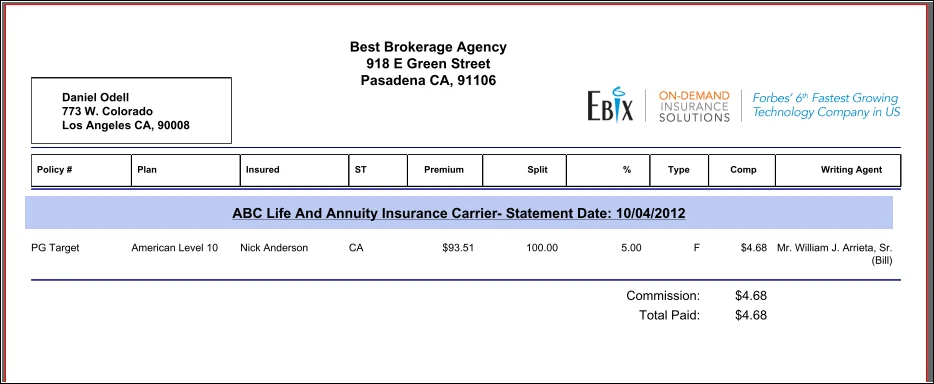
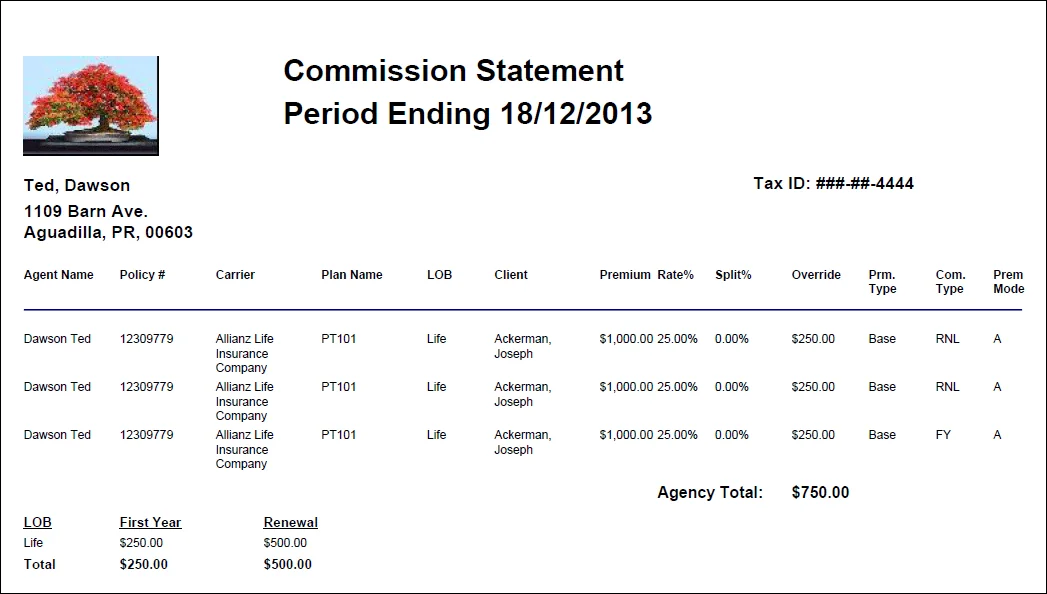
- Commission Statement: This is a fixed-layout commission statement that can be generated either from a posted batch or from the Smart Checks content link of an advisor record. There are several layouts to choose from (the SmartOffice administrator selects the default layout in the Commission Export Setup section of Commissions Setup):
- Generic Commission Statement \#1
- Generic Commission Statement \#2
- Generic Commission Statement \#3
Advisor Commission Content Link
The advisor Commission content link is used for ad-hoc reporting against a single advisor's commission transaction data. From an advisor record, click the Commission content link to display all commission transactions for that advisor.
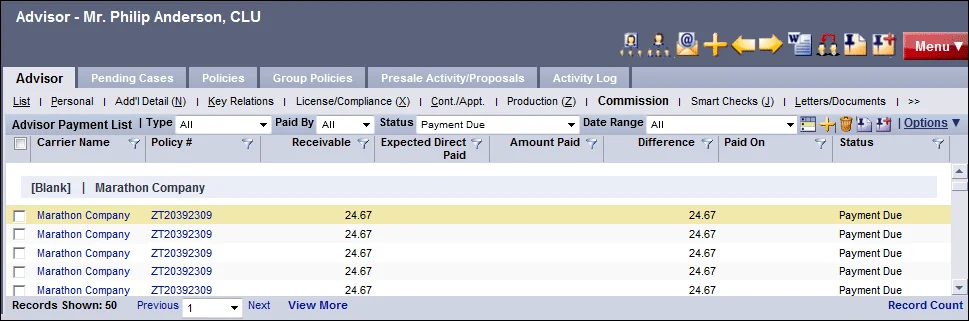
For users who have Advisor Payment Import enabled, there are two Advisor Payment Lists displayed; the bottom list displays these imported advisor payments.
To customize the payment list's data and layout:
- Use the drop-down lists across the top:
- Type: Filter the list based on premium type. For example, to display totals of base commission, select the Base option. - Paid By: Narrow down the list to include transactions paid by the house or the carrier. - Status: Use this drop-down list to separate transactions from paid items. Select the Not Open option to display transactions that have passed through the commission system regardless of Write Off, Reconciled or Paid status.
- Use the filter buttons
 in each column heading (for more information, see Lists
 - Column Filtering). Popular columns to filter on include:
- Due Date: Display all transactions that will come due in the next 3 months, 6 months, year, etc. - Policy \#: Display only those transactions related to a specific policy. - Date Paid: Display transactions paid within a specific time period.
- Change the columns displayed, their order, the sorting of the list and the sub-totals and totals defined (see List Layout Customization).
 and select Show History.